Micron Technical Reference V9 Volume 1.pdf - 第270页
PROACTIV REPLACEMENT PROCEDURES 10.20 Technical Reference Manual Chapter Issue 5, Jan 15 1 1. P lace the squeegee mechanism on the board. 12. On the squeegee mechanism, connect the four spade connectors to the enable swi…

PROACTIV
REPLACEMENT PROCEDURES
Chapter Issue 5, Jan 15 Technical Reference Manual 10.19
REPLACEMENT PROCEDURES
Fitment NOTE
The ProActiv option cannot be used if a squeegee drip tray is fitted to the printer.
Remove the squeegee drip tray before fitting the active squeegee module to the
printer. Do not attempt to fit a squeegee drip tray to a printer, which has a
ProActiv module fitted.
Figure 10-2 The Warning Label as Fitted to the Active Squeegee Set
This procedure details the fitment of the ProActiv unit to the printer.
1. From the Ready page select Open Cover Commands.
2. Select Carriage to Front.
3. Select Back.
4. Select Shut Down.
5. Select Confirm.
6. Turn the mains isolator to the OFF position.
7. Open the printhead front cover.
8. Remove the stencil.
9. Remove any applicator modules fitted to the printhead mechanism; refer to
the relevant chapter of this manual or the module’s stand alone manual.
NOTE
The ProActiv option cannot be used if a Squeegee Drip Tray is fitted to the
printer. Remove the paste drip tray before fitting ProActiv active squeegee
module to the printer. Do not attempt to fit a paste drip tray to a printer which
has a ProActiv module fitted.
10. Place a board over the rails at the tooling area; this is used to support the
squeegee mechanism.
WARNING!
Squeegee Drip tray MUST be removed when using ProActiv
.Squeegees Only use Drip tray with Standard Squeegees.
ATTENTION!
Le plateau sous racles DOIT ętre retiré quand les racles ProActiv
sont utilisées. Le plateau sous racles ne peut ętre utilisé qu'avec
des racles standard.
WARNUNG!
Das Abtropfblech der Rakel MUSS entfernt Werden, falls die
ProActiv Rakel verwendetwerden. Das Abtropfblech darf nur mit
Standard Rakel verwendet werden.
PROACTIV
REPLACEMENT PROCEDURES
10.20 Technical Reference Manual Chapter Issue 5, Jan 15
11. Place the squeegee mechanism on the board.
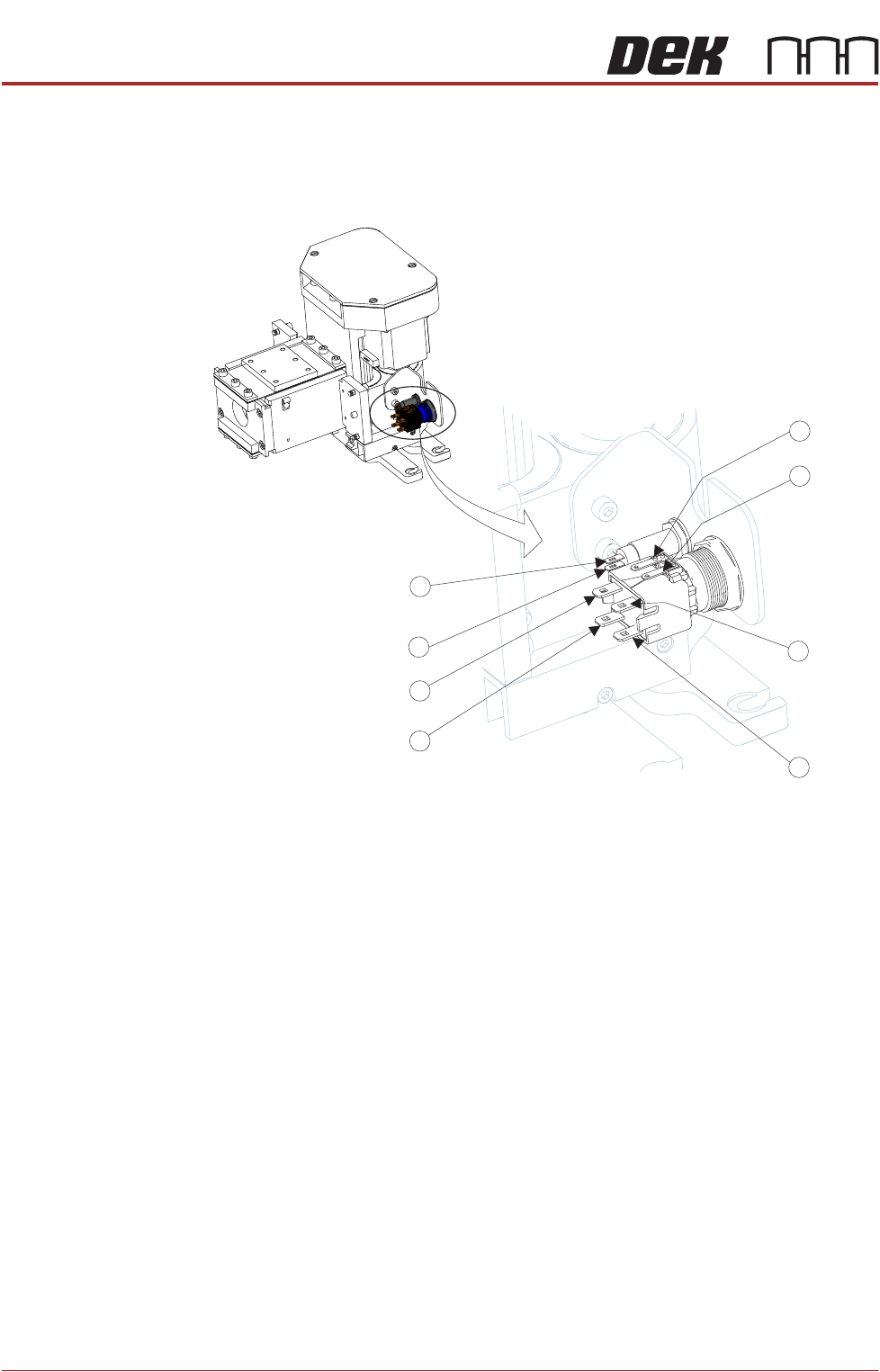
12. On the squeegee mechanism, connect the four spade connectors to the
enable switch /indicator and the two spade connectors to the status indicator
from N18PL08 (6) and N18PL05 (2) as follows:
Enable switch/indicator.
• Grey lead to Pin 1.
• Violet lead to Pin 2.
• No connection Pin 3.
• No connection Pin 4.
• Red lead to Pin 5 (marked +).
• Black lead to Pin 6 (marked -).
Status indicator.
• Brown lead to Pin 1 (Identified by the red dot on the indicator body.)
• White lead to Pin 2.
5
6
3
2
1
4
2
1
Status
Status
Enable
Enable
Enable
Enable
Enable
Status
Enable
Status
PROACTIV
REPLACEMENT PROCEDURES
Chapter Issue 5, Jan 15 Technical Reference Manual 10.21
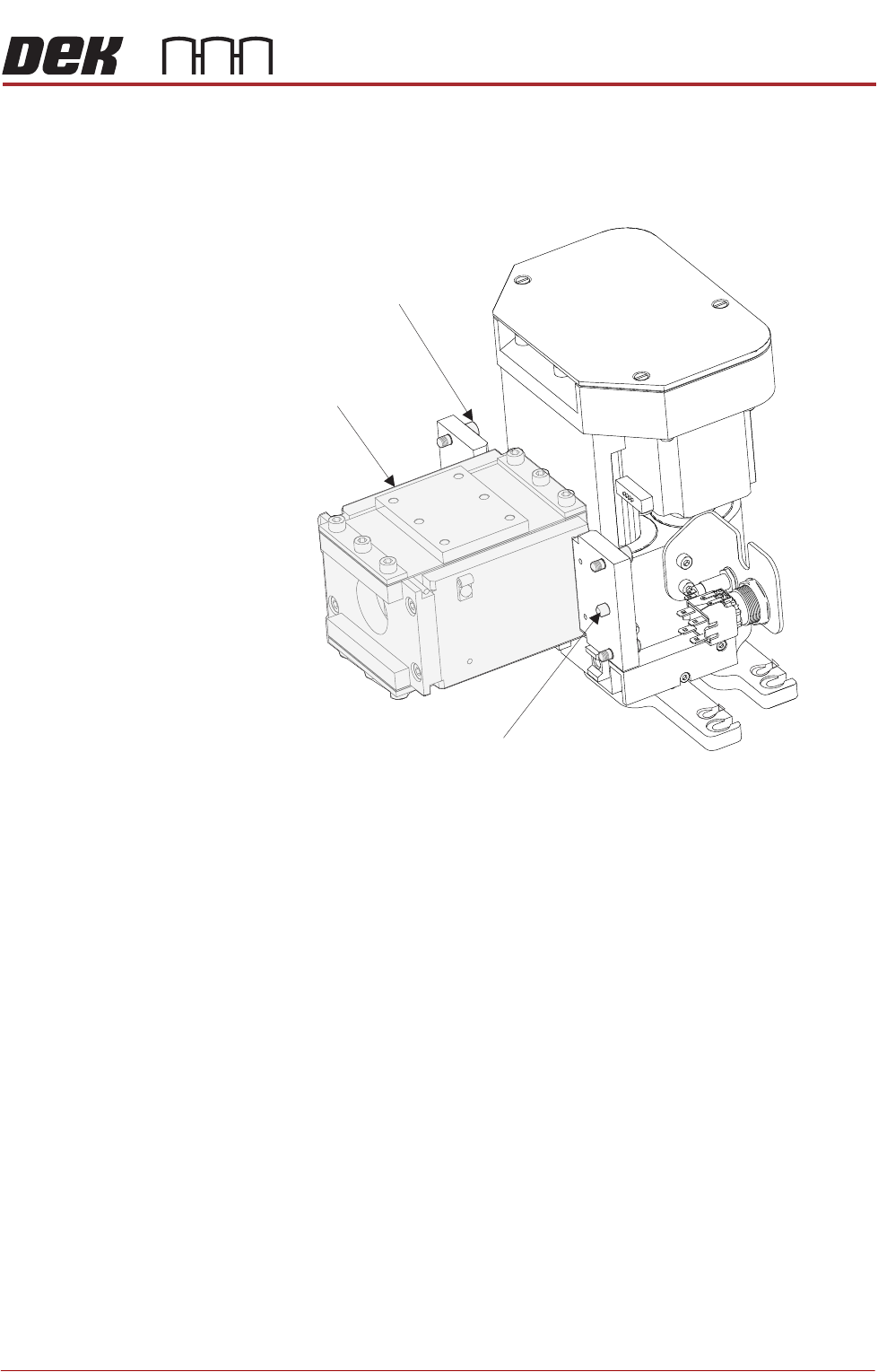
13. Carefully position the rear of the ProActiv squeegee mechanism (spring
beam assembly) into the print carriage so that both printhead mechanism
dowels locate into the print carriage locating holes. Secure the unit to the
print carriage by means of the four captive screws, using a 4mm Allen key.
14. Connect the following connectors to the print carriage, left-hand-side:
• Rear squeegee motor at 9SK17
• Front squeegee motor at 9SK16
• Home sensors at 9SK08
• Squeegee pressure amplifier at N3SK16
15. Connect the proximity switch sensor connector 9PL68 to 9SK68.
16. Fit the active squeegees to the squeegee mechanism.
17. Connect the active front squeegee drive 9PL74 to 9SK74.
18. Connect the active rear squeegee drive 9PL75 to 9SK75.
19. Remove the board from the tooling area.
Location Dowel
(2 positions)
Spring Beam
4mm Captive Screws
(4 positions)