Micron Technical Reference V9 Volume 1.pdf - 第40页
SAFETY FEATURES HIGH VOLTAGE PROTECTION 2.16 Technical Reference Manual C hapter Issue 14, Feb 18 HIGH VOL T AGE PROTECTION Access Where incoming supply voltages are present, protection is af forded by con- trolling acce…

SAFETY FEATURES
PRINTHEAD COVER
Chapter Issue 14, Feb 18 Technical Reference Manual 2.15
PRINTHEAD COVER
Safety Interlocks The safety features designed into the printer are for the protection of all
operators and maintenance personnel. ASM strongly recommend safety
devices are never overridden.
Opening the printhead cover allows access to the following areas:
• Printhead
• Paste Dispenser
• Squeegee/ProFlow
• Stencil/Screen
• Under Screen Cleaner
• Tooling
The printhead cover is accessible to the operator and an interlock safety switch
protects personnel from the mechanisms during normal line operations. Lifting
the cover cuts power to all motors and selected actuators, via the E Stop
module, to all printer modules.
Full details of the device types fitted can be found in the covers chapter of this
manual.
NOTE
The pass through lane belt motors on the dual lane printer continue running
when the printhead cover is open but stop when the E Stop is pressed.
Pneumatically operated lid bolt(s) prevents the cover being raised during the
print cycle. The lid bolt is withdrawn and the cover may be raised:
• When Open Cover is requested by software
• When pause or stop is selected during a print cycle
• When the E Stop is pressed
Recovery When the printhead cover is closed, normal working condition is restored and
the line may be restarted. Pressing the system button enables resumption of
operations, where this is allowed by the control system.

SAFETY FEATURES
HIGH VOLTAGE PROTECTION
2.16 Technical Reference Manual Chapter Issue 14, Feb 18
HIGH VOLTAGE PROTECTION
Access Where incoming supply voltages are present, protection is afforded by con-
trolling access to the enclosures that house the supply. The printer is fitted with
a mains isolator switch that cuts power to all circuits located beyond the switch.
Hazard Warning
Labels
Hazard warning labels are placed on the outside of enclosures where danger-
ous voltage (100V-240V) terminations are present within.
Earth Bonding Apart from EPA and metal covers printers, which use the covers to make the
bond, all external metal surfaces are mechanically and electrically bonded to
the printer earth point. The bonding wire used is identified by its green and
yellow insulation and is commonly used to earth bond throughout. Care should
be taken when removing these links that when they are replaced they are
secured tightly and cleanly.
SAFETY FEATURES
LOCKOUT
Chapter Issue 14, Feb 18 Technical Reference Manual 2.17
LOCKOUT
Electrical Lockout
WARNING
LETHAL VOLTAGE. DANGEROUS VOLTAGES EXIST IN THIS EQUIPMENT.
ENSURE ALL ELECTRONIC COVERS AND MAIN MACHINE COVERS ARE FITTED
BEFORE OPERATING THIS EQUIPMENT.
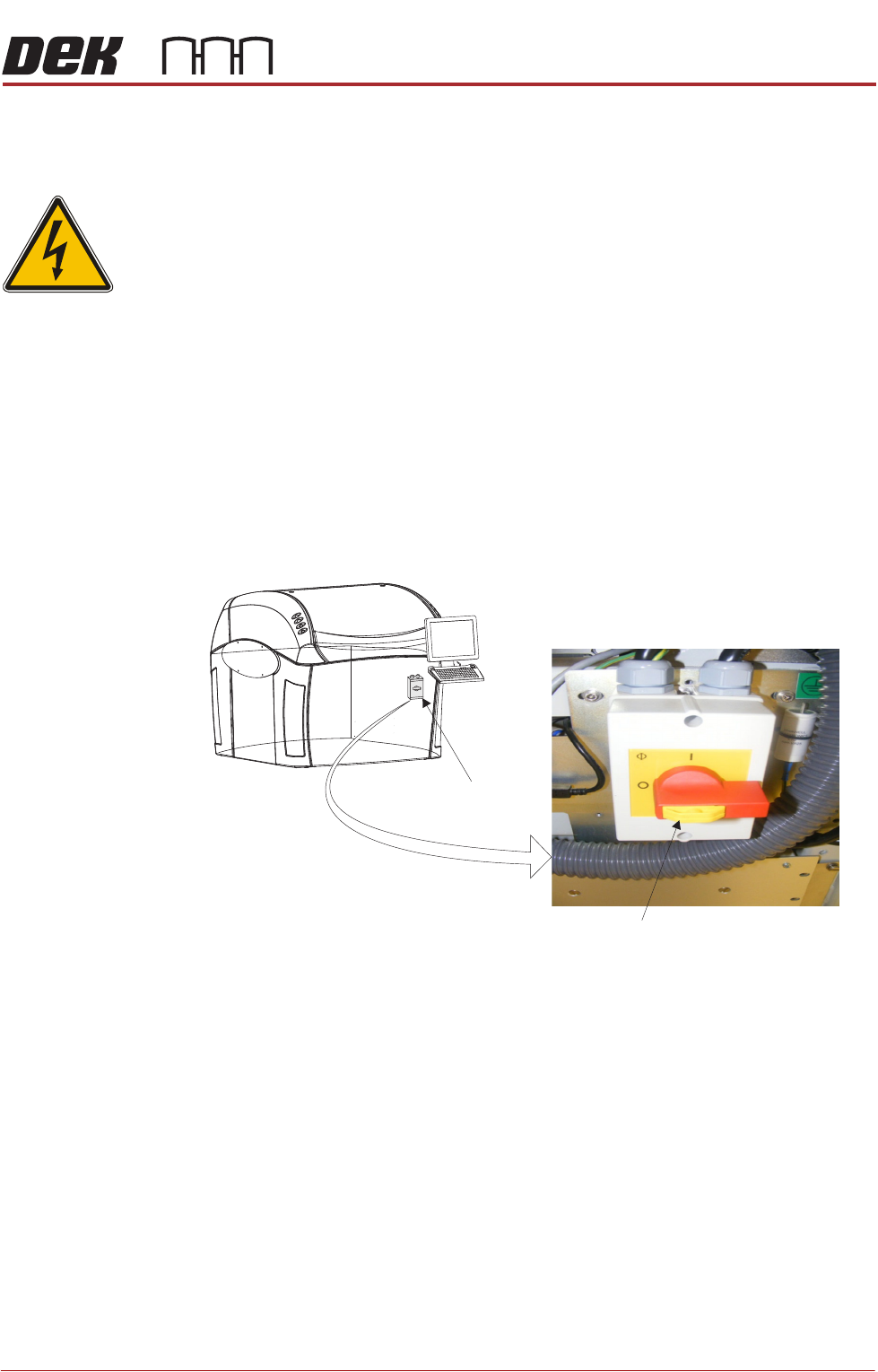
Electrical lockout of the printer is achieved by applying a padlock, or any other
suitable locking device, through the body and the switch shroud of the mains
isolator switch. This can only be achieved when the mains isolator switch is in
the OFF position.
To electrically lockout the printer, carry out the following procedure:
1. Close down the printer software.
2. Switch the mains isolator to the OFF position.
3. Pull the lockout tab out.
4. Fit a padlock or suitable locking device through the lockout point.
5. This completes the electrical lockout.
Mains Isolator Switch
NOTE
Switch shown in the positionOFF
Lockout Tab