JANETS_INM.pdf - 第14页
JaNets Instr ucti on Man ual 1. Overview 1-1 1. Overv iew Produ ct Configura tion JaNets is co nfigur ed with opt ion funct ions such as Basic Ed itor , Line Manag er and exter nal out put function as sho wn bel ow . * 1…
C. Database Management Tool ................................................................................. C-1
JaNets Instruction Manual
1. Overview
1-1
1. Overview
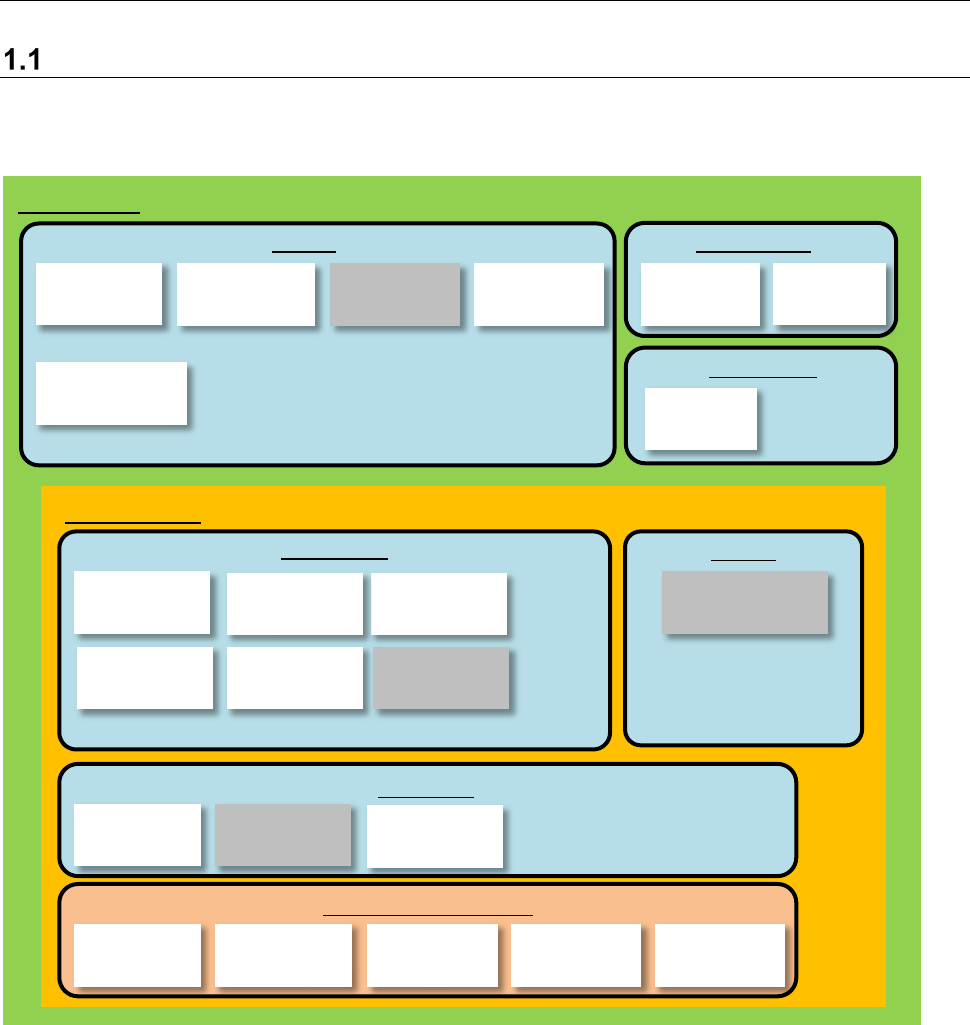
Product Configuration
JaNets is configured with option functions such as Basic Editor, Line Manager and external output
function as shown below.
*1: The Component Database is a function that cooperates with the main unit. When you “create
data,” you can create a production program by referring to the common database. Refer to the
“Component Database Instruction Manual” supplied with the main unit for details.
*2: FlexlineCAD is a linking function.
*3: Line Manager is an option of Basic Editor.
*4: The external output function is an option of Line Manager.
*5: Output in the JSON format and Off-line Setup are options of the External Output Function.
*6: Device linkage function is an option of Line Manager.
*7: TraceMonitor (for data collection) is an option of Line Manager.
User
Management
Shopfloor
Setup
Component
Database
Language
Changer
Program
Editor
Create Data
Shared
Basic Editor
Program
Downloader
External output
monitor
External output
function
Environment setting
Parts stock
management
tool
External output function
Production
Line Manager
Snapshot
Tool
Maintenance
Log Control
Tool
Create Data
Job
Optimizer
Mark
Database
Feeder Set
Database
Machine
Program Relater
Tact
Simulation
Flexline CAD
Output in the
JSON format
Device linkage
function
Nozzle data
viewer
Off-line Setup
Shared
TraceMonitor
(
Data display
)
TraceMonitor
(Data collection)
JaNets Instruction Manual
1. Overview
1-2
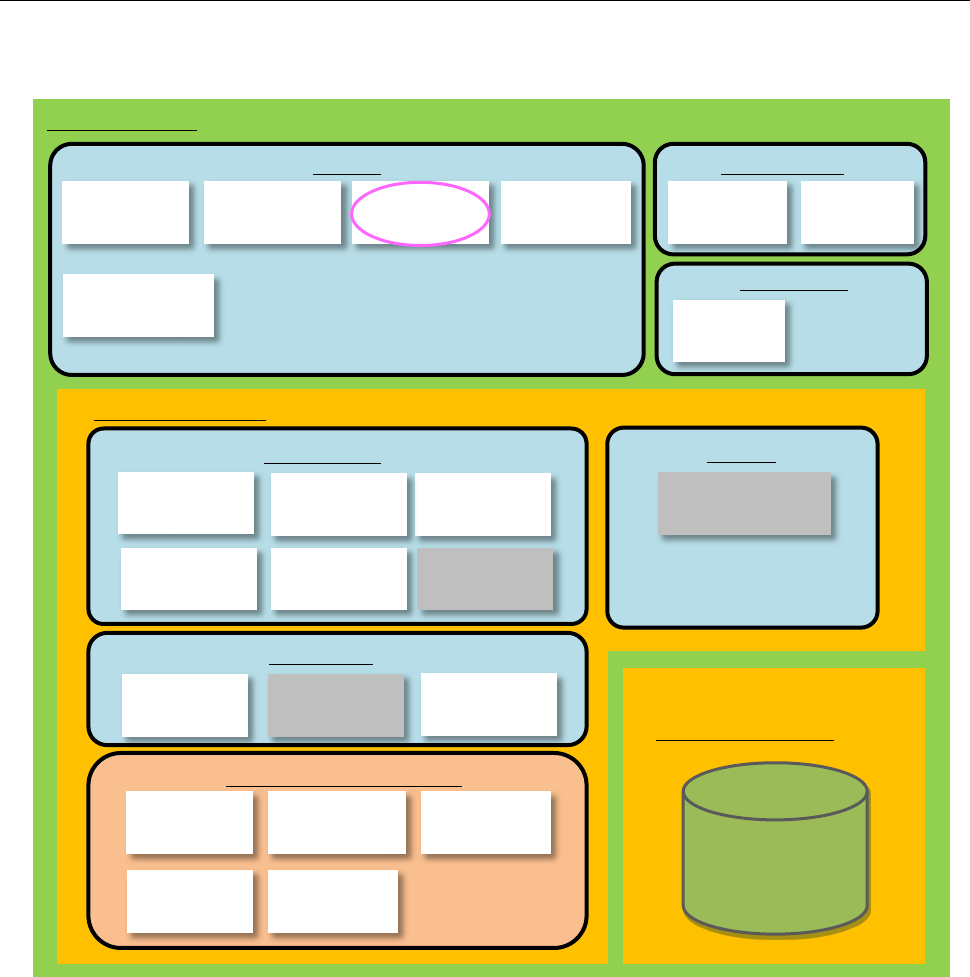
1.1.1 Configuration including a Data Manager option
When you add a Data Manager option to the system, the Component Database can be used as the
“shared” function.
*1: FlexlineCAD is a linking function.
*2: Line Manager is an option of Basic Editor.
*3: The external output function is an option of Line Manager.
*4: Data Manager is an option of Basic Editor.
*5: Output in the JSON format and Off-line Setup are options of the External Output Function.
*6: Device linkage function is an option of Line Manager.
*7: TraceMonitor (for data collection) is an option of Line Manager.
Shared
Basic Editor
External output function
Production
Line Manager
Maintenance
Create Data
Data Manager
Data Manager
Data Base
User
Management
Shopfloor
Setup
Language
Changer
Component
Database
Snapshot
Tool
Log Control
Tool
Job
Optimizer
Mark
Database
Feeder Set
Database
Machine
Program Relater
Tact
Simulation
Flexline CAD
Program
Downloader
External output
monitor
External output
function
Environment setting
Parts stock
management tool
Output in the
JSON format
Device linkage
function
Nozzle data
viewer
Off-line Setup
Program
Editor
Create Data
Shared
TraceMonitor
(
Data collection
)
TraceMonitor
(
Data display
)