JANETS_INM.pdf - 第141页
JaNets In structio n Manual 5. Shopflo or Setu p 5- 21 T able 5.4 -2 List of operation options Icon Operation opti on Icon Operation opti on V erify Comp (comp onent) Release Reduce PWB i n pro cess T ombstone De tection…
JaNets Instruction Manual 5. Shopfloor Setup
5-20
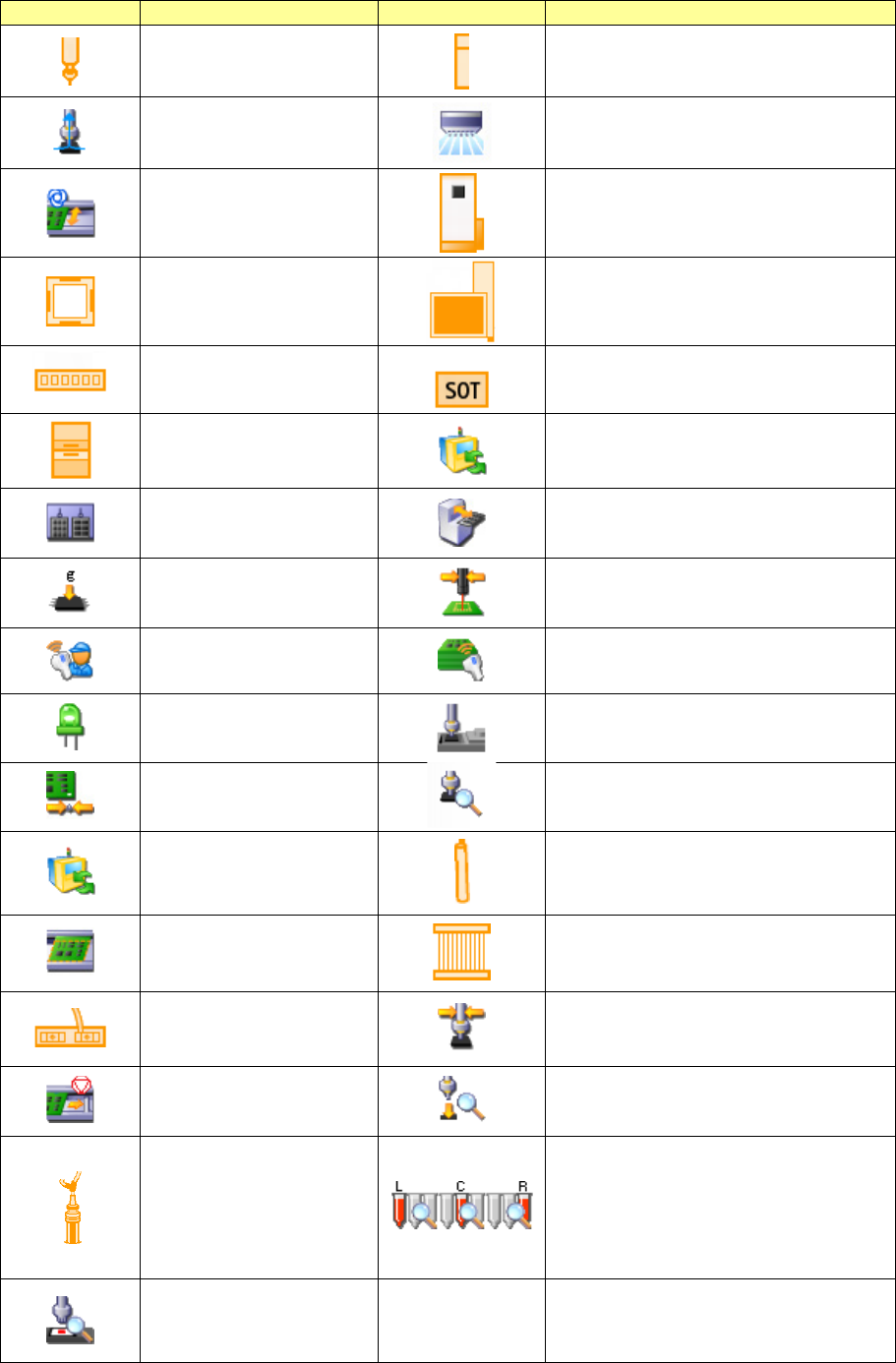
Table 5.4-1 Devices displayed on the machine view
Icon
Device
Icon
Device
Nozzle
OCC
Vacuum pump
Placement monitor
Automatic board width
adjustment unit
IC collection belt
VCS unit
Trash box for extra-large components
Verify (6 axes)
SOT direction inspection table
Coplanarity
MTS non-stop operation
Multi-tray (MTS)
Low-speed 2 (MTC/MTS)
Load Control
Solder printing recognition and placement
position correction
IFS-NX
Traceability
Long board option
Fluxer
Reference pin unit
Attachment detection
MTS non-stop operation
Bad mark reader
L-Wide transport
MNVC
Verify
HMS pick position correction
Transport stopper
Component falling detecting function
Applicator head
Detection of the residual quantity of the
left head
Detection of the residual quantity of the
center head
Detection of the residual quantity of the
right head
Application check
JaNets Instruction Manual 5. Shopfloor Setup
5-21
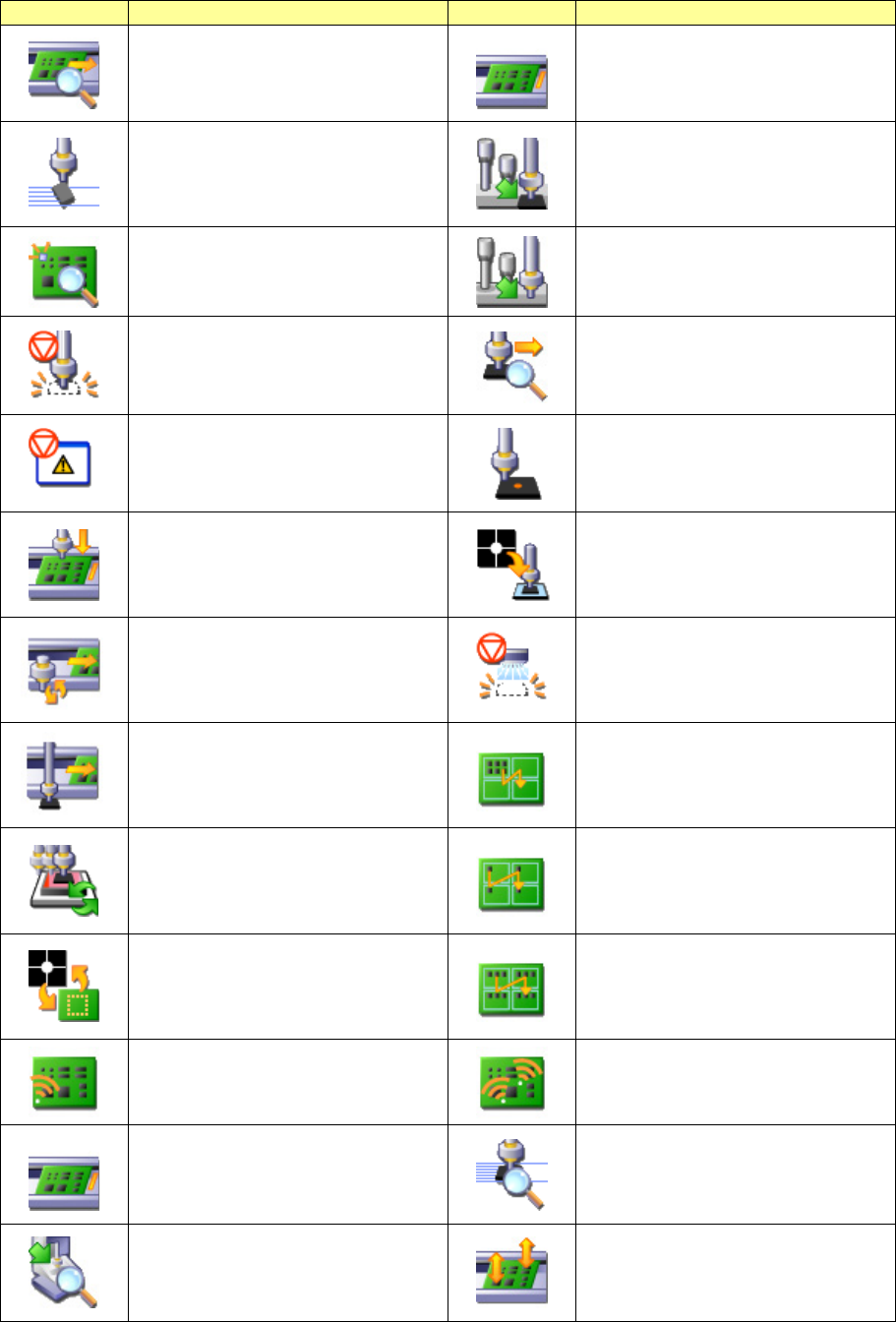
Table 5.4-2 List of operation options
Icon
Operation option
Icon
Operation option
Verify Comp (component) Release
Reduce PWB in process
Tombstone Detection
Component Feed Timing Before Pick
Dimension Check
Component Feed Timing After Pick
Stop when comp. (components) run
out
Start moving before the completion of
pick check in sequential pick
Stop on any error
Pick Position Check
Production during board
transportation
Start production after transport is
finished
Fluxer operation after recognition with
a VCS
Production during board
transportation
Nozzle replacement during board
transportation
Pause when an EPV component
existence error occurs
Production during board
transportation
Component pick-up during board
transportation
Place Sequence for Matrix Boards
Build panel by circuit
Nonstop vision centering
Place Sequence for Matrix Boards
Build circuit by component ID
Recognition of solder transfer image
Image recognition before solder
transfer
Place Sequence for Matrix Boards
Build circuit by pick groups
Bad mark propagation
Fiducial mark propagation
Start PWB reducing function
Laser surface contact check
IC nozzle allocation before a start of
production
Placement PWB surface height
measurement
JaNets Instruction Manual 5. Shopfloor Setup
5-22
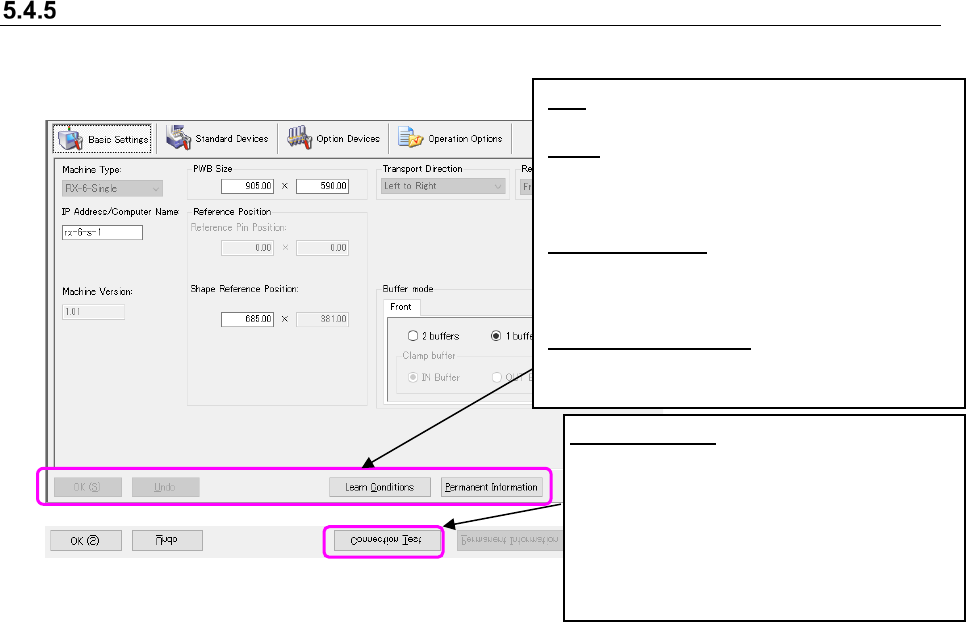
Machine details
Set the basic information on a machine and the condition of each device. The items you set here
are reflected on the machine view screen visually.
Figure 5.4-8 Machine details screen
How to make the settings:
① Set data on each tab: “Basic Settings,” “Standard Devices,” “Option Devices” and “Operation
Options” in this order.
(When you select the “Standard Devices” tab after entering the IP address, the system
automatically checks the entered IP address, and then switches the “Basic Settings” tab to
the “Standard Devices” tab.)
* When a machine arranged in the line being monitored is selected, all the setting items of
basic setting, standard unit, option unit and operation option cannot be changed (displayed
in gray).
* When a machine arranged in the line in the EPU mode is selected, the status getting
button cannot be operated. (Displayed in gray)
* When a machine arranged in the line in the EPU mode is selected, the IP address cannot
be checked automatically.
OK: Validates the changes when you change the
settings of the machine details.
Undo: Discards the changes when you change
the settings of the machine details, and
restores them to the conditions you validated
last time.
Learn Conditions: Communicates to the machine
whose IP address/computer name is specified
to obtain the “Machine Type” and the detailed
information on the machine.
Permanent Information: Displays the
“Permanent Feeders” setting screen and the
“Permanent Nozzles” setting screen.
Connection Test:
Communicates with a
machine whose IP address/computer name
is specified in order to check to see if it is
connected to the system.
* This Connection Test function does not
guarantee the machine model connected to
the system. It checks response to the
specified machine.