JANETS_INM.pdf - 第158页
JaNets In structio n Manual 5. Shopflo or Setu p 5- 38 Setting up equipment Y ou can control the num b er of nozzles or feeder s owned by a us er . Select the [T ools] command from the m enu bar , and th en the [Equipm e…
JaNets Instruction Manual 5. Shopfloor Setup
5-37
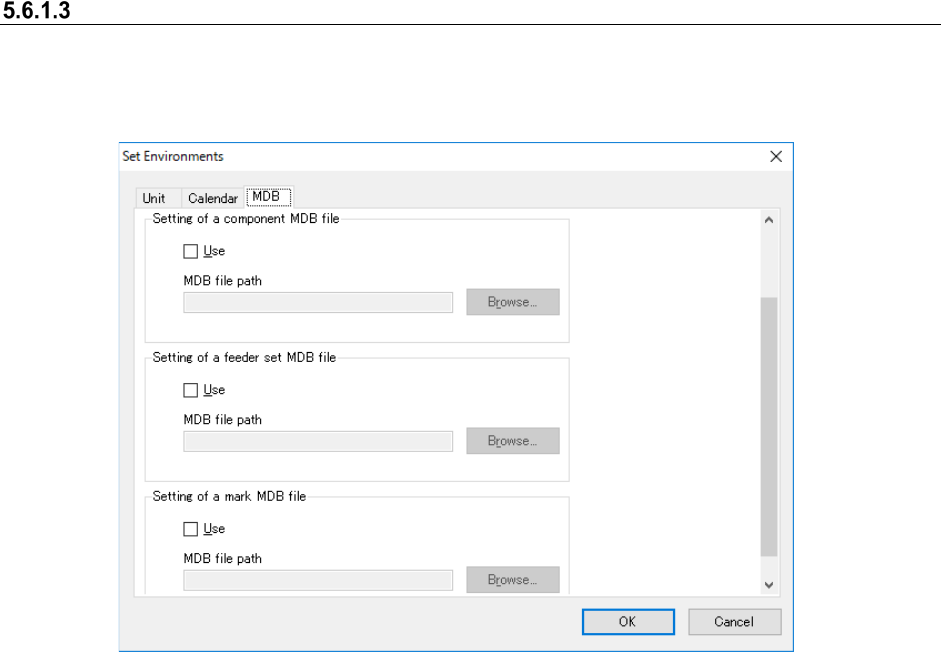
MDB setting
When you add a Data Manager option to the system and select the “Use” radio button of the
“Server” for the “JaNets Configuration” of the Launcher, you do not have to make the MDB
settings.
Figure 5.6-7 “Set Environments” screen (MDB)
Set the maximum number of display items of the component data to be displayed in the standing
information. Up to 20,000 items can be set.
Set the use/no use of the component MDB and set the path of the MDB file to be used.
Set the use/no use of the feeder set MDB and set the path of the MDB file to be used.
Set the use/no use of the mark MDB and the path of the MDB file to be used.
JaNets Instruction Manual 5. Shopfloor Setup
5-38
Setting up equipment
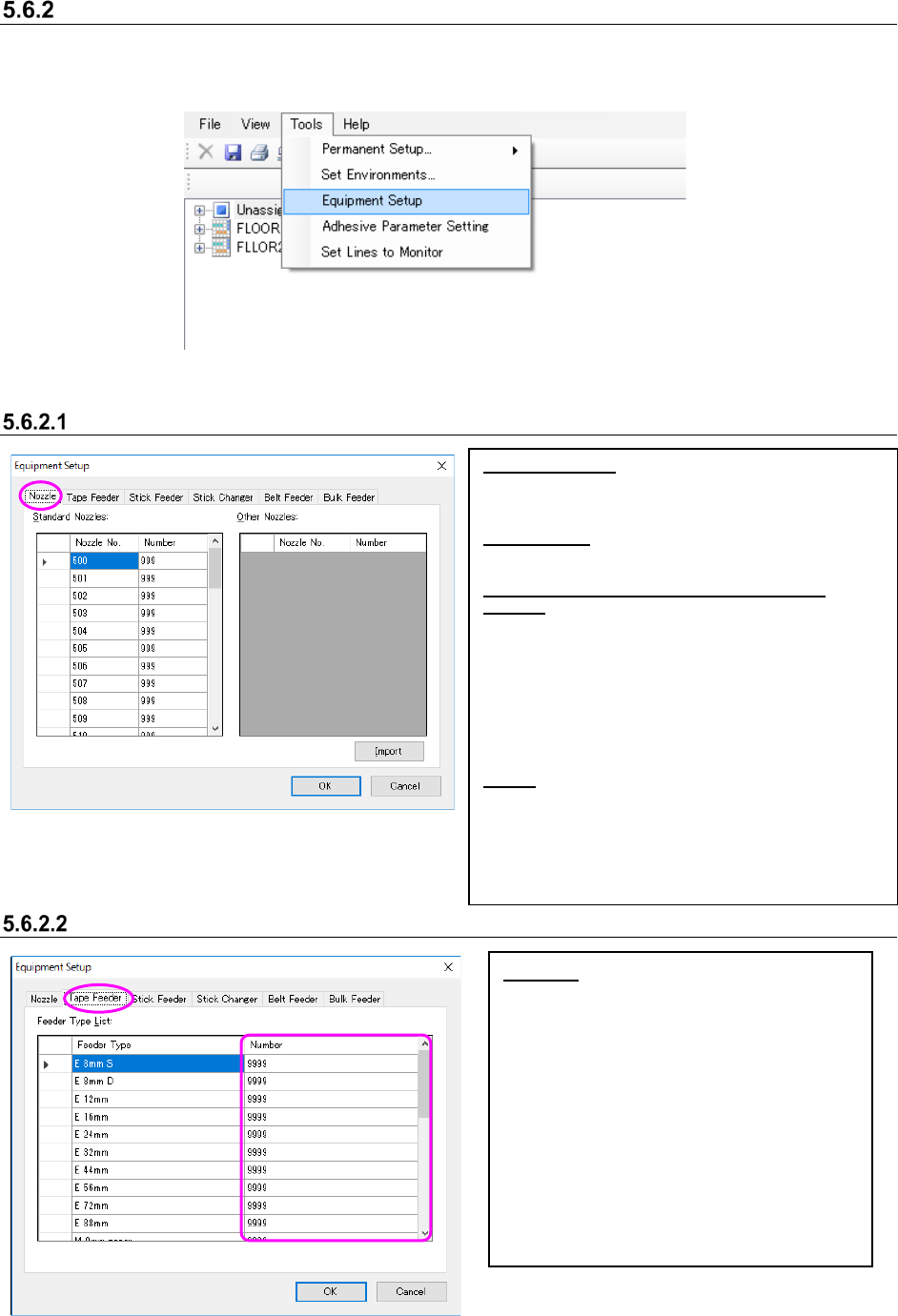
You can control the number of nozzles or feeders owned by a user. Select the [Tools] command
from the menu bar, and then the [Equipment Setup] command from the “Tools” menu. The
“Equipment Setup” screen appears.
Figure 5.6-8 [Tools] – [Equipment Setup]
Setting nozzles
Figure 5.6-9 “Equipment Setup” screen (Nozzle)
Setting the number of Supply device
Figure 5.6-10 “Equipment Setup” screen (Tape Feeder)
Standard Nozzles:
[Nozzle No.]: Nozzle Nos. 500 ~ 511, 501H ~ 503H,
506H ~ 508H, 601M ~ 604M, 606M, 608M ~ 611M,
607M, 619M ~ 621M and 7500 ~ 7509 are displayed.
Other Nozzles:
“Nozzle No.”: The nozzle number imported from the
INI file is displayed.
Key operations for the Standard Nozzles/Other
Nozzles:
Enter the number in the “Number” cell directly. When
you press the [ALT] key and the [O] key at the same
time, you can move to the top “Number” cell of the
“Other Nozzles.”
Use the up/down arrow key to move to the “Number”
cell above or below the current cell.
When you click the <OK> button without entering any
value in the “Number” cell, “0” is entered in the
“Number” cell.
Import:
The system obtains the nozzle number from the INI file
* When you import the nozzle number, put the INI file
in the installation folder \Custom\Nozzle of the
JaNets manually.
When no INI file is available, optimization cannot be
executed normally.
* Obtain INI file from the mounter main body.
Number: Set the number of tape feeders
owned by a user.
* Enter a number in the “Number” cell
directly.
* Use the up/down arrow key to move to the
“Number” cell above or below the current
cell.
* When you press the [ALT] key and the [L]
key at the same time, you can move to the
top “Number” cell.
* When you click the <OK> button without
entering any number in the “Number” cell,
“0” is entered in the cell.
JaNets Instruction Manual 5. Shopfloor Setup
5-39
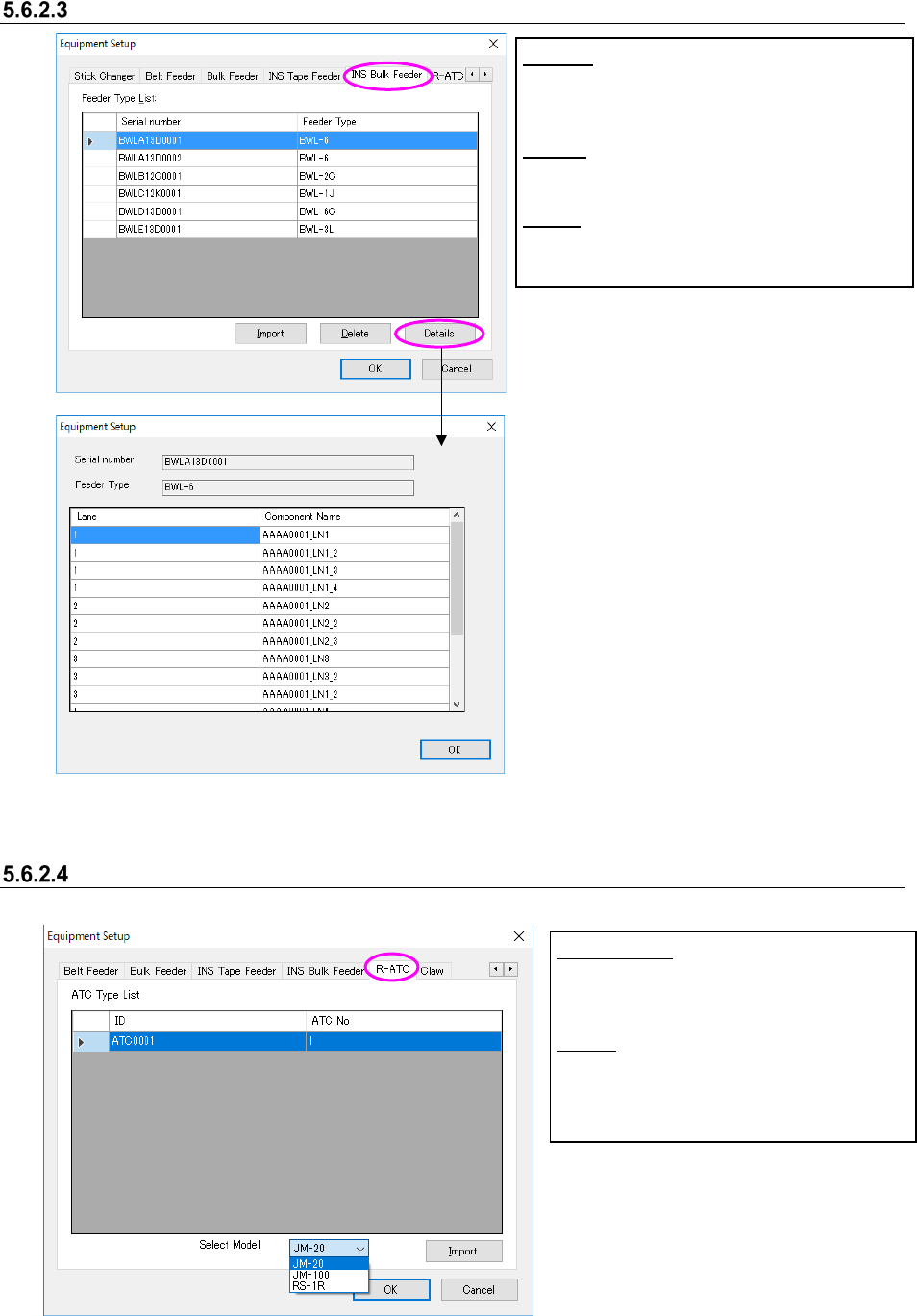
INS Bulk Feeder setting
Figure 5.6-11 “Equipment Setup” screen (INS bulk feeder)
R-ATC setting
Figure 5.6-12 “Equipment Setup” screen (R-ATC)
Select Model:
Select an R-
ATC machine model whose
information is to be imported.
Import:
The system loads R-ATC information
from the INI file.
Import:
The system obtains the INS bulk feeder setting
from the INI file.
Delete:
The system deletes the INS bulk feeder setting.
Details:
The system displays a component on each lane of
the INS bulk feeder on the screen.