JANETS_INM.pdf - 第178页
JaNets In structio n Manual 5. Shopflo or Setu p 5- 58 Operations Switching the displayed mach ine layout T o displ ay data of other machi nes of the lin e, select the desired m achine w ith the corres pondin g <Machi…
JaNets Instruction Manual 5. Shopfloor Setup
5-57
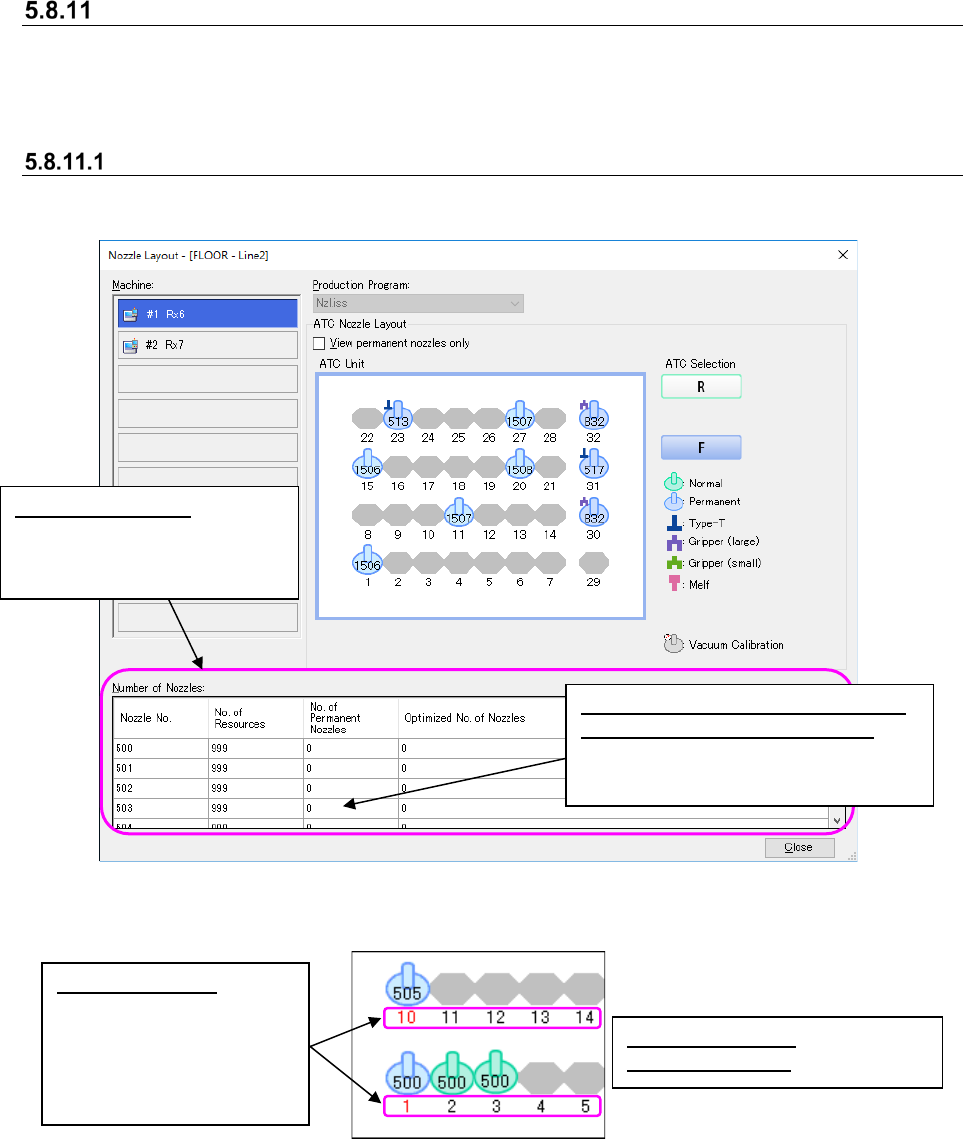
“Nozzle Layout” screen
This is the screen that allows you to check the nozzle settings for each machine specified with an
optimized production program.
This screen is used with the Program Editor
Descriptions of the screen
This screen displays the nozzle layout of a production program that is used to produce PWBs for
each production line.
Figure 5.8-20 Nozzle layout(Example: RX-6)
Figure 5.8-21 Color of displayed nozzles
Permanent nozzles: bright blue
Optimized nozzles: green
Red ATC number:
The nozzle assignment
made before optimization
is different that after
optimization, and you
have to replace nozzles.
Number of nozzles:
The number of resources of
each nozzle is listed for each
selected machine.
Number of nozzles (No. of Permanent
Nozzles/Optimized No. of Nozzles):
Displays the total number of nozzles
of not an ATC unit but one machine.
JaNets Instruction Manual 5. Shopfloor Setup
5-58
Operations
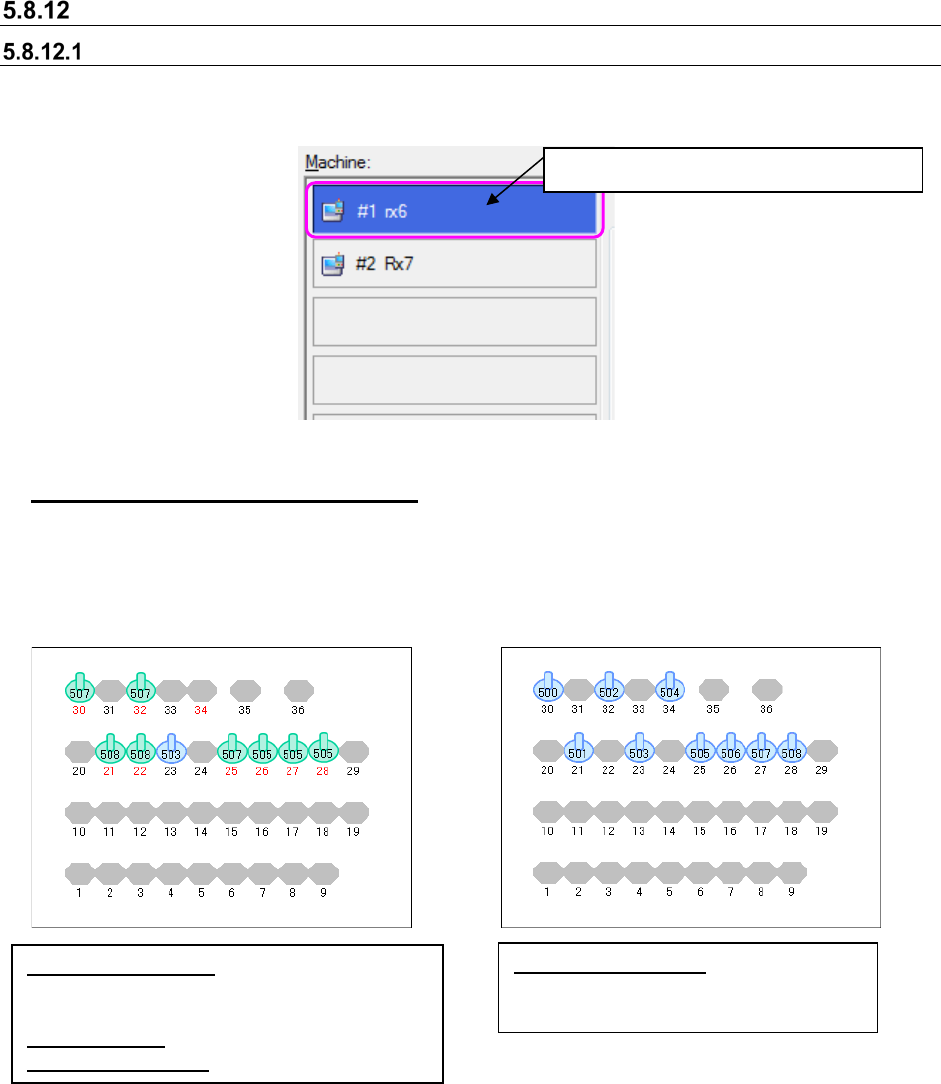
Switching the displayed machine layout
To display data of other machines of the line, select the desired machine with the corresponding
<Machine> on the “Nozzle Layout” screen.
Figure 5.8-22 Machine selecting buttons
Displaying the permanent nozzles only
When you check the check box “View permanent nozzles only” on the Nozzle Layout” screen, the
system displays the permanent nozzles only. When you deselect this check box, the normal
screen reappears. Normally, the optimized nozzle settings are displayed, and the screen
displaying the permanent nozzles only indicates the settings made before optimization.
Figure 5.8-23 Left: Not checked off (setting after optimization)
Right: Checked off (setting before optimization)
Nozzle number in red:
The nozzle assignments
are changed after optimization, and you have to
replace nozzles.
Nozzle in green: Optimized nozzle assignments
Nozzle in bright blue: Permanent nozzles
Nozzles in bright blue:
Permanent nozzle assignments made
before optimization
The selected machine is displayed in blue.
JaNets Instruction Manual 5. Shopfloor Setup
5-59
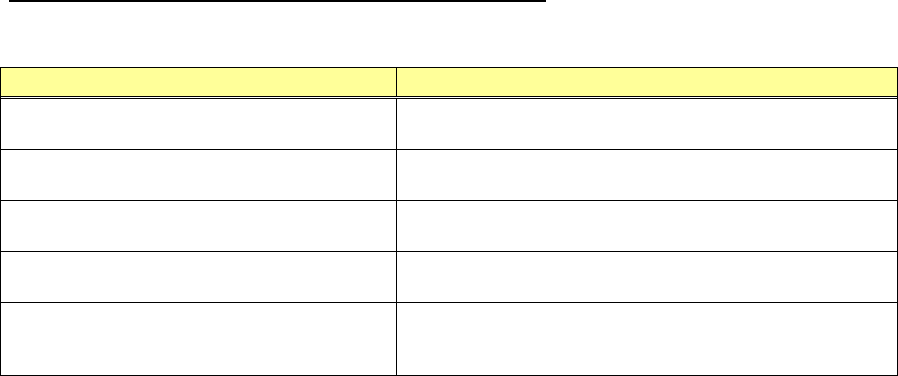
Error messages displayed on the confirmation screen
When the nozzle confirmation screen appears, the error messages shown below appear on the
screen.
Error condition
Displayed error message
No machine is assigned to the line at start-up.
“Found no machine information. The layout window will be
closed.”
A machine that is not assigned to the line is
selected at start-up.
“Unassigned machine be selected. Before start-up, select
assigned machine.”
A production program selected from the combo
box cannot be loaded.
“Failed to read the production program (only permanent
nozzles of the machine will be displayed).”
A loaded production program does not have
any optimized data.
“Production program " has no optimization condition data
(only permanent nozzles of the machine are displayed).”
The machine configuration of the selected line
is different from that of the production program.
“Machine layout differs between the line and the production
program (for machine No., only permanent nozzles of the
machine are set).”