JANETS_INM.pdf - 第249页
JaNets In structio n Manual 7. Program Editor 7- 42 Pick conditions screen ( 2070 - 80 S eries ) Figure 7.4 - 57 Pick co nditio ns screen ( 2 070 - 80 S eries ) T able 7.4 - 21 Pick - up conditions ( 2070 - 80 S eries ) …
JaNets Instruction Manual 7. Program Editor
7-41
Set the component picking up conditions of a high-speed head and those of a general-purpose
head respectively.
Table 7.4-19 Pick-up conditions (RX-7 Series) screen items
Item
Description
Number of recognition
retries
Set how many times the machine will retry to recognize a component.
Input range: 0 to 9. (Default: 4)
Component Run Out
Set the number counted as shortage of components.
Input range: 1 to 9. (Default: 3)
Unqualified Feeder Count
Set the number counted as a malfunctioning feeder.
Input range: 0 to 9. (Default: 3)
Picking stroke
Set offset of the height of the feeder travel surface.
Input range -1.00 to 10.50. (Default: 0.00)
Nozzle staying time
Set the time period while the nozzle stops at the component pick-up position (mov-
ing down position) in order to pick the component up securely.
Input range: 0 to 9999.
Pick Offset X Y
Set the XY-direction offset amount for shifting the pick-up position from the center of
a component.
Input range -999.99 to 999.99. (Default: 0.00)
Component Pick-up sur-
face offset
Set the distance from the topside of a component to the picked-up surface of the
component.
Input range -999.99 to 999.99. (Default: 0.00)
Vacuum Starting Timing
The choices are Nozzle to start the vacuum before the down and Nozzle to start the
vacuum after the down. (Default: before).
H-axis two-step control
Specify whether to control in two steps the nozzle moving up/down speed to pick up
a component.
To control the speed in two steps, enter the height and speed to be controlled in two
steps for moving up and moving down respectively.
Moving-down speed (%)
Enter the override of the speed for moving down the nozzle.
Enter the lower speed than the value set in the “H(Pick)” field of the menu item
“Override” on the vision centering screen (RX-7 series).
Moving-up speed (%)
Enter the override of the speed for moving up the nozzle.
Enter the lower speed than the value set in the “H(Pick)” field of the menu item
“Override” on the vision centering screen (RX-7 series).
Moving-down amount
Enter the height at which the speed is to be changed when the nozzle is moved
down.
Moving-up amount
Enter the height at which the speed is to be changed when the nozzle is moved up.
Set vision centering data for a high-speed head and that for a general-purpose head common
item.
Table 7.4-20 Pick-up conditions (common to RX-7 Series head) screen items
Item
Description
Auto Teaching X Y
Set practice having automatic cavity teaching or not at the time of the production.
When long side 2.00mm or less, narrow side 1.20mm or less, shape class tip parts,
load figure tape, 8mm, a condition of supply an angle of 0 degrees were prepared, it
becomes selectable.
Default "Yes."
When it is unselectable, "No" becomes fixed.
Auto Teaching height
Set it whether you carry out a measurement of the high parts top surface by HMS when
you perform parts adsorption from a feeder.
Default "Yes."
JaNets Instruction Manual 7. Program Editor
7-42
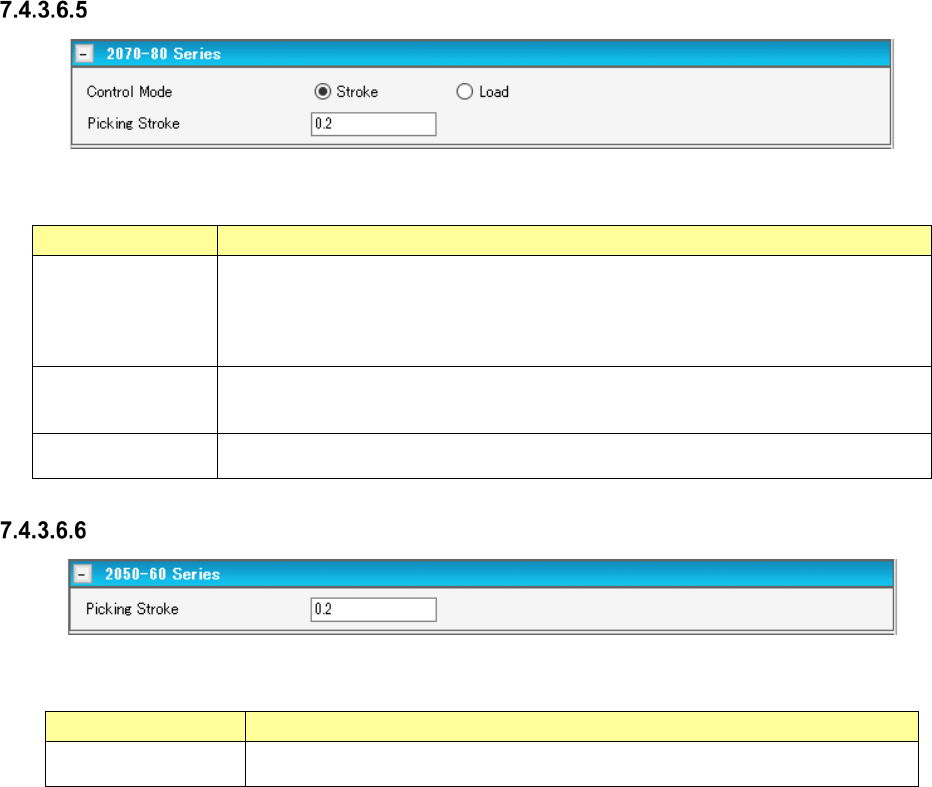
Pick conditions screen (2070-80 Series)
Figure 7.4-57 Pick conditions screen (2070-80 Series)
Table 7.4-21 Pick-up conditions (2070-80 Series) screen items
Item
Description
Stroke
Specifies the distance of the stroke of the nozzle end at component pick. Enter it in the
unit of mm.
Default: 0.20 mm When the gripper nozzle is used: 0.000 mm When the packaging
style is “tray”: 1.000 mm When the side of the external dimensions is less than 0.45
mm: 0.000 mm
Load
Specifies the load for the stroke of the nozzle end at component pick. Enter it in the unit
of g. The input range and default value vary depending on the nozzle number and
centering condition.
Picking Stroke
Specifies the stroke of the nozzle end at component pick. To make an adjustment, enter
the adjusting time in the unit of mm.
Pick conditions screen (2050-60 Series)
Figure 7.4-58 Pick conditions screen (2050-60 Series)
Table 7.4-22 Pick-up conditions (2070-60 Series) screen items
Item
Description
Picking Stroke
Specifies the stroke of the nozzle end at component pick. To make an adjustment,
enter the adjusting time in the unit of mm.
JaNets Instruction Manual 7. Program Editor
7-43
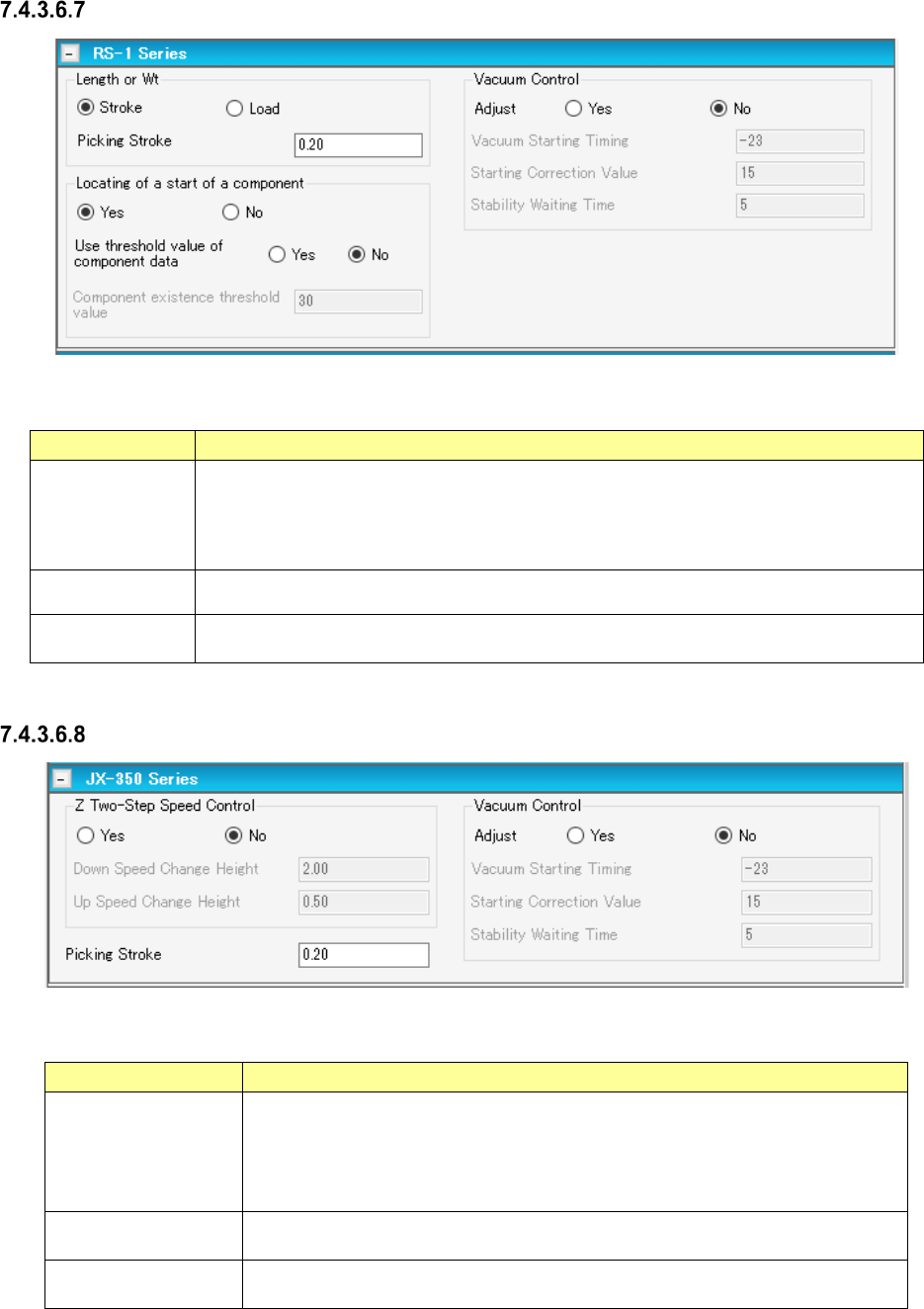
Pick conditions screen (RS-1 Series)
Figure 7.4-59 Pick conditions screen (RS-1 Series)
Table 7.4-23 Pick-up conditions (RS-1 Series) screen items
Item
Description
Picking Stroke
Specifies in millimeters how much to push the tip of the nozzle when a component is
picked up. (Default: 0.20 mm
When a gripper nozzle is used: 0.00 mm
When “Tray” is selected as the packaging style: 1.00 mm
When the shorter side length of the external dimensions is less than 0.45 mm: 0.00 mm)
Vacuum Control
Specifies whether to adjust the vacuum time when a component is picked up.
When you want to adjust the time, enter the adjustment time in microseconds.
Locating of a start
of a component
Specifies whether to cue (head) a component or not.
Pick conditions screen (JX-350 Series)
Figure 7.4-60 Pick conditions screen (JX-350 Series)
Table 7.4-24 Pick conditions (JX-350 Series) screen items
Item
Description
Z Two-Step Speed
Control
Specifies whether to control the speed at which the nozzle moves up or down to
pick up a component in two steps.
When you want to control the speed in two steps, enter the height at which the
speed shall be controlled for the second time to move up and move down the
nozzle respectively.
Picking Stroke
Specifies in millimeters how much to push the tip of the nozzle when a component
is picked up.
Vacuum Control
Specifies whether to adjust the vacuum time when a component is picked up.
When you want to adjust the time, enter the adjustment time in microseconds.