JANETS_INM.pdf - 第250页
JaNets In structio n Manual 7. Program Editor 7- 43 Pick conditions screen (RS -1 S eries ) Figure 7.4 - 59 Pick conditions sc reen (RS -1 S eries ) T able 7.4 - 23 Pick - up conditions ( RS -1 S eries ) scree n items It…
JaNets Instruction Manual 7. Program Editor
7-42
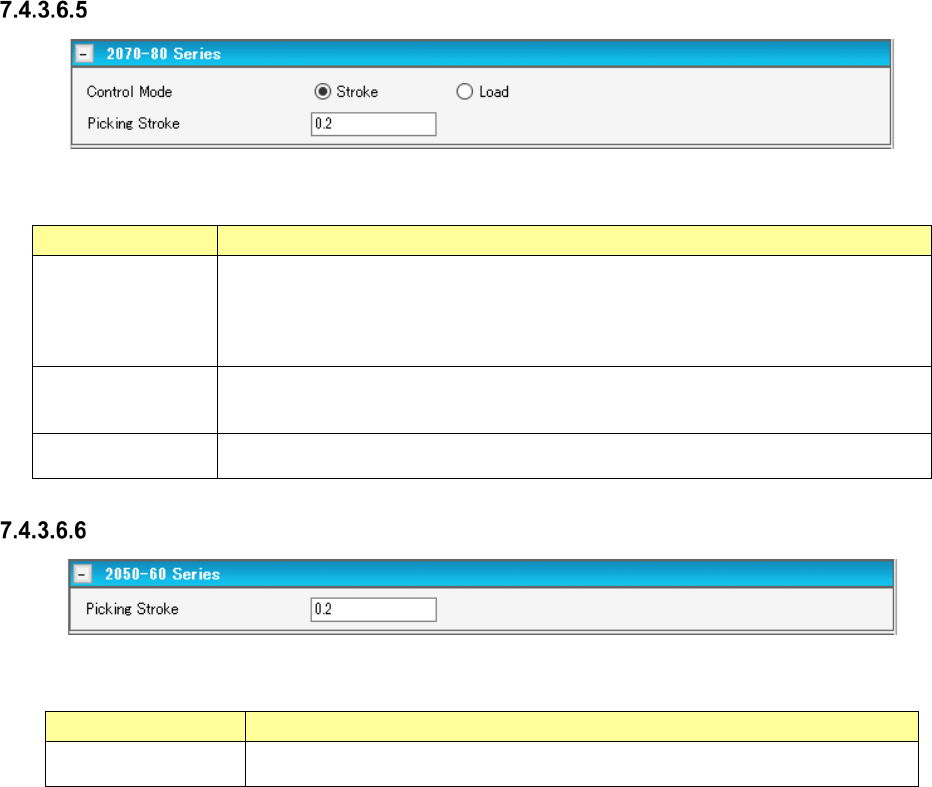
Pick conditions screen (2070-80 Series)
Figure 7.4-57 Pick conditions screen (2070-80 Series)
Table 7.4-21 Pick-up conditions (2070-80 Series) screen items
Item
Description
Stroke
Specifies the distance of the stroke of the nozzle end at component pick. Enter it in the
unit of mm.
Default: 0.20 mm When the gripper nozzle is used: 0.000 mm When the packaging
style is “tray”: 1.000 mm When the side of the external dimensions is less than 0.45
mm: 0.000 mm
Load
Specifies the load for the stroke of the nozzle end at component pick. Enter it in the unit
of g. The input range and default value vary depending on the nozzle number and
centering condition.
Picking Stroke
Specifies the stroke of the nozzle end at component pick. To make an adjustment, enter
the adjusting time in the unit of mm.
Pick conditions screen (2050-60 Series)
Figure 7.4-58 Pick conditions screen (2050-60 Series)
Table 7.4-22 Pick-up conditions (2070-60 Series) screen items
Item
Description
Picking Stroke
Specifies the stroke of the nozzle end at component pick. To make an adjustment,
enter the adjusting time in the unit of mm.
JaNets Instruction Manual 7. Program Editor
7-43
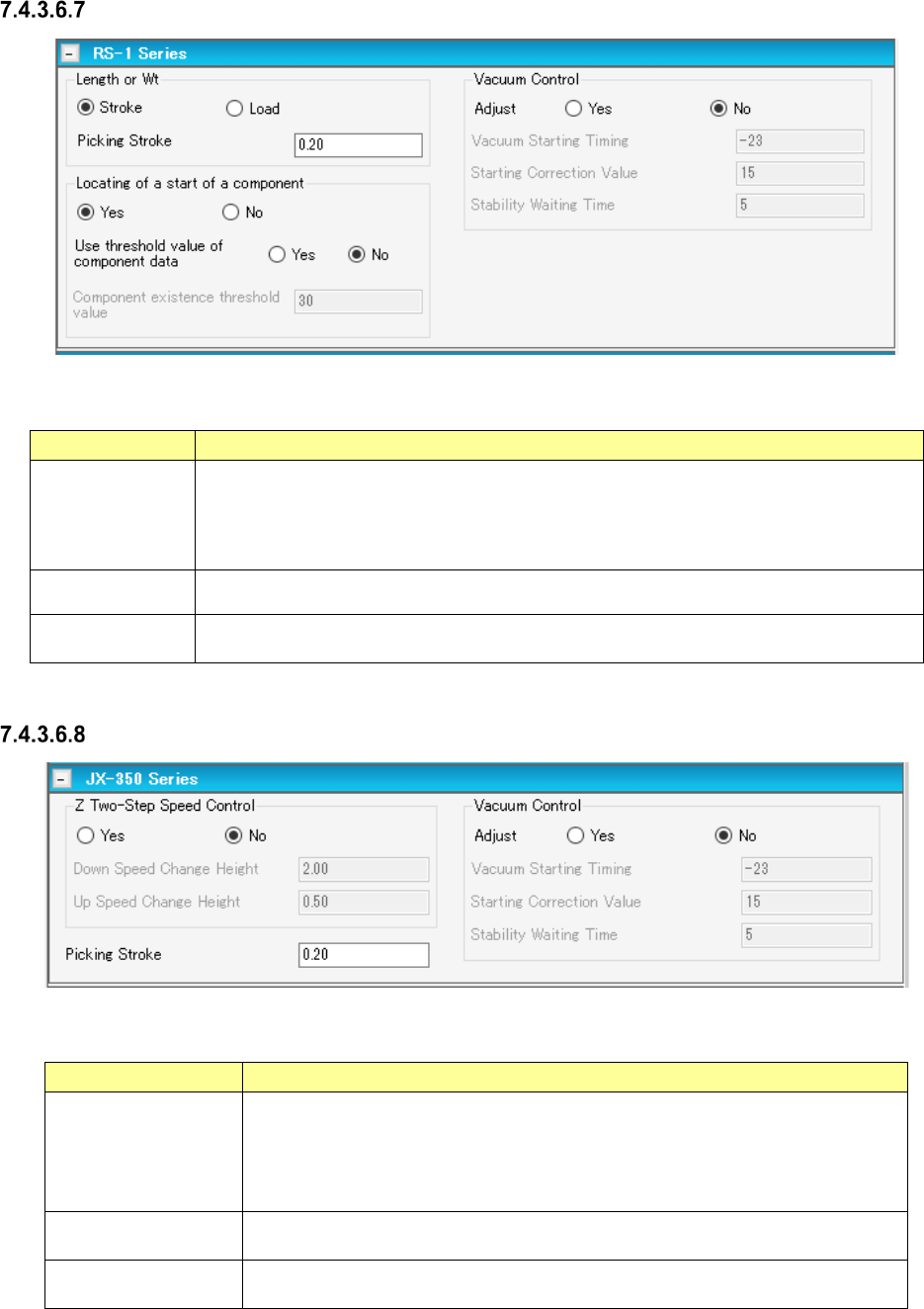
Pick conditions screen (RS-1 Series)
Figure 7.4-59 Pick conditions screen (RS-1 Series)
Table 7.4-23 Pick-up conditions (RS-1 Series) screen items
Item
Description
Picking Stroke
Specifies in millimeters how much to push the tip of the nozzle when a component is
picked up. (Default: 0.20 mm
When a gripper nozzle is used: 0.00 mm
When “Tray” is selected as the packaging style: 1.00 mm
When the shorter side length of the external dimensions is less than 0.45 mm: 0.00 mm)
Vacuum Control
Specifies whether to adjust the vacuum time when a component is picked up.
When you want to adjust the time, enter the adjustment time in microseconds.
Locating of a start
of a component
Specifies whether to cue (head) a component or not.
Pick conditions screen (JX-350 Series)
Figure 7.4-60 Pick conditions screen (JX-350 Series)
Table 7.4-24 Pick conditions (JX-350 Series) screen items
Item
Description
Z Two-Step Speed
Control
Specifies whether to control the speed at which the nozzle moves up or down to
pick up a component in two steps.
When you want to control the speed in two steps, enter the height at which the
speed shall be controlled for the second time to move up and move down the
nozzle respectively.
Picking Stroke
Specifies in millimeters how much to push the tip of the nozzle when a component
is picked up.
Vacuum Control
Specifies whether to adjust the vacuum time when a component is picked up.
When you want to adjust the time, enter the adjustment time in microseconds.
JaNets Instruction Manual 7. Program Editor
7-44
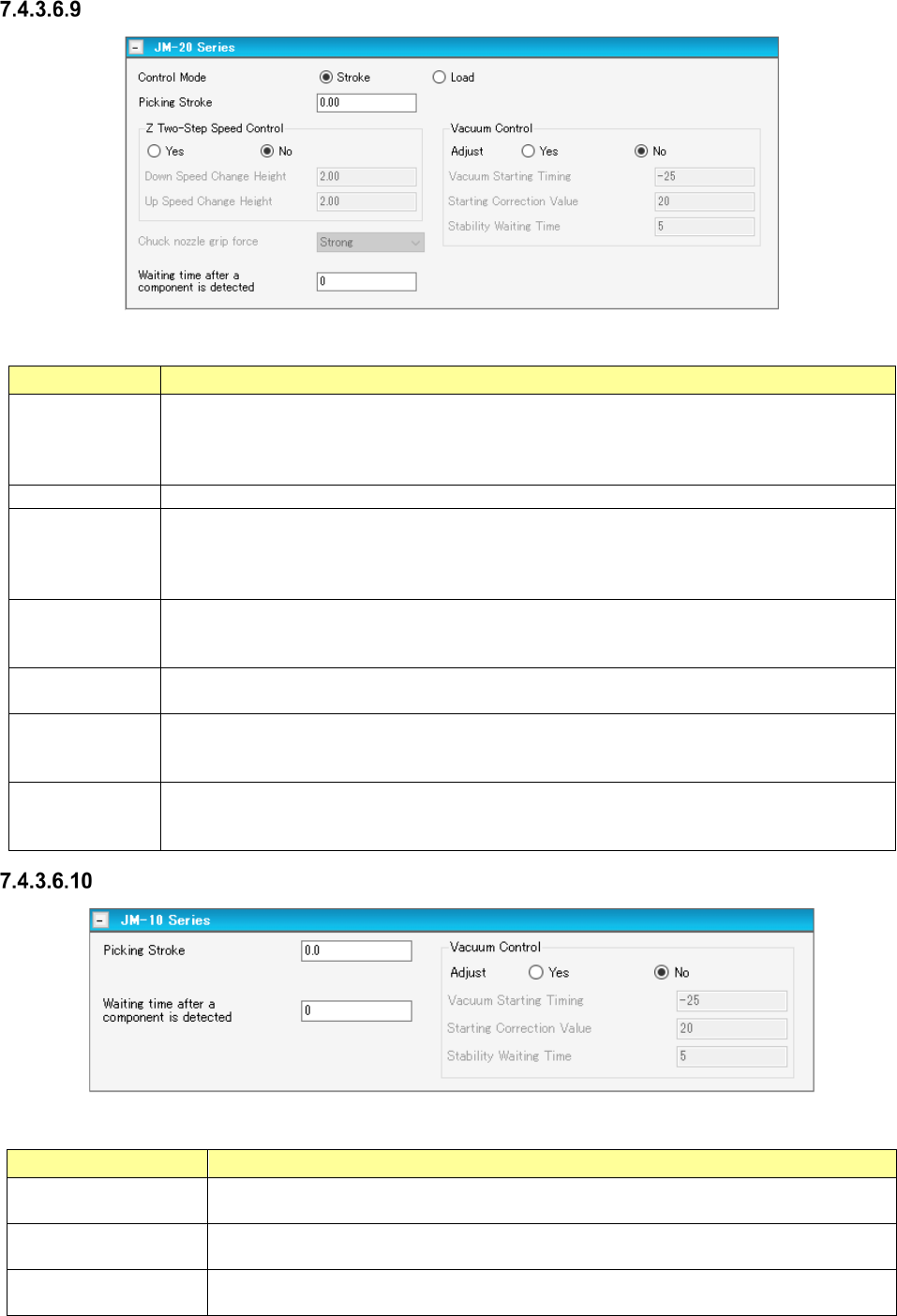
Pick conditions screen (JM-20 Series)
Figure 7.4-61 Pick conditions (JM-20 Series) screen
Table 7.4-25 Pick-up conditions (JM-20 Series) screen items
Item
Description
Z Two-Step
Speed Control
Specifies whether to control the speed at which the nozzle moves up or down to pick up a
component in two steps.
When you want to control the speed in two steps, enter the height at which the speed shall be
controlled for the second time to move up and move down the nozzle respectively.
Control Mode
Selects how the end of a nozzle should be pushed to pick up a component, “Stroke” or “Load.”
Picking Stroke
(Stroke)
Specifies how much to push the end of the nozzle to pick up a component in the unit of mm.
Default: 0.20 mm. When a gripper nozzle is used: 0.000 mm. When “Tray” is selected as
the packaging style: 1.000 mm. When the length of the shorter side of the outer dimensions
is less than 0.45 mm: 0.000 mm
Picking Stroke
(Load)
Specifies how much to push the end of the nozzle to pick up a component in the unit of gram.
The input range and the default value vary depending on the nozzle number and the centering
requirements.
Vacuum Control
Specifies whether to make an adjustment of vacuum time to pick up a component.
To make an adjustment, enter the adjusting time in the unit of ms.
Chuck nozzle
grip force
Changes the chuck nozzle gripping force by changing the vacuum pressure with the electro-
pneumatic regulator.
Select the grip force among “Weak,” “Medium” and “Strong.”
Waiting time after
a component is
detected
Sets the waiting time from when a component is detected until when it is picked up.
* You can set this item only when “Stick” or “INS Bulk” is selected as the packaging style.
Pick conditions screen (JM-10 Series)
Figure 7.4-62 Pick conditions (JM-10 Series) screen
Table 7.4-26 Pick-up conditions (JM-10 Series) screen items
Item Description
Picking Stroke
(Stroke)
Specifies how much to push the end of the nozzle to pick up a component in the unit of
mm.
Vacuum Control
Specifies whether to make an adjustment of vacuum time to pick up a component.
To make an adjustment, enter the adjusting time in the unit of ms.
Waiting time after a
component is detected
Sets the waiting time from when a component is detected until when it is picked up.
* You can set this item only when “Stick” or “INS Bulk” is selected as the packaging style.