JANETS_INM.pdf - 第253页
JaNets In structio n Manual 7. Program Editor 7- 46 Placement conditions general setting screen For compone nt plac ement , sett ings are made acc or ding to the gener al data o f the mac hine ty pe. Figure 7.4 - 64 Plac…
JaNets Instruction Manual 7. Program Editor
7-45
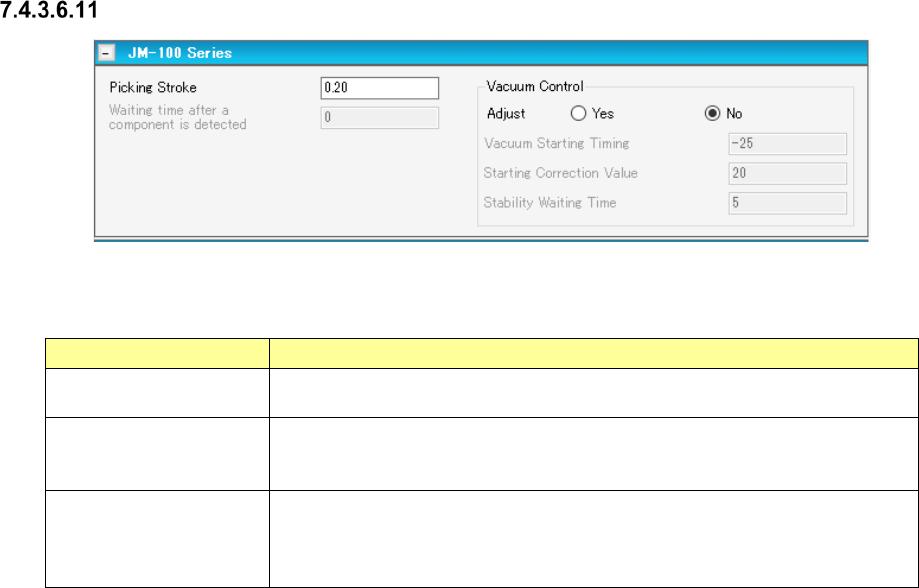
Pick conditions screen (JM-100 Series)
Figure 7.4-63 Pick conditions (JM-100 Series) screen
Table 7.4-27 Pick-up conditions (JM-100 Series) screen items
Item Description
Picking Stroke
(Stroke)
Specifies how much to push the end of the nozzle to pick up a component in
the unit of mm.
Vacuum Control
Specifies whether to make an adjustment of vacuum time to pick up a
component.
To make an adjustment, enter the adjusting time in the unit of ms.
Waiting time after a
component is detected
Sets the waiting time from when a component is detected until when it is picked
up.
* You can set this item only when “Stick” or “INS Bulk” is selected as the
packaging style.
JaNets Instruction Manual 7. Program Editor
7-46
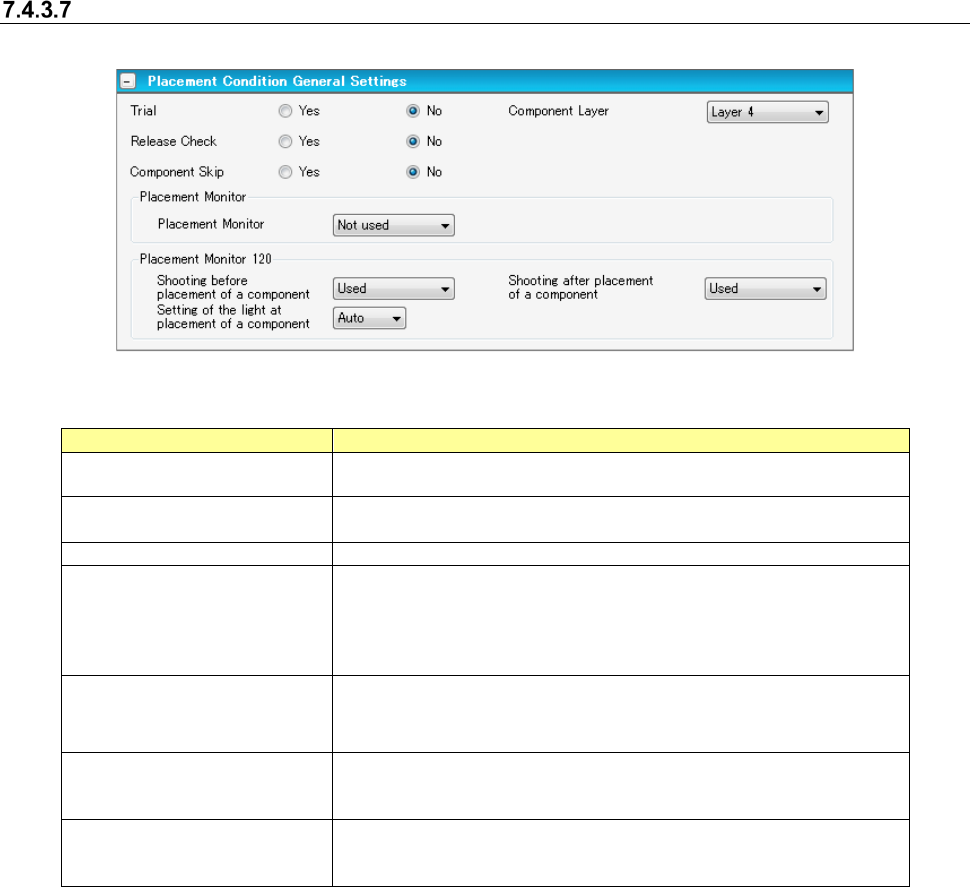
Placement conditions general setting screen
For component placement, settings are made according to the general data of the machine type.
Figure 7.4-64 Placement conditions general setting screen
Table 7.4-28 Placement condition common setting screen items
Item
Description
Trial
Specifies for every component whether the component is placed at
the time of execution of a trial.
Release Check
Specifies whether the component that is left after placement of laser
centering component is checked by laser.
Component Layer
Select placement sequence by component.
Placement Monitor
Specifies the operation of a placement monitor for every component.
Select one from among the “Not image” (default), “Image,” “Compo-
nent existence,” and “Movie.”
When you use a Placement Monitor for an RX-6, specify the "Place-
ment Monitor 120."
Placement Monitor 120
Shooting before placement
of a component
Specify whether or not to image before placement.
Placement Monitor 120
Shooting after placement of
a component
Specify whether or not to image after placement.
Placement Monitor 120
Setting of the light at
placement of a component
Select the light from "Auto" or 1~8 at the time of placement.
[When a production line includes a JM series machine]
None of the menu items, “Placement Monitor” “and “Placement Monitor 120” are displayed on the
screen.
JaNets Instruction Manual 7. Program Editor
7-47
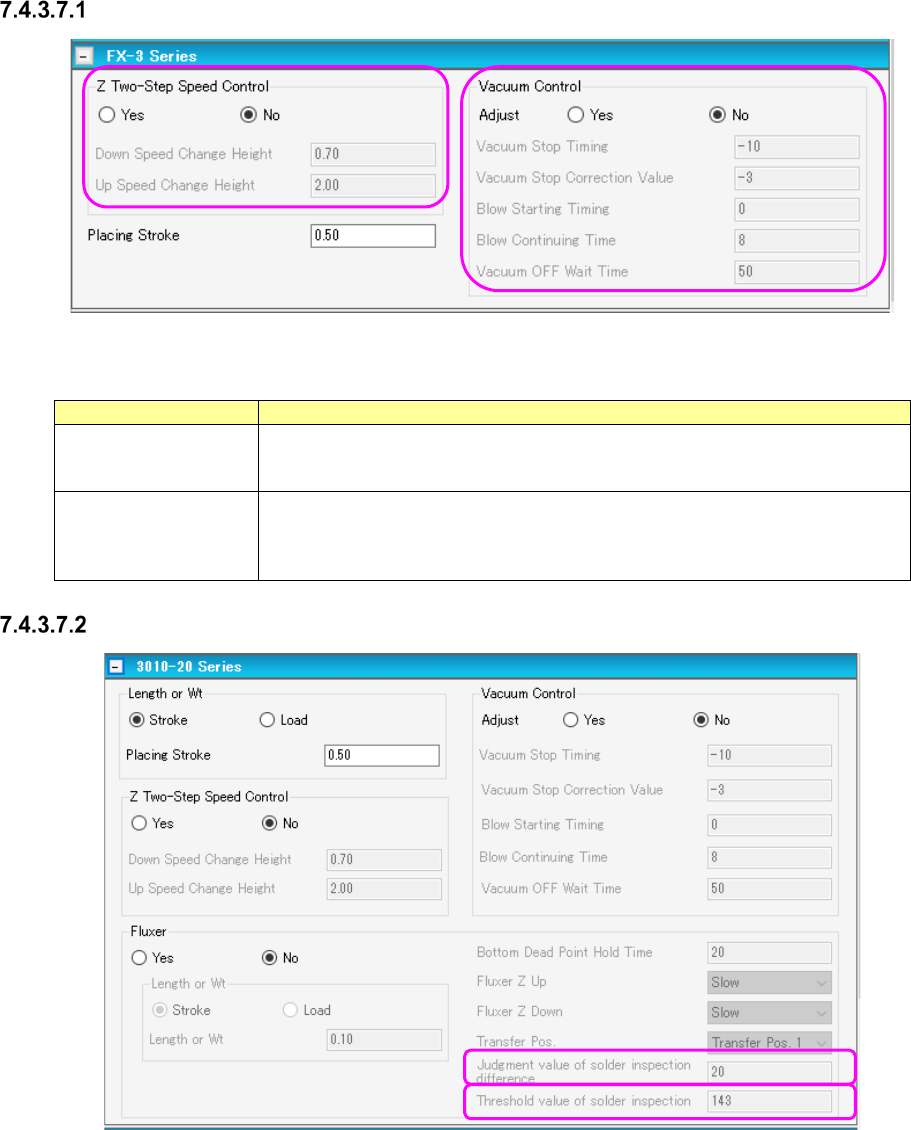
Placement conditions screen (FX-3 Series)
Figure 7.4-65 Placement conditions (FX-3 Series) screen
Table 7.4-29 Placement condition (FX-3 Series) screen items
Item
Description
Z Two-Step Speed
Control
Specifies whether to control the up/down speed of the nozzle at pick by two steps.
For 2-step control, enter the height for 2-step control for each of up and down
operations.
Vacuum Control
Specifies the stroke of the nozzle end at component pick. To make an adjust-
ment, enter the adjusting time in the unit of ms.
Specifies whether to make an adjustment for vacuum time at pick. To make an
adjustment, enter the adjusting time in the unit of ms.
Placement conditions screen (3010-20 Series)
Figure 7.4-66 Placement conditions (3010-20 Series) screen