JANETS_INM.pdf - 第28页
JaNets Instr ucti on Man ual 1. Overview 1- 15 When a Line Manager option and a Data Manager option are added to Basic Editor The operati on flow up to P WB product ion to be ap plied wh en a Line M anager option and a D…
JaNets Instruction Manual
1. Overview
1-14
1.6.3 Data Manager option
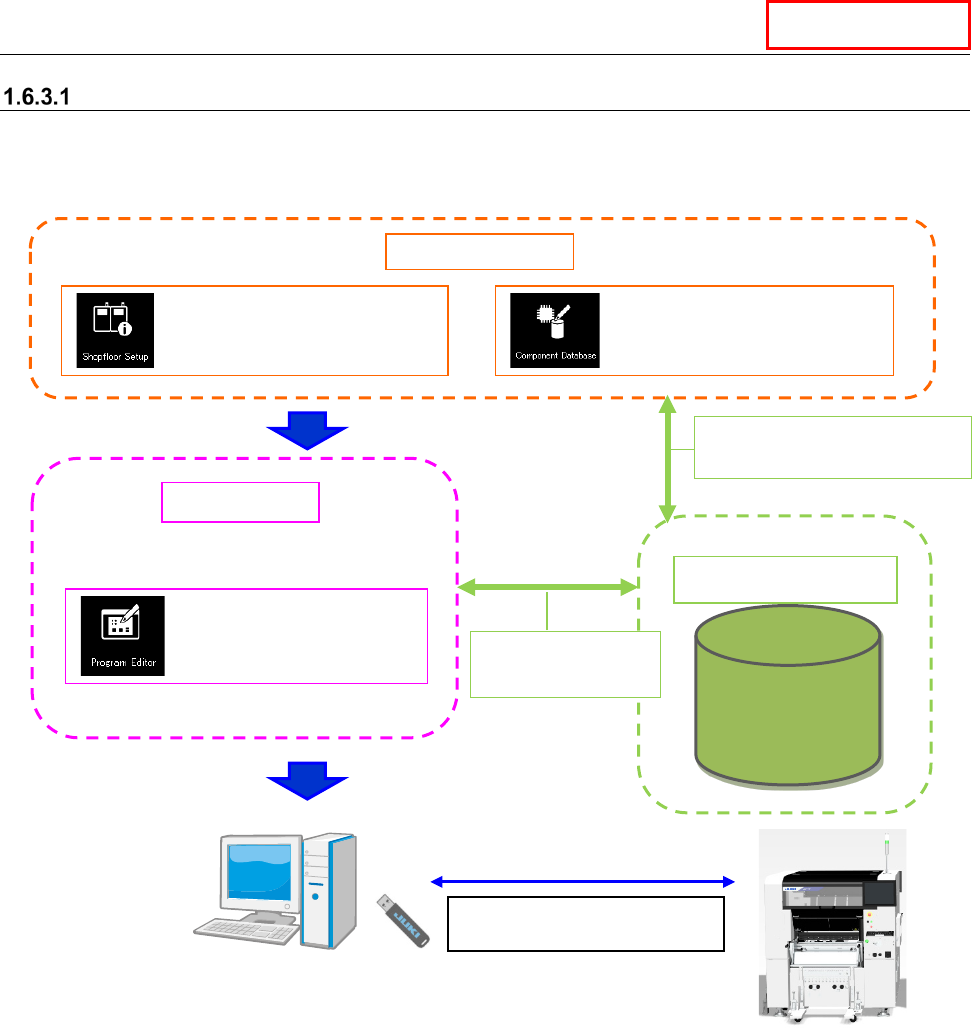
When a Data Manager option is added to Basic Editor
The operation flow up to PWB production to be applied when a Data Manager option is added to
Basic Editor is shown below.
Data Manager
Data Manager
Data Base
Data Manager
Sharing of
Component data
Create Data
Shared function
: Configuration of a machine
: Registration of
component information
: Creation of a production
program (execution of
optimization)
Use a USB flash memory stick
to copy a production program.
Sharing of machine information
Sharing of Component data
JaNets Instruction Manual
1. Overview
1-15
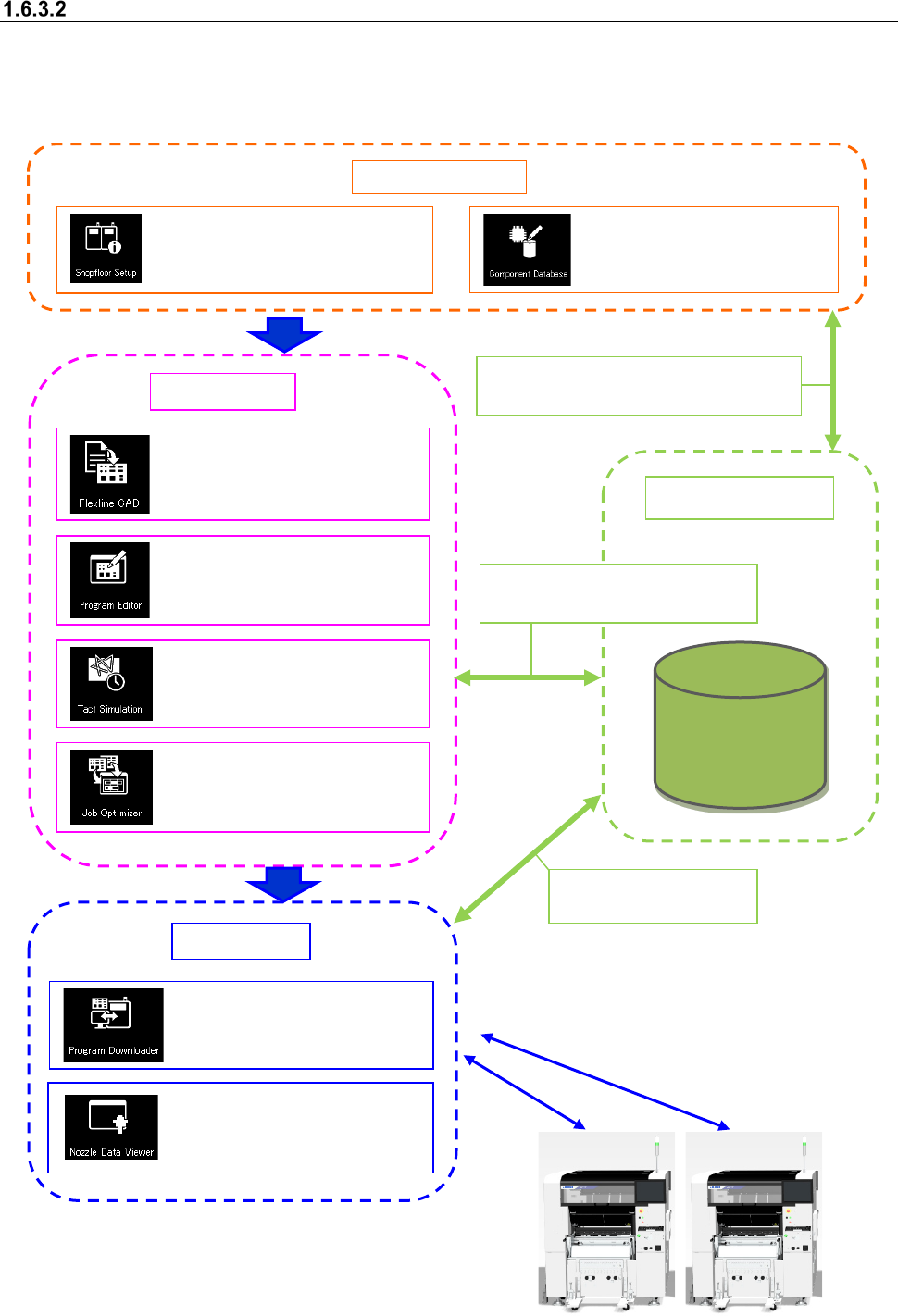
When a Line Manager option and a Data Manager option are added to Basic Editor
The operation flow up to PWB production to be applied when a Line Manager option and a Data
Manager option are added to Basic Editor is shown below.
A data shift using the USB flash memory can be
performed in the same way as Basic Editor.
Data Manager
Data Base
Data Manager
Sharing of the floor/line/machine information
Sharing of Component data
Sharing of a production program
Sharing of Component data
Sharing of a production
program
Create Data
Shared function
: Configuration of a floor, line
and machine
: Registration of component
information
Production
: Conversion of external data
into JUKI data (optional)
: Creation of a production
program (execution of
optimization)
: Time measurement by
optimized production program
: Optimization of feeder setting
change
:
Downloads of a production
program, and uploading of
them after PWB production
:
Viewing usage status of
ID-equipped nozzles

JaNets Instruction Manual 2. Installation
2-1
2. Installation
2.1 Installing JaNets
2.1.1 Necessary supplied parts
• Installation disk (CD)
• Protect module (Sentinel Super Pro USB key)
2.1.2 Notes on Installation
• You have to establish a network in order to move data of a production program between a PC
and a mounter, to obtain information on a mounter (“obtain the production states”) or to share the
Component Database.
Since the specialized knowledge is required to establish a network, consult our Service
department or your network manager.
• Before installing the JaNets software programs on a PC, quit all application programs that are
running.
• You have to have the administrator’s privilege (that is, log in the system with a user name having
the user privilege) to install the programs on a PC.
(Create the user-name only in alphanumeric one byte characters when you newly create the
user-name (that the administrator authority was given.)
* Avoid including a single quote ('), a back quart (`), and a hyphen (-) in the user name to create
newly.
• Before installing the programs, remove the Sentinel Super Pro USB key from the PC.
• When upgrading the software version, log into Windows with the user name having the
administrator’s privilege (that is, log in the system with a user name having the user privilege)
that was created when the JaNets was installed for the first time. If you are unable to remember
the said user name, log into Windows with the user name that the administrator's privilege was
given to.
• A name of computer needs to fall inside the range of 15 characters which is limited to NetBIOS,
using standard words (A to Z, a to z), figures (0 to 9), and hyphen (-).
2.1.3 Procedure for newly installing JaNets
2.1.3.1 Starting up the installer
* If the USB of the protect module is attached onto the PC when the JaNets is installed, remove
the USB from the PC before installing the JaNets.
(1) Insert the JaNets disk into the CD-ROM drive.
Start "Setup.exe" in D:\ JaNets\Setup.exe in installation CD.