JANETS_INM.pdf - 第317页
JaNets In structio n Manual 7. Program Editor 7- 110 7.4.7 Editing the station data This sc reen allo ws you t o set data such as a pro duction pr ogram when a produc tion line includes a machine other than a moun ter or…
JaNets Instruction Manual 7. Program Editor
7-109
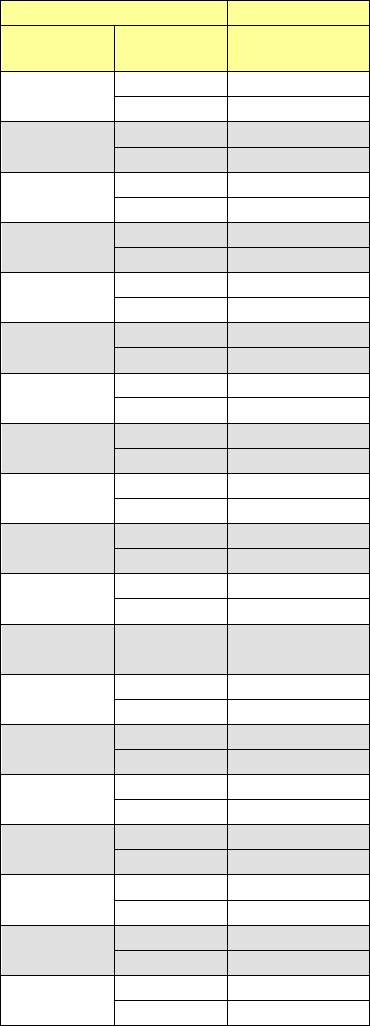
The relation between the component pick-up position of the JaNets and that of an RX-7 series is
shown in the table below. (This is common to the left station and the right station.)
JaNets
RX-7 series
Hole
number
Lane Slot number
1
1
101
2
102
2
1
103
2
104
3
1
105
2
106
4
1
107
2
108
5
1
109
2
110
6
1
111
2
112
7
1
113
2
114
8
1
115
2
116
9
1
117
2
118
10
1
119
2
120
11
1
121
2
122
12
1
123
2
124
13
1
125
2
126
14
1
127
2
128
15
1
129
2
130
16
1
131
2
132
17
1
133
2
134
18
1
135
2
136
19
1
137
2
138
JaNets Instruction Manual 7. Program Editor
7-110
7.4.7 Editing the station data
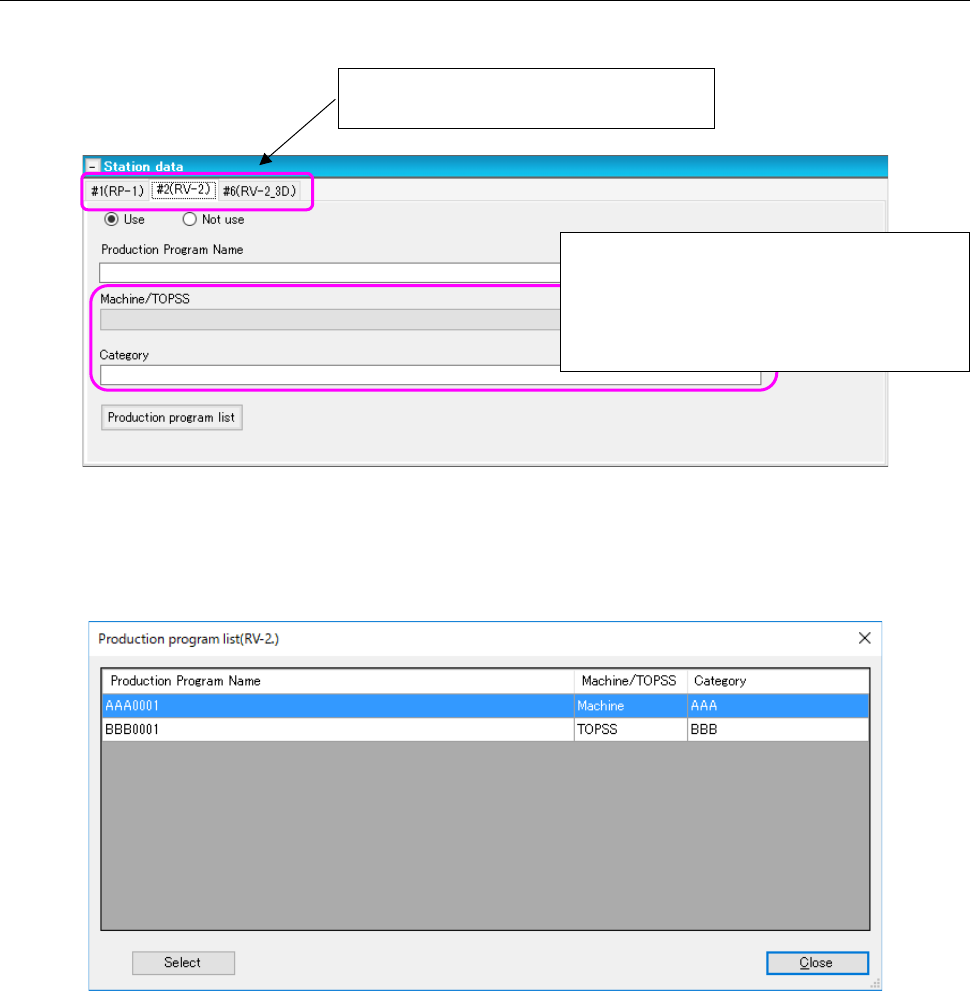
This screen allows you to set data such as a production program when a production line includes a
machine other than a mounter or a dispenser.
Figure 7.4-151 Station data screen
Specify a production program used with each machine.
When you press the <Production program list> button, the system inquires of the machine for the pro-
duction program list, and then displays the “Production program list” on the screen.
Figure 7.4-152 Production program list screen
After selecting a production program to be used, press the <Select> button. The selected production
program is reflected in the station data.
Set data for each inspection machine
and/or printer of a production line.
When the machine model is an RV-1, RV-2 or
RV-2-3D, specify the distinction of a machine
and TOPSS, and the corresponding category
here. These fields do not appear on the
screen in case of a printer.
JaNets Instruction Manual 7. Program Editor
7-111
7.5 Description of Each Screen
7.5.1 Main screen
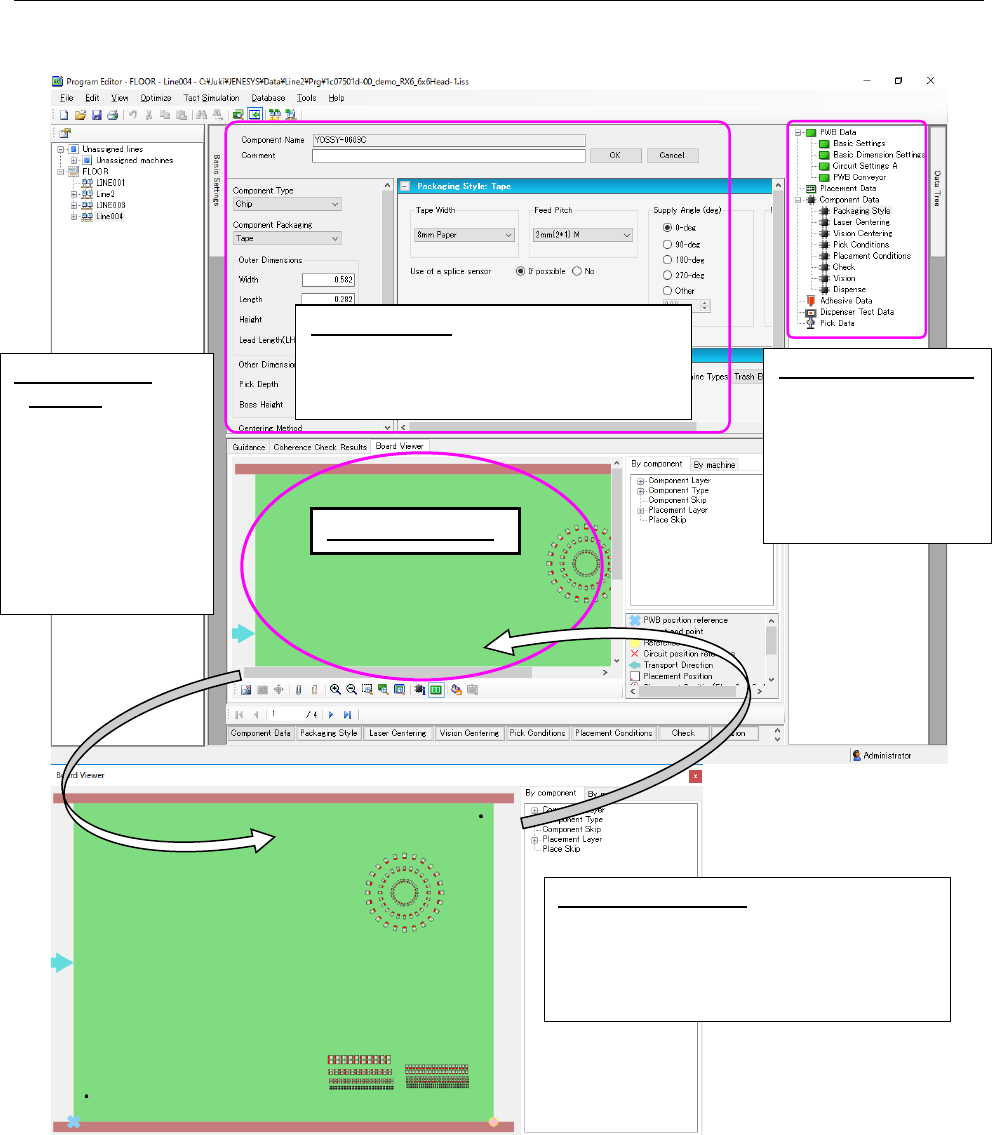
The entire screen of the Program Editor is shown below.
Figure 7.5-1 Main screen
When you drag and drop a production program onto the Board Viewer, the system displays the
corresponding production program.
Separate Board
Viewer: When you
click the right button
of a mouse on the
“Board Viewer,” the
pop-up menu ap-
pears. Select the
[Separate Board
Viewer] command on
this menu.
Viewer display area
Tree view display area:
When you select
each item, the cor-
responding input
screen is displayed
on the data input
area.
Data input area:
Allows you to check or set
items of a production program such as
PWB data, Placement data, Component
data and Pick data.
Return Board Viewer:
Click the right button of
a mouse on the “Board Viewer” to display
the pop-up menu. Select the [Return Board
Viewer] command on this menu to display
the Program Editor screen again.