JANETS_INM.pdf - 第326页
JaNets In structio n Manual 7. Program Editor 7- 119 Dat a t ype Descripti on Component data W hen you select the " Compon ent data" from the output d ata, you can se- lect between the " Detail s " an…
JaNets Instruction Manual 7. Program Editor
7-118
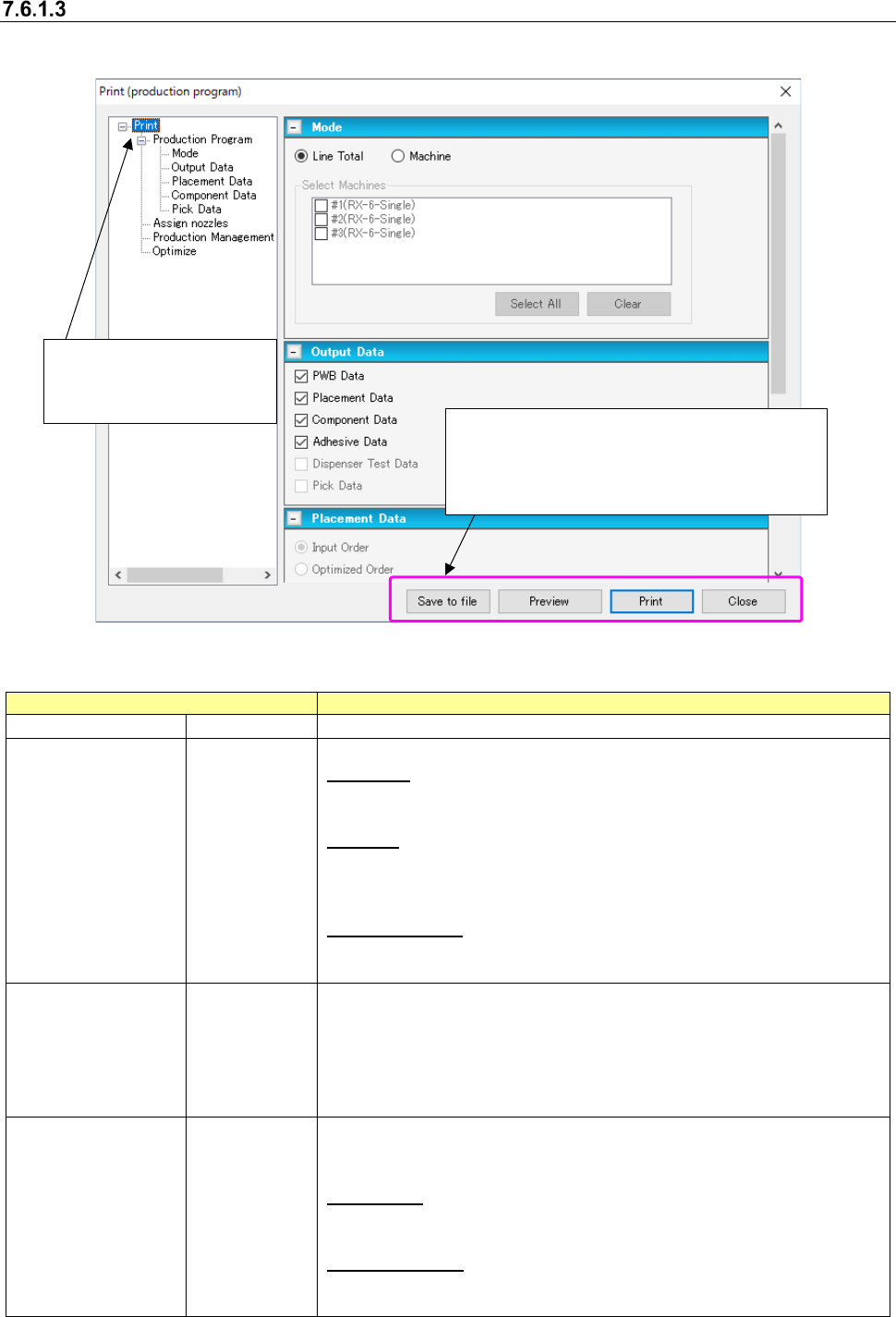
[Print & Save to file] command
This command prints data and outputs it in a file.
Figure 7.6-3 Print setting screen
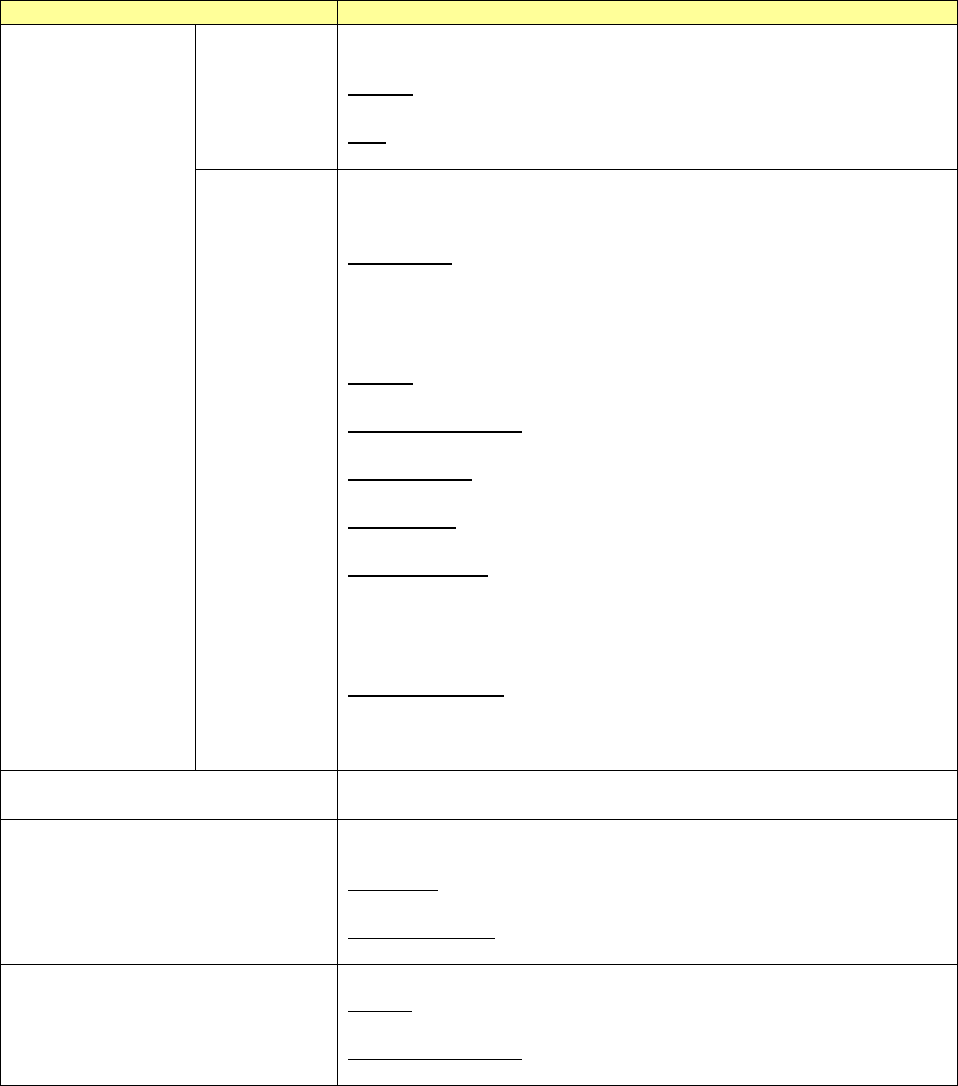
Table 7.6-1 Outputs
Data type
Description
Production Program
Print type
Outputs the production program data.
Mode
Specify a print mode of the production program data.
Line Total:
Outputs the information on the production program assigned to the whole
line.
Machine:
Outputs the information on the production program assigned to the ma-
chine. You cannot select this data type when the production program is
not optimized.
Select Machines:
You can select the machine which outputs the data only when the “Ma-
chine” is selected.
Output data
Select the data type to output from among the "PWB data," "Placement
data," "Component data," and "Pick data."
When you select the "Line Total" from the mode, you can select the "PWB
data," "Placement data", and "Component data."
When you select the "Machine" from the mode, you can select the
"Placement data" and "Pick data," and output the data for every machine.
Placement
data
Only when you select the "Machine" from the mode and the "Placement
data" from the output data, you can select between the "Input order" and
"Optimized Order."
Input Order:
Outputs the placement data in the input order.
* RX-7 series is unable to be output in entry sequence.
Optimized Order:
Outputs the placement data in the order which optimization has assigned
to.
Save to file: Outputs data to the file in a specified
mode.
Preview: Checks the printed contents to preview.
Print: Prints data.
Close: Closes the print setting screen to end the print.
Select an item to print from the
tree view.
Output the item that is being
displayed on the screen.
JaNets Instruction Manual 7. Program Editor
7-119
Data type
Description
Component
data
When you select the "Component data" from the output data, you can se-
lect between the "Details" and "List."
Details:
Outputs the details of component data.
List:
Outputs a list of component data.
Pick data
Only when you select the "Machine" from the mode and the "Pick data"
from the output data, you can select from among the "Input order," "Layout,"
and "Feeder Setup Sheet."
Input Order:
Outputs the pick data in the input order.
Outputs the information on one pick position in two columns.
Outputs a pick position, a feeder type, etc. in the first column and outputs
the pick coordinates in the second column.
Layout:
Outputs the pick data in the layout mode of a bank.
Feeder Setup Sheet:
Outputs the data for a feeder setup.
W/o comment:
Outputs the component data without the comment.
W/comment:
Outputs the component data with the comment.
W/placement ID:
Outputs the pick data with the placement ID for picking components at a
pick position.
You cannot select this data type when you select the "Placement data"
from the output data.
W/o placement ID:
Outputs the pick data without the placement ID.
You cannot select this data type when you select the "Placement data"
from the output data.
Assign nozzles
Outputs the information of assigning nozzles to the ATC.
You cannot select this data type when nozzle assignment is not optimized.
Production Management
Outputs the production management information.
Select between the “Line Total” and “Select Machines.”
Line Total:
Outputs the production management information of the whole line.
Select Machines:
Outputs the production management information for every machine.
Optimize
Outputs an optimization option and the number of supplies.
Option:
Outputs the information of setting up an optimization option.
Number of supplies:
Outputs the information of setting up the number of component supplies.
In addition, since the dialog display language which is displayed at printing preview generation
depends on OS, it is unable to switchover by language switchover function.
JaNets Instruction Manual 7. Program Editor
7-120
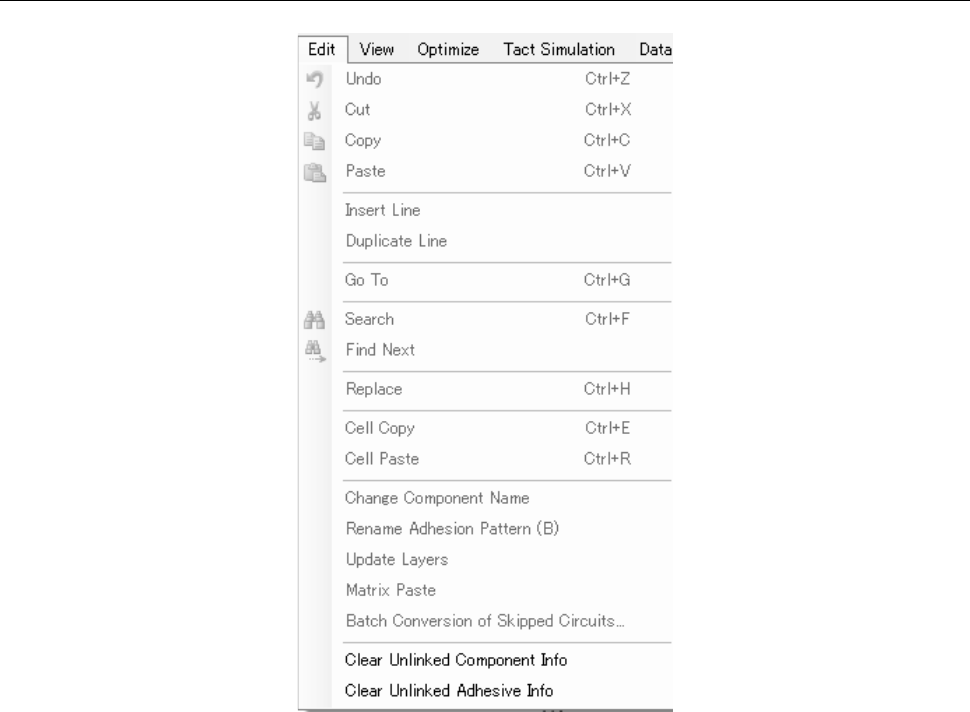
7.6.2 Descriptions of the “Edit” menu commands
Figure 7.6-4 “Edit” menu