JANETS_INM.pdf - 第341页
JaNets In structio n Manual 7. Program Editor 7- 134 Notes of the quant ity of compon ent s uppl y in case an RX - 7 ser ies is o n a line : Optimizat ion of an RX - 7 ser ies cann ot contr ol the number of feeder t o co…
JaNets Instruction Manual 7. Program Editor
7-133
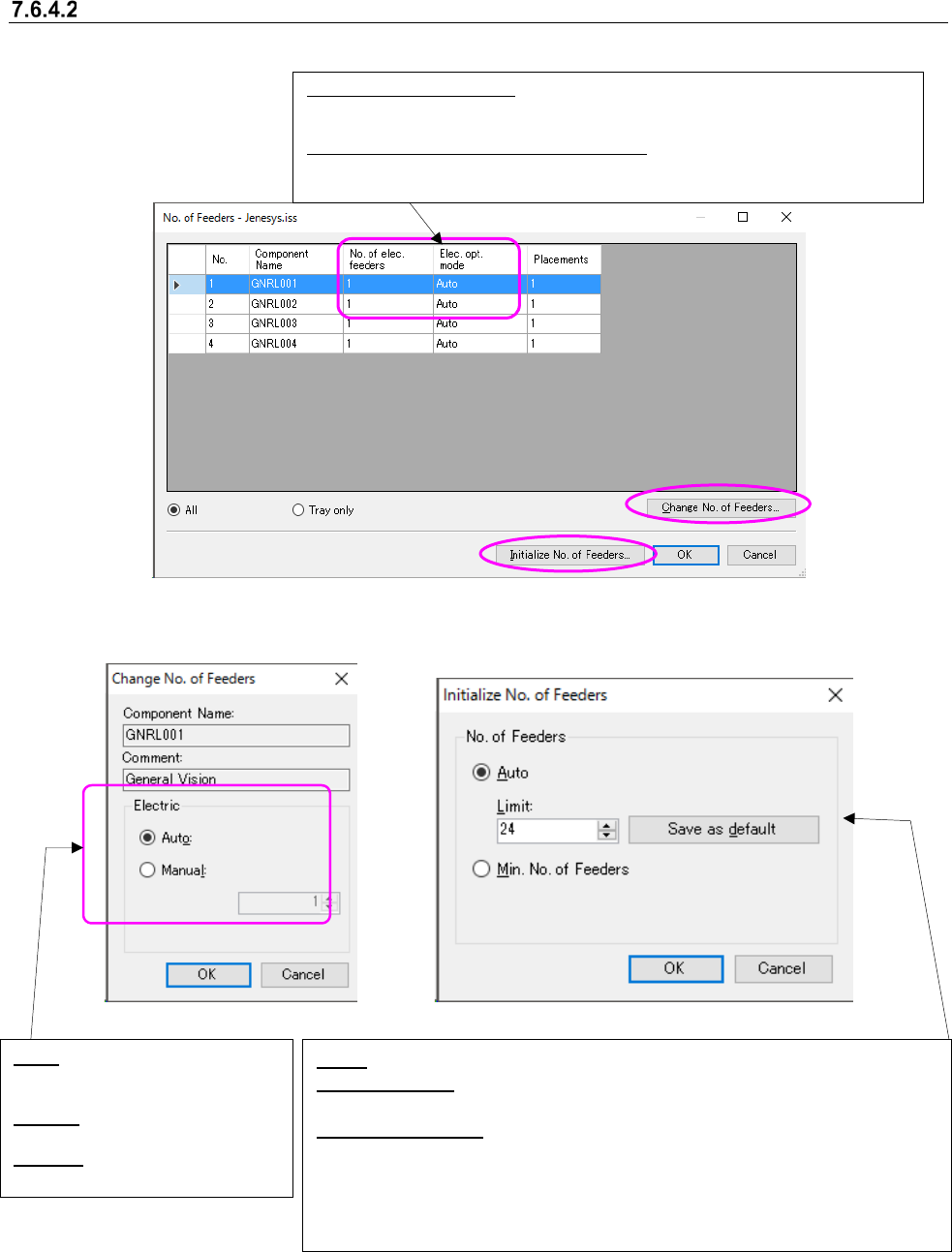
No. of Feeders
This command sets the number of feeders to be used with a machine.
When you select the <Change No. of Feeders> button on the screen above, you can change the
number of feeders. When you select the <Initialize No. of Feeders> button, the system initializes
the number of feeders (see the screens below).
Figure 7.6-26 “No. of Feeders,” “Change No. of Feeders” and “Initialize No. of Feeders” screens
On each of the “No. of Feeders” screen, the “Change No. of Feeders” screen and the “Initialize No.
of Feeders” screen, only the driving method used on the production line is displayed. For exam-
ple, these screens do not display any “Electric” settings for a production line that uses the me-
chanical driving method only.
No. of mech./elec. feeders:
Displays how many feeders are assigned after the optimization. When there
is no pick data, it displays nothing.
Mech./Elec. opt. mode (Optimization Mode):
Displays how the number of feeder is assigned during the optimization.
Auto, Manual or Unused.
Auto: You can specify the upper limit of the number of feeders.
Save as default: Sets the value entered in the “Limit” field as the default upper
limit number.
Min. No. of Feeders: Initializes all the numbers of component supplies to the
total number of pick data of each component or minimum value. Sets the number
of minimum supplies individually for a mechanical feeder and an electric feeder.
Sets the packaging to “Unused,” which cannot be used with the specified drive
method.
Auto: Optimizes according to the
setting of ”Initialize No. of
Feeders”.
Manual: You can specify the
number of feeders.
Unused: Mech./Elec. feeders are
not used.

JaNets Instruction Manual 7. Program Editor
7-134
Notes of the quantity of component supply in case an RX-7 series is on a line:
Optimization of an RX-7 series cannot control the number of feeder to correspond to the
quantity of component supply.
For this reason, only one unit of feeder is supposed to be assigned to an RX-7 series.
(Except that pick data is set up for an RX-7 series beforehand)
Optimization of an RX-7 series usually assigns one unit of feeder in order to employ the
characteristic of a head efficiently. However, when "Assign duplicate feeders to left and right
stations." of "Machine Type Specific – RX-7 series " is selected, the components with many
placement points may be assigned to right and left stations. In this case, optimization is per-
formed without protecting a setup of the quantity of component supply for the said compo-
nents.
JaNets Instruction Manual 7. Program Editor
7-135
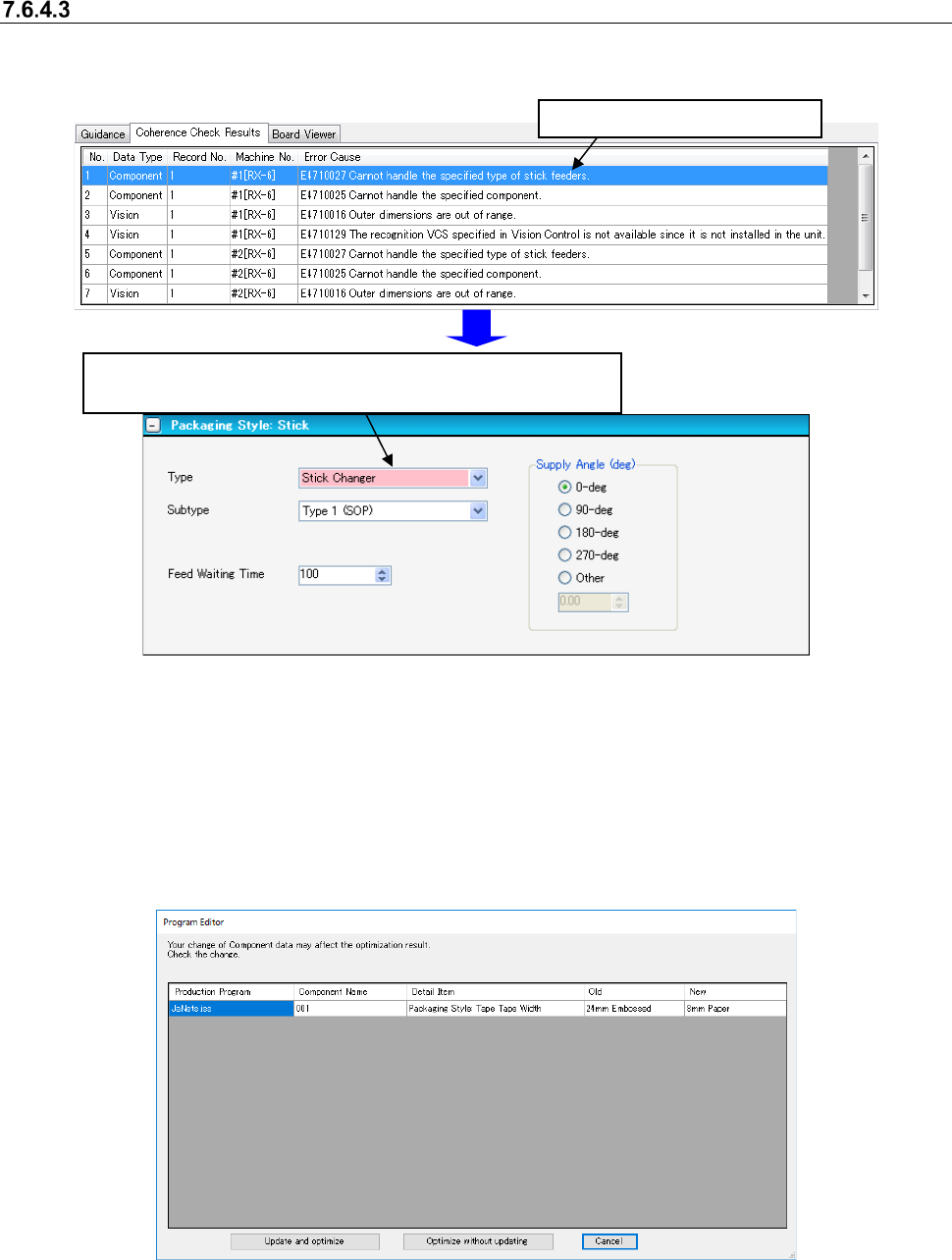
Data Coherence Check
This command performs the coherence check for a created production program. If an error occurs,
the corresponding error message is displayed in the message display area.
Figure 7.6-27 Data coherence check screen
When you select the <Yes>button for the menu item “Automatic batch loading of Mark data” and
for the menu item “Automatic batch loading of Component data” on the “Operation Preferences”
screen invoked from the “Set Environments” screen respectively, data of the same name is ob-
tained from the database before the data coherence check starts.
If any difference such as auto selection of pick data is generated as a result of this data obtaining
operation (for example, the packaging style is different), the dialog box like one shown below ap-
pears on the screen.
Figure 7.6-28 Confirmation screen for changing due to data automatically obtained
Select one of three buttons: <Update and optimize>, which updates data to continue optimization,
<Optimize without updating>, which performs optimization without updating data and <Cancel>.
* See Section 7.8 “Automatically Loading Component Data/Mark Data at a Time” also.
Double-click the error message.
The screen for a component that caused the error appears, and
the corresponding feeder is displayed in red.