JANETS_INM.pdf - 第346页
JaNets In structio n Manual 7. Program Editor 7- 139 7.6.6 Descriptions of the “ Tools ” menu com mands Merge Production Progr am This comma nd loads the speci fied produ ction pr ogram int o the syst em to paste it. T a…
JaNets Instruction Manual 7. Program Editor
7-138
Importing data from the database
The [Import] command displays the list of the registered data from the database, and then imports
data. You can import the following data: Component data, Pick data and Mark data. How to import
each type of data is described below.
(1) Component data
From the “Placement Data” screen: this command assigns a name to a component not set
yet, and imports its Component data.
* You cannot import Component data to Placement
data to which Component data is assigned already.
From the “Component Data” screen: this command replaces the selected Component data
with that registered in the database.
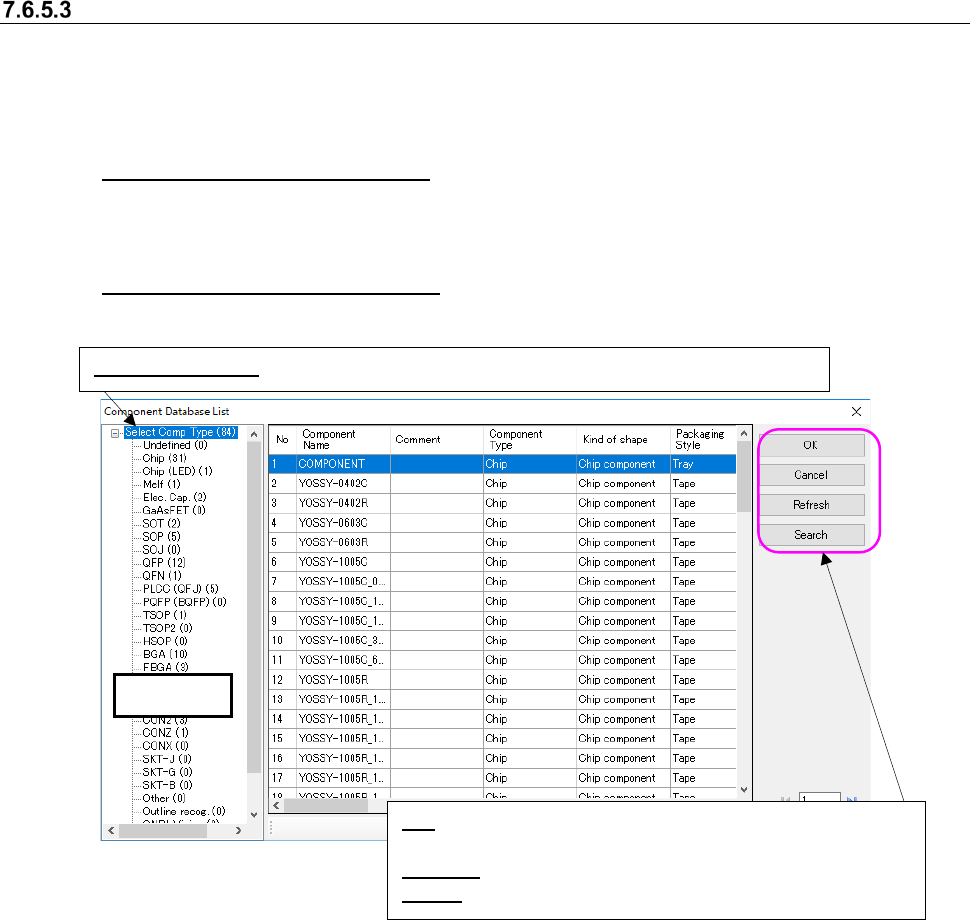
Figure 7.6-34 “Component Database List” screen
* When the system imports information from the component database, it does not replace setting
of the “Component Skip” made on the “Placement Conditions General Setting.”
* When the system imports information from the component database, the “Search through
Component Database” screen appears. It displays the data matched with the search require-
ments on the list. (This operation is applicable only when the Data Manager is available.)
Tree view
Select Comp Type: Displays the data on all component types registered in the database.
OK: Replaces the component data information with that regis-
tered in the database.
Refresh: Updates the displayed information to the latest one.
Search: Displays the screen for searching a component.
JaNets Instruction Manual 7. Program Editor
7-139
7.6.6 Descriptions of the “Tools” menu commands
Merge Production Program
This command loads the specified production program into the system to paste it.
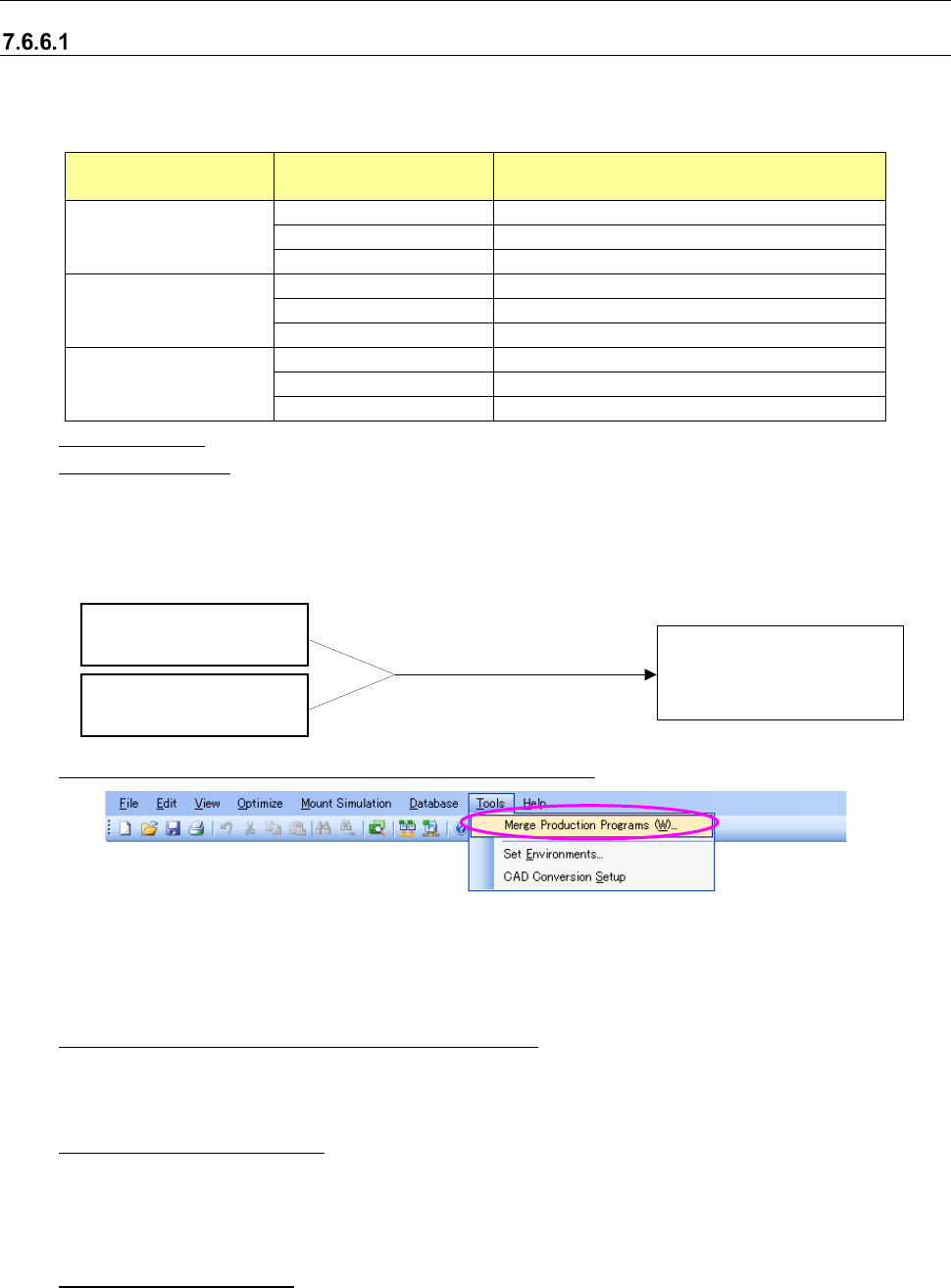
Table 7.6.4 PWB configuration after the [Merge Production Program] command is executed
Reference data Paste source data
PWB configuration after the [Merge
Production Program] command is executed
Single-plane
Single-plane
Single-plane
Matrix circuit
Single-plane
Non-matrix circuit
Single-plane
Matrix circuit
Single-plane
Single-plane
Matrix circuit
Single-plane
Non-matrix circuit
Single-plane
Non-matrix circuit
Single-plane
Single-plane
Matrix circuit
Single-plane
Non-matrix circuit
Single-plane
Reference data: a production program loaded with the Program Editor
Paste source data: a production program loaded with the [Merge Production Program] com-
mand
Example: When two or more different circuits are to be placed on a board, a production program is
created as one for a single-place PWB.
①
Starting up the [Merge Production Program] command
Figure 7.6-35 Menu for selecting the [Merge Production Program] command
* Unless PWB data of the reference production program is created completely, this menu is
disabled.
② Selecting the paste source production program
Select a production program on the “Open” dialog box that is displayed with the operation at
Step 1.
③ Checking the execution
The dialog box for confirming the merge operation appears on the screen. When you select
the <Yes> button on this dialog box, the system starts merging these two production pro-
grams.
④ Completion message
After the two production programs are merged successfully, the message for notifying you of
completion of the [Merge Production Program] command appears on the screen. When you
select the <OK> button, the system closes this message.
Reference production
program A
Paste source production
program B
Single-plane PWB (A + B)
Execution of the [Merge
Production Program]
command
JaNets Instruction Manual 7. Program Editor
7-140
⑤ About each checking function
<Check before merging production programs>
The system checks data before executing the process for merging production programs.
* In the following cases, you cannot execute the [Merge Production Program] command.
- PWB data of a paste source production program has not been created completely (check
of completion of PWB data).
- The settings of the “Multi Circuit References” of both a reference production program and a
paste source production program are “Use” (check of the reference circuit configuration).
- The maximum number of component placement positions exceeds 30,000 (check of the
maximum number of component placement positions).
- The maximum number of circuits exceeds 500 (check of the maximum number of area fi-
ducial marks).
<Check of duplication of a component name>
If a component name is duplicated, the system displays the inquiry message on the screen.
Yes: The system uses the component name specified in the source Component data without
using that specified in the destination Component data.
No: The system aborts merging operation of production programs, and outputs the dupli-
cated component name as text.
⑥
Checking the displayed log list
The system displays the inquiry message: whether the log list is to be displayed or not.
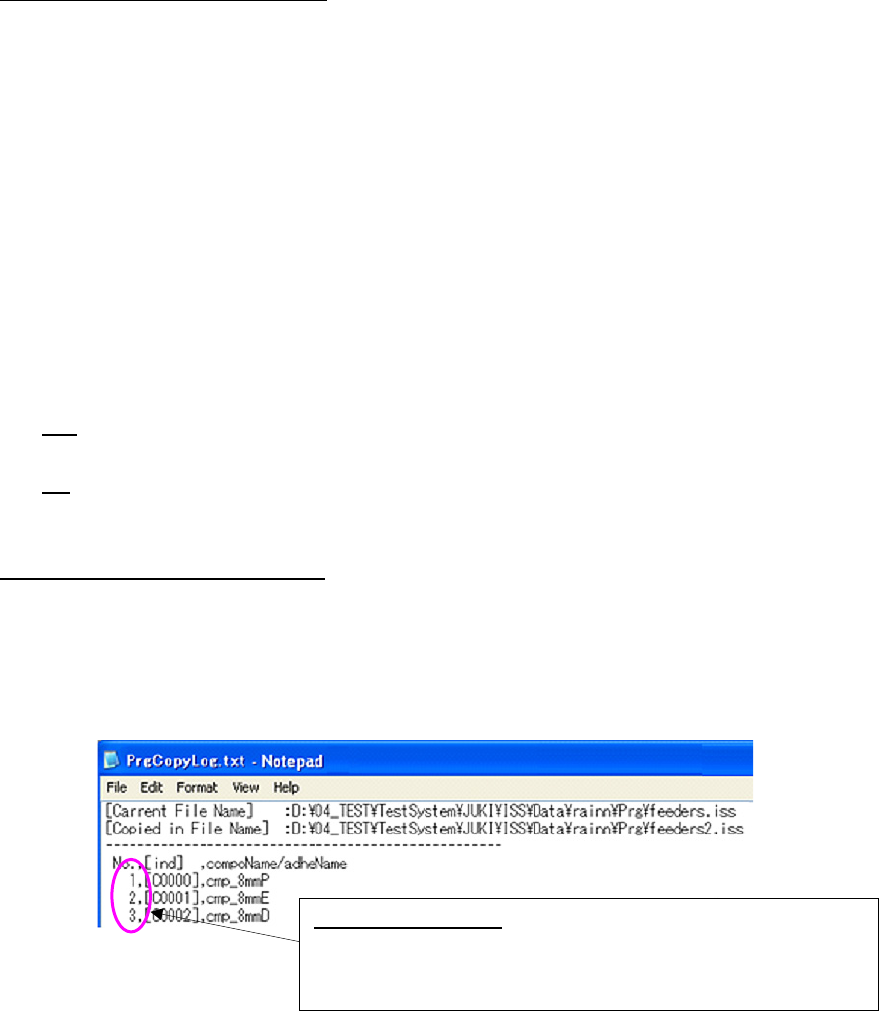
- Log list file
The system outputs the log list file to the destination folder in which the paste source file is
loaded.
File name: PrgCopyLog.txt
Figure 7.6-36 Log file
<Check the board reference side and the board transport direction>
If the board reference side or the board transport direction of a reference production program
is different from that of a paste source production program, the system displays the message
indicating that the board reference side or the board transport direction is not the same as
each other.
<User template check>
If a user template is used as a BOC mark, but it is not to be used after two production pro-
grams are merged, the system displays the message indicating that the user template will be
deleted.
Log file output items:
Assigned numbers, index numbers of the
destination component list and the duplicated component names
of the destination program are displayed here.
“C” of [Idx] indicates Component data.