JANETS_INM.pdf - 第357页
JaNets In structio n Manual 7. Program Editor 7- 150 2) Individual Ma chine When you se lect the “Ind iv idual Mach ine” radio b utton, t he <Set> but ton is activ ated to allow you t o make sett ings dependi ng on…
JaNets Instruction Manual 7. Program Editor
7-149
7.7.4 How to Operate the Optimization Options
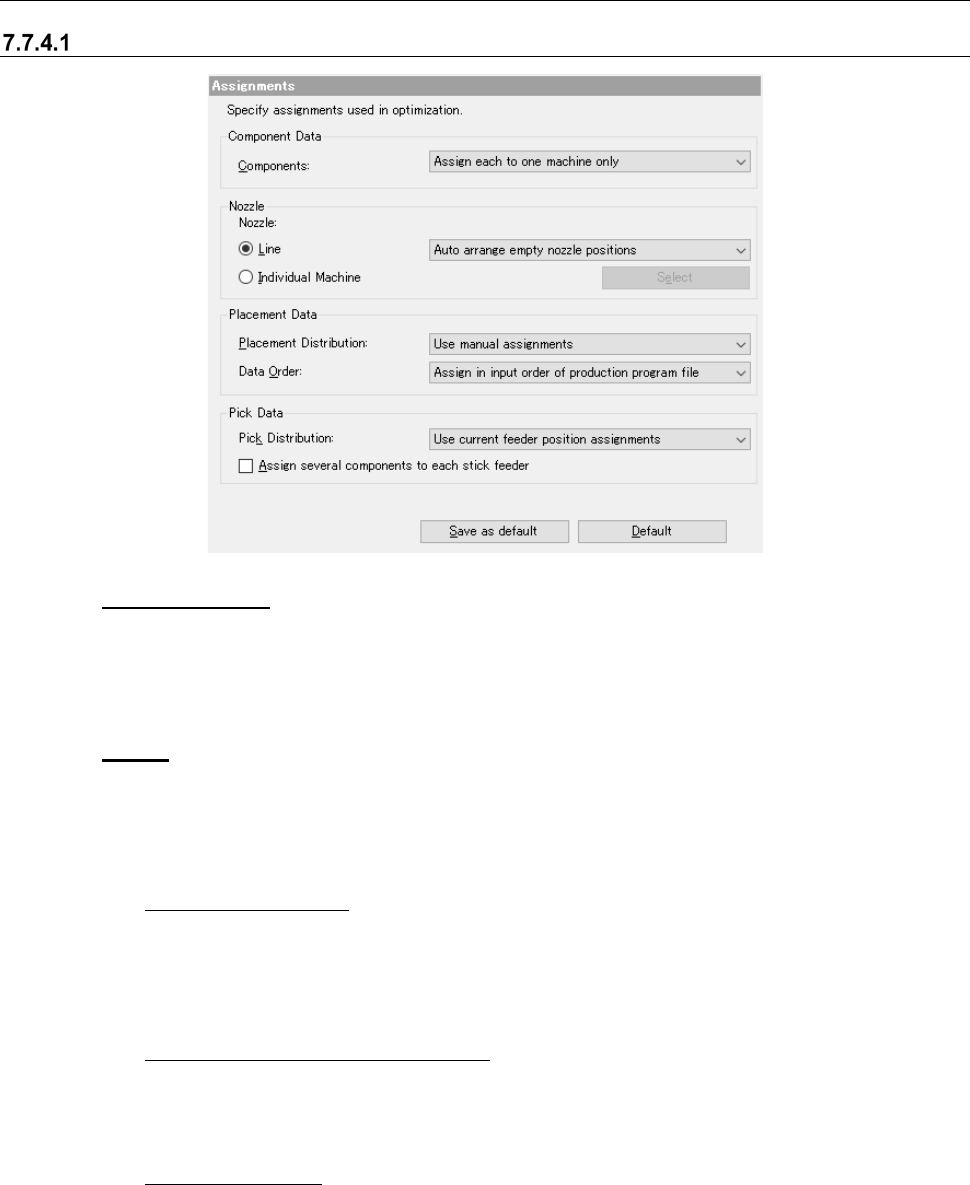
Assignments option
Figure 7.7-3 “Assignments” option
(1) Component Data
When there are two or more feeders for the same component type, specify whether to assign
components to only one feeder or two or more feeders.
This is an ineffective option when the number of machines is 1.
(2) Nozzle
Specify which nozzle assignment is to be used, the nozzle assignment made with the
“Shopfloor Setup” or the optimized nozzle assignment.
1) Line
◆
Auto arrange nozzles:
Ignores the setting of the permanent nozzles made with the Shopfloor Setup and opti-
mizes the nozzle assignment. Although the production cycle time becomes shorter, you
have to change the settings of the machine and it takes longer time to set up the machine.
Select this option for mass production of PWBs.
◆ Auto arrange empty nozzle positions:
Uses the permanent nozzles set with the Shopfloor Setup as they are, and assigns the
applicable nozzles to the empty positions of the ATC when there are still nozzles you can
use.
◆ Use setup nozzles:
Uses only the permanent nozzles set with the Shopfloor Setup. Since it does not take
any time to set up the machine, select this radio button for small production of variety of
PWB types.
JaNets Instruction Manual 7. Program Editor
7-150
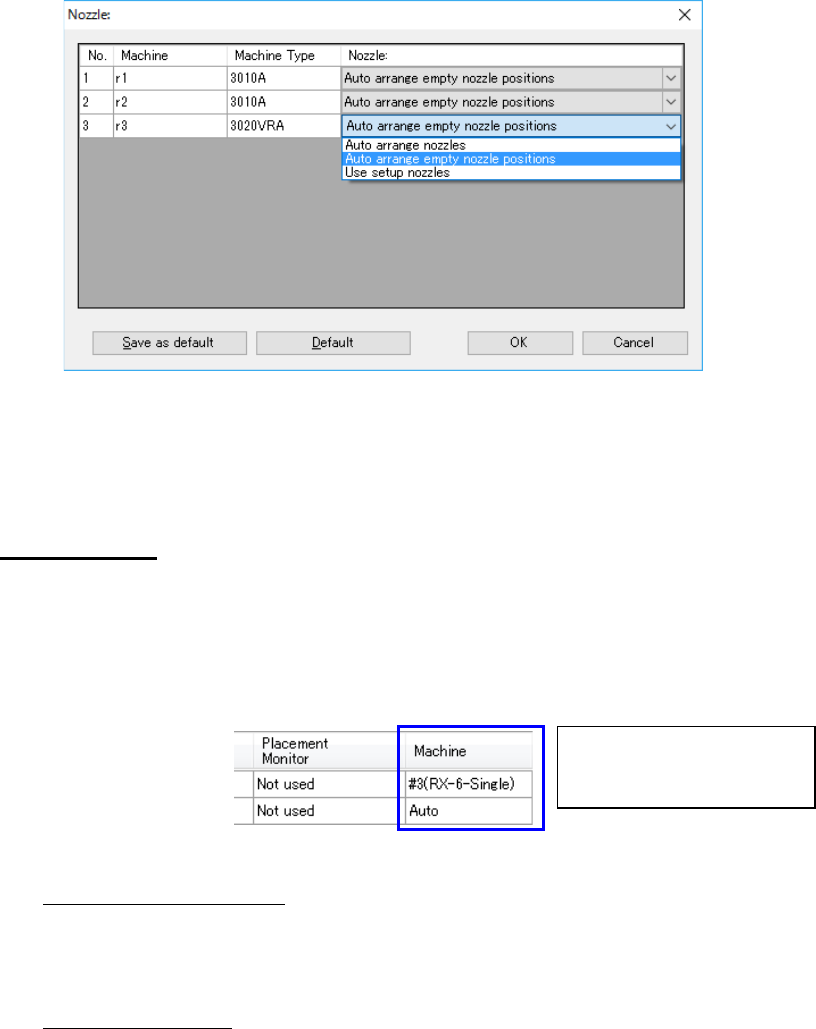
2) Individual Machine
When you select the “Individual Machine” radio button, the <Set> button is activated to
allow you to make settings depending on each machine.
Figure 7.7-4 Individual Machine
* When a “Manual nozzle attachment” “screw type nozzle” is selected on the “Option De-
vices” tab invoked with the [Machine] command of the Shopfloor Setup, only the “Use
setup nozzles” can be selected for the “Nozzle.”
(3) Placement Data
1) Placement Distribution
When a machine is specified in the “Machine” cell on the “Placement Data” screen, select
whether to assign component placement positions as specified or optimize them with
ignoring the specification.
This is an ineffective option when the number of machines is 1.
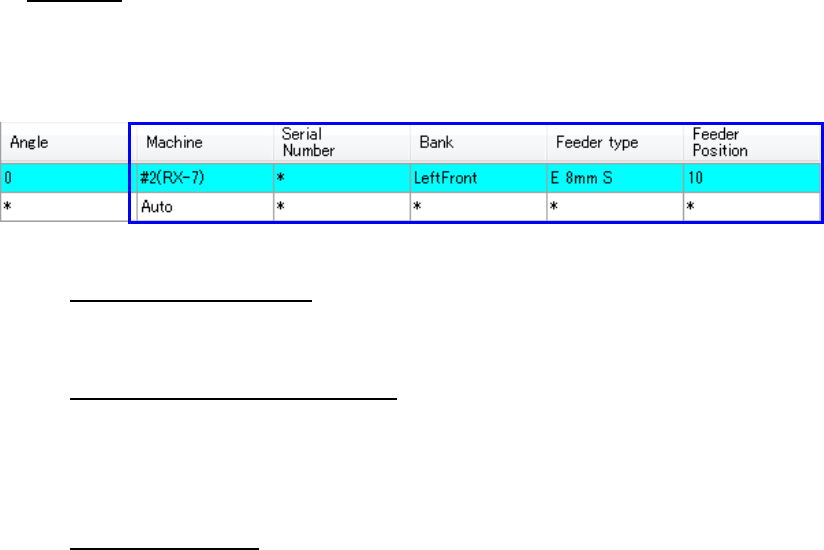
Figure 7.7-5 Placement Data
◆
Use manual assignments:
Assigns the specified component placement positions as specified, and assigns only the
component placement positions to which “Auto” is specified with the optimization func-
tion.
◆ Auto assign all data:
Ignores the specifications and optimizes all component placement positions.
2) Data Order
Specify the placement data order: input order (data entry order) or optimized order.
◆ Assign in input order of production file:
Placement data will be displayed in entry order (that is, not changed at all).
◆ Assign in optimized order:
Placement data will be displayed in the optimization order.
This order cannot be selected when an RX-7 series is on a line.
Select whether to disable or ena-
ble the specification in the “Ma-
chine” cell.
JaNets Instruction Manual 7. Program Editor
7-151
(4) Pick Data
1) Pick Distribution
When a machine is specified in the “Machine” cell on the “Pick Data” screen, select
whether to assign data as specified or ignore the specification.
Figure 7.7-6 Pick data
◆
Use manual assignments:
Assigns the specified feeders based on your specifications, and optimizes only feeders to
which “Auto” is specified.
◆ Use manual machine assignments:
Ignores the specified “Bank” setting, and enables only the specified “Machine” setting. In
the example above, although “the feeder position ‘10’ of the second RX-7” is specified,
the “Left Front 10” is ignored and only the setting of “#2(RX-7)” is effective in this case.
The case where the number of machines is 1 is the same as “All is distributed”.
◆ Auto assign all data:
Ignores the specified feeder assignments and optimizes all assignments.
2) Assign several components to each stick feeder
Normally, components used in an old type of stick feeders (that supply one stick feeder
with two or more sticks) are assigned to one feeder for one component type. If you
check this check box when there are stick components whose component types are the
same, they can be assigned to one feeder.