JANETS_INM.pdf - 第360页
JaNets In structio n Manual 7. Program Editor 7- 153 Balance option This option a llows you t o specify a mac hine t o which co mponents placem ent point s are divided and assig ned , and set the mac hine bala nce betwe …
JaNets Instruction Manual 7. Program Editor
7-152
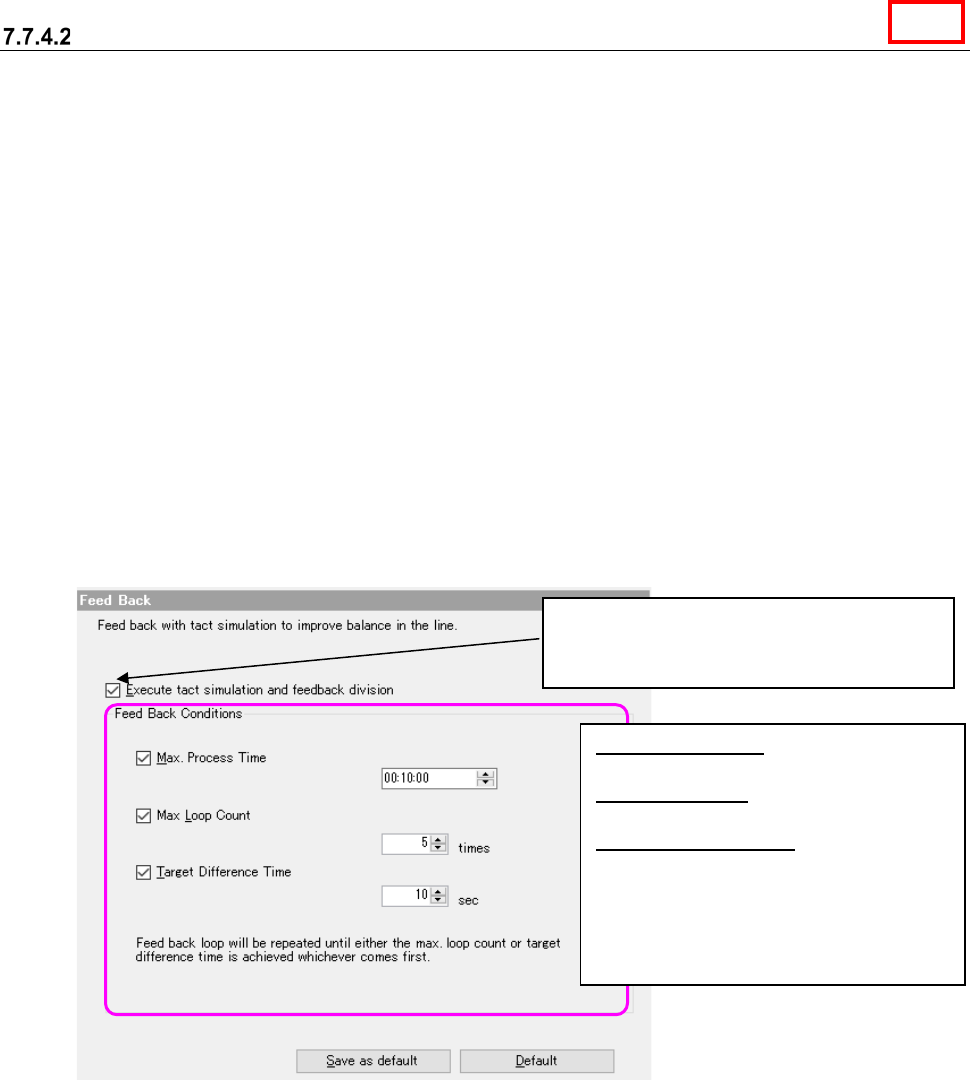
Feed back option
This option allows you to specify whether to perform the feedback process with the “tact simula-
tion,” and set the options for this feed back process. When you select the “Feed Back” option in the
option selecting area, the following “Feed Back” option screen appears in the option setting area.
* Feedback processing: Performs optimization in consideration of the feeder arrangement be-
tween machines in the decided feedback conditions repeatedly, and outputs the best result in the
feedback.
* A tact time does not change because a feeder is not exchanged between machines when the
conditions of optimization are to fix the feeder and to specify a station since the feedback pro-
cessing considers line balance.
* When “Tray” is selected as the “Packaging Style,” the tact simulation uses the coordinates of the
center point of the component supply device to perform the feedback processing. Therefore,
the actual time of each PWB may be different from the simulation result.
* When the number of component placement positions is small, the error rate becomes higher.
Therefore, when a small number of components are placed on a board, the actual time may be
different from the simulation result.
Figure 7.7-7 Feed back option
When you check this check box, the Optimize
application uses the tact simulator to execute
the feedback process.
Max. Process Time: Enter the time in the
format: hour:minute:second.
Max. Loop Count: Enter the number of
loops from 0 to 100.
Target Difference Time: Enter the time
from 0 to 60 seconds.
* When you check two or more check
boxes, the feedback process is stopped
if any of the conditions indicated with
these check boxes is satisfied.
Line
JaNets Instruction Manual 7. Program Editor
7-153
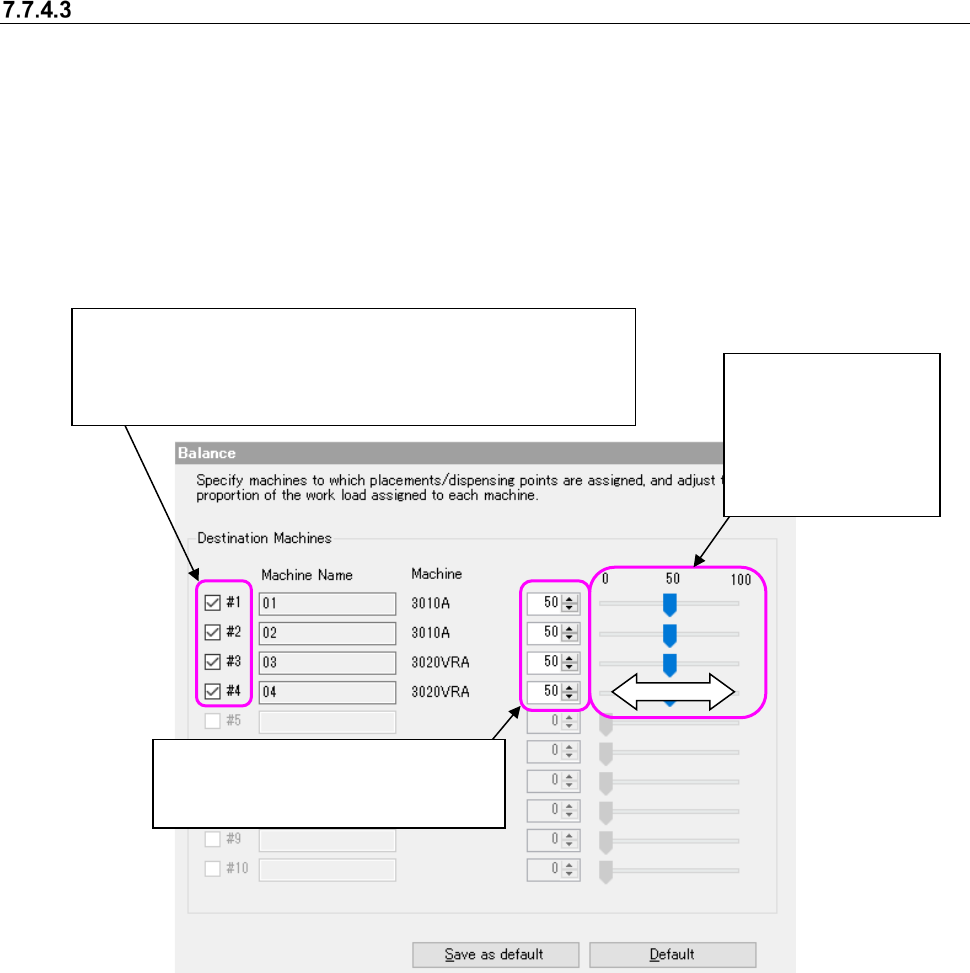
Balance option
This option allows you to specify a machine to which components placement points are divided
and assigned, and set the machine balance between 0 and 100 % when components placement
points are divided. If a component run-out error occurs frequently and it takes long time to produce
PWBs actually even though the balance is good as a result of execution of the Optimize applica-
tion, this option is effective. When you select the “Balance” option in the option selecting area, the
following screen appears in the option setting area. Perform the operation 1 or 2 below.
The settings you made are enabled.
This is an ineffective option when the number of machines is 1.
Figure 7.7-8 Balance option
②
Move the slider to
the right or the left
with a mouse to in-
crease/decrease
the value and set
the balance.
①
Enter the desired value in the edit
box directly or use the spin button to
increase/decrease the value.
When you deselect the check boxes of all destination machines,
the system will not assign any component placement point to the
desired machine. The color of the column of a machine to which no
component point is assigned becomes gray.
JaNets Instruction Manual 7. Program Editor
7-154
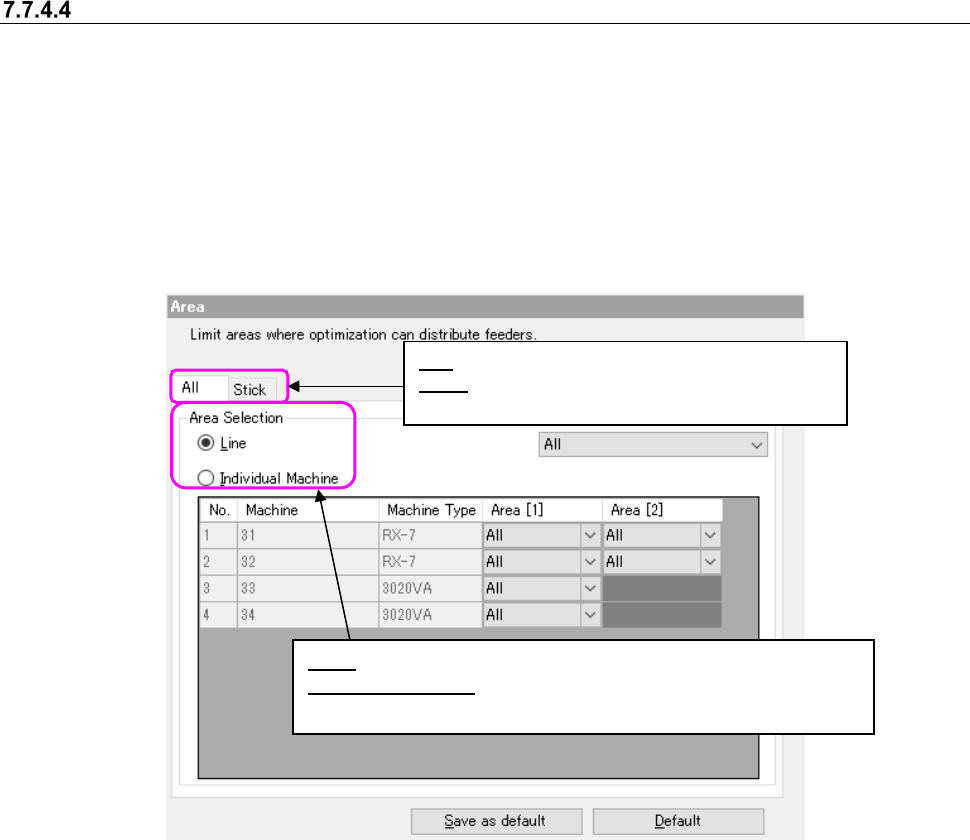
Area option
You can use the Optimize application to specify the area to which a feeder can be assigned. You
can switch the feeder attachment area for each program, front side or rear side. When you attach
a feeder on the feeder exchange trolley in advance, it can shorten the preparation time for starting
the next PWB production. When you select the “Area” option in the option selecting area, the fol-
lowing screen appears in the option setting area.
There are two types of setting objects, namely, “All” and “Stick.” Each area setting can be per-
formed by selecting each tab
In the EPU mode, “Stick” cannot be specified.
Figure 7.7-9 Area option (All)
Line: You can specify the entire line for the feeder attachment area.
Individual Machine: You can specify the respective area for each
machine in the line.
All: The mounting range of all feeders is specified.
Stick: You can specify the respective area for each
machine in the line.