JANETS_INM.pdf - 第361页
JaNets In structio n Manual 7. Program Editor 7- 154 A rea opti on Y ou can use the Opt imize applicatio n to spec ify the area to w hich a feeder can be ass igned. Y ou can switch th e feeder att ach ment area for e ach…
JaNets Instruction Manual 7. Program Editor
7-153
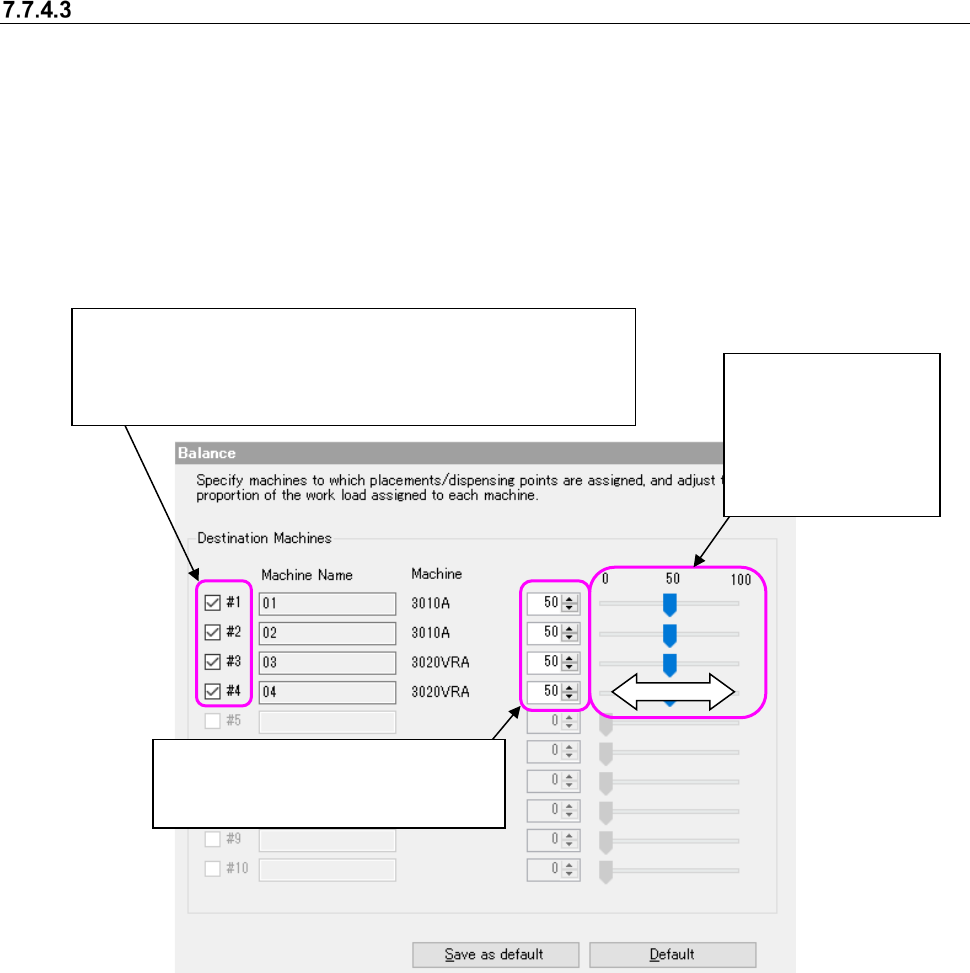
Balance option
This option allows you to specify a machine to which components placement points are divided
and assigned, and set the machine balance between 0 and 100 % when components placement
points are divided. If a component run-out error occurs frequently and it takes long time to produce
PWBs actually even though the balance is good as a result of execution of the Optimize applica-
tion, this option is effective. When you select the “Balance” option in the option selecting area, the
following screen appears in the option setting area. Perform the operation 1 or 2 below.
The settings you made are enabled.
This is an ineffective option when the number of machines is 1.
Figure 7.7-8 Balance option
②
Move the slider to
the right or the left
with a mouse to in-
crease/decrease
the value and set
the balance.
①
Enter the desired value in the edit
box directly or use the spin button to
increase/decrease the value.
When you deselect the check boxes of all destination machines,
the system will not assign any component placement point to the
desired machine. The color of the column of a machine to which no
component point is assigned becomes gray.
JaNets Instruction Manual 7. Program Editor
7-154
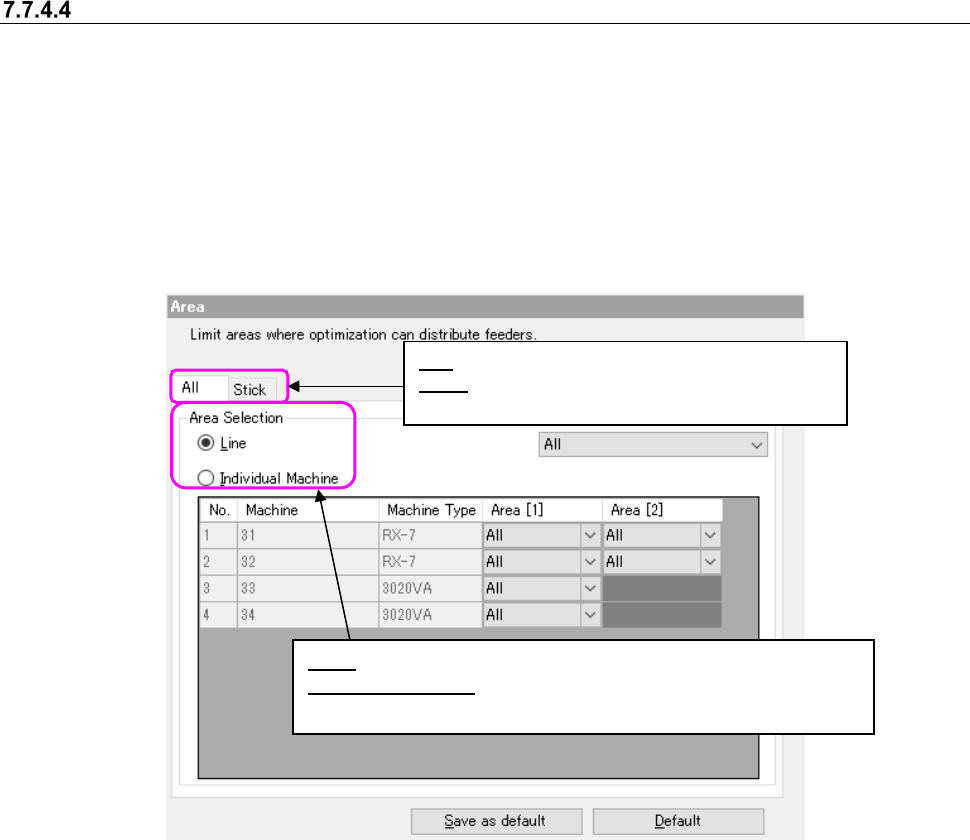
Area option
You can use the Optimize application to specify the area to which a feeder can be assigned. You
can switch the feeder attachment area for each program, front side or rear side. When you attach
a feeder on the feeder exchange trolley in advance, it can shorten the preparation time for starting
the next PWB production. When you select the “Area” option in the option selecting area, the fol-
lowing screen appears in the option setting area.
There are two types of setting objects, namely, “All” and “Stick.” Each area setting can be per-
formed by selecting each tab
In the EPU mode, “Stick” cannot be specified.
Figure 7.7-9 Area option (All)
Line: You can specify the entire line for the feeder attachment area.
Individual Machine: You can specify the respective area for each
machine in the line.
All: The mounting range of all feeders is specified.
Stick: You can specify the respective area for each
machine in the line.
JaNets Instruction Manual 7. Program Editor
7-155
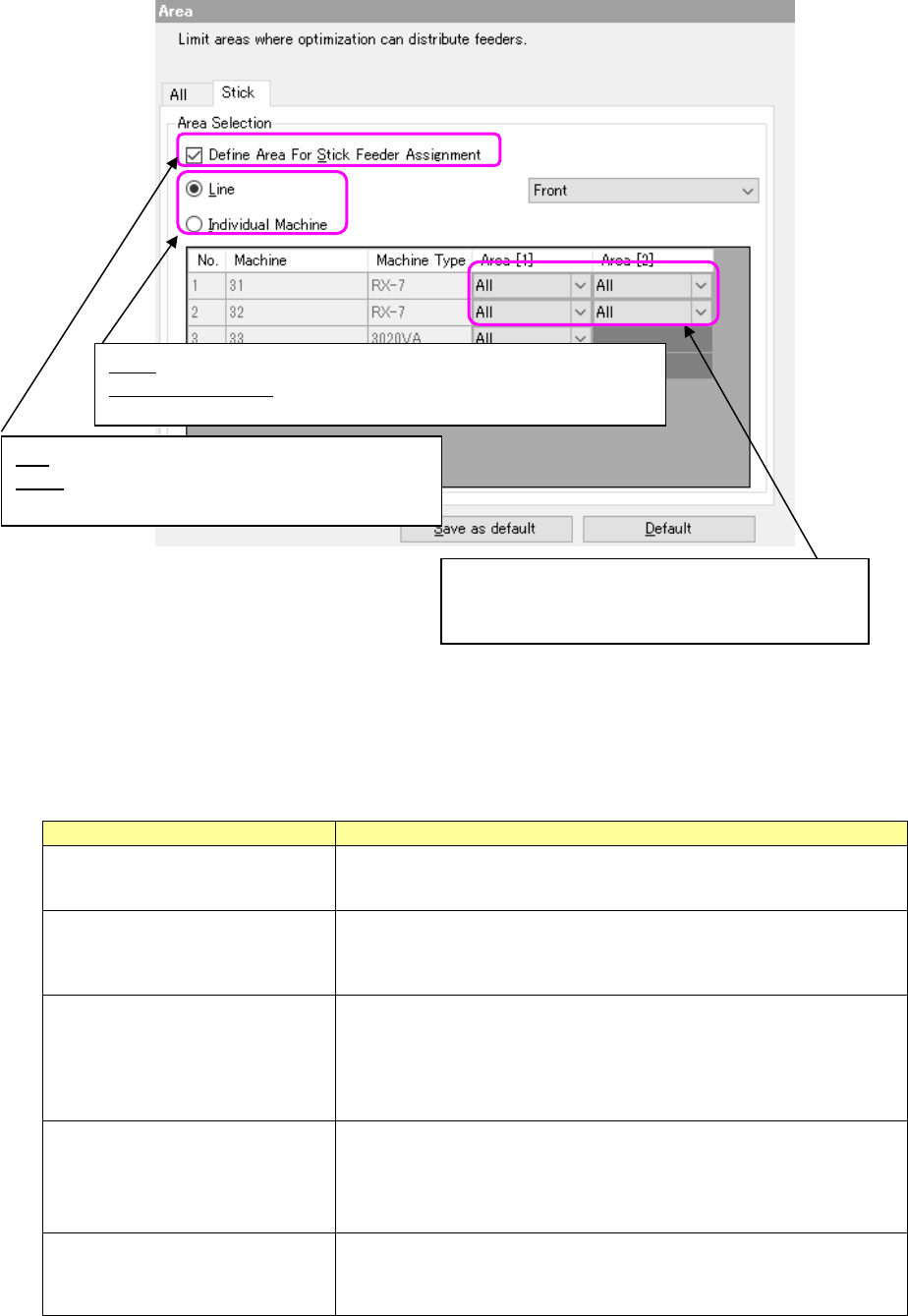
* You can select neither “Front Priority” nor “Rear Priority” as the feeder attachment area of a line
that includes FX-3/RX-6 series machine. You cannot select either one for FX-3/RX-6 series
machine even though you select the “Individual Machine” radio button.
Figure 7.7-10 Area option (Stick)
When the stick area specification is overlapped with another optimization option as a matter of
condition, the priority order is as shown below.
Table 7.7-2 Priority order of stick area options
Other optimization option
Contents
Balance option
Both conditions are taken into consideration. To the machine in which
“0” is specified for Balance option, no stick feeder is assigned.
Area option/All
Both conditions are taken into consideration. Supposing that "All" is
“Rear” and "Stick" is “Front”, a stick feeder cannot be assigned to both
“Front” and “Rear.”
Multi-optimize/Cluster option/
Succeed of the previous cluster
result:
The succeed of the previous cluster result has priority.
Even if Stick is specified to “None”, a stick is arranged in the same
position when the stick is arranged in the previous cluster. If there are
many succeeded feeders and a stick cannot be assigned to the speci-
fied area, the optimization will result in a failure.
Multi-optimize/Cluster option/
Non-Cluster Area
Area option (stick) has priority. Even if parts are stick parts classified as
“out of cluster object”, a stick feeder is arranged in the specified area of
Area option (stick). If it cannot be arranged, the optimization will result
in a failure.
Reference feeder/
Reference feeder setup
Reference feeder setup has priority. Even if Stick is specified to
“None”, a stick is arranged in the same position when a stick is ar-
ranged by Reference feeder setup.
All: The mounting range of all feeders is specified.
Stick: You can specify the respective area for each
machine in the line.
Line: You can specify the entire line for the feeder attachment area.
Individual Machine: You can specify the respective area for each
machine in the line.
At selection of “Line”, it is possible to select “All”,
“Front”, “Rear” or “None.” If “None” is selected, no
stick feeder will be assigned to this machine.