JANETS_INM.pdf - 第365页
JaNets In structio n Manual 7. Program Editor 7- 158 Feeder option This option allows you t o specify t he feeder o ption when r estrict ing the nu mber of a feed er used for every optimizat ion. When you se lect the “ F…
JaNets Instruction Manual 7. Program Editor
7-157
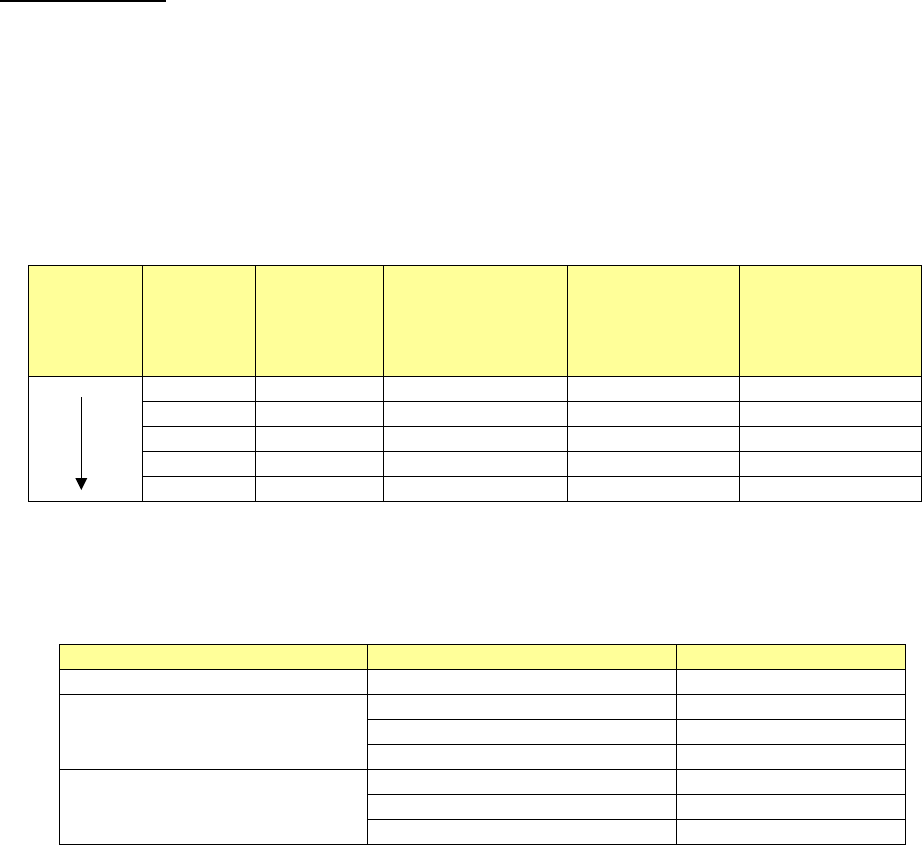
Priority of layers
The placement order priority is decided according to the settings of the check boxes “Consider the
component types and heights,” “Order placements from smallest to largest nozzle size” of the
“Place Order” options and ”Calculate neighbor parts relation”, the placement layer and the com-
ponent layer as shown below:
Placement layer > Component layer > Calculate neighbor parts relation (when the “Place Order”
option is used) > Component type/Component height (when the “Place Order” option is used) >
Use of a small nozzle(s) (when the “Place Order” option is used)
Example:
Placement
order
Placement
layer
Component
layer
Neighbor parts
[Component
height] (when the
“Place Order”
option is used)
Component
type/Component
height (when the
“Place Order”
option is used)
Use of a small
nozzle(s) (when
the “Place Order”
option is used)
1
1
0.5
1
501
3
4
0.5
3
503
4
4
1.0
4
502
6
3
1.5
1
504
7
7
3.0
7
508
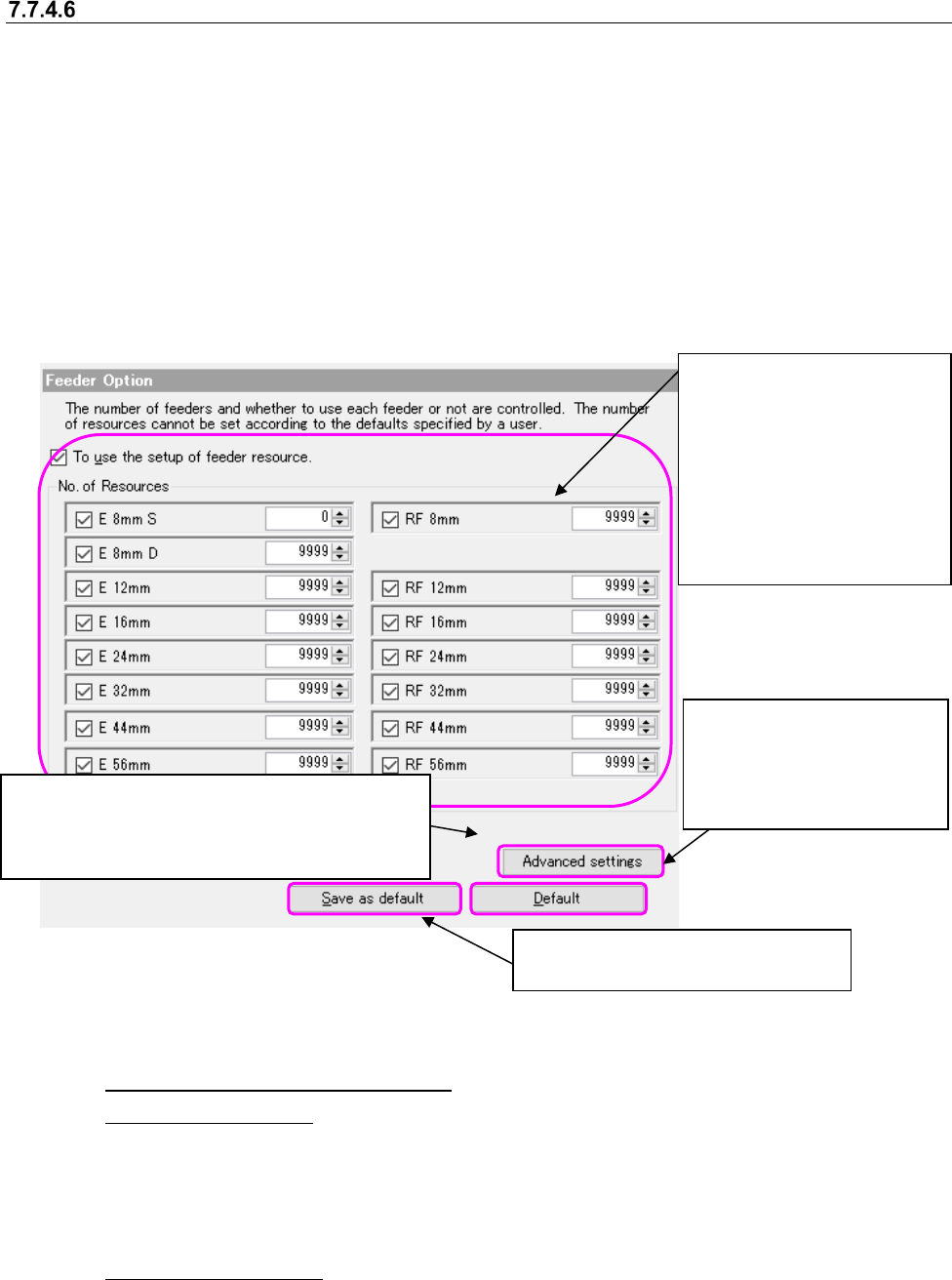
The component types and heights are internally assigned to layers according to the following
specifications.
Table 7.7-3 Specifications of layer assignments for the component types/component heights
Component types
Component heights
Layer
Square chip resistor
0.0mm
<
H
≦
0.25mm
1
Component other than a square
chip resistor and an aluminum elec-
trolytic capacitor
0.0mm
<
H
≦
5.5mm
2
5.5mm
<
H
≦
12.0mm
3
12.0mm
<
H
4
Aluminum electrolytic capacitor
0.0mm
<
H
≦
5.5mm
5
5.5mm
<
H
≦
12.0mm
6
12.0mm
<
H
7
JaNets Instruction Manual 7. Program Editor
7-158
Feeder option
This option allows you to specify the feeder option when restricting the number of a feeder used
for every optimization.
When you select the “Feeder” option in the option selecting area, the following screen appears in
the option setting area.
You cannot specify a user default for this item.
The item of a feeder is enabled only when the electric (EF) bank is equipped with the production
line. You cannot select the item of a "Feeder" when not equipped.
If the electric (RF/EF) bank on the line has been fitted, to display the configuration control of the
RF feeder, but it does not do the view if they have not been fitted.
In the EPU mode, the data may be changed automatically according to the upper limit value
available in the target machine.
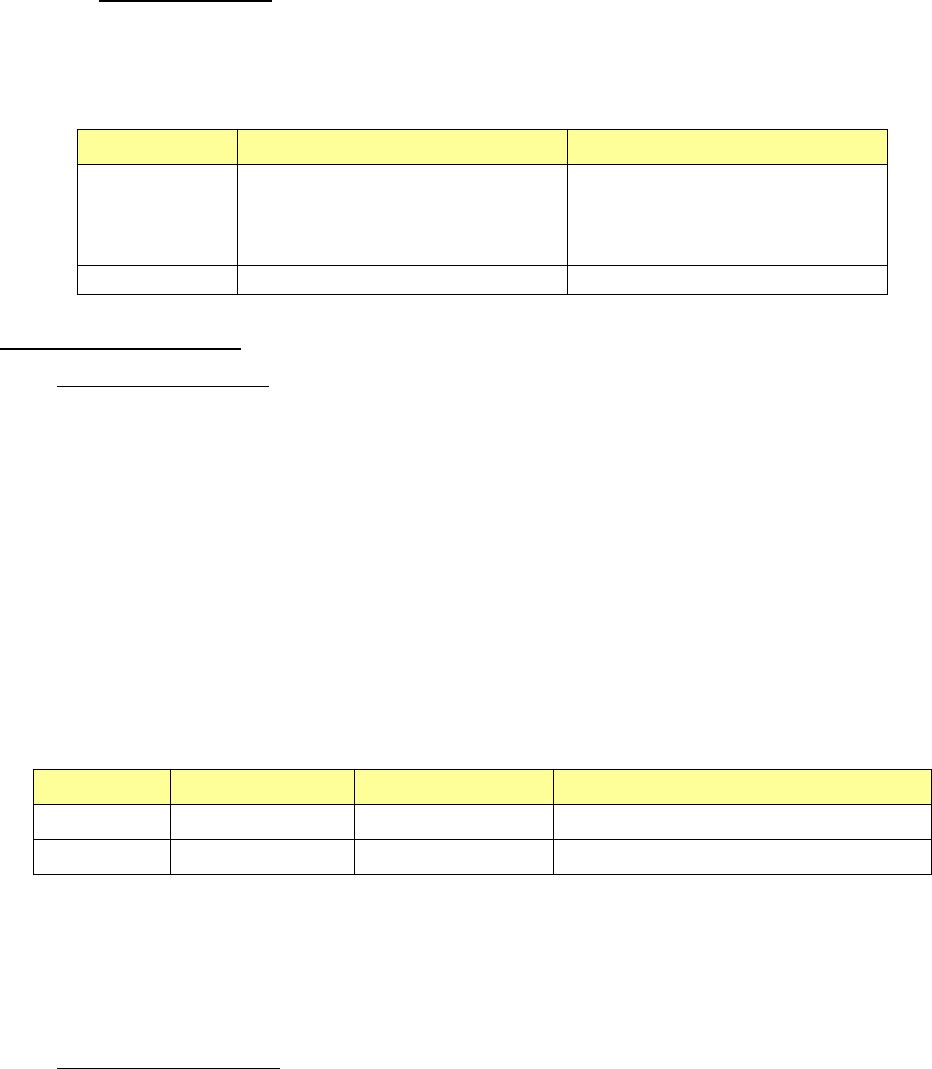
Figure 7.7-12 Feeder option
(1) To use the setup of feeder resource
◆Use in the line mode
Select whether to use this option. When using it, use the number of resources in the group
box under a checkbox. When not using it, use the value set on the “Equipment Setup” screen
of the Shopfloor Setup application. The "Not used" is a default in the setup of a feeder re-
source.
◆Use in the EPU mode
This option is enabled at all time and an option cannot be selected. Regarding the displayed
feeder, the equipment setting values set in the shop floor setup are ignored.
The setting of the number of resources
is not saved as the default value.
This is displayed only when the production line is
equipped with an electrical bank (RF).
You can set the use conditions of the attachment
and an “E 8mm D” feeder.
This setting is to be applied to
the feeder options other than
the number of resources.
(This is applied to the ad-
vanced settings also.
)
When you put a checkmark in
the check box “Use of the
feeder resource settings,” the
settings of the “Number of re-
sources” group are enabled.
When you uncheck the check
box for each feeder, the cor-
responding feeder is not used
as long as it is not a permanent
feeder.
JaNets Instruction Manual 7. Program Editor
7-159
(2) No. of Resources
The number of resources is an enabled option when you use the setup of a feeder resource.
The input possible range is as follows, respectively.
Table 7.7-4 Input range of resources
Mode
Minimum
Maximum
Line mode The number of feeders that is used
as a permanent feeder within a
production floor of the Shopfloor
Setup application
A value set on the “Equipment
Setup” screen of the Shopfloor
Setup application
EPU mode
0
9999
The number of resource
◆Use in the line mode
The number of resources expresses the number of the feeders which can be used within a pro-
duction floor.
Among them, a permanent feeder is treated as a used feeder because it is actually assigned. For
this reason, the number of feeder which can be newly assigned becomes less than the number of
resources that is input when a permanent feeder is used.
In addition, when a permanent feeder is used within a production program, it is already regarded
as being used as a permanent feeder, and does not go into the frame of the feeder which can be
newly assigned.
An example is below shown about the relation between the value input in the item of the number of
resources and the number of resources which can actually be used.
Table 7.7-5 The relation among the number of resources to specify,
a permanent feeder and the feeder which can be newly assigned
Equipment
No. of resources
Permanent feeder
Feeder which can be newly assigned
E 8mm S
100
80
20
E 8mm D
80
20
60
In the case of the above table, the number of feeder which can be newly assigned is 20 sets of E
8mm S and 60 sets of E 8mm D respectively if you consider a used number of a permanent feeder
even when setting 100 sets of E 8mm S and 80 sets of E 8mm D respectively when specifying the
number of resource.
◆
Use in the EPU mode
The number of available feeders is indicated. The number of other regular lines is not taken into
consideration.