JANETS_INM.pdf - 第369页
JaNets In structio n Manual 7. Program Editor 7- 162 Placement mode option This option a llows you t o specify t he placem ent mode of RX -6 seri es . A placement mode opti on is disp layed o n an optio n setting field u…
JaNets Instruction Manual 7. Program Editor
7-161
Non-stop option
This option allows you to specify a machine performing a non-stop operation that replaces com-
ponents without stopping PWB production.
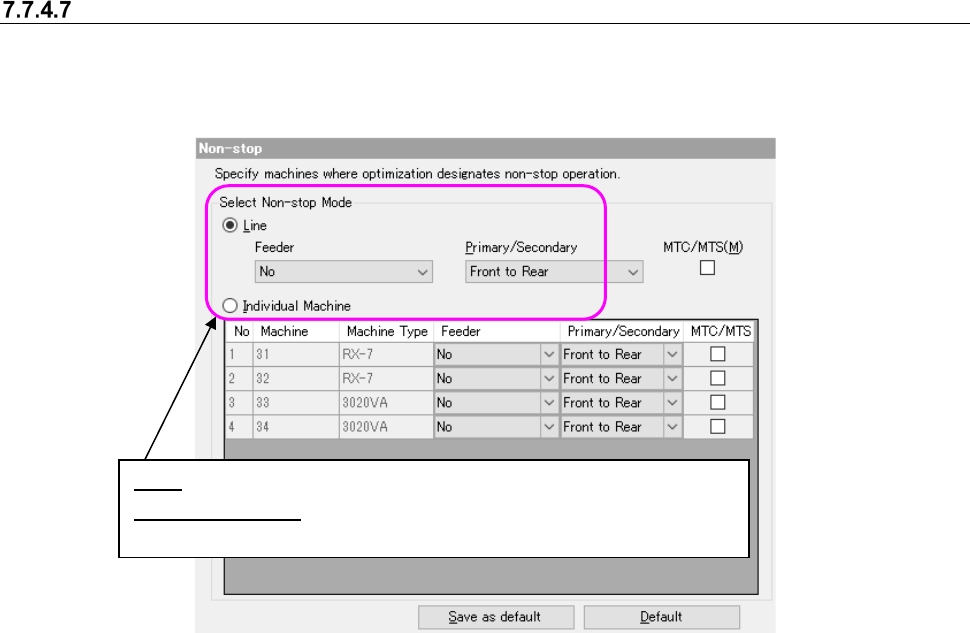
When you select the “Non-stop” option in the option selecting area, the following screen appears
in the option setting area.
Figure 7.7-15 Non-stop operation
In the following cases of ① and ②, this will result in a data matching error.
① “Priority of setup” or “Machine individual” is selected as non-stop specification for the line in-
cluding 3020 series.
② “Priority of tact” or “Priority of setup” is selected as non-stop specification for the line including
FX-3/RX-6/RX-7/JX series. When Machine individual is set, non-stop cannot be specified for
FX-3/RX-6/RX-7/JX series. (The setting is fixed to “No execution.”)
③ MTC/MTS and feeder are selected for the line including MTS. When both MTC/MTS and
feeder are checked off for machine individual setting, non-stop is impossible because the
bank exists only on one side.
④ When you are to use an EF feeder with an RS-1 series, you have to select “Use” for the menu
item “Use of Attachments on Electric Bank (RF/EF)” on the “Feeder Option” screen for both
the front bank and the rear bank.
Line: You can specify a non-stop operation for the entire line.
Individual Machine: You can specify a non-stop operation for each ma-
chine in the line.
JaNets Instruction Manual 7. Program Editor
7-162
Placement mode option
This option allows you to specify the placement mode of RX-6 series.
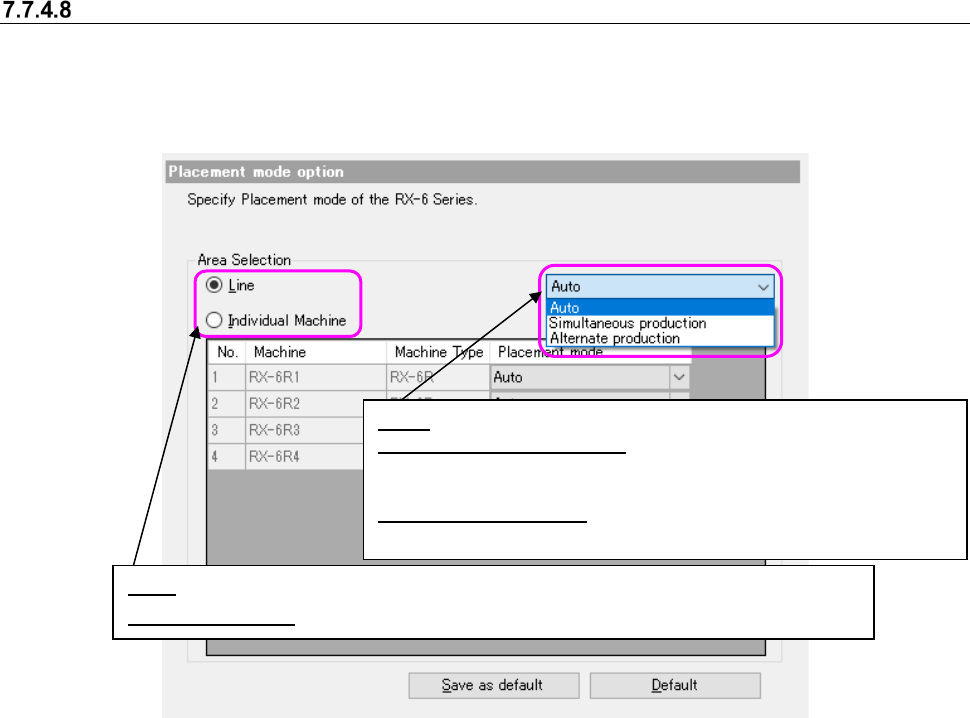
A placement mode option is displayed on an option setting field using the "Placement mode" of an
option preference field.
Figure 7.7-16 Placement mode option
Line: You can specify a non-stop operation for the entire line.
Individual Machine:
You can specify a non-stop operation for each machine in the line.
Auto: Optimization determines production mode.
Simultaneous production: When the head units on front and
rear sides do not interfere with each other, placement operation
is performed simultaneously.
Alternate production: The head units on front and rear sides
are kept from performing placement operation simultaneously.
JaNets Instruction Manual 7. Program Editor
7-163
Max Part Height Option
This option allows you to specify the maximum component height for an RS-1/RX-7 series. You
can set this option only when the RS-1/RX-7 series is incorporated into the production line.
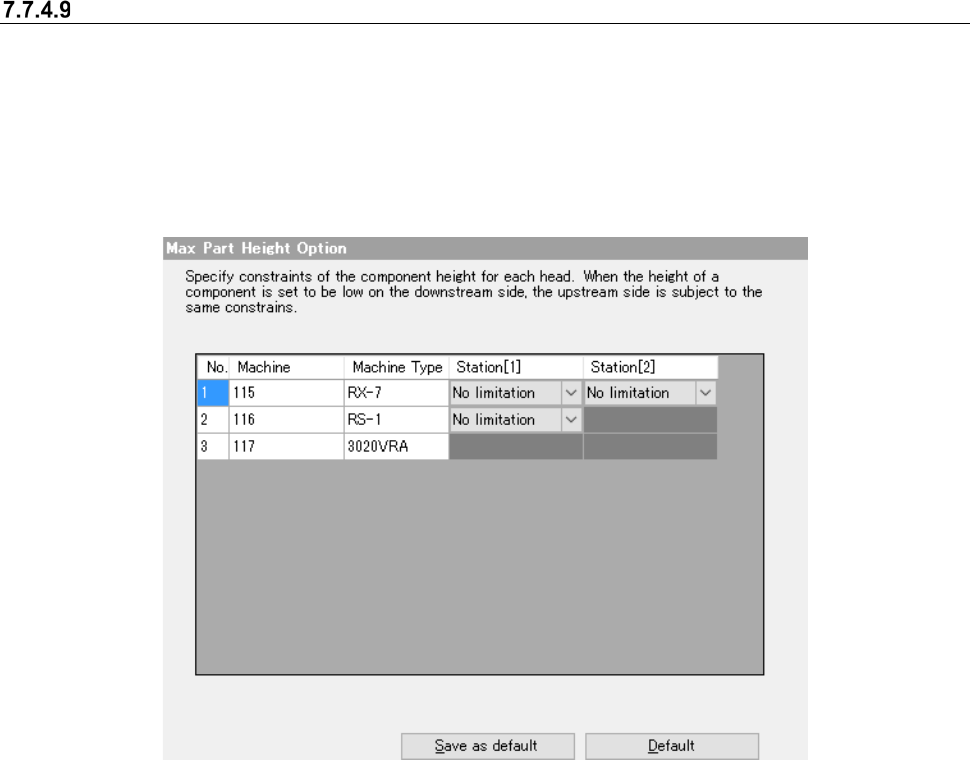
When you select the “Max Part Height” option in the option selecting area, the “Max Part Height
Option” is displayed in the optimize option setting area.
If any mounter is located before the RS-1/RX-7 series on the production line, this option cannot be
used.
Figure 7.7-17 Max Part Height Option
For a station of the RX-7 series equipped with an P16 head, you can select from a menu of
choices: No limitation, 0.5mm and 0.2 mm.
For a station of the RX-7 equipped with a P8 head, you can select from a menu of choices: No
limitation and 0.6 mm.
For a station of the RS-1 series, you can select from a menu of choices: No limitation, 1.0 mm, 6.0
mm, 12.0 mm and 20.0 mm.
You cannot select any of them for mounter models other than an RS-1/RX-7 series.
If you specify any height, you cannot assign any component whose height exceeds the selected
height to the corresponding station. For example, a component whose height is 1 mm cannot be
assigned to the station for which “0.5 mm” is selected.
Note that when the component height is strictly restricted with the downstream side, components
that can be assigned to the upstream side are restricted in the same manner.