JANETS_INM.pdf - 第370页
JaNets In structio n Manual 7. Program Editor 7- 163 Max Part Height Option This option a llows you t o specify t he maxi mum com ponent hei ght for an RS - 1/ RX -7 seri es . Y ou can set this opt ion on ly when the RS …
JaNets Instruction Manual 7. Program Editor
7-162
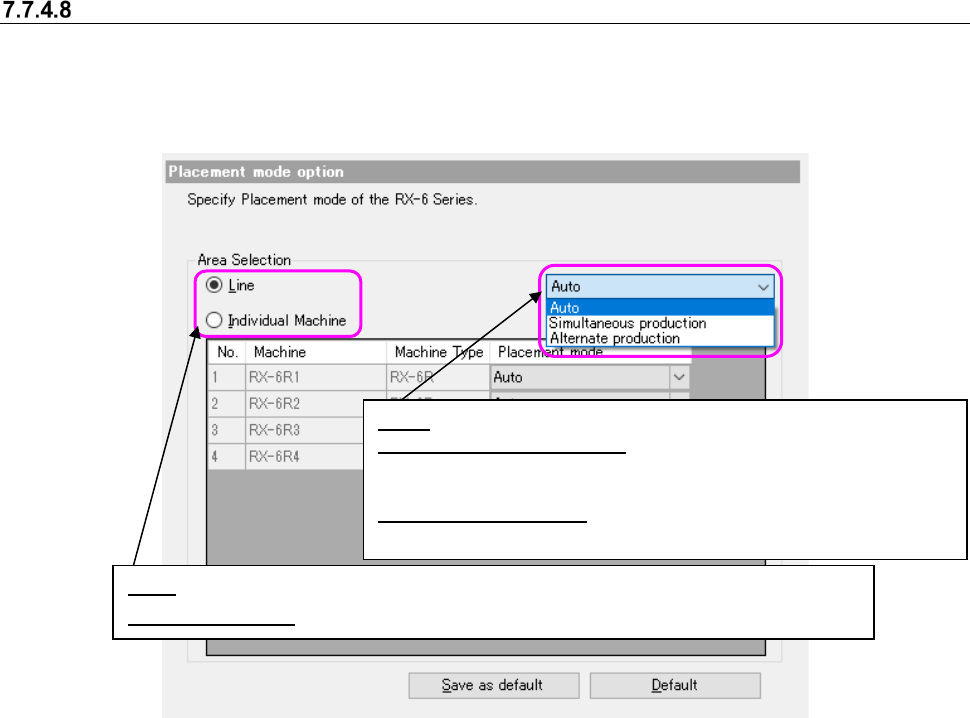
Placement mode option
This option allows you to specify the placement mode of RX-6 series.
A placement mode option is displayed on an option setting field using the "Placement mode" of an
option preference field.
Figure 7.7-16 Placement mode option
Line: You can specify a non-stop operation for the entire line.
Individual Machine:
You can specify a non-stop operation for each machine in the line.
Auto: Optimization determines production mode.
Simultaneous production: When the head units on front and
rear sides do not interfere with each other, placement operation
is performed simultaneously.
Alternate production: The head units on front and rear sides
are kept from performing placement operation simultaneously.
JaNets Instruction Manual 7. Program Editor
7-163
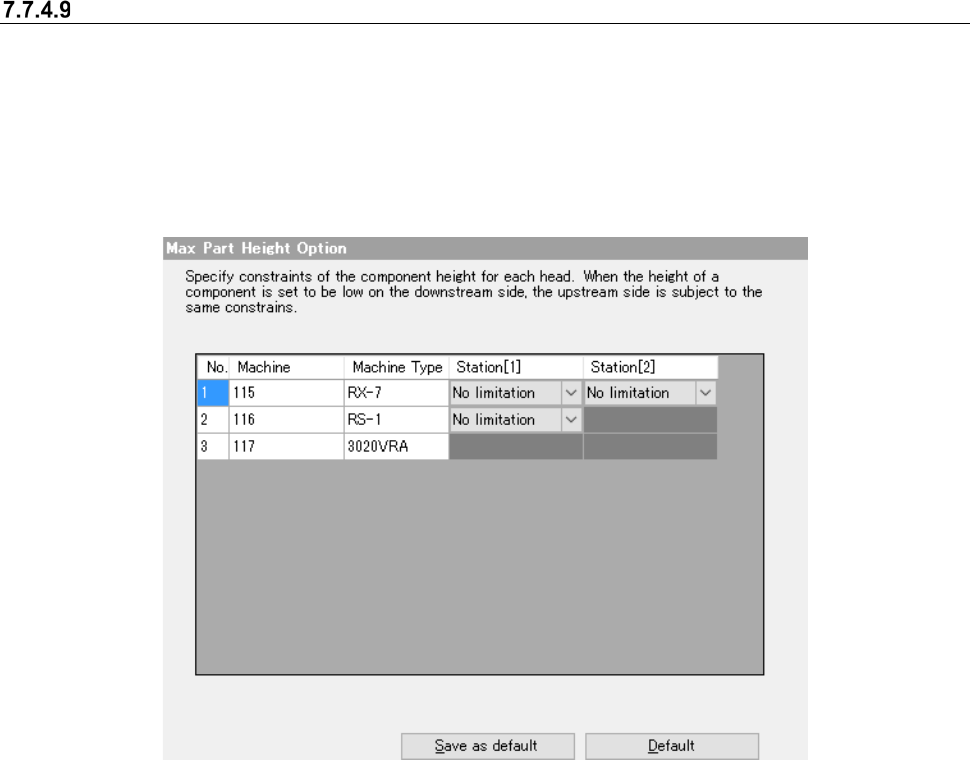
Max Part Height Option
This option allows you to specify the maximum component height for an RS-1/RX-7 series. You
can set this option only when the RS-1/RX-7 series is incorporated into the production line.
When you select the “Max Part Height” option in the option selecting area, the “Max Part Height
Option” is displayed in the optimize option setting area.
If any mounter is located before the RS-1/RX-7 series on the production line, this option cannot be
used.
Figure 7.7-17 Max Part Height Option
For a station of the RX-7 series equipped with an P16 head, you can select from a menu of
choices: No limitation, 0.5mm and 0.2 mm.
For a station of the RX-7 equipped with a P8 head, you can select from a menu of choices: No
limitation and 0.6 mm.
For a station of the RS-1 series, you can select from a menu of choices: No limitation, 1.0 mm, 6.0
mm, 12.0 mm and 20.0 mm.
You cannot select any of them for mounter models other than an RS-1/RX-7 series.
If you specify any height, you cannot assign any component whose height exceeds the selected
height to the corresponding station. For example, a component whose height is 1 mm cannot be
assigned to the station for which “0.5 mm” is selected.
Note that when the component height is strictly restricted with the downstream side, components
that can be assigned to the upstream side are restricted in the same manner.
JaNets Instruction Manual 7. Program Editor
7-164
Machine Options option
This option allows you to set the optimize option for each machine type. When you select the
“Machine Options” option in the option setting area, the “Machine Type Specific” screen appears in
the option setting area.
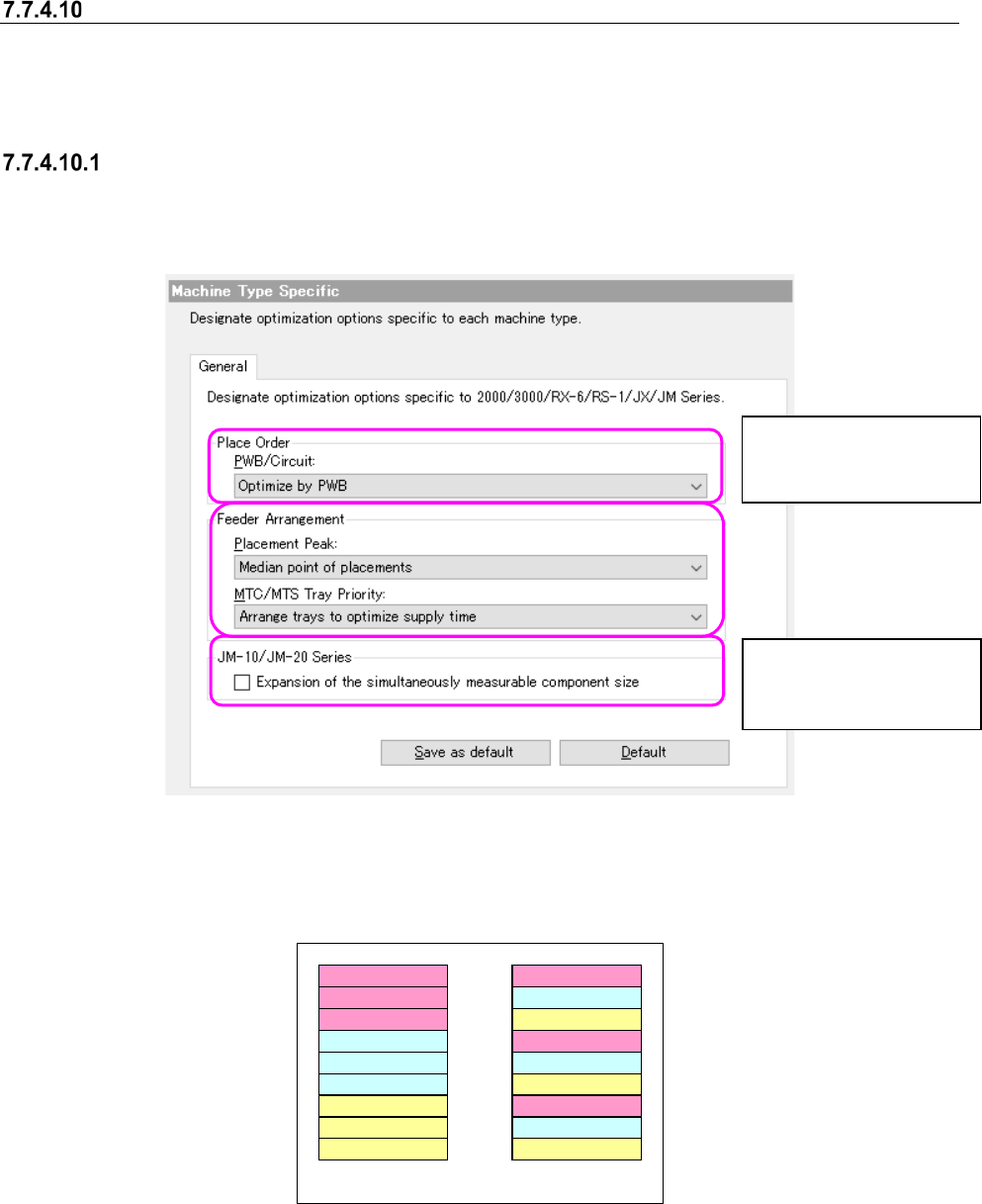
2000/3000/RX-6/RS-1/JX/JM Series options
When you select the “General” tab on the “Machine Type Specific” screen, the following screen
appears.
Figure 7.7-18 Machine Options – 2000/3000/RX-6/RS-1/JX/JM Series
The examples below show the assignments of component depending on your choice of the
“MTC/MTS Tray Priority.”
Component type A
A
A
Component type B
B
B
Component type C
C
C
Component type A
Component type B
Component type C
A
B
C
A
B
C
Group trays with same
component type together
Arrange trays to optimize
supply time
Figure 7.7-19 Example of components assignments vaying depending
on your choice of the “MTC/MTS Tray Priority” menu item.
You can set this menu
item forJM-10/JM-20 se-
ries machine only.
You can set this menu
item for a KE2000/JM-10
series machine only.