JANETS_INM.pdf - 第384页
JaNets In structio n Manual 7. Program Editor 7- 177 7.8.2 Executing the automatic batch loading function If the menu ite m “ Auto matic batch loading o f Compo nent data ” or “ Autom atic batch lo ading o f Mark data ” …
JaNets Instruction Manual 7. Program Editor
7-176
7.8 Automatically Loading Component Data/Mark Data at a Time
This is a function for updating Component data and Mark data of a production program according
to the information of the database before performing optimization.
7.8.1 Settings for automatic batch loading
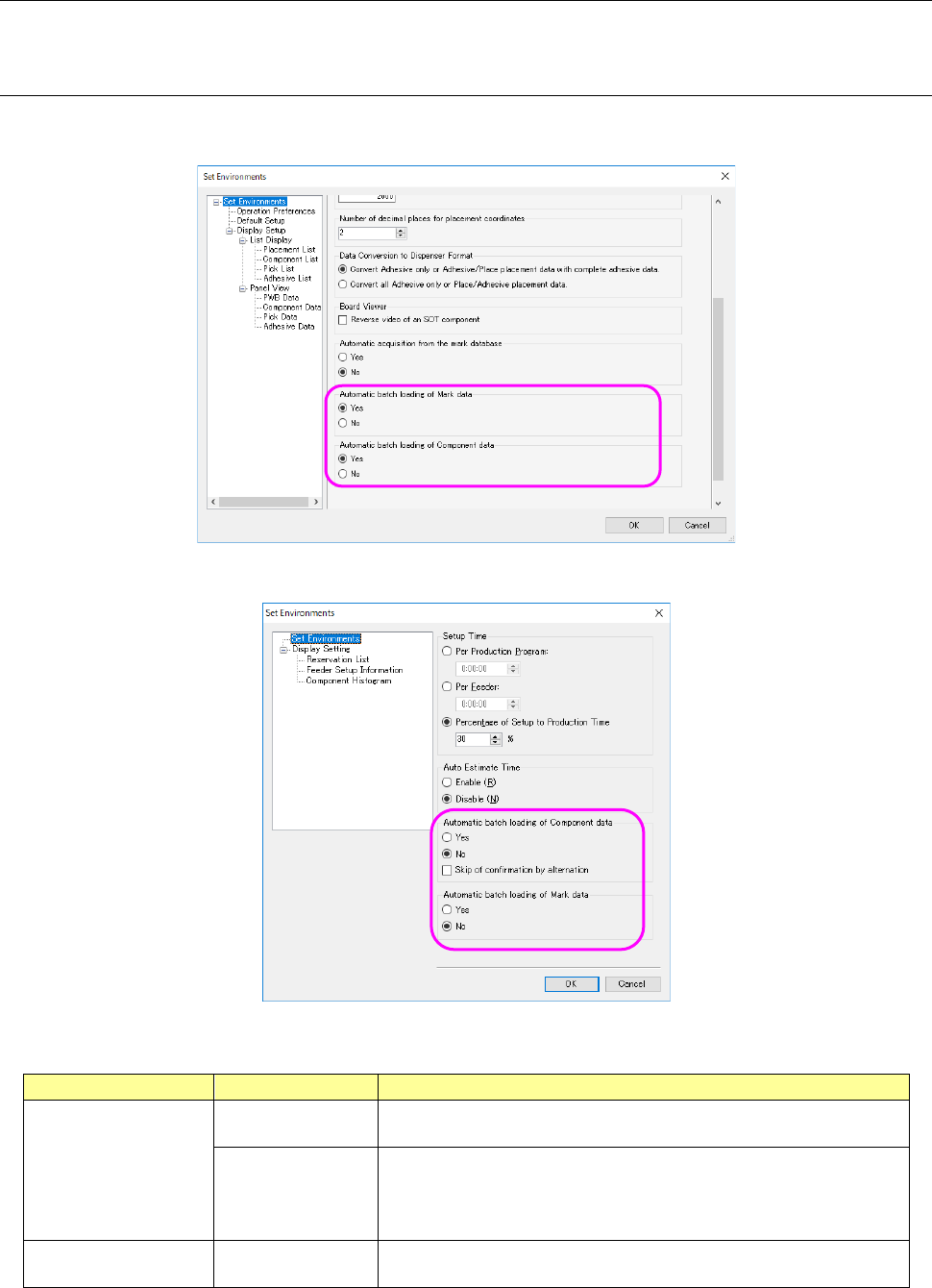
To use this automatic batch loading function, you have to specify whether to use it or not on the
“Set Environments” screen of the Program Editor and that of the Job Optimizer.
Figure 7.8-1 “Set Environments” screen (of the Program Editor)
Figure 7.8-2 “Set Environments” screen (of the Job Optimizer)
Table 7.8-1
Menu item
Setting
Description
Automatic batch
loading of
Component data
Yes/No
Specifies whether to access to the Component Database before
optimization starts to update the Component data.
Skip confirmation
by alternation
When this check box is enabled, the system skips display of the
confirmation dialog box to be displayed when Component data is to
be changed, and then automatically applies the change to perform
optimization.
Automatic batch
loading of Mark data
Yes/No
Specifies whether to access to the mark database before optimi-
zation starts to update the mark data.
* Even though this automatic batch loading function is enabled on the “Set Environments”
screen, the function cannot be used for a file created in “EPU mode.”
JaNets Instruction Manual 7. Program Editor
7-177
7.8.2 Executing the automatic batch loading function
If the menu item “Automatic batch loading of Component data” or “Automatic batch loading of
Mark data” is set to “Yes” on the “Set Environments” screen when you press the <Go> button on
the “Optimize” dialog box, the system accesses to each database to update data of a production
program. After updating data, the system performs optimization.
* A production program is automatically saved before automatic batch loading starts.
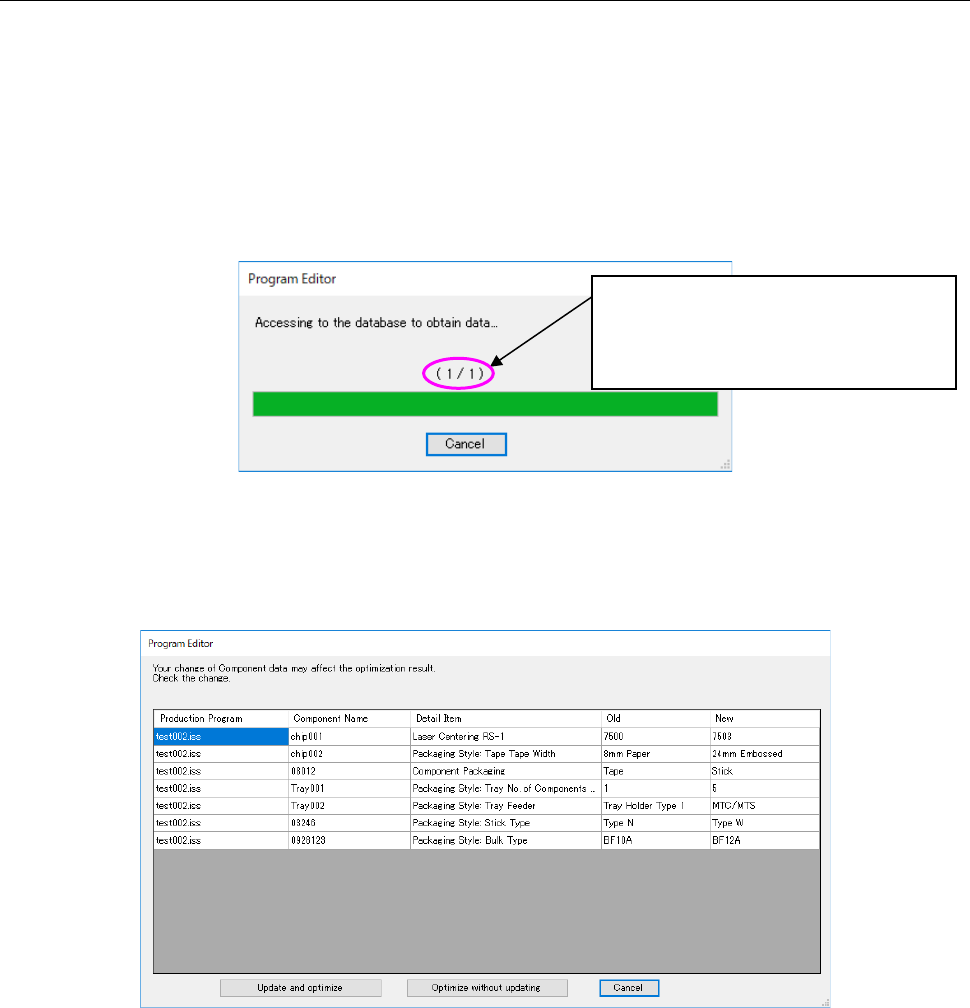
When automatic batch loading starts, the system accesses to the database. While the system is
accessing to the database, the following dialog box appears on the screen.
Figure 7.8-3 Dialog box displayed during accessing to the database
Only if updating of Component data that affects the optimization result occurs after updating fin-
ishes, the following dialog box appears on the screen.
Figure 7.8-4 Confirmation dialog box for change of Component data
When you press the <Update and optimize> button, the system performs optimization with apply-
ing the updating.
When you press the <Optimize without updating> button, the system restores the production pro-
gram to the original state before the automatic batch loading function is executed, and then per-
forms optimization. When you press the <Cancel> button, the system restores the production
program to the original state before the automatic batch loading function is executed without per-
forming optimization.
* When the “Skip confirmation by alternation” check box is enabled on the “Set Environments”
screen, the system automatically updates the data and performs optimization without displaying
the confirmation dialog box above.
The number of production programs that
finish being updated and that of produc-
tion programs that will be updated are
displayed here.
JaNets Instruction Manual 7. Program Editor
7-178
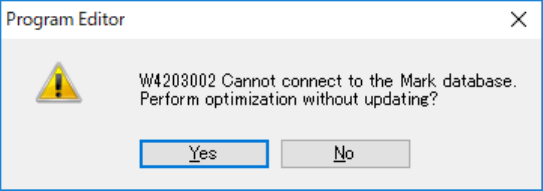
If the system is not connected to the database or if communication is cut during connection to the
database, the following dialog box appears on the screen. When you press the <Yes> button, the
system restores the production program to the original state before the automatic batch loading
function is executed, and then performs optimization. When you press the <No> button, the
system only restores the production program to the original state before the automatic batch
loading function is executed without performing optimization.
Figure 7.8-5 Dialog box indicating a failure to connect to the database