JANETS_INM.pdf - 第418页
JaNets Instr ucti on Man ual 8. Job Optim izer 8- 33 Divided Plac ement D ata Figure 8.3 - 60 Main scr een – [V iew] – [Divided Placem ent Data] The divide d placem ent da ta for t he production progr am selected f rom t…
JaNets Instruction Manual 8. Job Optimizer
8-32
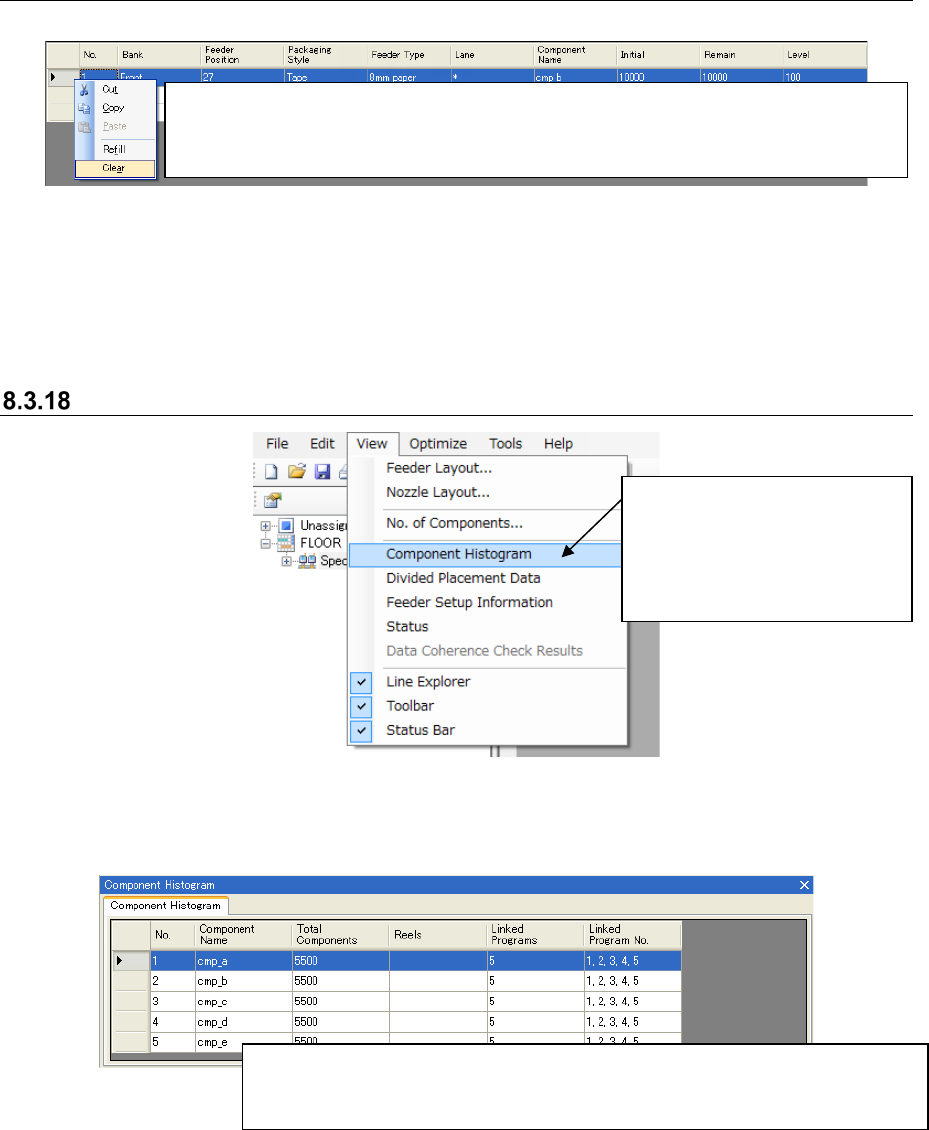
8.3.17.5 Clearing the number of components
Follow the instruction ① or ② shown below.
Figure 8.3-57 “No. of Components” (Clear)
* When you follow either of the above instructions, the values in the “Initial,” “Remain” and “Level”
fields are set to 0. This means that the system will not control the situation the number of
components becomes 0, that is, components run out. When you execute this command for a tray
component, the value set in the “Initial” field is copied to the “Remain” field, and “0” is set to the
“Level” field.
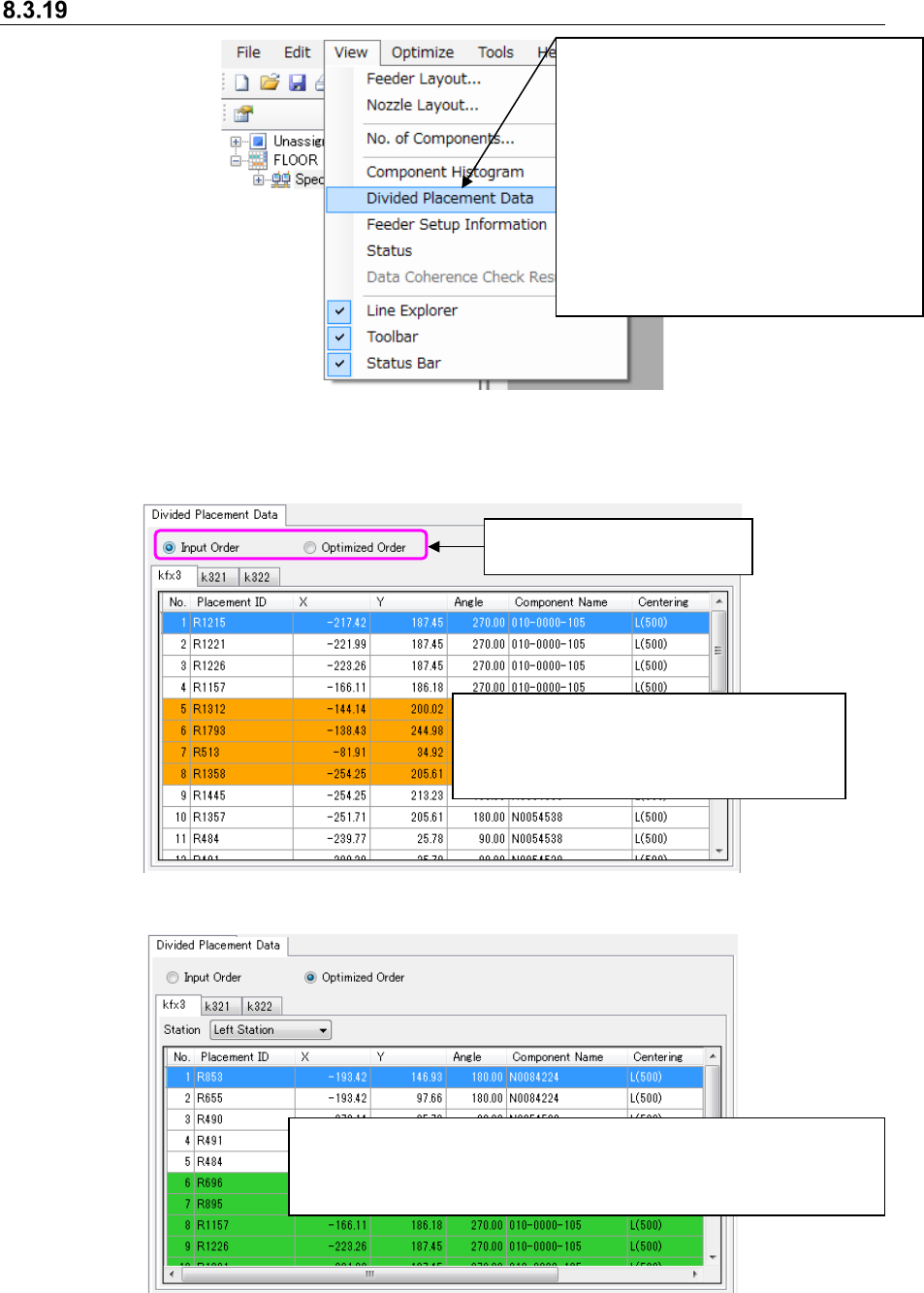
Component Histogram
Figure 8.3-58 Main screen – [View] – [Component Histogram]
The component histogram for the Reservation list is displayed on the Detailed data display area of
the Main screen.
Figure 8.3-59 Main screen – Component Histogram
①
Select the desired line on the “No. of Components” dialog box, and select the <Clear> displayed
on the bottom of this dialog box.
② Select the desired line on the “No. of Components” dialog box, and click the selected line with the
right button. Select the [Clear] command on the displayed menu.
The number of components of all component types used with the reserved
production program and the number of programs that use each component type
are displayed on the list under each component name.
①
Select the [View]
command, and then the
[Component Histogram]
command from the “View”
menu.
JaNets Instruction Manual 8. Job Optimizer
8-33
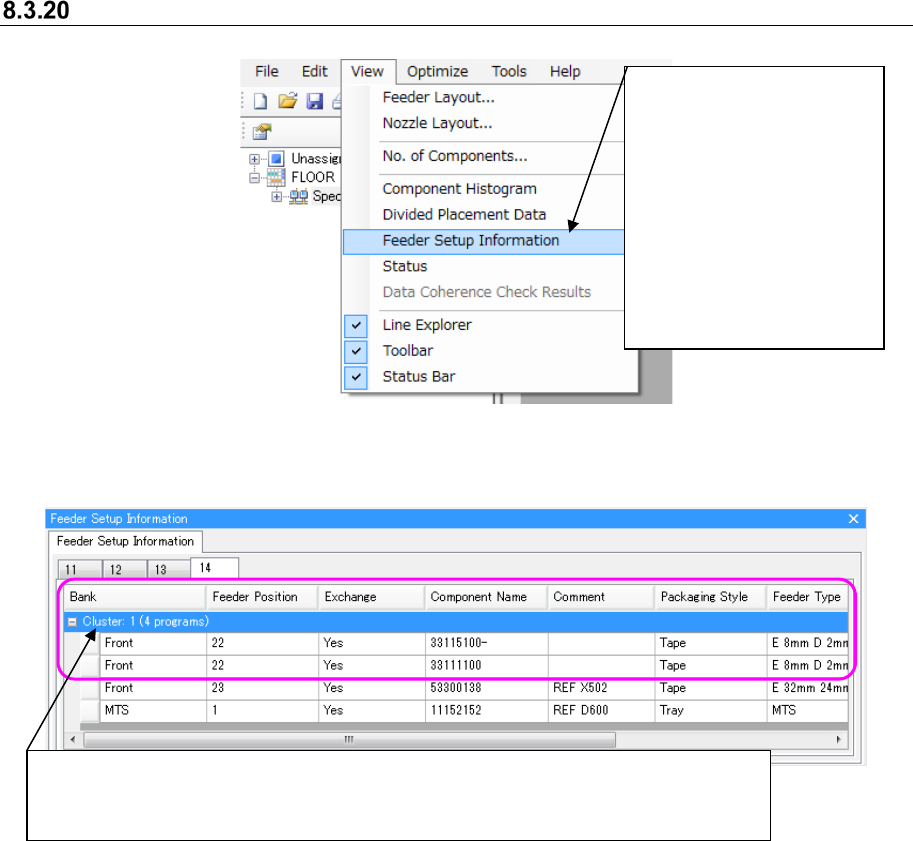
Divided Placement Data
Figure 8.3-60 Main screen – [View] –[Divided Placement Data]
The divided placement data for the production program selected from the Reservation list is
displayed on the Detailed data display area.
Figure 8.3-61 “Divided Placement Data” (Input Order)
Figure 8.3-62 Divided Placement Data (Optimized Order)
When “Yes” is set in the Skip” field of the
“Placement” data screen or “Component” data
screen, the background color of the line is
displayed in orange.
When you select the “Optimized Order” radio button, the background
color of lines is switched between the normal one and the colored one
every time components are paired (to be picked up at the same time)
during the cycle of a pick-up and placement operation.
Select the radio button “Input
Order” or “Optimized Order.”
①
After selecting one line from the
Reservation list displayed on the
Main screen, and select the [View]
command, and then the [Divided
Placement Data] command from the
“View” menu.
* If optimization is not executed yet,
if you change a production program
after optimizing it, or if no line is
selected on the Reservation list, you
cannot select this command.
JaNets Instruction Manual 8. Job Optimizer
8-34
Feeder Setup Information
Figure 8.3-63 Main screen – [View] – [Feeder Setup]
Figure 8.3-64 “Feeder Setup Information”
①
Select the [View]
command, and then the
[Feeder Setup
Information] command.
* If cluster-optimization is
not executed yet or if you
change a production
program after
cluster-optimizing it, you
cannot select this
command.
This area indicates how feeders of each production program are assigned and whether
feeders within the cluster have to be replaced as a result of execution of
cluster-optimization or not.