JANETS_INM.pdf - 第421页
JaNets Instr ucti on Man ual 8. Job Optim izer 8- 36 Optimize Figure 8.3 - 67 Main scr een – [Optimize] – [Opti mize ] * It is impos sible t o exec u te both progr am e ditor o ptim izat ion and j ob o ptim izer optimiz …
JaNets Instruction Manual 8. Job Optimizer
8-35
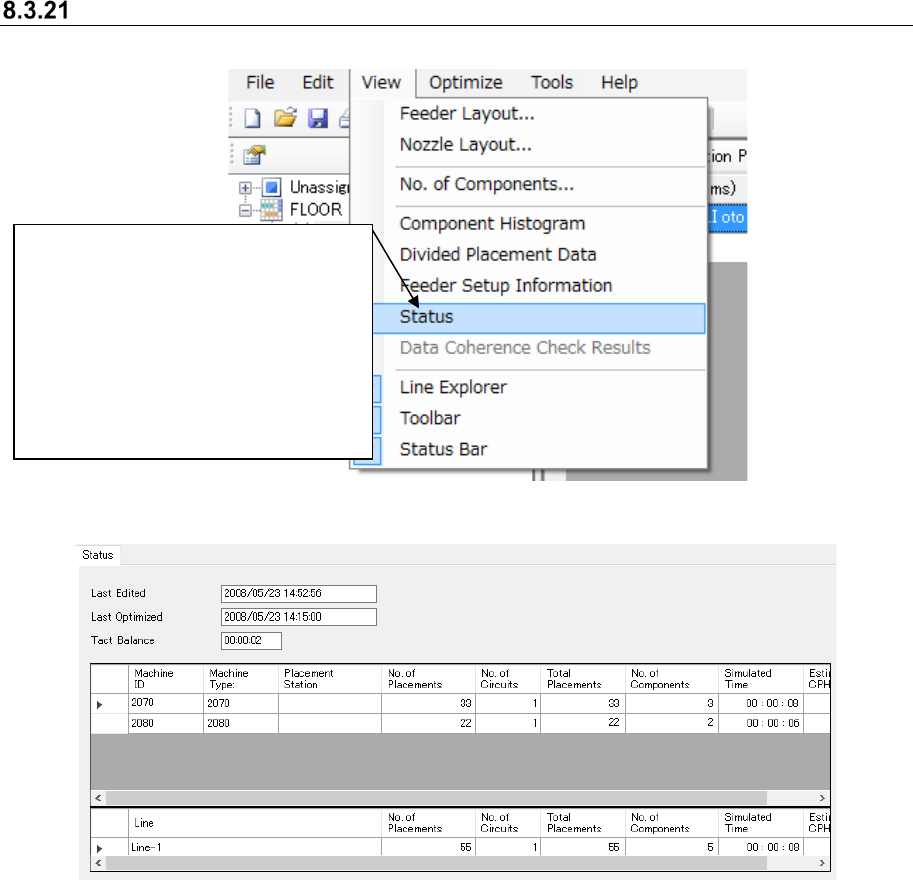
Status Display
Figure 8.3-65 Main screen – [View] – [Status]
Figure 8.3-66 “Status”
①
After selecting one line on the
Reservation list, select the [View]
command, and then the [Status ]
command from the “View” menu.
* If the “tact simulation” (cycle time
simulation) is not performed after
optimization is executed or if no line is
selected from the Reservation list,
you cannot select this command.
JaNets Instruction Manual 8. Job Optimizer
8-36
Optimize
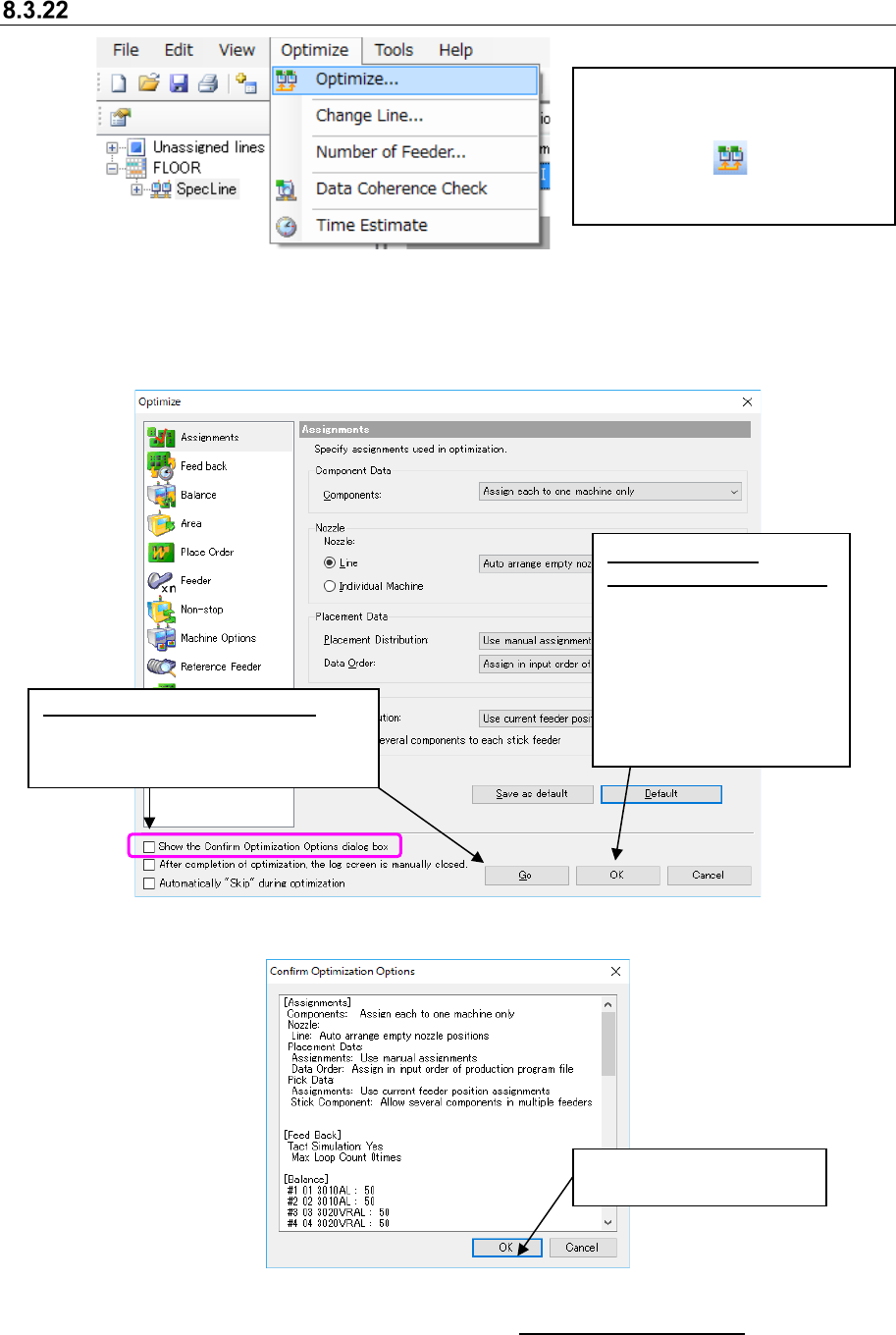
Figure 8.3-67 Main screen – [Optimize] – [Optimize]
* It is impossible to execute both program editor optimization and job optimizer
optimization simultaneously.
* Job Optimizer cannot optimize any machine whose data is created in EPU mode with the
Shopfloor Setup or any production line including a JM series machine.
Figure 8.3-68 “Optimize” dialog box
Figure 8.3-69 “Confirm Optimization Options” dialog box
* When “Auto time estimation” is set to “Execute” in “8.3.27 Set Environments”, time estimation is
automatically executed on “Planned production start day” and at “Planned production start time”
set by reservation file after normal termination. After the time is estimated, the simulation result
is reflected in the reservation.
Select the [Optimize] command, and
then the [Optimize] command from
the “Optimize” menu, or click the
“Optimize” tool ( ) from the
toolbar. The “Optimize” dialog box
shown below appears on the screen.
Click this button to execute
the optimization function.
When you set the
optimization options only:
Click the <OK> button after
changing the settings of the
optimization options on the
“Optimize” dialog box. The
system saves the changed
options without executing the
optimization function.
When you check this check box:
The “Confirm Optimization Options”
dialog box appears on the screen
after you click the <Go>.
JaNets Instruction Manual 8. Job Optimizer
8-37
8.3.22.1 Multi-optimize option
This option allows you to set options effective for two or more programs such as sharing of the
same feeder with two or more reserved programs.
It is possible to specify the coefficient of allowance (see “8.3.22.1.4 Cluster Options – Cluster”) for
the area where feeders are arranged by optimization.
When you select the “Multi-optimize” option in the option selecting area, the following screen
appears in the option setting area.
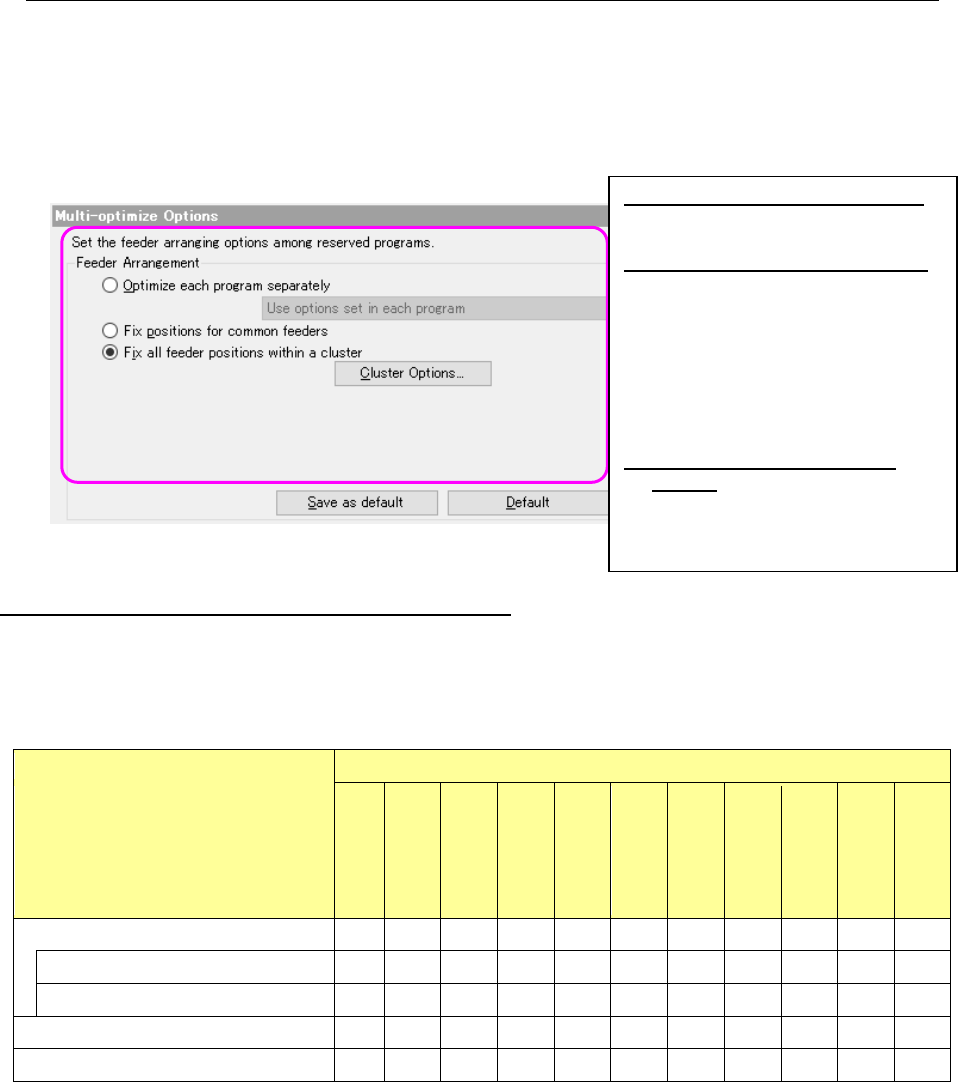
Figure 8.3-70 Multi-optimize options
The Multi-optimize option and the Optimize options
How each “Optimize” option set on the “Optimize” dialog box of the Job Optimizer is handled with
each option of the “Multi-optimize Options” screen is shown in the following table.
Table 8.3-4 Relation between the “Multi-optimize” options and other “Optimize” options
“Optimize” options
“Multi-optimize” options
Assignments
Feed back
Balance
Area
Place Order
Feeder
Non
-stop
Max Part
Height
Placement
mode
Machine
Options
reference
feeder
Optimize each program separately
Use options in each program × × × × × × × × × × ×
Use options set in Job Optimizer for all ○ ○ ○ ○ ○ ○ ○ ○ ○ ○ ×
Fix positions for common feeders
○
○
○
○
○
○
○
○
○
○
○
Fix all feeder positions within a cluster
○
○
○
○
○
○
○
○
○
○
○
(○: enabled, ×: disabled)
* When you select “Use options in each program” for the item “Optimize each program
separately,” the system ignores the optimization conditions set with the Job Optimizer, and
performs optimization according to the optimize options of each program set with the Program
Editor. However, the feeder option and reference feeder option are ignored for individual
program.
Optimize each program separately:
Optimizes reserved production
programs one by one separately.
Fix positions for common feeders:
Assigns feeders so that the feeder
attachment positions can be the
same if the same type components
are specified with the continuous
reserved production programs.
Feeders for other components are
assigned to the positions optimal for
each program.
Fix all feeder positions within a
cluster: This is an option that does
not require changeover of feeders
when a production program is
switched to another one.