JANETS_INM.pdf - 第423页
JaNets Instr ucti on Man ual 8. Job Optim izer 8- 38 Optimize each program separately When you se lect this r adio but ton, the sys tem optim izes reser ved pro duction programs on e by one separately . In this cas e, th…
JaNets Instruction Manual 8. Job Optimizer
8-37
8.3.22.1 Multi-optimize option
This option allows you to set options effective for two or more programs such as sharing of the
same feeder with two or more reserved programs.
It is possible to specify the coefficient of allowance (see “8.3.22.1.4 Cluster Options – Cluster”) for
the area where feeders are arranged by optimization.
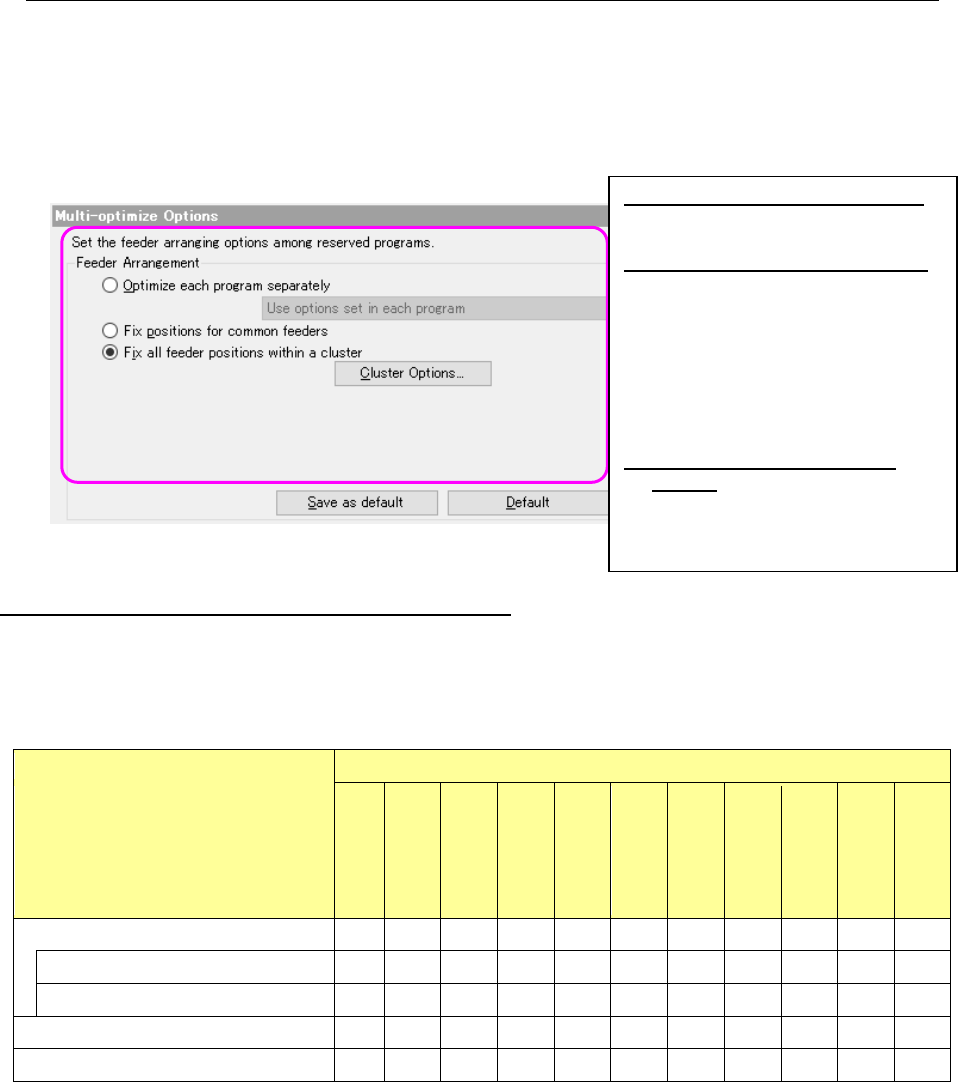
When you select the “Multi-optimize” option in the option selecting area, the following screen
appears in the option setting area.
Figure 8.3-70 Multi-optimize options
The Multi-optimize option and the Optimize options
How each “Optimize” option set on the “Optimize” dialog box of the Job Optimizer is handled with
each option of the “Multi-optimize Options” screen is shown in the following table.
Table 8.3-4 Relation between the “Multi-optimize” options and other “Optimize” options
“Optimize” options
“Multi-optimize” options
Assignments
Feed back
Balance
Area
Place Order
Feeder
Non
-stop
Max Part
Height
Placement
mode
Machine
Options
reference
feeder
Optimize each program separately
Use options in each program × × × × × × × × × × ×
Use options set in Job Optimizer for all ○ ○ ○ ○ ○ ○ ○ ○ ○ ○ ×
Fix positions for common feeders
○
○
○
○
○
○
○
○
○
○
○
Fix all feeder positions within a cluster
○
○
○
○
○
○
○
○
○
○
○
(○: enabled, ×: disabled)
* When you select “Use options in each program” for the item “Optimize each program
separately,” the system ignores the optimization conditions set with the Job Optimizer, and
performs optimization according to the optimize options of each program set with the Program
Editor. However, the feeder option and reference feeder option are ignored for individual
program.
Optimize each program separately:
Optimizes reserved production
programs one by one separately.
Fix positions for common feeders:
Assigns feeders so that the feeder
attachment positions can be the
same if the same type components
are specified with the continuous
reserved production programs.
Feeders for other components are
assigned to the positions optimal for
each program.
Fix all feeder positions within a
cluster: This is an option that does
not require changeover of feeders
when a production program is
switched to another one.
JaNets Instruction Manual 8. Job Optimizer
8-38
Optimize each program separately
When you select this radio button, the system optimizes reserved production programs one by one
separately. In this case, the system does not consider the relation among programs to assign
feeders.
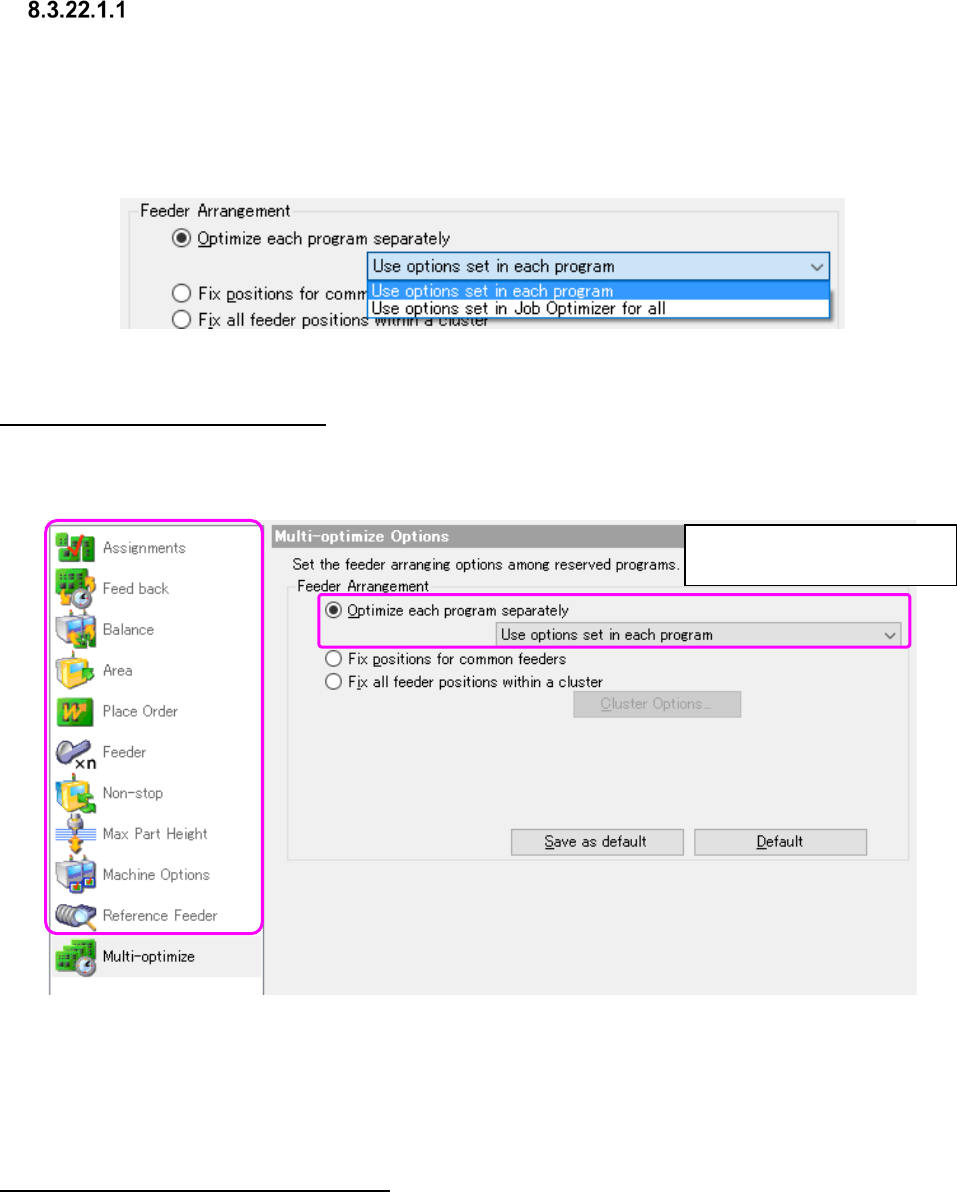
As the method for specifying the optimize options to optimize each program, you can select either
the method for optimizing by using options of each program or that by using the common options
set with the Job Optimizer for all production programs.
Figure 8.3-71 Multi-optimize – “Optimize each program separately”
Use options set in each program
When you select this method, the system uses the optimize options set when you edited a
program with the Program Editor to optimize the program, and you can obtain the same results as
that of the Program Editor.
Figure 8.3-72 Multi-optimize – “Use options in each program”
* In this case, the optimize options set with the Job Optimizer are ignored.
* The setting of the feeder option that is saved in the individual program is disregarded.
Use options set in Job Optimizer for all
When you select this method, the system optimizes programs separately according to the settings
of the Optimize options set with the Job Optimizer.
Other options are disabled.
(dimmed on the screen)
JaNets Instruction Manual 8. Job Optimizer
8-39
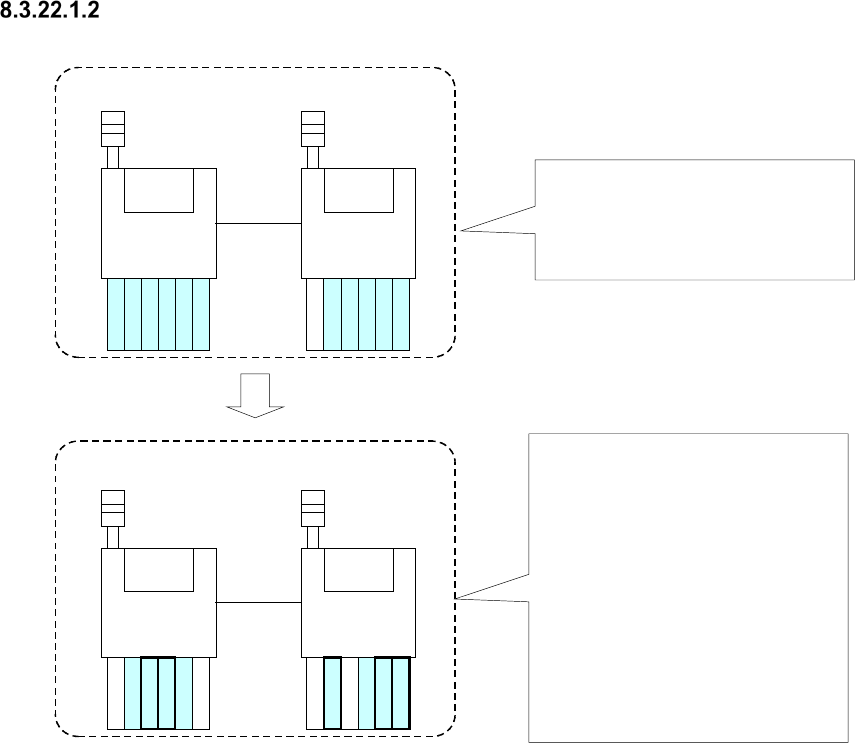
Fix positions for common feeders
First production program
(Components A, B, C, D, E, F)
Second production program
(Components B, D, F, G, H, I)
Machine 1
Machine 2
Machine 1
Machine 2
A
A
B
B
C
C
G
B
B
H
D
E
E
F
F
D
I
F
F
Components, A, B, C, D, E and F are
specified in the first production
program, and each feeder is
assigned with the Optimize
application as shown in the figure.
Components B, D and F are specified
also with the second production
program, and components G, H and I
are specified with this program too.
Since the feeders common to these
two production programs are for
components B, D and F, these feeder
attachment positions of the first
production program are inherited to
the second production program.
However, feeders for components G,
H and I are to be assigned without
considering the relation between
these two programs.
Figure 8.3-73 Overview of the “Fix positions for common feeders” radio button function
* If the same type components are assigned to different machines with two programs when you
select this option, no feeder is used commonly.