JANETS_INM.pdf - 第424页
JaNets Instr ucti on Man ual 8. Job Optim izer 8- 39 Fix positions for common feeders First produc tion program (Components A , B, C, D, E, F) Second produc tion program (Components B, D , F, G, H, I) Machine 1 Machine 2…
JaNets Instruction Manual 8. Job Optimizer
8-38
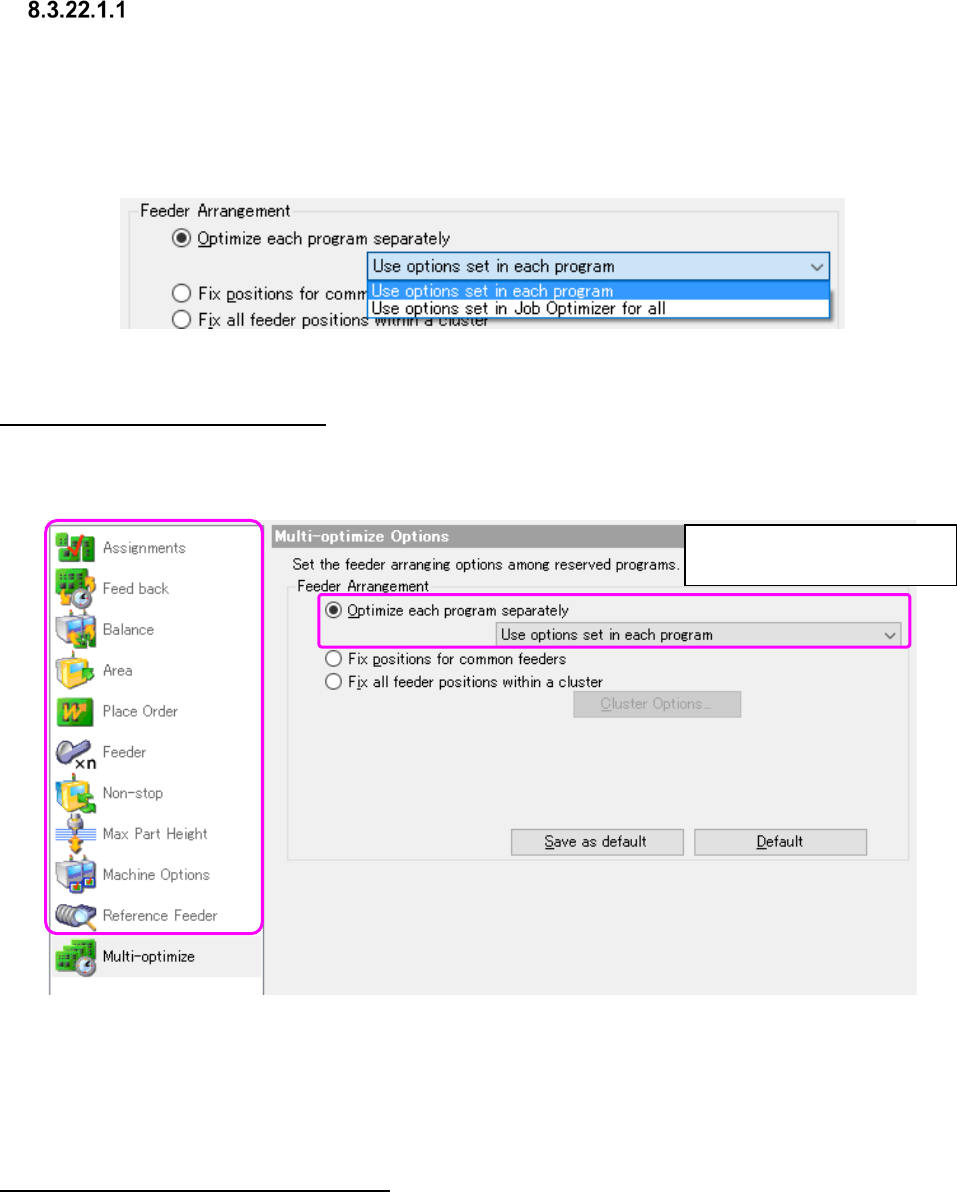
Optimize each program separately
When you select this radio button, the system optimizes reserved production programs one by one
separately. In this case, the system does not consider the relation among programs to assign
feeders.
As the method for specifying the optimize options to optimize each program, you can select either
the method for optimizing by using options of each program or that by using the common options
set with the Job Optimizer for all production programs.
Figure 8.3-71 Multi-optimize – “Optimize each program separately”
Use options set in each program
When you select this method, the system uses the optimize options set when you edited a
program with the Program Editor to optimize the program, and you can obtain the same results as
that of the Program Editor.
Figure 8.3-72 Multi-optimize – “Use options in each program”
* In this case, the optimize options set with the Job Optimizer are ignored.
* The setting of the feeder option that is saved in the individual program is disregarded.
Use options set in Job Optimizer for all
When you select this method, the system optimizes programs separately according to the settings
of the Optimize options set with the Job Optimizer.
Other options are disabled.
(dimmed on the screen)
JaNets Instruction Manual 8. Job Optimizer
8-39
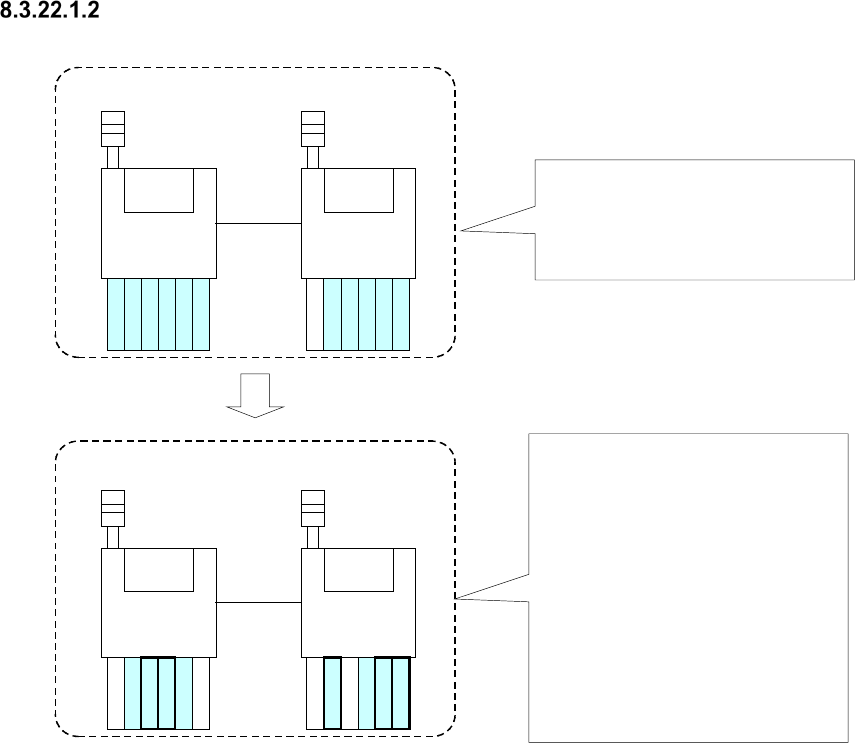
Fix positions for common feeders
First production program
(Components A, B, C, D, E, F)
Second production program
(Components B, D, F, G, H, I)
Machine 1
Machine 2
Machine 1
Machine 2
A
A
B
B
C
C
G
B
B
H
D
E
E
F
F
D
I
F
F
Components, A, B, C, D, E and F are
specified in the first production
program, and each feeder is
assigned with the Optimize
application as shown in the figure.
Components B, D and F are specified
also with the second production
program, and components G, H and I
are specified with this program too.
Since the feeders common to these
two production programs are for
components B, D and F, these feeder
attachment positions of the first
production program are inherited to
the second production program.
However, feeders for components G,
H and I are to be assigned without
considering the relation between
these two programs.
Figure 8.3-73 Overview of the “Fix positions for common feeders” radio button function
* If the same type components are assigned to different machines with two programs when you
select this option, no feeder is used commonly.
JaNets Instruction Manual 8. Job Optimizer
8-40
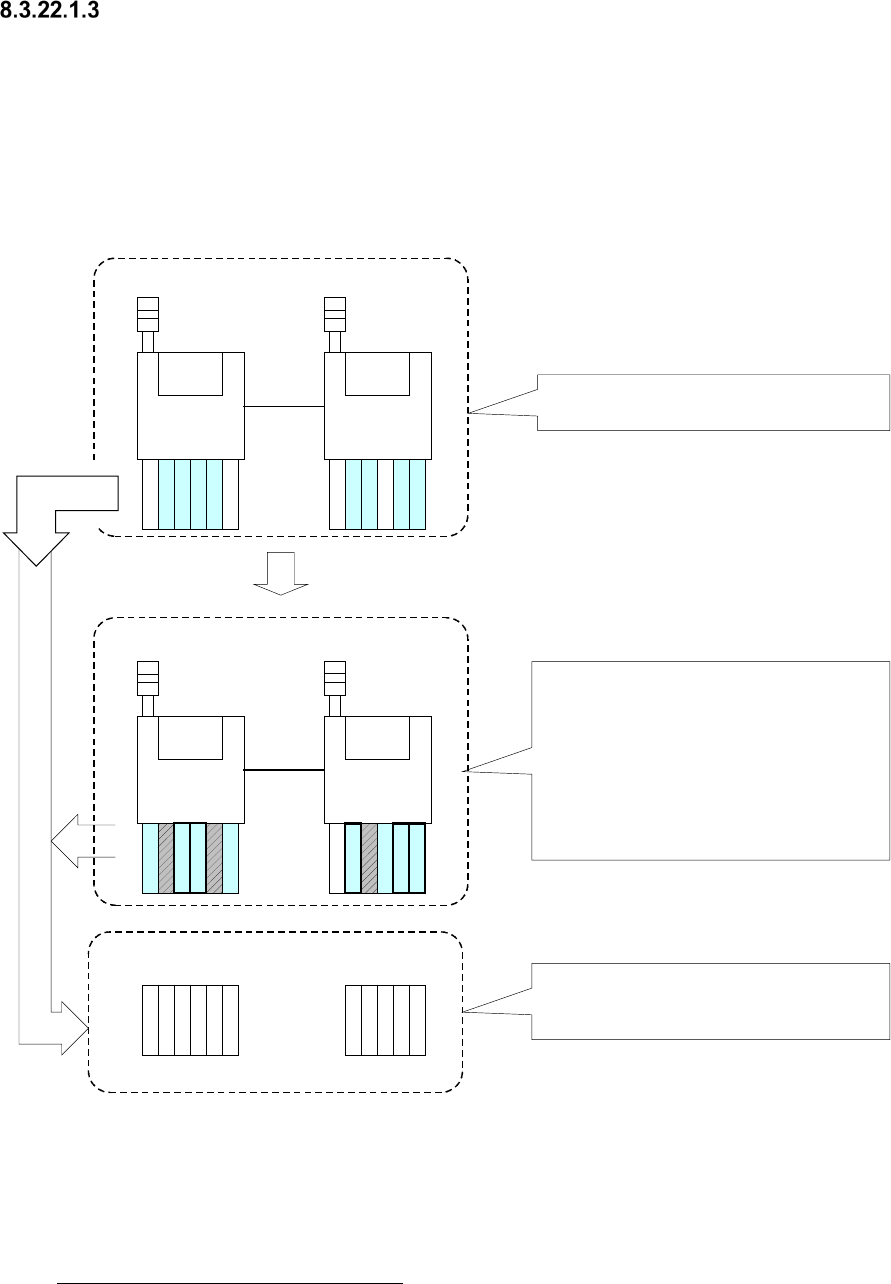
Fix all feeder positions within a cluster
This radio button regards programs from the first line of reserved programs to those that can
attach feeders at a time as a cluster to assign feeders. When you set up all feeders for one cluster
in advance, the feeders do not have to be replaced when one program is switched to another.
When two or more programs use the same type components, the same feeder is to be used for
this type of components.
The overview of optimization of a cluster is described below.
First production program
(Components A, B, C, D, E, F)
Second production program
(Components B, D, F, G, H, I)
Each feeder is assigned with the Optimize
application as shown in the figure.
Machine 1
Machine 2
Machine 1
Machine 2
Since the components common to two
programs are B, D and F, the feeder
attachment positions of these components
specified with the first production program are
inherited to the second production program.
Feeders for components G, H and I are to be
attached at the positions where any feeder
specified with the first production program
cannot be interfered.
A
B
B
C
G
B
B
H
D
E
F
F
D
I
F
F
G
A
B
B
C
H
D
E
I
F
F
Feeder set of the program 1 and
the program 2
For the machine 1
When a program is switched to another one,
a cluster is also generated as one unit that
does not require any feeder replacement.
For the machine 2
Figure 8.3-74 Overview of the “Fix all feeder positions within a cluster” function
* Although the time that is required to replace feeders when one program is switched to another
one is shortened, the placement cycle time of each program becomes longer.
If no cluster is created as a result of optimization with this option, adjust the “Room Coefficient”
or select “The cluster density has priority.” on the “Cluster Options” described in Section
8.3.22.1.4 “Cluster Options – Cluster.” If no cluster is created even though you adjust the
“Room Coefficient,” do not use the “Reference Feeder Setup,” or decrease the number of the
reserved files.