JANETS_INM.pdf - 第425页
JaNets Instr ucti on Man ual 8. Job Optim izer 8- 40 Fix all feeder positions within a clust er This radio but ton regar ds progr ams from t he first l ine of reser ved programs to those that can attach feed ers at a tim…
JaNets Instruction Manual 8. Job Optimizer
8-39
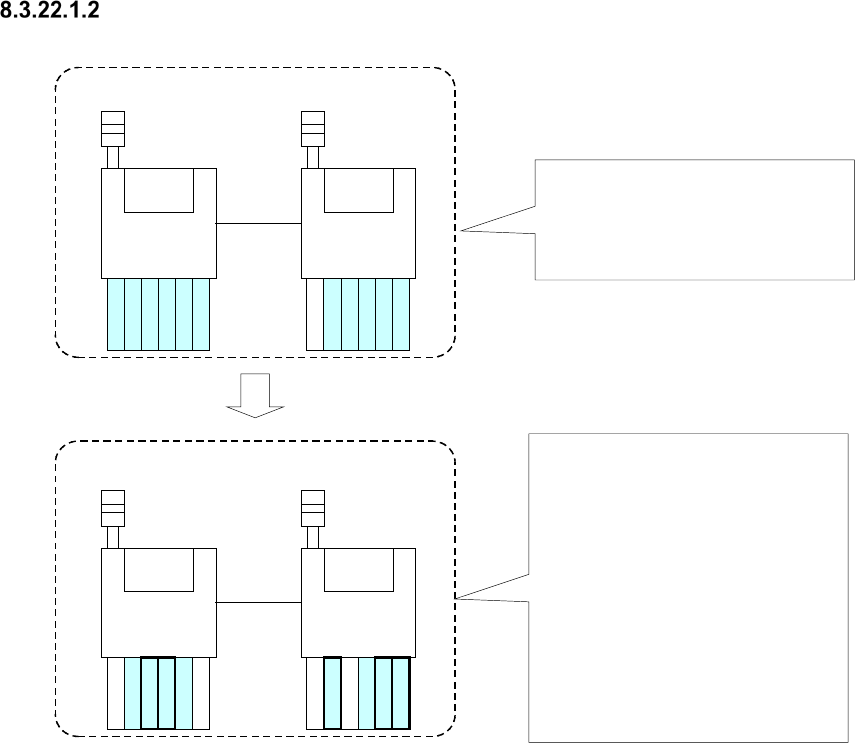
Fix positions for common feeders
First production program
(Components A, B, C, D, E, F)
Second production program
(Components B, D, F, G, H, I)
Machine 1
Machine 2
Machine 1
Machine 2
A
A
B
B
C
C
G
B
B
H
D
E
E
F
F
D
I
F
F
Components, A, B, C, D, E and F are
specified in the first production
program, and each feeder is
assigned with the Optimize
application as shown in the figure.
Components B, D and F are specified
also with the second production
program, and components G, H and I
are specified with this program too.
Since the feeders common to these
two production programs are for
components B, D and F, these feeder
attachment positions of the first
production program are inherited to
the second production program.
However, feeders for components G,
H and I are to be assigned without
considering the relation between
these two programs.
Figure 8.3-73 Overview of the “Fix positions for common feeders” radio button function
* If the same type components are assigned to different machines with two programs when you
select this option, no feeder is used commonly.
JaNets Instruction Manual 8. Job Optimizer
8-40
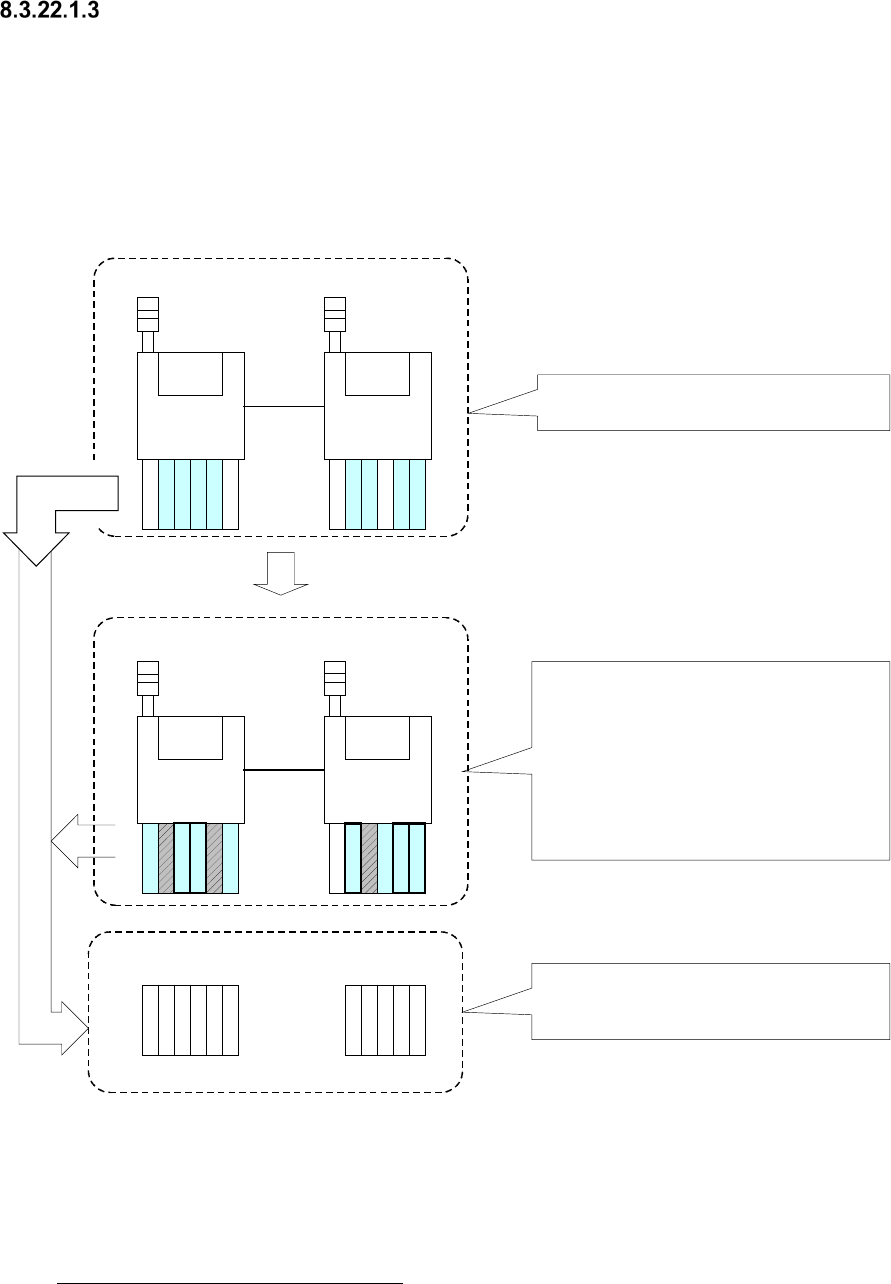
Fix all feeder positions within a cluster
This radio button regards programs from the first line of reserved programs to those that can
attach feeders at a time as a cluster to assign feeders. When you set up all feeders for one cluster
in advance, the feeders do not have to be replaced when one program is switched to another.
When two or more programs use the same type components, the same feeder is to be used for
this type of components.
The overview of optimization of a cluster is described below.
First production program
(Components A, B, C, D, E, F)
Second production program
(Components B, D, F, G, H, I)
Each feeder is assigned with the Optimize
application as shown in the figure.
Machine 1
Machine 2
Machine 1
Machine 2
Since the components common to two
programs are B, D and F, the feeder
attachment positions of these components
specified with the first production program are
inherited to the second production program.
Feeders for components G, H and I are to be
attached at the positions where any feeder
specified with the first production program
cannot be interfered.
A
B
B
C
G
B
B
H
D
E
F
F
D
I
F
F
G
A
B
B
C
H
D
E
I
F
F
Feeder set of the program 1 and
the program 2
For the machine 1
When a program is switched to another one,
a cluster is also generated as one unit that
does not require any feeder replacement.
For the machine 2
Figure 8.3-74 Overview of the “Fix all feeder positions within a cluster” function
* Although the time that is required to replace feeders when one program is switched to another
one is shortened, the placement cycle time of each program becomes longer.
If no cluster is created as a result of optimization with this option, adjust the “Room Coefficient”
or select “The cluster density has priority.” on the “Cluster Options” described in Section
8.3.22.1.4 “Cluster Options – Cluster.” If no cluster is created even though you adjust the
“Room Coefficient,” do not use the “Reference Feeder Setup,” or decrease the number of the
reserved files.
JaNets Instruction Manual 8. Job Optimizer
8-41
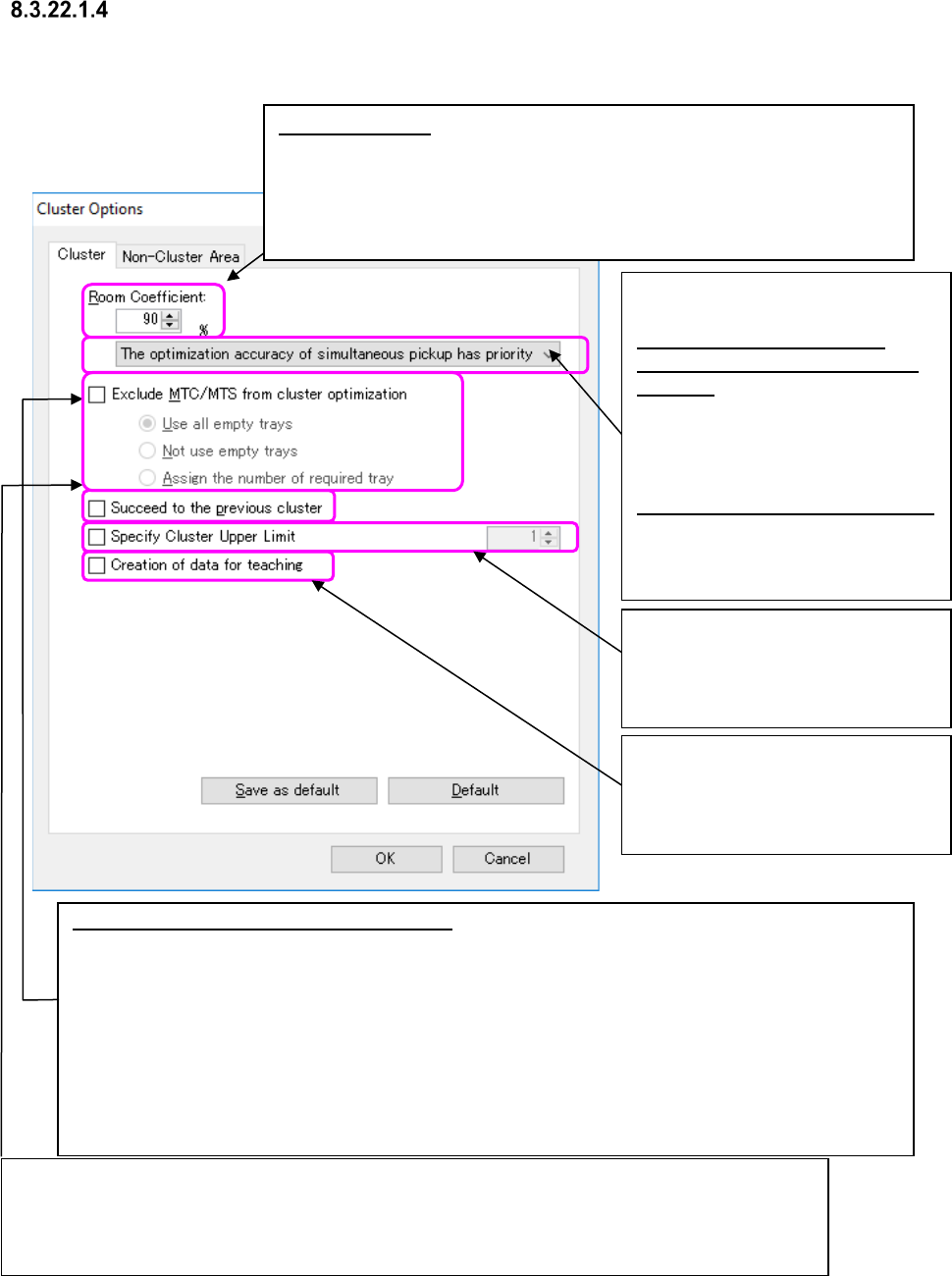
Cluster Options – Cluster
When you select the <Cluster Options> button on the “Multi-optimize Options” screen, the
following screen appears.
Figure 8.3-75 “Cluster Options” dialog box
If the same types of components are to be used with two or more clusters, select whether to assign
feeders within each cluster or assign feeders to the same positions for all clusters.
When you check the check boxes “Exclude MTC/MTS from cluster optimization” and “Succeed to the
previous cluster,” the system assigns feeders so that each one can be attached at the same position
when the same type of components are fed with only feeders without considering any MTC/MTS.
Room Coefficient: Assigns feeders using only the set ratio (on the supposition
that the total number of positions be regarded as 100 %) of all feeder
assignment area. When you set the “Room Coefficient” to a smaller value,
the production cycle becomes faster. However, since the number of
programs that can be assigned to one cluster becomes smaller, the time
required to change the feeder assignment becomes longer.
Exclude MTC/MTS from cluster optimization: Specify whether a cluster including an MTC/MTS is to be
made or a cluster including feeders only is to be made.
[Use all empty trays] (default)
After assigning the minimum number of necessary MTC/MTS components, the system assigns
MTC/MTS components whose supply count is automatically set to empty trays in descending order of
the number of placement points.
[Not use empty trays]
The system assigns the minimum necessary MTC/MTS components only.
[On an empty step, the required tray steps are arranged.]
If this arrangement is possible, the number of tray steps required by
Required number of steps = ((Number of PWBs to be produced x Number of placement points in
consideration of the number of circuits) ÷ Accommodated number of points for each tray).
Select the mode of the cluster
optimization.
The optimization accuracy of
simultaneous pickup has priority
(Default):
Assigns the feeders to perform the
simultaneous pickup in descending
order of the number of the placement
points of production.
The cluster density has priority:
Integrates the production programs
within a cluster to assign the feeders
in high density.
If the cluster specification is not within
the upper limit value, an error occurs
and the optimization is terminated.
The setting range is 1 ~ 100.
When you check this check box, the
system creates programs for teaching
in which all pick data in unit of cluster
is specified for each cluster.