JANETS_INM.pdf - 第427页
JaNets Instr ucti on Man ual 8. Job Optim izer 8- 42 * Assignme nt mode [ It gives prior ity to the opt imizati on accurac y at the simu ltaneous pic k - up.] The first product ion program ( Component A,B,C,D,E,F) The se…
JaNets Instruction Manual 8. Job Optimizer
8-41
Cluster Options – Cluster
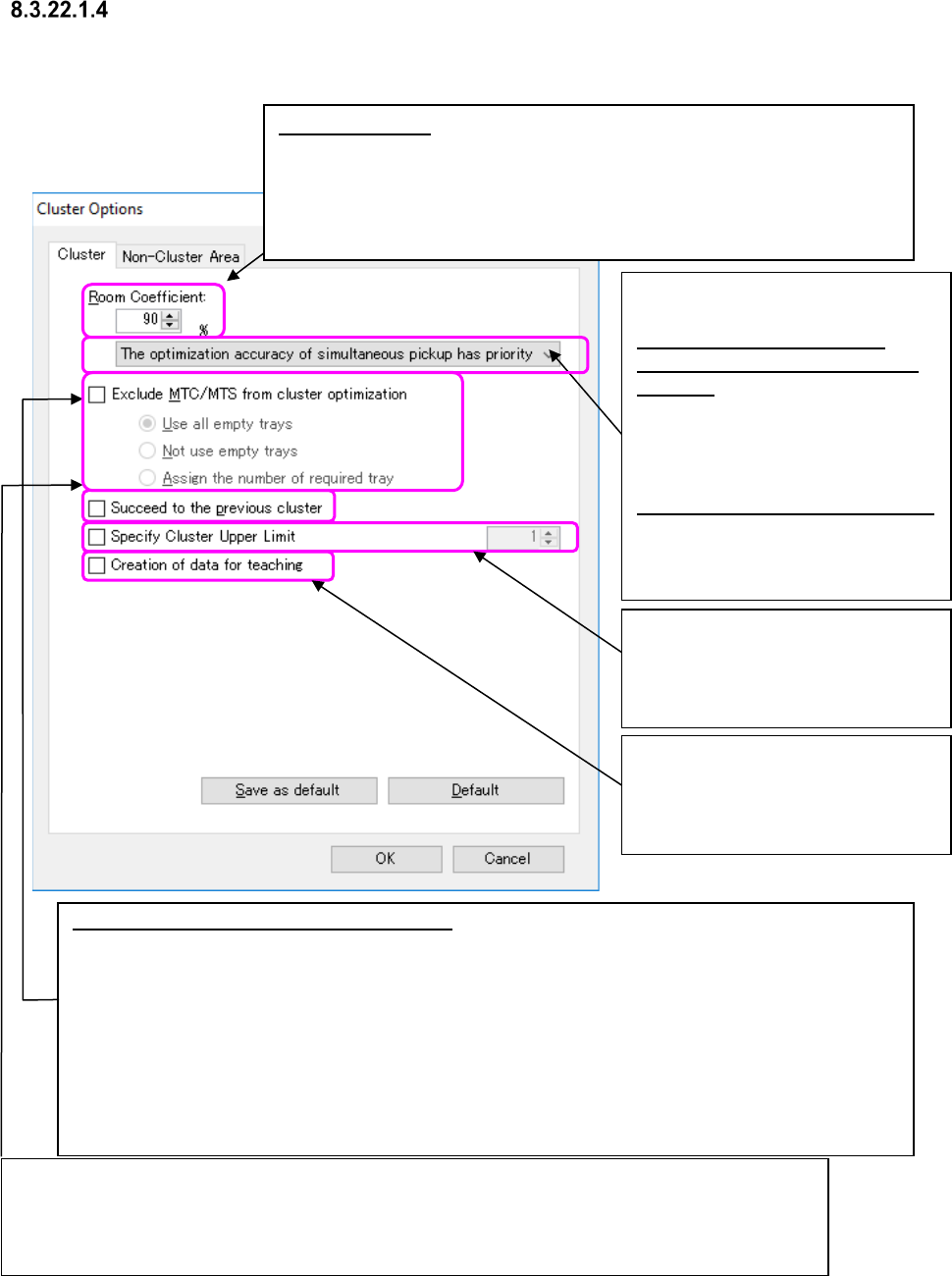
When you select the <Cluster Options> button on the “Multi-optimize Options” screen, the
following screen appears.
Figure 8.3-75 “Cluster Options” dialog box
If the same types of components are to be used with two or more clusters, select whether to assign
feeders within each cluster or assign feeders to the same positions for all clusters.
When you check the check boxes “Exclude MTC/MTS from cluster optimization” and “Succeed to the
previous cluster,” the system assigns feeders so that each one can be attached at the same position
when the same type of components are fed with only feeders without considering any MTC/MTS.
Room Coefficient: Assigns feeders using only the set ratio (on the supposition
that the total number of positions be regarded as 100 %) of all feeder
assignment area. When you set the “Room Coefficient” to a smaller value,
the production cycle becomes faster. However, since the number of
programs that can be assigned to one cluster becomes smaller, the time
required to change the feeder assignment becomes longer.
Exclude MTC/MTS from cluster optimization: Specify whether a cluster including an MTC/MTS is to be
made or a cluster including feeders only is to be made.
[Use all empty trays] (default)
After assigning the minimum number of necessary MTC/MTS components, the system assigns
MTC/MTS components whose supply count is automatically set to empty trays in descending order of
the number of placement points.
[Not use empty trays]
The system assigns the minimum necessary MTC/MTS components only.
[On an empty step, the required tray steps are arranged.]
If this arrangement is possible, the number of tray steps required by
Required number of steps = ((Number of PWBs to be produced x Number of placement points in
consideration of the number of circuits) ÷ Accommodated number of points for each tray).
Select the mode of the cluster
optimization.
The optimization accuracy of
simultaneous pickup has priority
(Default):
Assigns the feeders to perform the
simultaneous pickup in descending
order of the number of the placement
points of production.
The cluster density has priority:
Integrates the production programs
within a cluster to assign the feeders
in high density.
If the cluster specification is not within
the upper limit value, an error occurs
and the optimization is terminated.
The setting range is 1 ~ 100.
When you check this check box, the
system creates programs for teaching
in which all pick data in unit of cluster
is specified for each cluster.
JaNets Instruction Manual 8. Job Optimizer
8-42
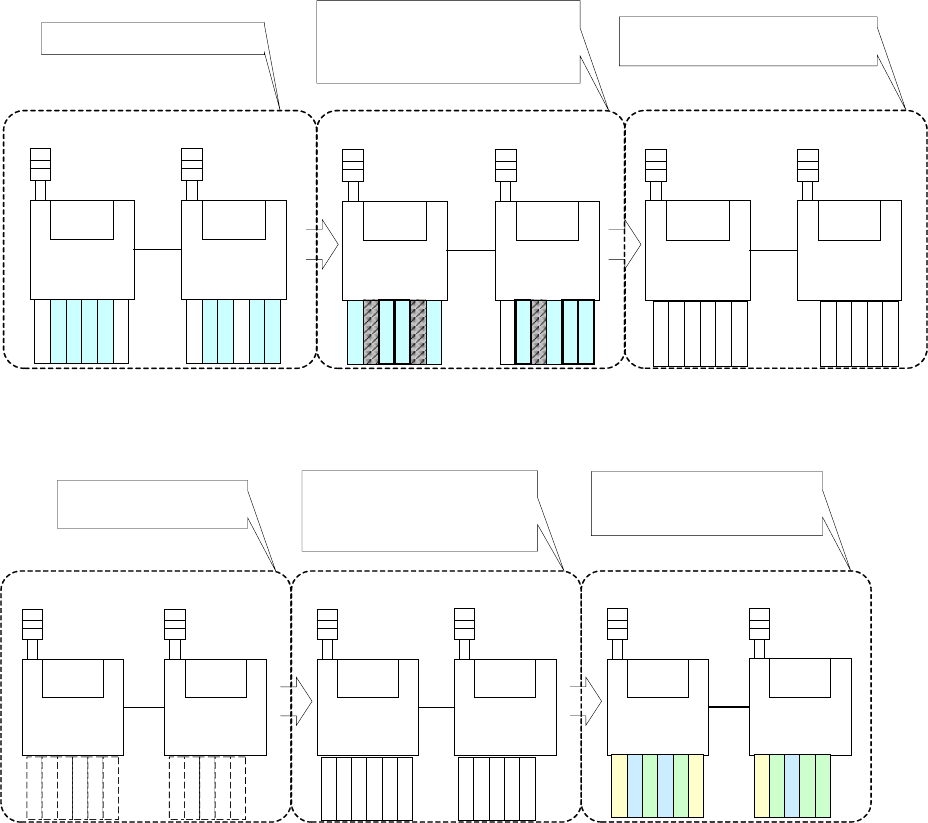
* Assignment mode
[It gives priority to the optimization accuracy at the simultaneous pick-up.]
The first production program
(Component A,B,C,D,E,F)
The second production program
(Component B,D,F,G,H,I)
The first production program is arranged.
Machine 1
Machine 2
Machine 1
Machine 2
A
B
B
C
G
B
B
H
D
E
F
F
D
I
F
F
The second production program is arranged. At this
time, the common components take over the
installation position, and the uncommon ones are
installed at the position that does not interfere.
The feeder set is formed.
Machine 1 Machine 2
The cluster is formed as an unnecessary feeder
exchange when the production program changes.
G
A
B
B
C
H
D
E
I
F
F
[It gives priority to the density of the cluster.]
The packaging in all programs is
temporarily arranged.
The optimization feeder set is formed
.
The first and second production
programs are arranged
.
Machine 1
Machine 2
Machine 1
Machine 2
A
B
B
C
D
E
F
F
The temporarily arranged packaging allocated
to each machine is rearranged after the
optimization in the machine, and the cluster is
formed.
The pick and placement order in each
program is decided.
Machine 1
Machine 2
The cluster picking position is reflected in each
program, and the pick and placement order in
each program is decided.
G
H
I
G
A
B
B
C
H
D
E
I
F
F
G
A
B
B
C
H
D
E
I
F
F
* Under the operating condition of the "long-size PWB in X axis" and "nonstop operation,"
optimization in the mode "The cluster density has a priority." cannot be performed.
JaNets Instruction Manual 8. Job Optimizer
8-43
Cluster Options – Non-Cluster Area
This tab allows you to specify whether to create a cluster with all components considered or assign
components used only with half or less of the set production programs to an area that is not for
cluster optimization.
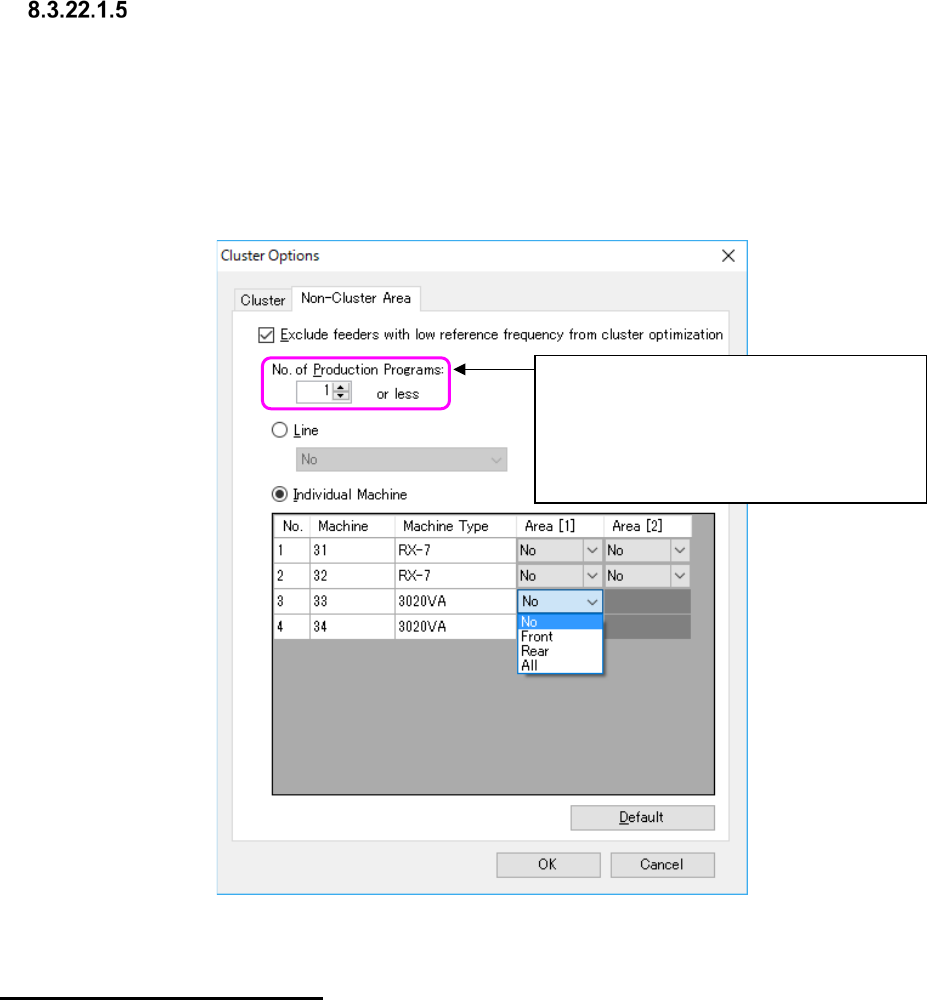
When you check the check box “Exclude feeders with low reference frequency from cluster
optimization,” you can set the number of production programs not for cluster optimization and set
the area that is not to be used for a cluster. In addition, you can also set an area that is not to be
used with cluster optimization for either the entire line or each machine.
Figure 8.3-76 “Non-Cluster Area” options
Specifying a “Non-Cluster Area”
Set the area not to be used with cluster optimization for either the entire line or each machine.
When you select the “Individual Machine” radio button, you can specify an area for the existing
placement stations of FX-3 series machine or a general-purpose machine. For a model having one
placement station, you can set one area for the machine.
If all components that are not to be used with cluster optimization cannot be assigned to such a
non-cluster area, the system assigns the remaining components to the area that is to be used with
a cluster.
The system applies the area specified with this option to the effective area set with the “Area”
option to perform optimization.
For example, if the machine 1 is set to the “Front only” with the “Area” option, the machine 1
cannot use the rear side regardless of the settings of this “Non-Cluster Area” option.
* If you assign components that are used with two or more production programs to an area that is
not to be used with cluster optimization, the system does not assign them to the same pick-up
point. MTC/MTS components are not handled with this option.
Specify the condition of a component to be
assigned to an area that is not to be used
with a cluster as the number of production
programs with which the component is used.
<Range of a value to be set here>
1 to 100