JANETS_INM.pdf - 第428页
JaNets Instr ucti on Man ual 8. Job Optim izer 8- 43 Cluster Opti ons – Non - Cluster Area This tab a llows y ou to speci fy whether t o create a clust er with a ll comp onents consider ed or assign components used o nly…
JaNets Instruction Manual 8. Job Optimizer
8-42
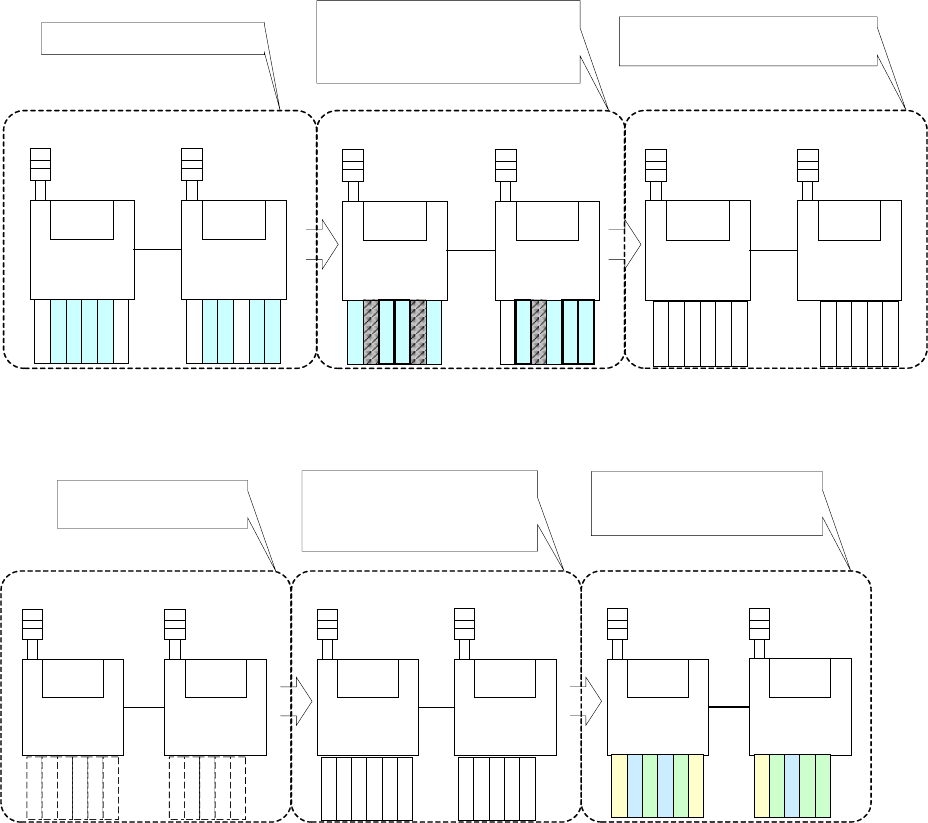
* Assignment mode
[It gives priority to the optimization accuracy at the simultaneous pick-up.]
The first production program
(Component A,B,C,D,E,F)
The second production program
(Component B,D,F,G,H,I)
The first production program is arranged.
Machine 1
Machine 2
Machine 1
Machine 2
A
B
B
C
G
B
B
H
D
E
F
F
D
I
F
F
The second production program is arranged. At this
time, the common components take over the
installation position, and the uncommon ones are
installed at the position that does not interfere.
The feeder set is formed.
Machine 1 Machine 2
The cluster is formed as an unnecessary feeder
exchange when the production program changes.
G
A
B
B
C
H
D
E
I
F
F
[It gives priority to the density of the cluster.]
The packaging in all programs is
temporarily arranged.
The optimization feeder set is formed
.
The first and second production
programs are arranged
.
Machine 1
Machine 2
Machine 1
Machine 2
A
B
B
C
D
E
F
F
The temporarily arranged packaging allocated
to each machine is rearranged after the
optimization in the machine, and the cluster is
formed.
The pick and placement order in each
program is decided.
Machine 1
Machine 2
The cluster picking position is reflected in each
program, and the pick and placement order in
each program is decided.
G
H
I
G
A
B
B
C
H
D
E
I
F
F
G
A
B
B
C
H
D
E
I
F
F
* Under the operating condition of the "long-size PWB in X axis" and "nonstop operation,"
optimization in the mode "The cluster density has a priority." cannot be performed.
JaNets Instruction Manual 8. Job Optimizer
8-43
Cluster Options – Non-Cluster Area
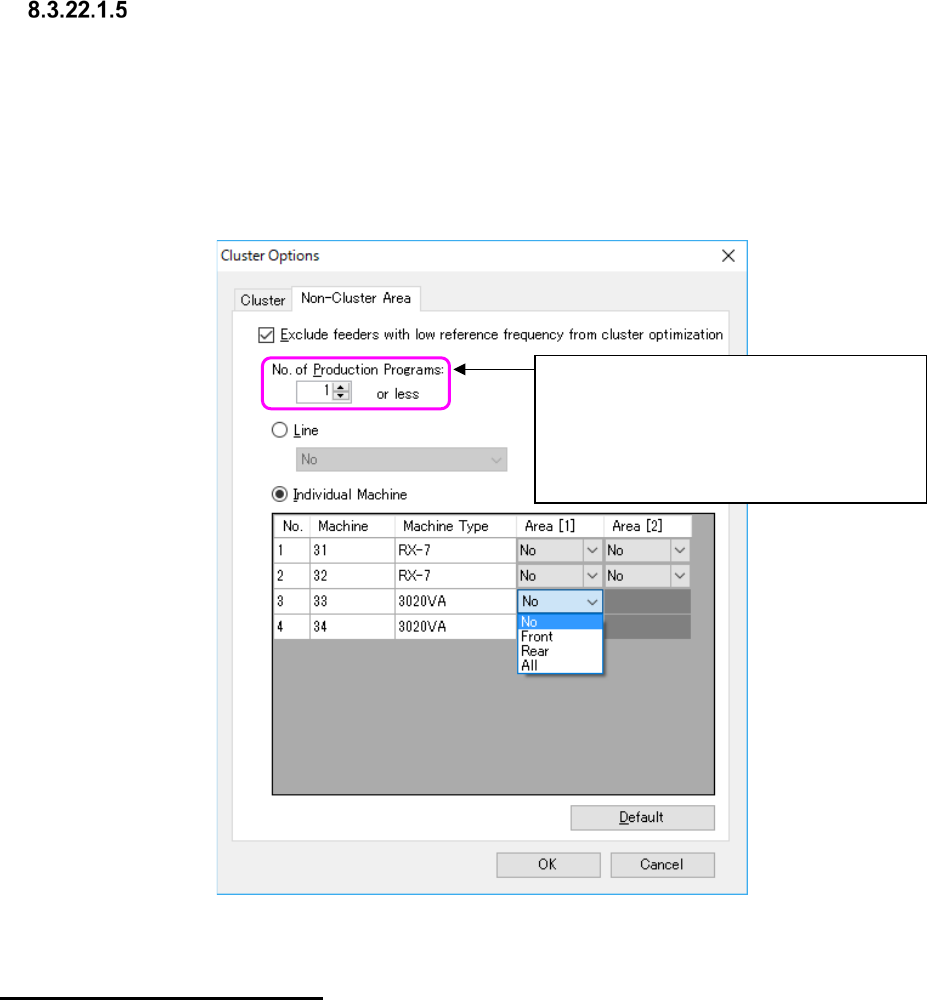
This tab allows you to specify whether to create a cluster with all components considered or assign
components used only with half or less of the set production programs to an area that is not for
cluster optimization.
When you check the check box “Exclude feeders with low reference frequency from cluster
optimization,” you can set the number of production programs not for cluster optimization and set
the area that is not to be used for a cluster. In addition, you can also set an area that is not to be
used with cluster optimization for either the entire line or each machine.
Figure 8.3-76 “Non-Cluster Area” options
Specifying a “Non-Cluster Area”
Set the area not to be used with cluster optimization for either the entire line or each machine.
When you select the “Individual Machine” radio button, you can specify an area for the existing
placement stations of FX-3 series machine or a general-purpose machine. For a model having one
placement station, you can set one area for the machine.
If all components that are not to be used with cluster optimization cannot be assigned to such a
non-cluster area, the system assigns the remaining components to the area that is to be used with
a cluster.
The system applies the area specified with this option to the effective area set with the “Area”
option to perform optimization.
For example, if the machine 1 is set to the “Front only” with the “Area” option, the machine 1
cannot use the rear side regardless of the settings of this “Non-Cluster Area” option.
* If you assign components that are used with two or more production programs to an area that is
not to be used with cluster optimization, the system does not assign them to the same pick-up
point. MTC/MTS components are not handled with this option.
Specify the condition of a component to be
assigned to an area that is not to be used
with a cluster as the number of production
programs with which the component is used.
<Range of a value to be set here>
1 to 100
JaNets Instruction Manual 8. Job Optimizer
8-44
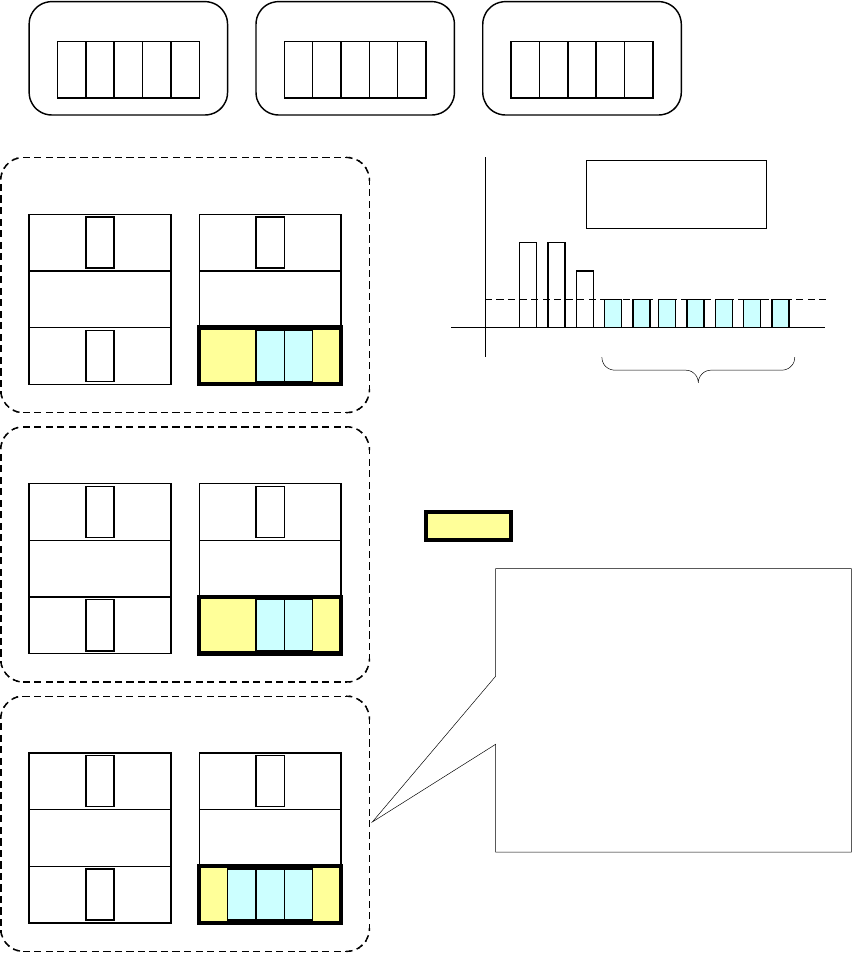
The example of the feeder assignments to a non-cluster area is shown below.
Program 1
A B
C
D E
Program 2
A
B
C
Program 3
A
B
If the front side of the Station 2 is specified as a non-cluster area
when "1" is set in the "No. of Production Programs"
0
1
2
3
4
5
A B C D E
Number of each
type of components
used with programs
F
G
H
I J
F G H I J
Since the usage frequency
is 1 or less, these
components are assigned
to a non-cluster area.
Station 1 Station 2
F GA
B
C
Program 2
Non-cluster area
Front
Front
Rear Rear
Station 1
Station 2
I
J
A
B C
Program 3
FrontFront
Rear Rear
H
Station 1
Station 2
D E
A
B
C
Program 1
Front
Front
Rear Rear
Components D, E, F, G, H, I and J are
assigned to the front side of the Station 2,
which is a non-cluster area, and any
feeders are not used with two or more
programs (that is, there are no common
feeders).
Common feeder assignment is considered
for other cluster areas with the Programs
1, 2 and 3 (a cluster is to be created).
Figure 8.3-77 Overview of a non-cluster area