JANETS_INM.pdf - 第429页
JaNets Instr ucti on Man ual 8. Job Optim izer 8- 44 The examp le of the feeder ass ignme nts to a non - cluste r are a is show n bel ow . Program 1 A B C D E Program 2 A B C Program 3 A B If the front side of the Statio…
JaNets Instruction Manual 8. Job Optimizer
8-43
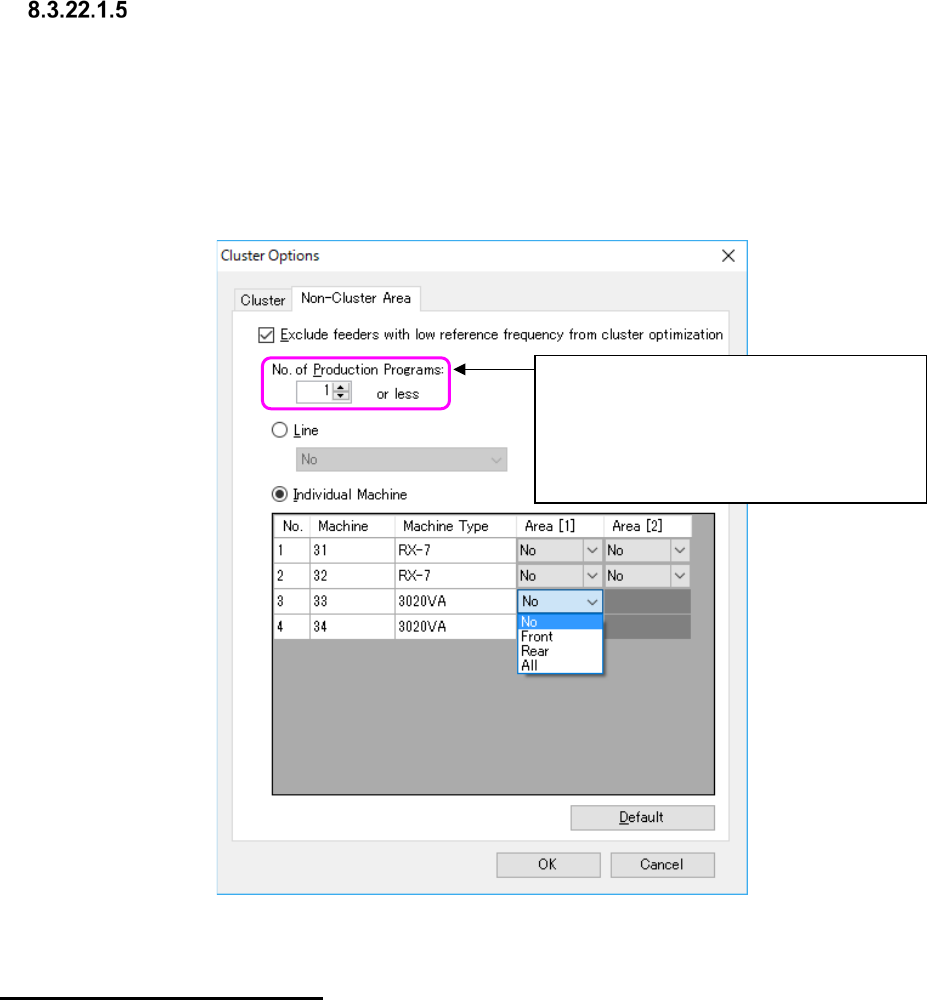
Cluster Options – Non-Cluster Area
This tab allows you to specify whether to create a cluster with all components considered or assign
components used only with half or less of the set production programs to an area that is not for
cluster optimization.
When you check the check box “Exclude feeders with low reference frequency from cluster
optimization,” you can set the number of production programs not for cluster optimization and set
the area that is not to be used for a cluster. In addition, you can also set an area that is not to be
used with cluster optimization for either the entire line or each machine.
Figure 8.3-76 “Non-Cluster Area” options
Specifying a “Non-Cluster Area”
Set the area not to be used with cluster optimization for either the entire line or each machine.
When you select the “Individual Machine” radio button, you can specify an area for the existing
placement stations of FX-3 series machine or a general-purpose machine. For a model having one
placement station, you can set one area for the machine.
If all components that are not to be used with cluster optimization cannot be assigned to such a
non-cluster area, the system assigns the remaining components to the area that is to be used with
a cluster.
The system applies the area specified with this option to the effective area set with the “Area”
option to perform optimization.
For example, if the machine 1 is set to the “Front only” with the “Area” option, the machine 1
cannot use the rear side regardless of the settings of this “Non-Cluster Area” option.
* If you assign components that are used with two or more production programs to an area that is
not to be used with cluster optimization, the system does not assign them to the same pick-up
point. MTC/MTS components are not handled with this option.
Specify the condition of a component to be
assigned to an area that is not to be used
with a cluster as the number of production
programs with which the component is used.
<Range of a value to be set here>
1 to 100
JaNets Instruction Manual 8. Job Optimizer
8-44
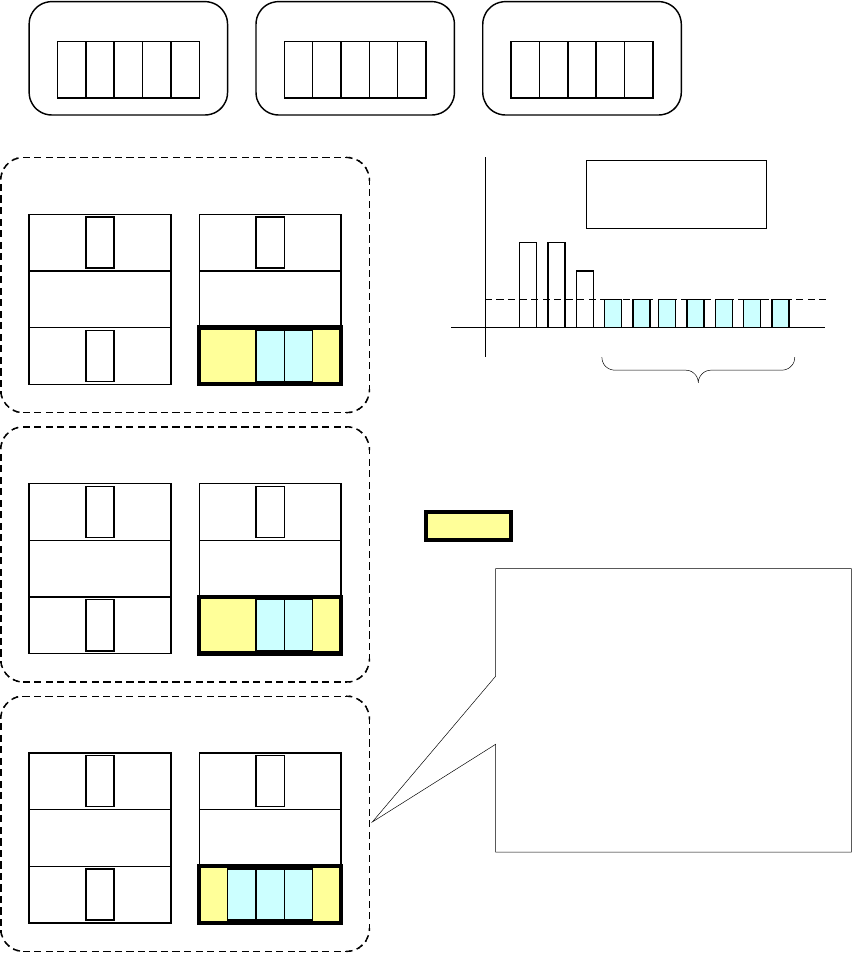
The example of the feeder assignments to a non-cluster area is shown below.
Program 1
A B
C
D E
Program 2
A
B
C
Program 3
A
B
If the front side of the Station 2 is specified as a non-cluster area
when "1" is set in the "No. of Production Programs"
0
1
2
3
4
5
A B C D E
Number of each
type of components
used with programs
F
G
H
I J
F G H I J
Since the usage frequency
is 1 or less, these
components are assigned
to a non-cluster area.
Station 1 Station 2
F GA
B
C
Program 2
Non-cluster area
Front
Front
Rear Rear
Station 1
Station 2
I
J
A
B C
Program 3
FrontFront
Rear Rear
H
Station 1
Station 2
D E
A
B
C
Program 1
Front
Front
Rear Rear
Components D, E, F, G, H, I and J are
assigned to the front side of the Station 2,
which is a non-cluster area, and any
feeders are not used with two or more
programs (that is, there are no common
feeders).
Common feeder assignment is considered
for other cluster areas with the Programs
1, 2 and 3 (a cluster is to be created).
Figure 8.3-77 Overview of a non-cluster area
JaNets Instruction Manual 8. Job Optimizer
8-45
Conditions of same parts
The conditions to be handled as same parts between programs are shown below.
● The part names are same (upper c
ase and lower case are not distinguished)
● The part types are same
● The packing style is same (the tape part includes the feeding pitch)
If any of these conditions are not fulfilled, the feeders are allocated at the different positions even
if the parts names are same.
If there are parts whose packing styles are different although the part names are same between
programs at the optimization, a warning will be displayed.
Figure 8.3-78 Setting unmatched warning
If you want to continue the optimization without any change, click "Yes".
If you want to cancel the optimization, click "No".
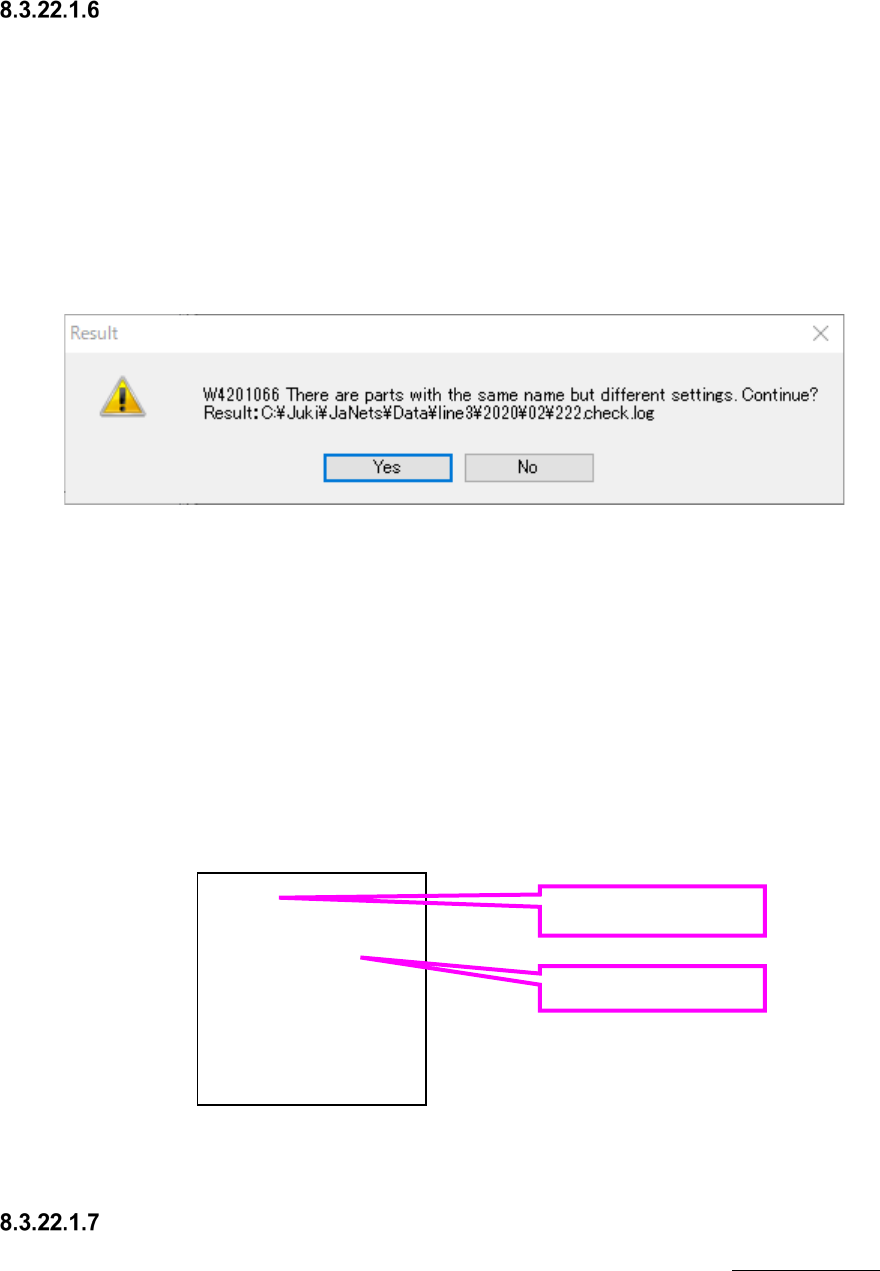
The part name whose setting is unmatched and the production program that uses it are saved in
the log file shown in the warning.
If the log file already exists, it will be overwritten.
The log shown below means that the part name chip is used for program1.iss and program3.iss,
however, the settings are unmatched, and the part name chip2 is used for program2.iss and
program4.iss, however, the settings are unmatched.
Figure 8.3-79 Content of log file
Others
For other precautions that are not provided in optimization options, refer to “7-7-4-12 Others” of
Program editor.
chip
program1.iss
program3.iss
chip2
program2.iss
program4.iss
Part name
Production program
name