JANETS_INM.pdf - 第431页
JaNets Instr ucti on Man ual 8. Job Optim izer 8- 46 8.3.22.2 “ Optimiz ing ” dia log b ox When the Opt imizatio n start s, the following “ Optimizin g ” dia log box ap pears on the scree n. Figure 8.3 - 80 “ Optimiz ing…
JaNets Instruction Manual 8. Job Optimizer
8-45
Conditions of same parts
The conditions to be handled as same parts between programs are shown below.
● The part names are same (upper c
ase and lower case are not distinguished)
● The part types are same
● The packing style is same (the tape part includes the feeding pitch)
If any of these conditions are not fulfilled, the feeders are allocated at the different positions even
if the parts names are same.
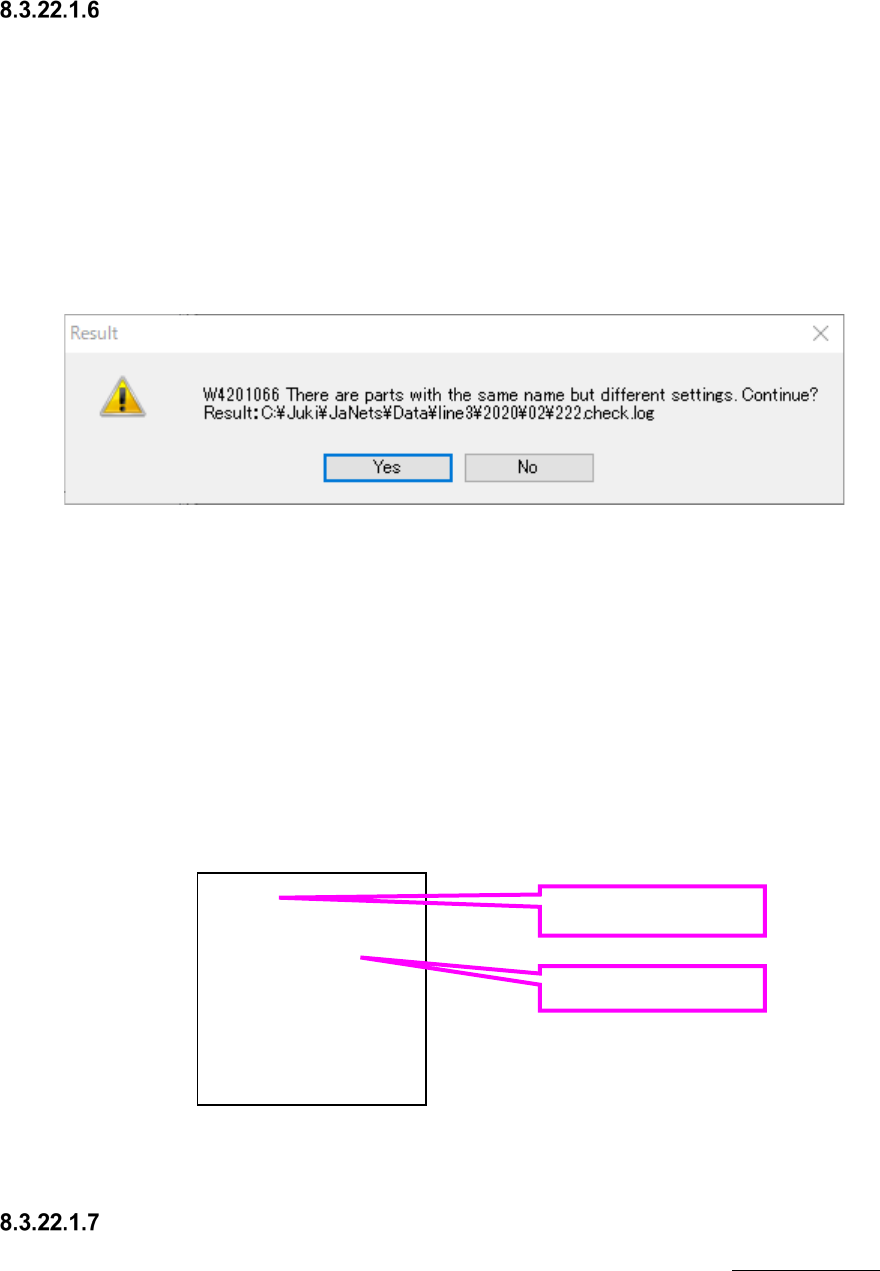
If there are parts whose packing styles are different although the part names are same between
programs at the optimization, a warning will be displayed.
Figure 8.3-78 Setting unmatched warning
If you want to continue the optimization without any change, click "Yes".
If you want to cancel the optimization, click "No".
The part name whose setting is unmatched and the production program that uses it are saved in
the log file shown in the warning.
If the log file already exists, it will be overwritten.
The log shown below means that the part name chip is used for program1.iss and program3.iss,
however, the settings are unmatched, and the part name chip2 is used for program2.iss and
program4.iss, however, the settings are unmatched.
Figure 8.3-79 Content of log file
Others
For other precautions that are not provided in optimization options, refer to “7-7-4-12 Others” of
Program editor.
chip
program1.iss
program3.iss
chip2
program2.iss
program4.iss
Part name
Production program
name
JaNets Instruction Manual 8. Job Optimizer
8-46
8.3.22.2 “Optimizing” dialog box
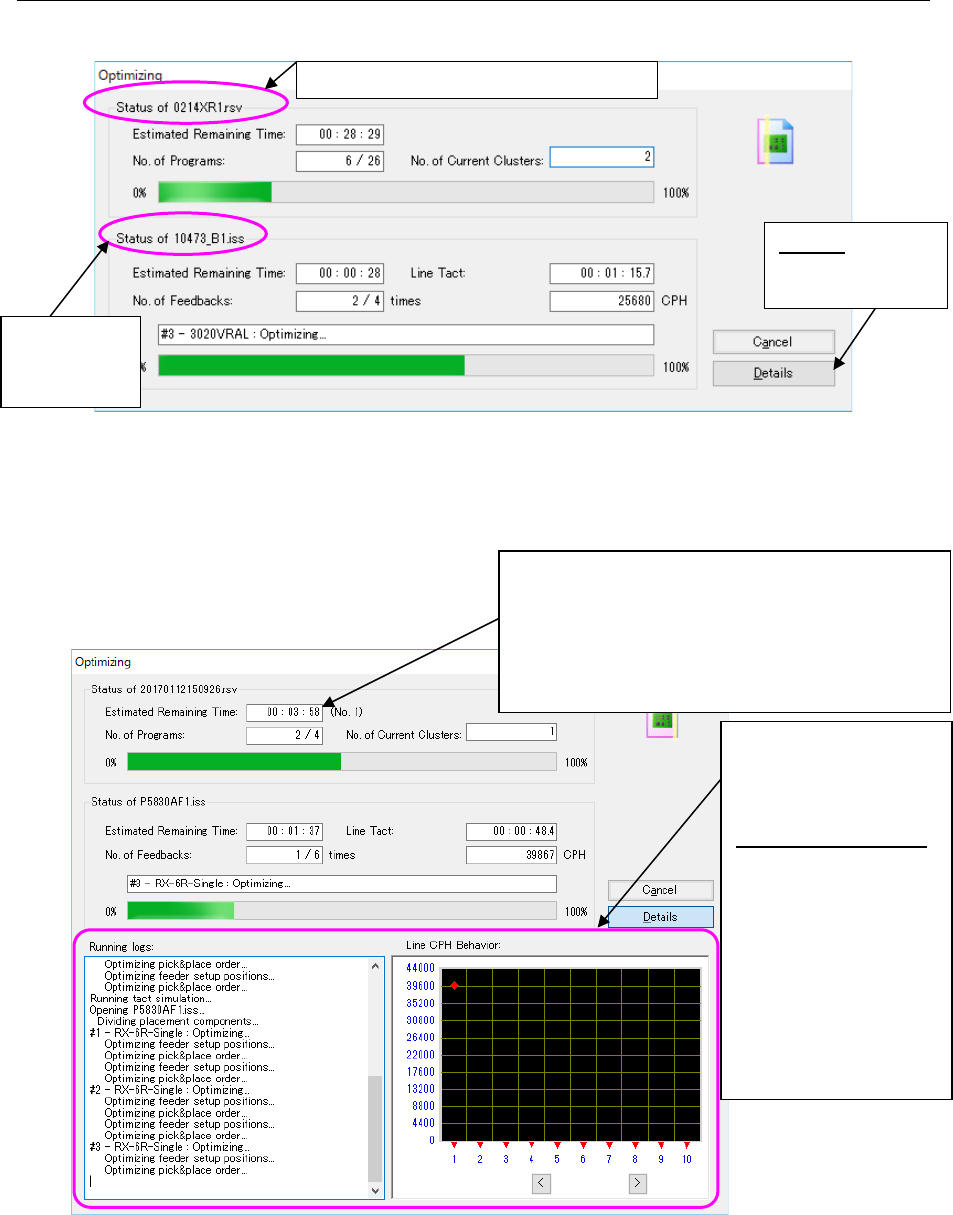
When the Optimization starts, the following “Optimizing” dialog box appears on the screen.
Figure 8.3-80 “Optimizing” dialog box (without the running logs)
displayed with the Job Optimizer
When you select the <Details> button in the above dialog box, both he “Running logs” and the
“Line CPH Behavior” are also displayed.
Figure 8.3-81 “Optimizing” dialog box (with running logs)
displayed with the Job Optimizer
When optimization is done normally, the “Optimizing” dialog box is closed, and control is returned
to the application invoking the Optimize application (Program Editor). When you invoke the
Optimize application from the Program Editor, the optimized production program is displayed on
the screen.
Production
program
(*.iss format)
Details: “detail
screen” appears
or not. Please
Reservation program (*.rsv format)
If optimization fails when the “Fix all feeder position
within a cluster” radio button is selected on the
“Multi-optimize Options” screen and you recreate the
production program, the number of times you have
recreated the program is indicated here.
If the conditions you have set are very hard to satisfy,
this number tends to be large.
Both the “Running logs”
and the “Line CPH
Behavior” are displayed
on the screen.
Line CPH Behavior :
When you enable the
Feed Back option
and then start the
Optimization
function, the
transition of the line
cycle time per
feed-back is
displayed on the
graph (unit: CPH).
JaNets Instruction Manual 8. Job Optimizer
8-47
8.3.22.3 Creating data for teaching
What is data for teaching?
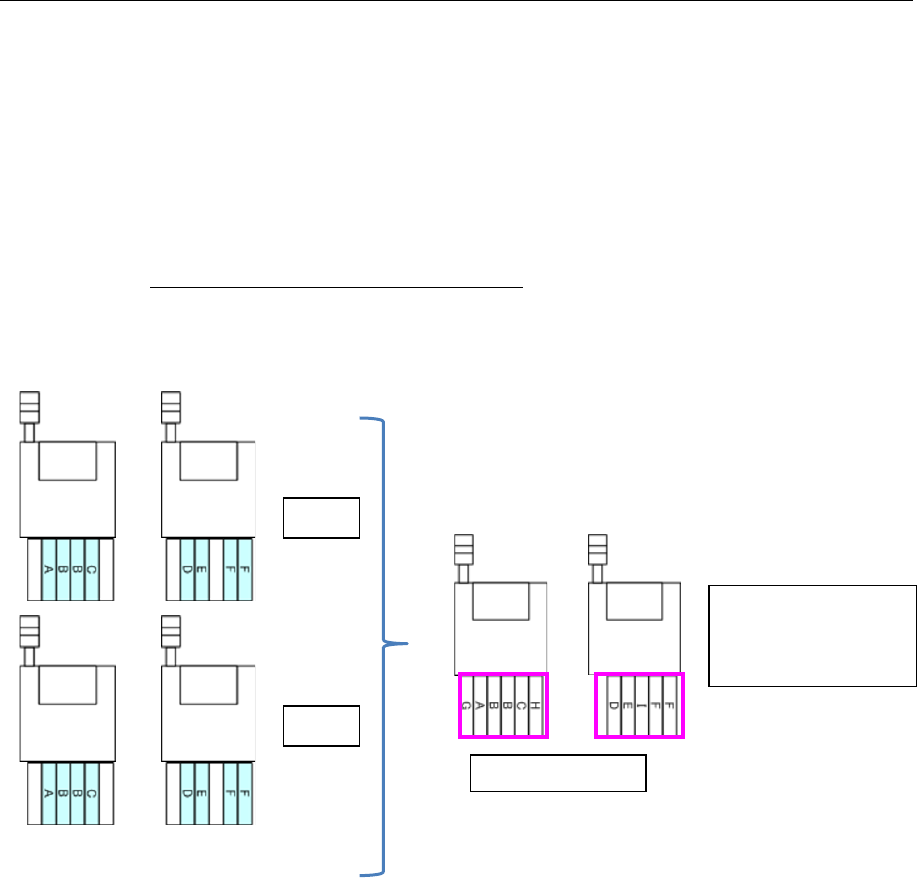
When a cluster is optimized, two or more production programs are grouped as one cluster.
When the “Creation of data for teaching” check box is checked on the “Multi-optimize option”
screen invoked from the [Optimize] command, the system creates a production program that
contains Pick data of each production program contained in one cluster. This production program
is data for teaching.
By both creating data for teaching and using the component pick-up coordinates takeover function
of the Program Downloader (the “Yes” radio button of the menu item “Inherit Pick Position” is
selected), you can teach Pick data of each cluster.
See Section 13.8.3.1 “Downloading data for teaching” for how to operate with the Program
Downloader.
Production programs in one cluster
Figure 8.3-82 Data for teaching
Data for teaching
A program containing
Pick data of “A.iss”
and that of “B.iss” is
created.
Machine 2
Machine
1
A.iss
B.iss
Machine 2
Machine
1
Machine 2
Machine
1