JANETS_INM.pdf - 第432页
JaNets Instr ucti on Man ual 8. Job Optim izer 8- 47 8.3.22.3 Creati ng d ata for teaching What is data for teaching? When a clust er is optim ized, two or more prod uctio n programs ar e grouped as one clust er . When t…
JaNets Instruction Manual 8. Job Optimizer
8-46
8.3.22.2 “Optimizing” dialog box
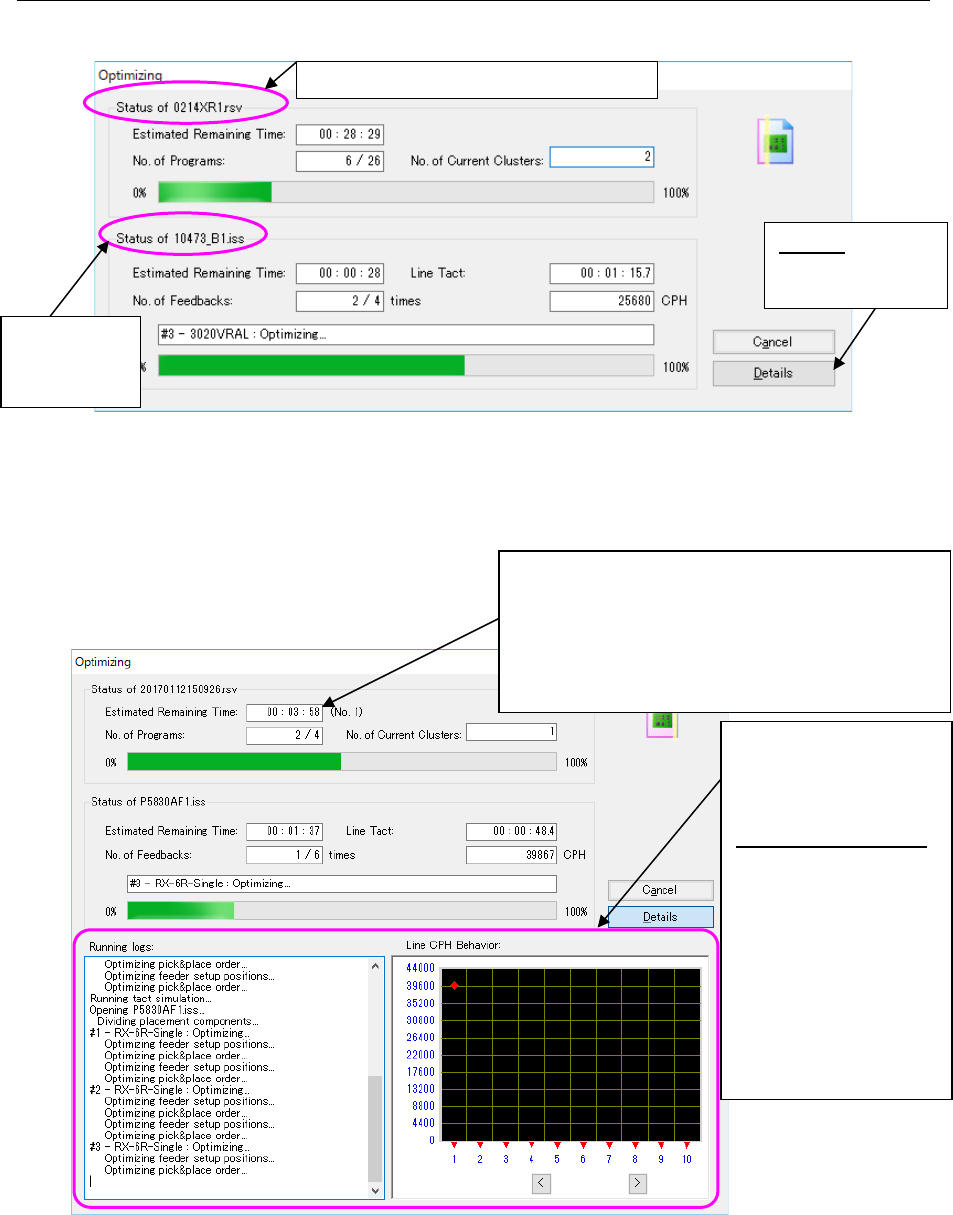
When the Optimization starts, the following “Optimizing” dialog box appears on the screen.
Figure 8.3-80 “Optimizing” dialog box (without the running logs)
displayed with the Job Optimizer
When you select the <Details> button in the above dialog box, both he “Running logs” and the
“Line CPH Behavior” are also displayed.
Figure 8.3-81 “Optimizing” dialog box (with running logs)
displayed with the Job Optimizer
When optimization is done normally, the “Optimizing” dialog box is closed, and control is returned
to the application invoking the Optimize application (Program Editor). When you invoke the
Optimize application from the Program Editor, the optimized production program is displayed on
the screen.
Production
program
(*.iss format)
Details: “detail
screen” appears
or not. Please
Reservation program (*.rsv format)
If optimization fails when the “Fix all feeder position
within a cluster” radio button is selected on the
“Multi-optimize Options” screen and you recreate the
production program, the number of times you have
recreated the program is indicated here.
If the conditions you have set are very hard to satisfy,
this number tends to be large.
Both the “Running logs”
and the “Line CPH
Behavior” are displayed
on the screen.
Line CPH Behavior :
When you enable the
Feed Back option
and then start the
Optimization
function, the
transition of the line
cycle time per
feed-back is
displayed on the
graph (unit: CPH).
JaNets Instruction Manual 8. Job Optimizer
8-47
8.3.22.3 Creating data for teaching
What is data for teaching?
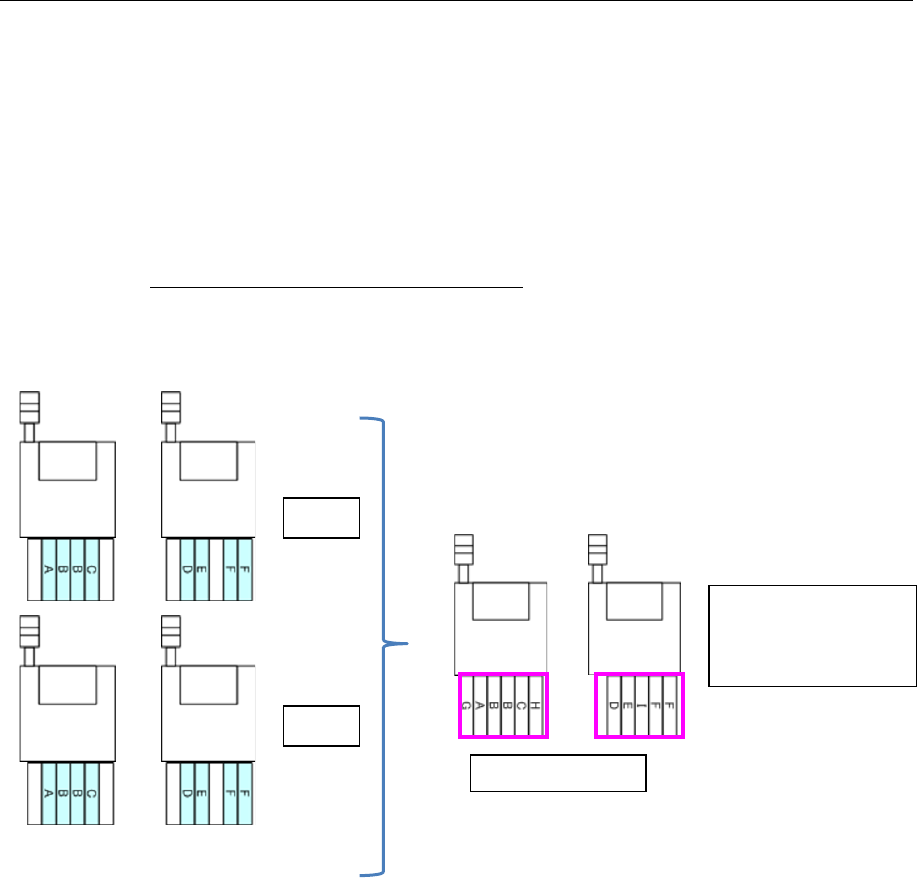
When a cluster is optimized, two or more production programs are grouped as one cluster.
When the “Creation of data for teaching” check box is checked on the “Multi-optimize option”
screen invoked from the [Optimize] command, the system creates a production program that
contains Pick data of each production program contained in one cluster. This production program
is data for teaching.
By both creating data for teaching and using the component pick-up coordinates takeover function
of the Program Downloader (the “Yes” radio button of the menu item “Inherit Pick Position” is
selected), you can teach Pick data of each cluster.
See Section 13.8.3.1 “Downloading data for teaching” for how to operate with the Program
Downloader.
Production programs in one cluster
Figure 8.3-82 Data for teaching
Data for teaching
A program containing
Pick data of “A.iss”
and that of “B.iss” is
created.
Machine 2
Machine
1
A.iss
B.iss
Machine 2
Machine
1
Machine 2
Machine
1
JaNets Instruction Manual 8. Job Optimizer
8-48
About data for teaching
Contents of data for teaching
Only Component data and Pick data that are to be used with each production program of one
cluster required for teaching operation is reflected in data for teaching. Since other data is
automatically set, be sure to use this data only for teaching operation. The skip function is
enabled for all component placement positions of Placement data.
Saving data for teaching
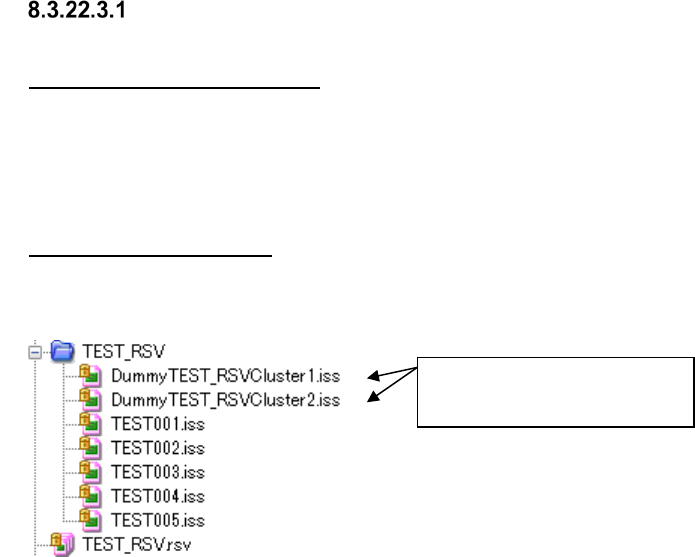
A production program and a division file are created as data for teaching under the file name
“Dummy+Reservation file name+Cluster+Cluster number,” and saved in a reservation folder.
Figure 8.3-83 Reservation file and data for teaching (displayed by Program Explorer)
Data for teaching
(For Cluster 1 and Cluster 2)