JANETS_INM.pdf - 第434页
JaNets Instr ucti on Man ual 8. Job Optim izer 8- 49 Executing creation of data for teaching When you se lect the “Cr eation of data for teac hing” check box on the “ Clust er Options” tab of t he Optimize opt ions, the …
JaNets Instruction Manual 8. Job Optimizer
8-48
About data for teaching
Contents of data for teaching
Only Component data and Pick data that are to be used with each production program of one
cluster required for teaching operation is reflected in data for teaching. Since other data is
automatically set, be sure to use this data only for teaching operation. The skip function is
enabled for all component placement positions of Placement data.
Saving data for teaching
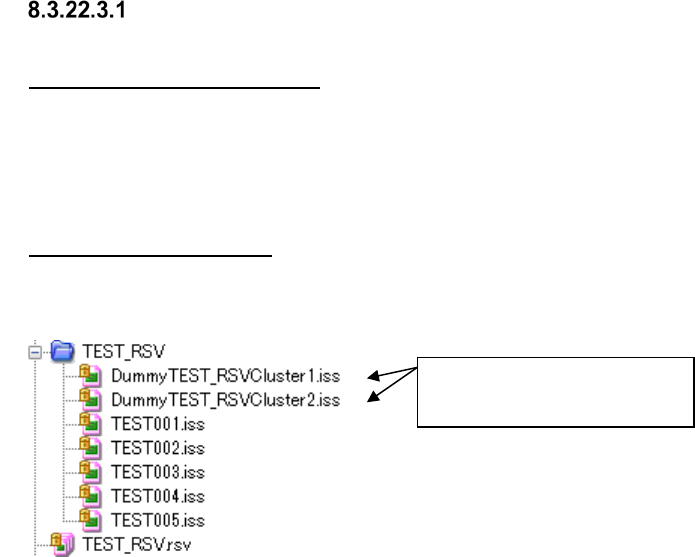
A production program and a division file are created as data for teaching under the file name
“Dummy+Reservation file name+Cluster+Cluster number,” and saved in a reservation folder.
Figure 8.3-83 Reservation file and data for teaching (displayed by Program Explorer)
Data for teaching
(For Cluster 1 and Cluster 2)
JaNets Instruction Manual 8. Job Optimizer
8-49
Executing creation of data for teaching
When you select the “Creation of data for teaching” check box on the “Cluster Options” tab of the
Optimize options, the dialog box for creating data for teaching appears on the screen automatically
after the dialog box for showing the optimize function execution status is closed.
The system creates a program and a division file that contain Pick data for each cluster created by
the Optimize function.
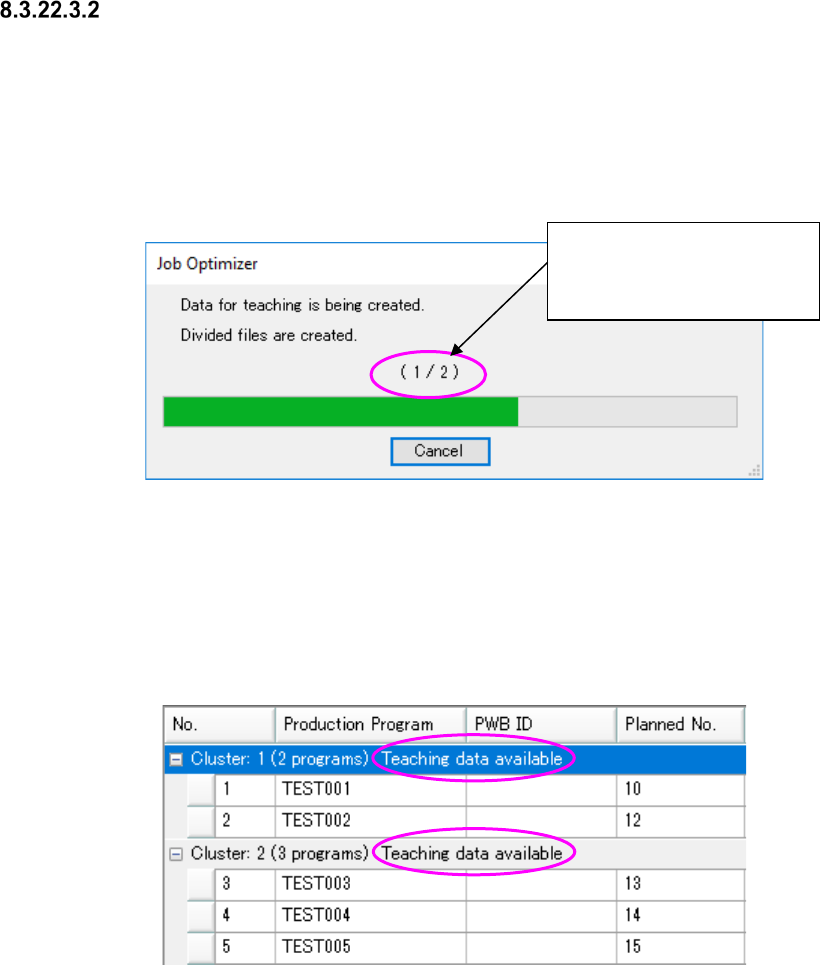
The “number of created data files for teaching”/the “number of data files for teaching to be created”
is shown here.
Figure 8.3-84 Dialog box for creating data for teaching
When the system finishes creating data normally, the dialog box shown above is closed, and then
the screen for the application that called this function (Job Optimizer) appears again.
When you press the <Cancel> button, the system aborts creating data for teaching. However,
you can save an optimized reservation file(s).
A cluster in which dummy data for teaching has been created is displayed in the reservation list as
shown below.
Figure 8.3-85 Display of a reservation list (including data for teaching)
If you have to optimize data again, for example, because the production line is changed or a
production program is added after data for teaching is created, relation between a reservation file
and data for teaching is cancelled.
The “number of created data
files for teaching”/the “number
of data files for teaching to be
created” is shown here.
JaNets Instruction Manual 8. Job Optimizer
8-50
Notes on creation of data for teaching
To create data for teaching, the following requirements have to be satisfied.
About the name of a production program to be optimized
Data for teaching (production program and division file) is output into a reservation folder
according to the following naming rule.
“Dummy+Reservation file name+Cluster+Cluster number”
(Example: When a reservation file name is TEST.rsv, and data for teaching is for the first
program of the cluster, the file whose name is “DummyTESTCluster1.iss” is output.)
Do not use a production program whose name is the same as a file whose name is created
according to the rule above.
Enabling the “Automatic batch loading of Component data”
Enable the “Automatic batch loading of Component data” on the “Set Environments” screen of the
Job Optimizer.
Setting of the requirements for the optimization options
Select the “Fix all feeder positions within a cluster” radio button on the “Multi-optimize Options”
screen.
Do not enable the “Exclude MTC/MTS from cluster optimization” check box on the “Cluster
Options” tab and the “Exclude feeders with low reference frequency from cluster optimization”
check box on the “Non-Cluster Area” tab.
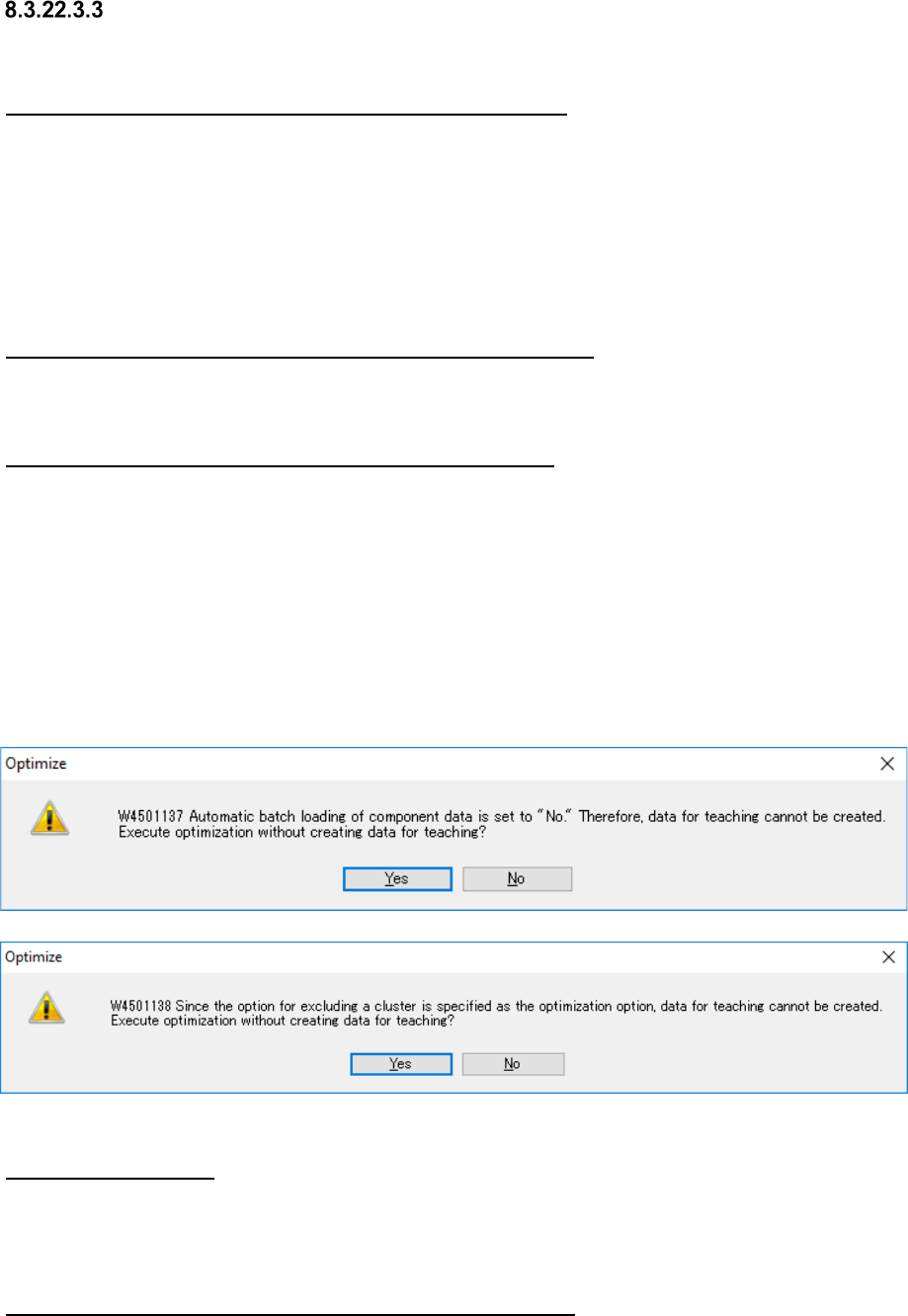
* If you do not satisfy the requirements above, the confirmation message appears on the screen
when you press the <GO> button on the “Optimize” screen.
When you select the <Yes> button for this message, the system executes optimization without
creating any data for teaching.
Figure 8.3-86 Confirmation messages
About an RX-7 series
Since an RX-7 series is equipped with the automatic component pick-up position correcting
function, the component pick-up coordinates are not taken over.
Therefore, a production program for Idle mode is output as a division file for the RX-7.
About an adhesive dispenser/printer/inspection machine
Since the system does not teach any Pick data for an adhesive dispenser/printer/inspection
machine, the component pick-up coordinates are not taken over.
Therefore, a production program for Idle mode is output as a division file for these machines.