JANETS_INM.pdf - 第437页
JaNets Instr ucti on Man ual 8. Job Optim izer 8- 52 Displayin g t he “ Number of Feeders ” dialog box T o displ ay the “ Num ber of Feeders ” dialog bo x for a reser vation fi le, follo w the instruct ion ① below with o…
JaNets Instruction Manual 8. Job Optimizer
8-51
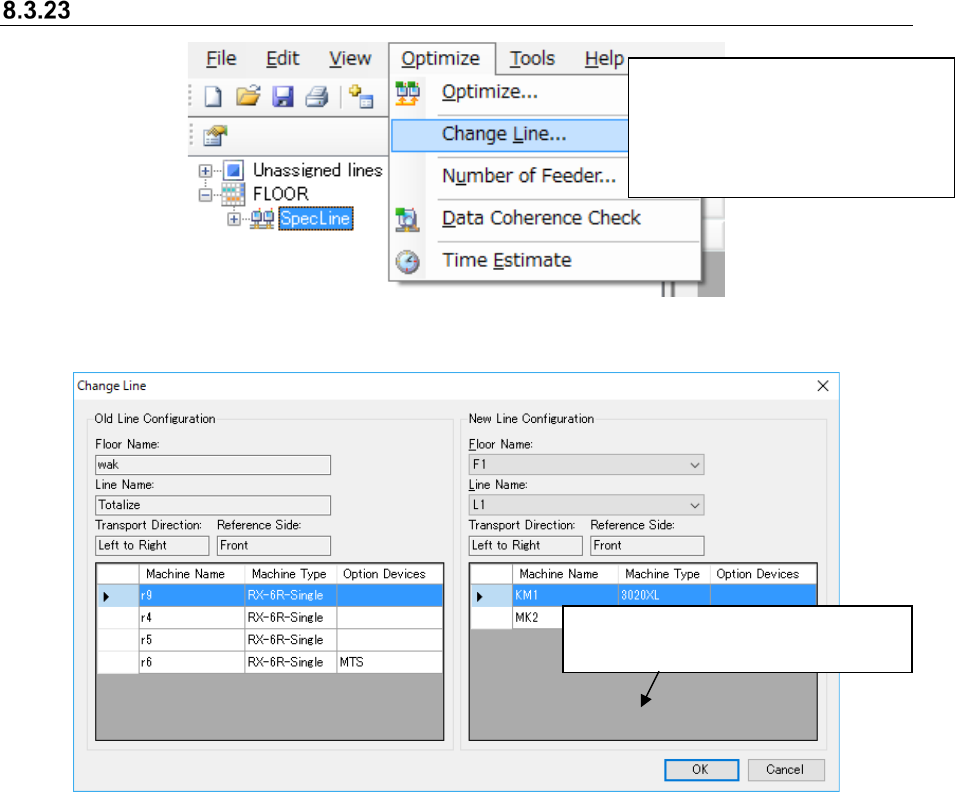
Change Line
Figure 8.3-87 Main screen – [Optimize] – [Change Line]
Figure 8.3-88 “Change Line” dialog box
When you select the [Optimize]
command, and then the [Change
Line] command from the “Optimize”
menu, the “Change Line” dialog box
appears on the screen.
This button changes the line whose
reservation file is to be optimized.
JaNets Instruction Manual 8. Job Optimizer
8-52
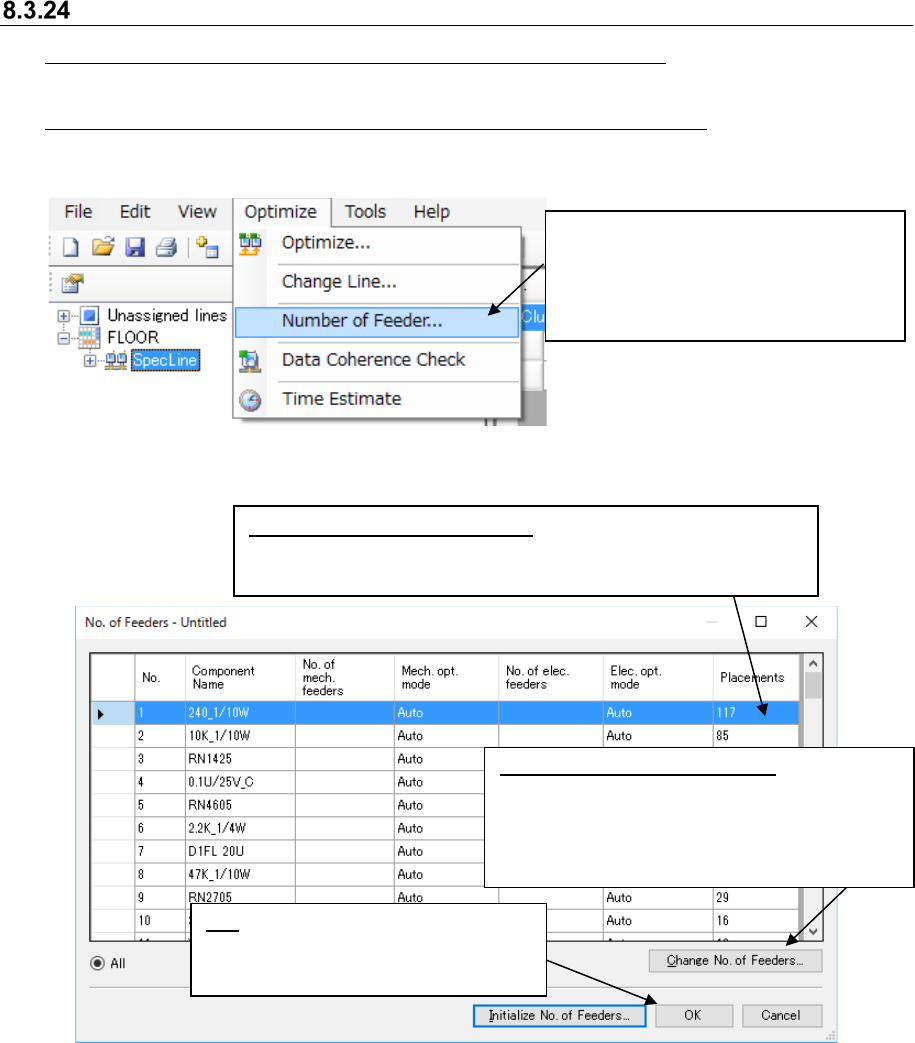
Displaying the “Number of Feeders” dialog box
To display the “Number of Feeders” dialog box for a reservation file, follow the instruction ①
below without selecting any line on the Reservation list.
To display the “Number of Feeders” dialog box for a production program, follow the instruction ①
below after selecting a line on the Reservation list.
Figure 8.3-89 Main screen – [Optimize] – [Number of Feeders]
Figure 8.3-90 “No. of Feeders” dialog box
①
Select the [Optimize] command, and
then the [Number of Feeders]
command from the “Optimize” menu.
The “ No. of Feeders” dialog box
appears on the screen.
OK: Reflects the number of components
you set in a reservation file/production
program, and closes this dialog box.
Change the number of Feeders: Select a line
and click the <Change No. of Feeders>, or
double-click a line. The “Change of No. of
Feeders” dialog box for the selected component
appears on the screen (see the description
below).
Number of placement positions:
The number of component
placement positions specified in the registered program multiplied by
the number of circuits is displayed here in case of a reservation file.
JaNets Instruction Manual 8. Job Optimizer
8-53
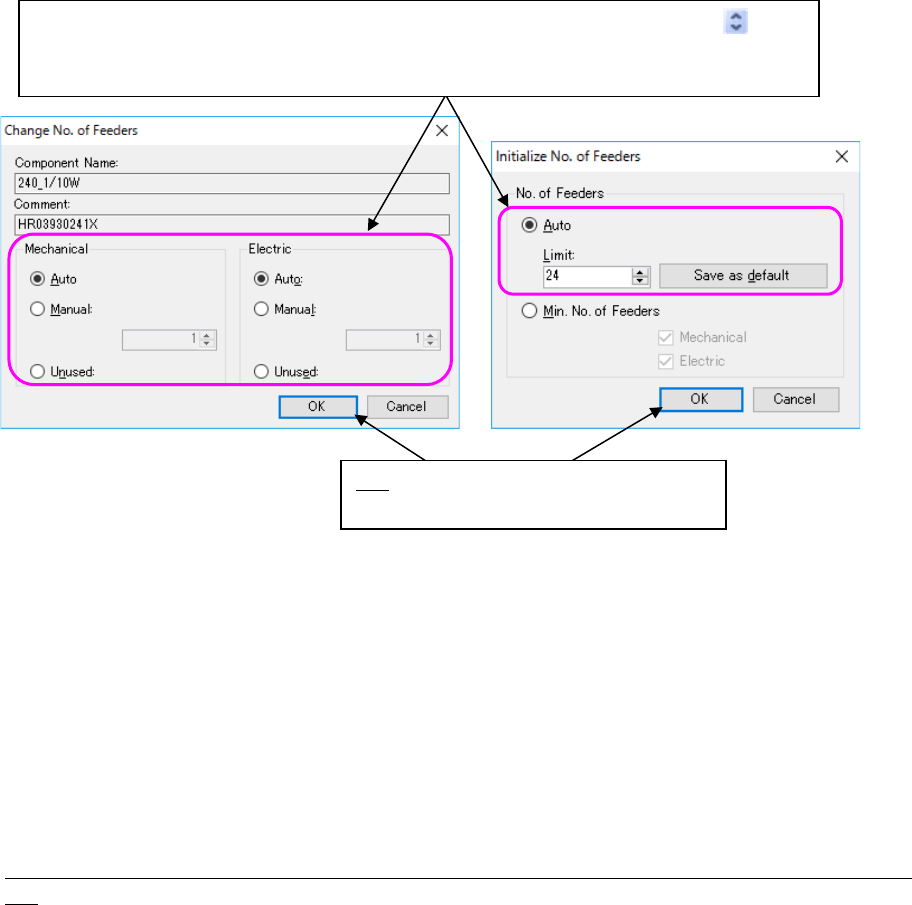
Figure 8.3-91 [Number of Feeders] – “Change No. of Feeders” and “Initialize No. of Feeders”
dialog boxes
* To specify the upper limit of the number of feeders when you select the “Auto” radio button for
the menu item “No. of Feeders,” click the <Initialize No. of Feeders> on the “Number of Feeders”
dialog box.
* Even if you select “Manual” to specify the number of feeders, if “Fix all feeder positions within a
cluster” of “Multi-optimize Options” is selected, the number of feeder that you specified would
be changed by the optimization.
* The optimization function uses settings of a reservation file (except when an option(s) of an
individual program is (are) used).
Precautions related to the number of components to be supplied when there is RX-7 series on the
line
The number of feeders cannot be controlled by the number of components to be supplied in the
optimization of RX-7 series.
Therefore, when feeders must be allocated to RX-7 series, only one feeder is allocated to the
RX-7 series.
(Except when pick data is already set in RX-7 series)
In the optimization of RX-7 series, only one feeder is allocated to make the most of the
characteristics of the head. However, when you select “The same component is allocated to the
left and right sides” of “Option depending on the model – RX-7 series”, the components with
many placement points may be arranged to the left and right stations. In this case, optimization
is executed for only the corresponding components by ignoring the setting of the number of
components to be supplied.
Select the desired radio button. When you select the “Manual” radio button, select the
button, or the [↑] key or the [↓] key to set a value. You can directly enter the desired value also.
When the line end is selected, the set default value is valid for the reservation file.
OK: Sets the desired value on the dialog
box, and closes the dialog box