JANETS_INM.pdf - 第442页
JaNets Instr ucti on Man ual 8. Job Optim izer 8- 57 Set Environments Figur e 8.3 - 100 Main screen – [T ool] – [ Set Environments ] This “Set E nvironme nts” dialog bo x allows y ou to make set tings of t he follo wing …
JaNets Instruction Manual 8. Job Optimizer
8-56
Time Estimate
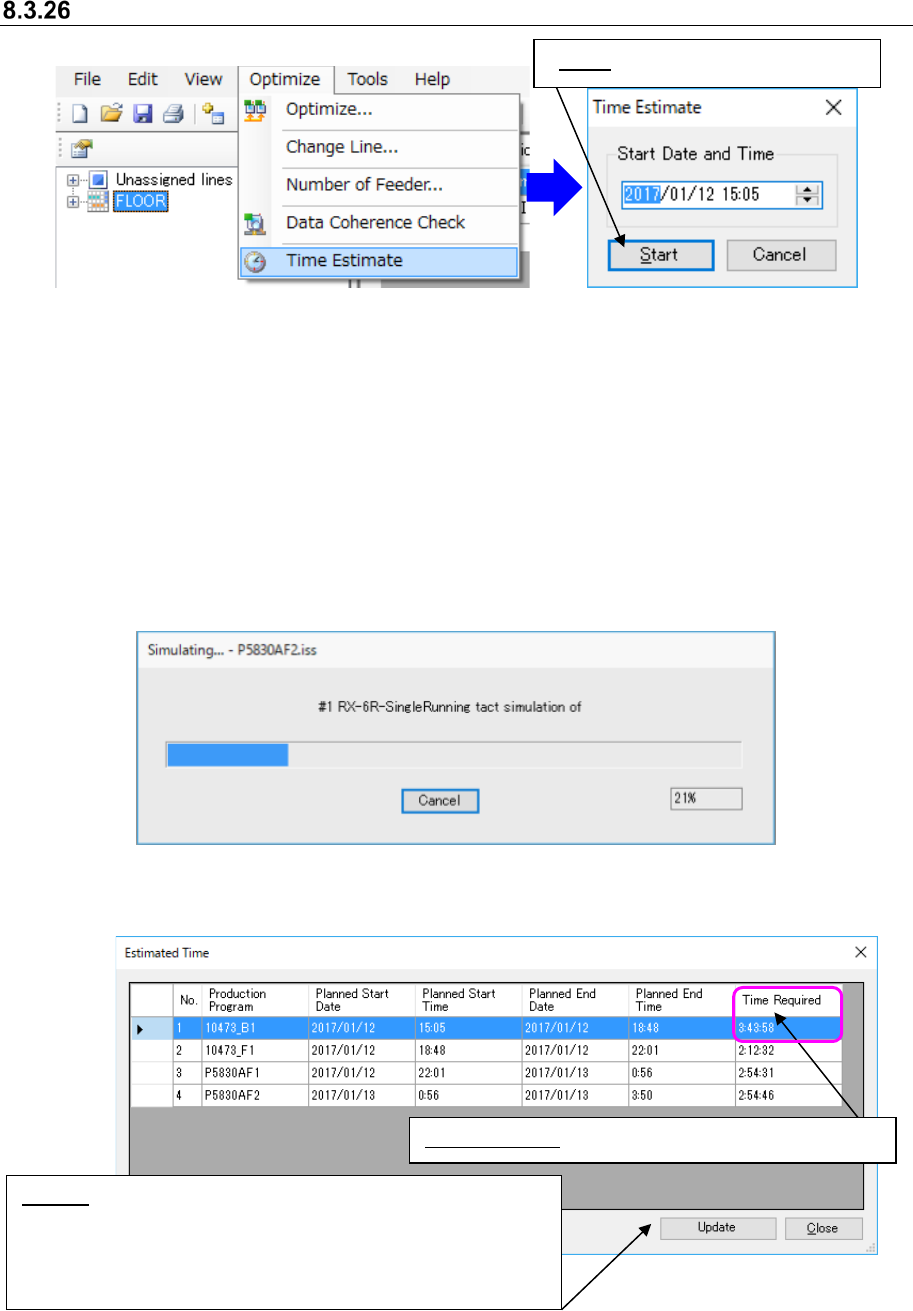
Figure 8.3-96 [Optimize] – [Time Estimate] Figure 8.3-97 “Time Estimate” dialog box
When the user operation time zone is not set yet, the message indicating the operation time zone
is not set yet appears on the screen, and you cannot execute the Time Estimate function. In such
a case, set the user operation time zone on the “Calendar” tab of the “Set Environments” dialog
box invoked from the Shop Floor Setup.
When the optimization is not executed or the production program is changed after the optimization,
the time estimate cannot be selected.
When the “Planned Start Date” and “Planned Start Time” are set for a reservation file to which you
are to execute the Time Estimate function, the system displays the date and time as the “Start
Date and Time” on the “Time Estimate” dialog box.
Figure 8.3-98 “Simulating” dialog box
After simulation, the “Estimated Time” dialog box appears on the screen.
Figure 8.3-99 “Estimated Time” dialog box
Time Required: Simulation results + Changeover time
Update: This button displays the message that asks you whether
to change the data of the reservation list. When you click the
<Update> button, the items “Planned Start Date,” “Planned Start
Time,” “Planed End Date” and “Planned End Time” of all
production programs are updated.
Start: Starts the tact simulation.
JaNets Instruction Manual 8. Job Optimizer
8-57
Set Environments
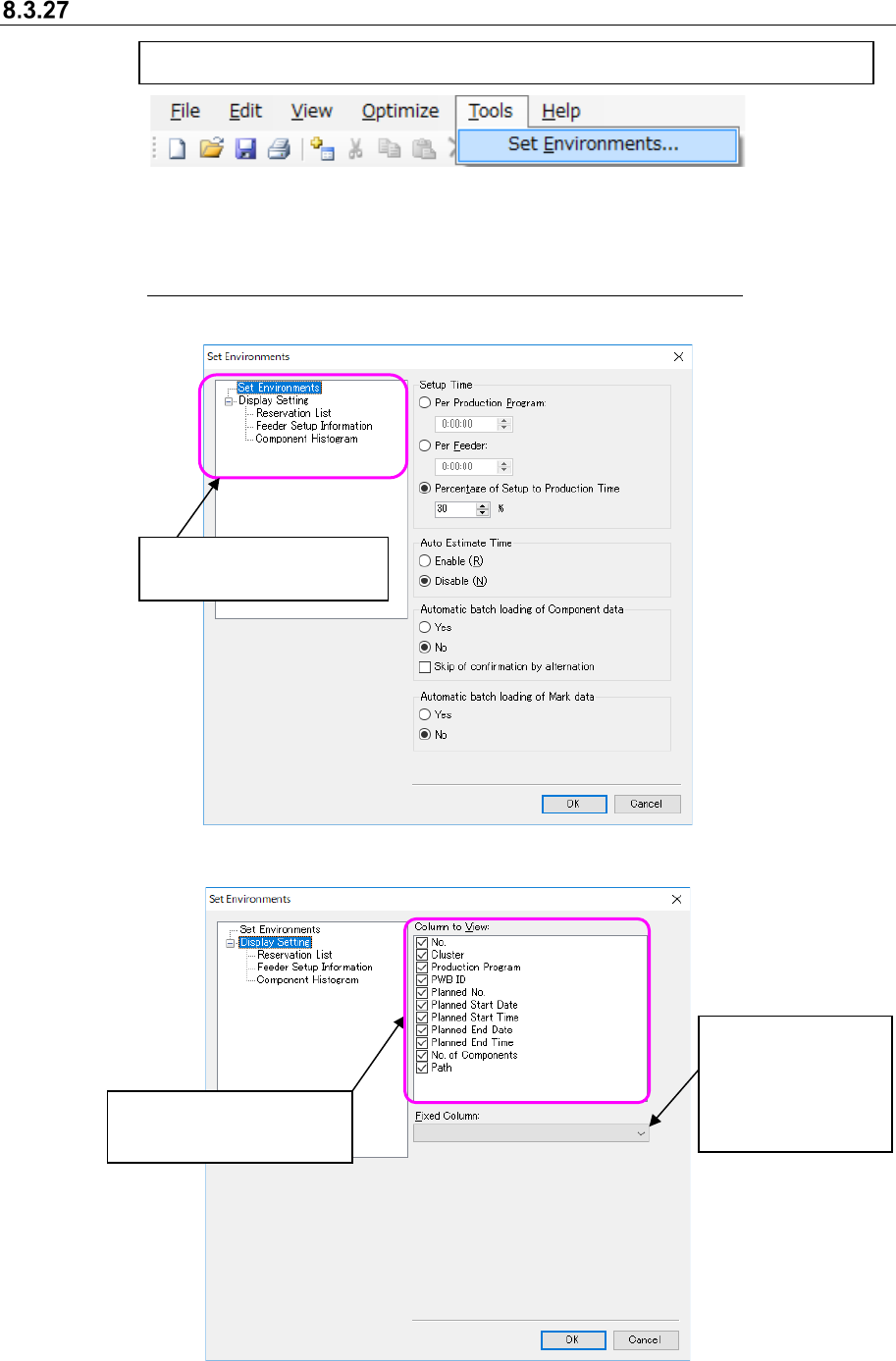
Figure 8.3-100 Main screen – [Tool] – [Set Environments]
This “Set Environments” dialog box allows you to make settings of the following items: “Setup
Time,” “Auto Estimate Time” and “Automatic batch loading of Component data/Mark data.”
See Section 7.8 “Automatically Loading Component Data/Mark Data at a Time” for automatic
batch loading.
Figure 8.3-101 “Set Environments” dialog box (“Set Environments”)
Figure 8.3-102 “Set Environments” dialog box (“Display Setting”)
[Tool] -[Set Environments] → The “Set Environments” dialog box appears on the screen.
Setting the column
to be displayed even
though you scroll the
screen horizontally
Settings for displaying or
hiding each column
Settings for displaying or
hiding each column
JaNets Instruction Manual 9. Tact Simulation
9-1
Tact Simulation 9.
What is the Tact Simulation?
This application simulates mounting of components to measure the approximate production
time of an optimized production program before the system starts producing PWBs.
Starting Up or Quitting the Tact Simulation 9.1
Follow the procedure ① or ② below.
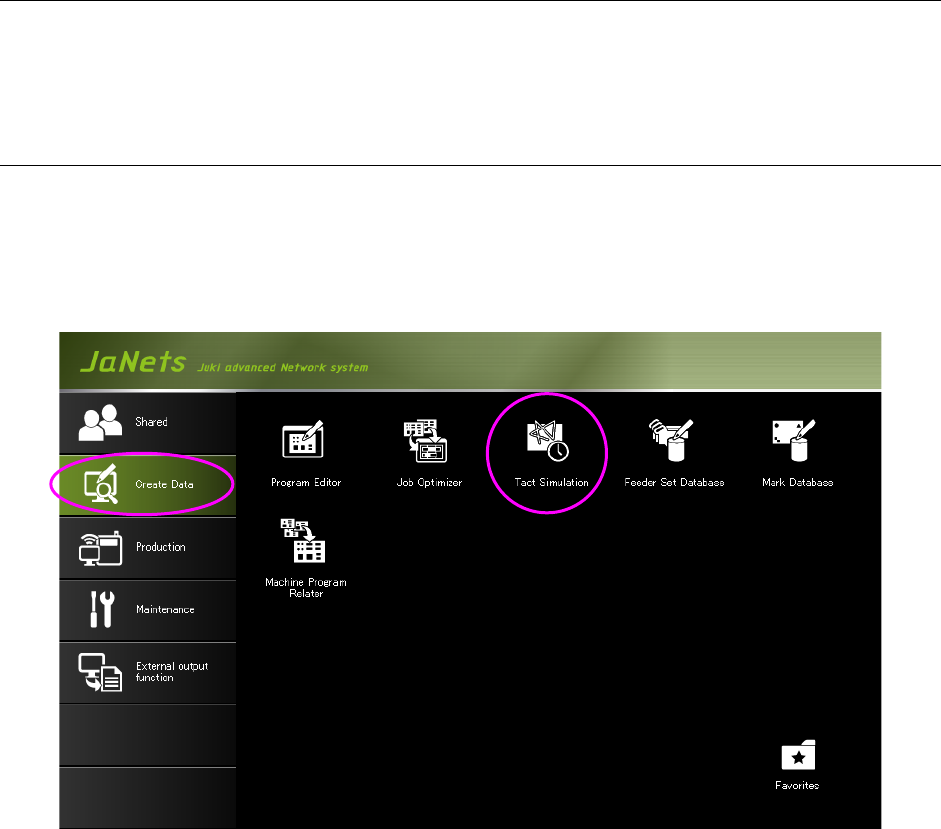
① Click the “Create Data” tab, and then the “Ta c t Simulation” icon on the JaNets Launcher
screen. After the Tac t Simulation starts up, you have to specify a production program to be
used.
Figure 9.1-1 Starting up the Tact Simulation from the JaNets Launcher