JANETS_INM.pdf - 第447页
J aN et s Instr ucti on M anua l 9. Tact S imul at ion 9-5 9.3.1. 2 When there is not any producti on program The b lank pr ogres s w indow app ear s on the sc reen. Figur e 9.3 -3 Progress window ( bla nk) an d to ol ba…
JaNets Instruction Manual 9. Tact Simulation
9-4
Operating Procedure 9.3
“Simulation Conditions” setting screen 9.3.1
9.3.1.1 When there is a production program
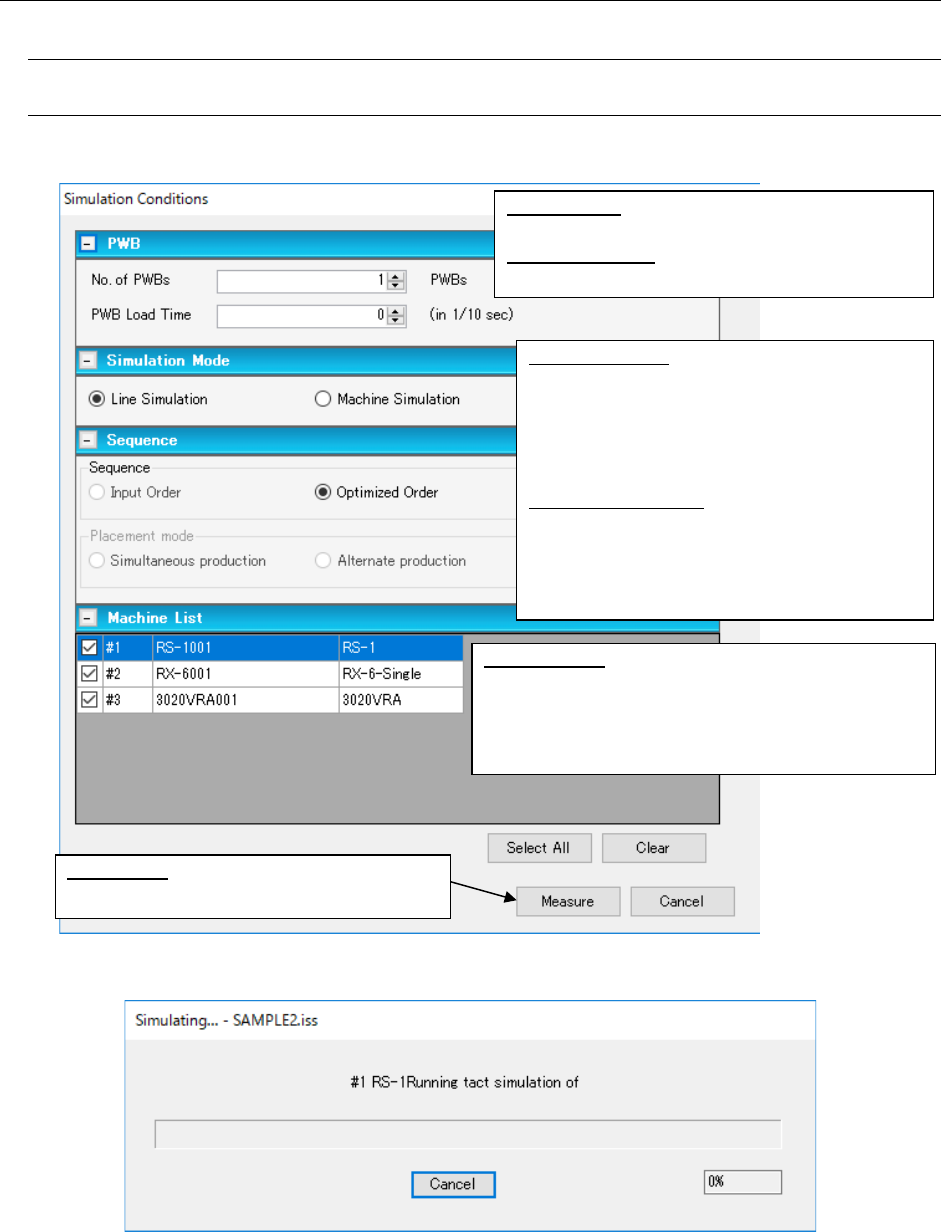
The “Simulation Conditions” screen appears.
Figure 9.3-1 “Simulation Conditions” setting screen.
Figure 9.3-2 “Simulating” screen
When the system finishes measuring, the “Result and Log” screen appears.
No. of PWBs: Enter the number of PWBs whose
component placement to be simulated.
PWB Load Time: Enter the interval for loading a
PWB.
Line Simulation: Measures the entire line. The
“Optimized Order” radio button is selected as
the “Sequence” and you cannot change this
setting. The system simulates transporting a
PWB and measures the required time only for
a machine not selected.
Machine Simulation: Measures machines only.
You can select either the “Input Order” radio
button or the “Optimized Order” radio button
as the “Sequence.” When you select two or
more machines, the <Measure> is disabled.
Machine List: Select a machine(s) to be measured.
When you click the <Select All> button, the system
selects all machines. Note that this <Select All>
button is enabled only you select the “Line Simula-
tion” radio button.
<Measure>: Starts measuring and displays
the “Simulating” dialog box on the screen.
JaNets Instruction Manual 9. Tact Simulation
9-5
9.3.1.2 When there is not any production program
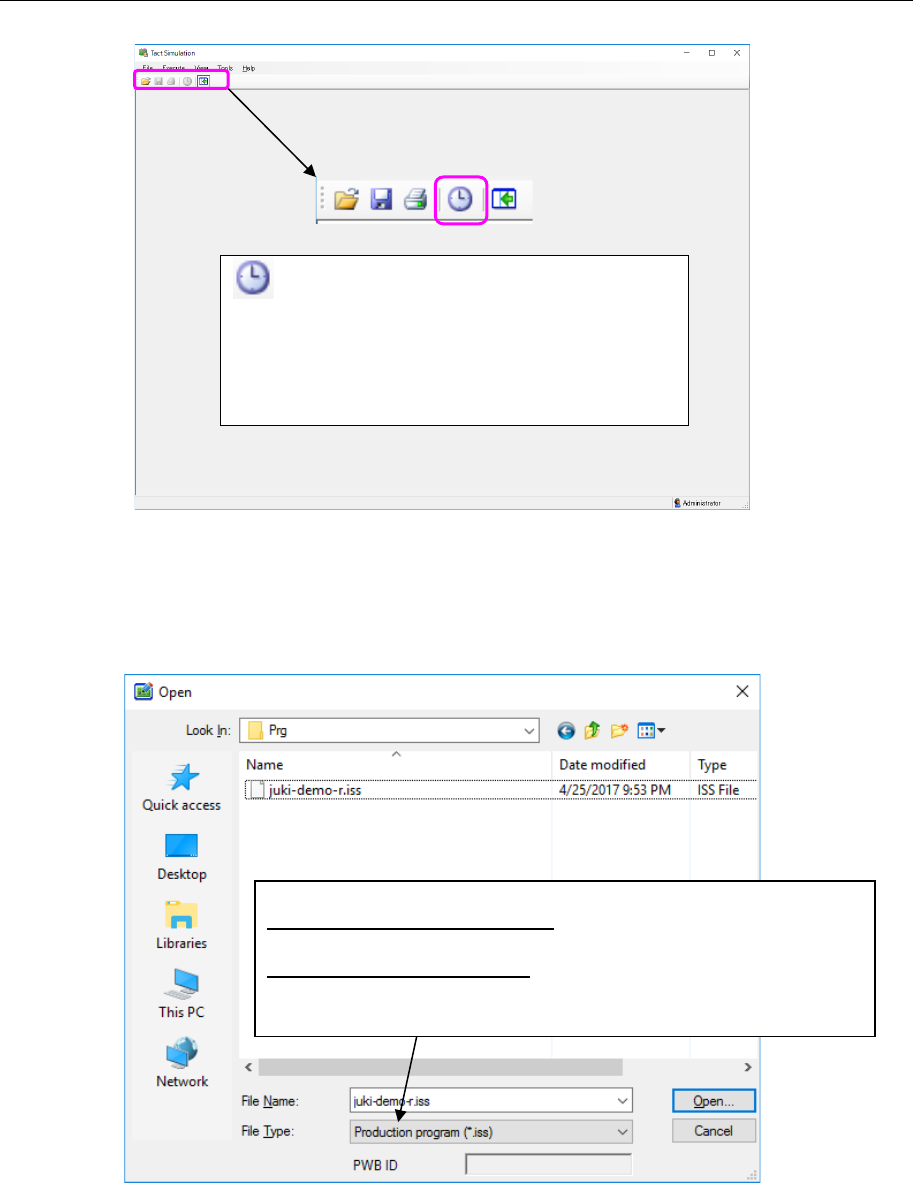
The blank progress window appears on the screen.
Figure 9.3-3 Progress window (blank) and toolbar
Opening a production program/result and log file 9.3.1.2.1
Select the [File] command from the menu bar of the progress window, and then the [Open]
command from the “File” menu. Specify a file to be loaded on the displayed “Open” dialog box.
Figure 9.3-4 “Open” dialog box for a production program
* If the specified file is damaged, you cannot open any file.
Measure button: displays the “Simulation Con-
ditions” screen.
* When the Measure button above is displayed in
gray, you cannot display any simulation screen.
You have to load a production program into the
system (see Section 4.3.1.2.1).
Specify a file to be loaded.
To specify a production program: Select the [Execute] command on the
progress window. The “Measure” menu command is enabled.
To specify a result and log file: Display the loaded log on the “Result and
Log” screen, and select the [Execute] command on the progress win-
dow. The [Start] menu command is enabled.
JaNets Instruction Manual 9. Tact Simulation
9-6
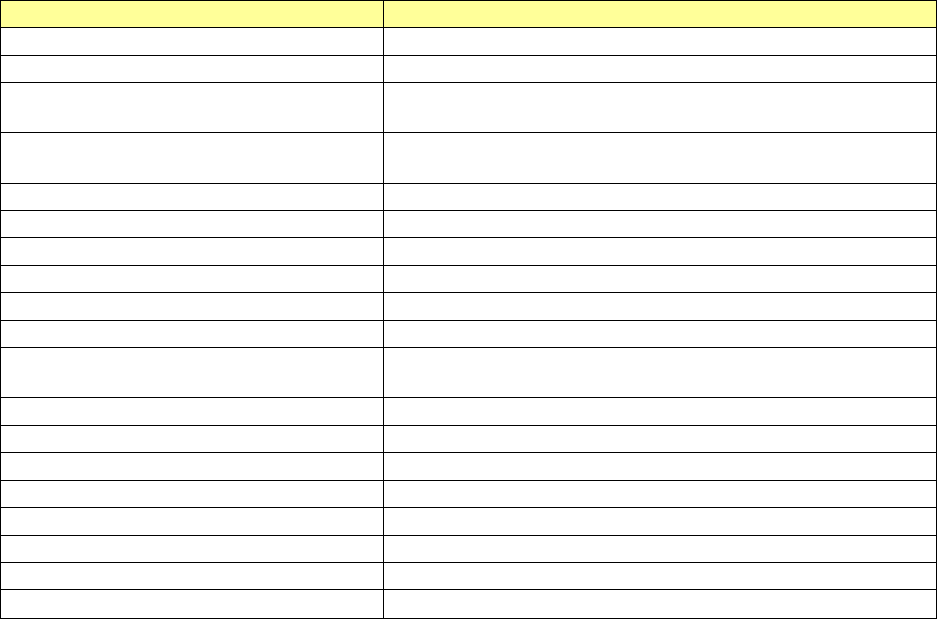
The files that can be read are as follows:
Table 9.3-1 Readable files
File types
Description
Production program (*.iss)
Production program file created with JaNets
Result log (*.gxl)
Log file simulated with Tact simulation
Optimized division file (*.i01 to *.i10)
Division file for each machine created after optimization with
JaNets Program Editor
Optimized division file (*.m01
to
*.m10)
Division file for each machine created with the LC-01 Pro-
gram Editor
2050, 2050R format file (*.e45)
Production program file created with 2050 or 2050R
2055R, 2060, 2060R format file (*.e46)
Production program file created with 2050, 2060, or 2060R
2070 format file (*.e47)
Production program file created with 1070 (*) or 2070
2080, 2080R format file ( *.e48)
Production program file created with 2080 or 2080R
3020, 3020R format file (*.x21)
Production program file created with 3020 or 3020R
3010,3010A format file (*.x11)
Production program file created with 3010 or 3010A
3020V, 3020VR, 3020VA, 3020VRA
format file (*.x21)
Production program file created with 3020V, 3020VR, 3020VA
or 3020VR
FX-3, FX-3R, FX-3RA format file (*.x01)
Production program file created with FX-3, FX-3R or FX3RA
RX-6, RX-6R format file (*.j01x)
Production program file created with RX-6 or RX-6R
RX-7 format file (*.prd)
Production program file created with RX-7
RS-1 format file (*.s01x)
Production program file created with RS-1
2077 format file (*.x4d)
Production program file created with 2077
JM-10 format file (*.e71)
Production program file created with JM-10
JM-20 format file (*.X41)
Production program file created with JM-20
JM-100 format file (*.s30x)
Production program file created with JM-100
* When you specify an optimized division file and a production program in main unit format, specify
a line by a line explorer before file reading.
* When measuring the optimized division file and the production program in main unit format, sim-
ulation is performed in an "independent simulation" mode.