JANETS_INM.pdf - 第471页
J aN et s Instr ucti on M anua l 10 . Feed er S et D at a ba se 10 - 15 Ob tainin g (importin g) extern al data 10.3.13 Y ou c an l oad t he sp ecif i ed pr oducti on p rog ram data, and t hen r egi ster it s Pic k data …
JaNets Instruction Manual 10. Feeder Set Database
10-14
Displaying the feeder layout 10.3.12
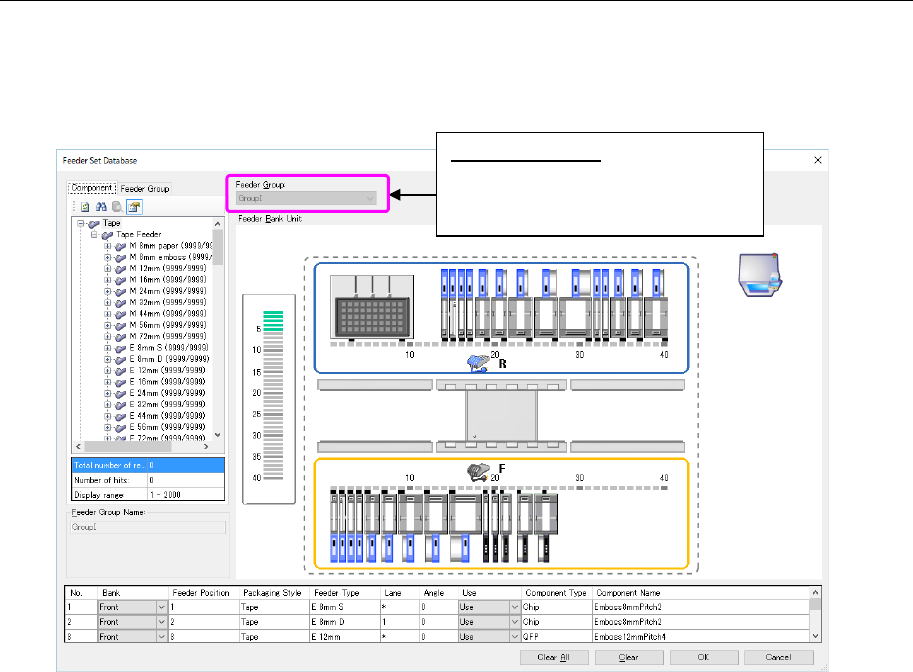
You can display the layout of the registered feeder set data for each feeder group.
Select one feeder group whose layout you want to display, and select the [View] command from
the menu bar, and then the [Feeder Layout] command from the “View” menu. The layout screen
appears.
Figure 10.3-17 “Feeder Layout” screen
* You cannot change the feeder layout or other settings on this screen.
The basic operations are the same as the operations for regular feeder setting from the shop
floor setup. However, the following restrictions are provided.
- The regular group cannot be edited. It is only displayed.
- Feeder resources are neither added nor subtracted.
- A feeder group cannot be arranged from the feeder group.
- The display cannot be changed from this screen to another feeder group. (After the end of
this screen, go back to the feeder setting data base and select a group to be displayed
anew.)
- The functions that are different from Shop floor setup/regular feeder setting screen layout
are not supported.
Feeder Group(G):
The feeder group name that displays
a layout drawing is displayed in a
light color.
JaNets Instruction Manual 10. Feeder Set Database
10-15
Obtaining (importing) external data 10.3.13
You can load the specified production program data, and then register its Pick data in the da-
tabase as a feeder group. To obtain (import) external data, perform one of the three operations
below.
1. Select the [File] command from the menu bar, and then the [Import Data] command from
the “File” menu.
The “Open” dialog box appears on the screen. Select a production program to be added
(you cannot select two or more programs), and then select the <Open> button. The system
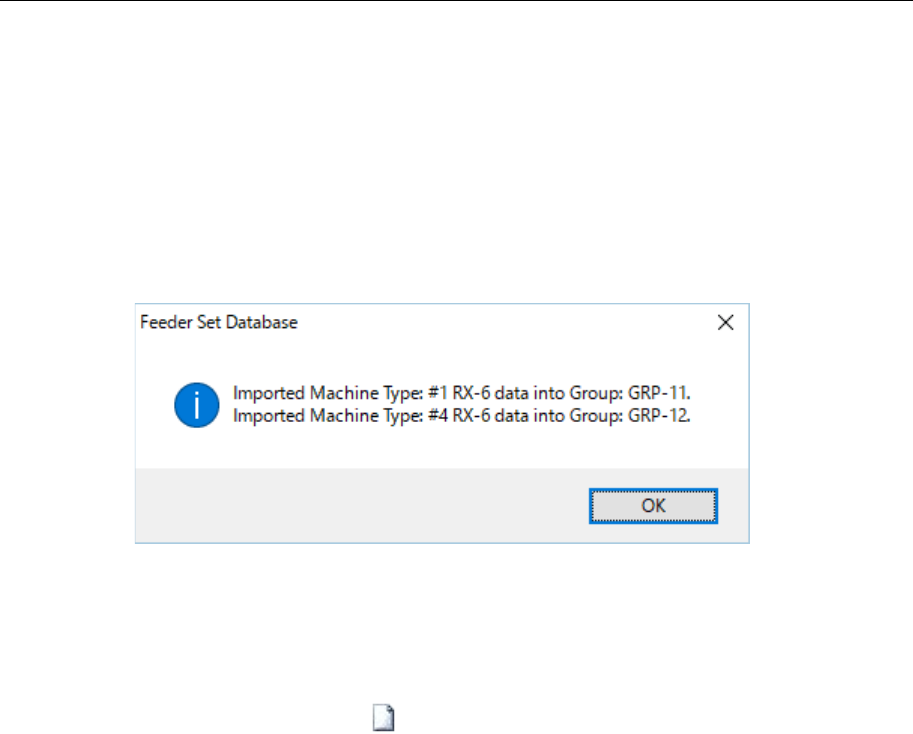
performs the data obtaining process. When it finishes obtaining data, the message indi-
cating that data finishes being obtained appears on the screen.
Figure 10.3-18 Message indicating that data finishes being obtained
* Data you can obtain is component pick-up information stored in the selected production pro-
gram, and it is loaded as a feeder group of each machine. A group name from “GRP1” is au-
tomatically assigned to a feeder group by default.
2. Press the “Import Data” button ( ) of the toolbar.
The “Open” dialog box appears on the screen. Select a production program to be added
(you cannot select two or more programs), and then select the <Open> button. The system
performs the data obtaining process. When it finishes obtaining data, the message indi-
cating that data finishes being obtained appears on the screen.
JaNets Instruction Manual 10. Feeder Set Database
10-16
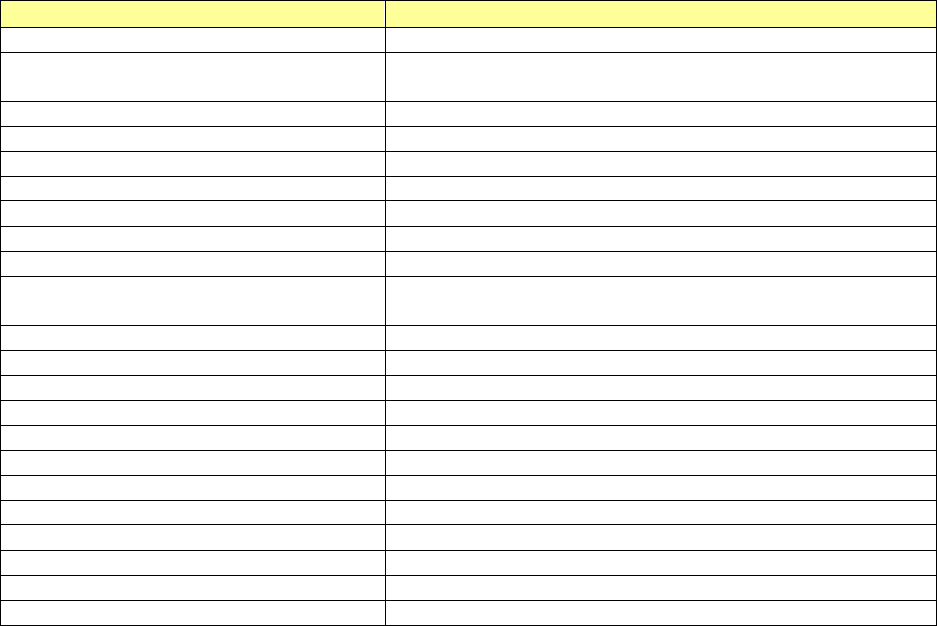
The files that can be imported are as follows:
Table 10.3-1 Importable external data
File types
Description
Production Program ( *.iss)
Production program file created with JaNets
Optimized division file (*.i01 to
*.i10)
Division file for each machine created after optimization with Pro-
gram Editor
HLC format file (*.h8h, *.h7h, *h5h,*.h4h)
Production program file created with HLC
2050, 2050R format file (*.e45)
Production program file created with 2050 or 2050R
2055R, 2060, 2060R format file (*.e46)
Production program file created with 2050, 2060 or 2060R
2070 format file (*.e47)
Production program file created with 1070 (*) or 2070
2080, 2080R format file (*.e48)
Production program file created with 2080 or 2080R
3020, 3020R format file (*.x21)
Production program file created with 3020 or 3020R
3010,3010A format file (*.x11)
Production program file created with 3010 or 3010A
3020V, 3020VR, 3020VA, 3020VRA format
file (*.x21)
Production program file created with 3020V, 3020VR, 3020VA or
3020VR
FX-3, FX-3R, FX-3RA format file (*.x01)
Production program file created with FX3, FX3R or FX-3RA
RX-6, RX-6R format file (*.j01x)
Production program file created with RX-6 or RX-6R
RX-7, RX-7R format file (*.prd)
Production program file created with RX-7 or RX-7R
RS-1, RS-1R format file (*.s01x)
Production program file created with RS-1 or RS-1R
2077 format file (*.x4d)
Production program file created with 2077
JM-10 format file (*.e71)
Production program file created with JM-10
JM-20 format file (*.X41)
Production program file created with JM-20
JM-100 format file (*.s30x)
Production program file created with JM-100
HLC permanent text file (*.txt)
Permanent text file created with HLC
Reservation file (*.rsv)
Reservation file created with IS, IS Lite and JaNets
IS server export file (*zip)
File for the feeder set database exported from IS DB2
csv files (*.csv)
csv file created with text output from the feeder set database
* A reservation file imports the cluster data created when cluster optimization is performed with
the Job Optimizer. For this reason, it is necessary that cluster optimization is being performed
in the reservation file.
* When importing a HLC permanent text file and a reservation file, it is necessary that the
component being assigned to the pick position is registered in the component database.
* When a file including an unsupported model is opened, this is displayed as an error and the
processing is discontinued.
* The IS server export file is intended for a file output by DB2 data export tool supplied by JUKI,
having a version of IS server Ver12.10A or later.