JANETS_INM.pdf - 第487页
JaNets Instr ucti on Man ual 12 . Machine Program R elater 12 -5 Procedure for manual re lating Perform the op eratio ns from ① to ④ below . When both th e “ Product ion Pro gram ” field and the “ Line Name ” f ield are …
JaNets Instruction Manual 12. Machine Program Relater
12-4
Operating Procedure
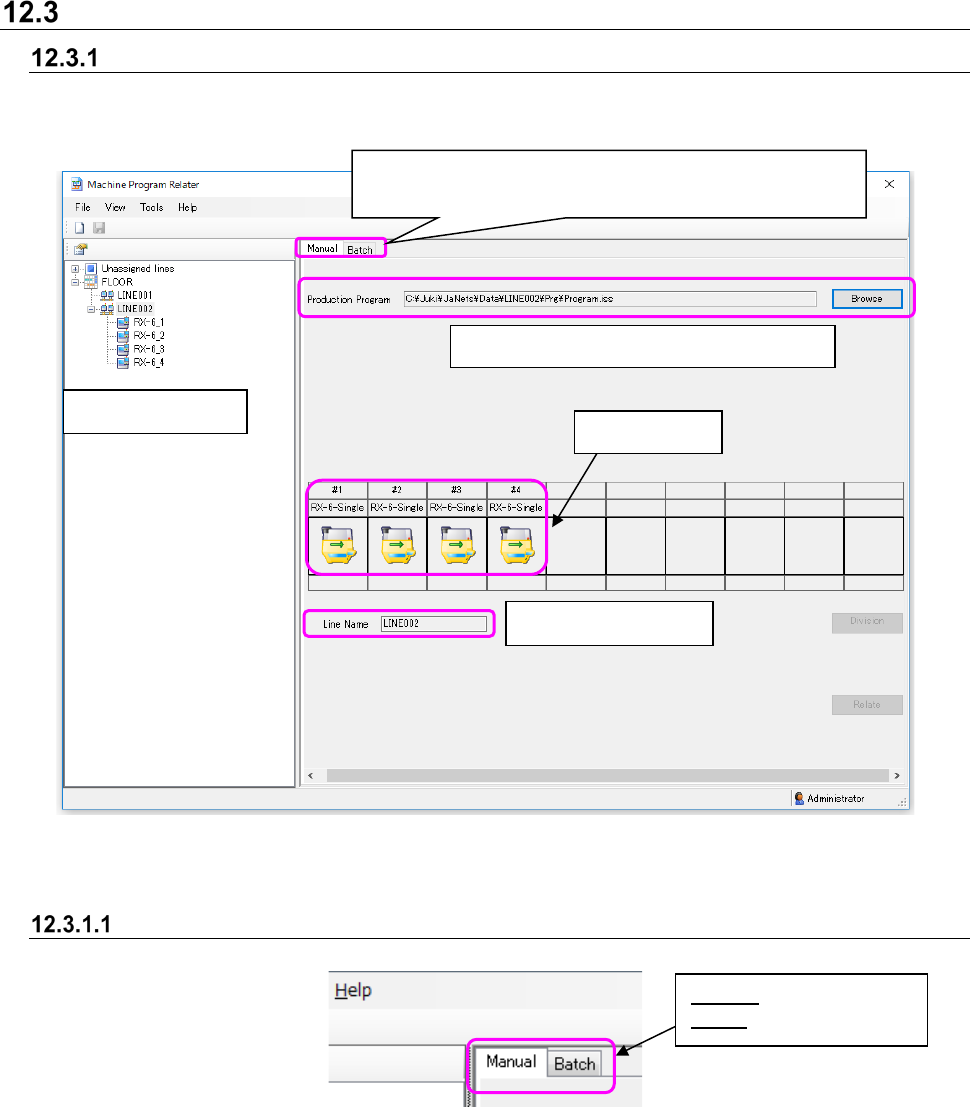
Configuration of the main screen
There are two methods for relating files: “manual relating” and “batch relating.” Switch the method
by selecting the corresponding tab.
Figure 12.3-1 Main screen (for manual relating files)
Tab for selecting the relating method
Figure 12.3-2 Tab for selecting the relating method
* If you click another tab (not selected at the present) without saving a file after relating it, the
warning message appears on the screen. When you select the <Yes> button on this warning
message, the system discards the current operation and displays another screen.
Name of a production program to be related
Production line name
Line Explorer
See Section “12.3.1.1 Tab for selecting the relating method”
Tab for selecting the relating method
Divided files
Manual:
Manual relating
Batch: Batch relating
JaNets Instruction Manual 12. Machine Program Relater
12-5
Procedure for manual relating
Perform the operations from ① to ④ below. When both the “Production Program” field and the
“Line Name” field are blank when the screen appears for the first time.
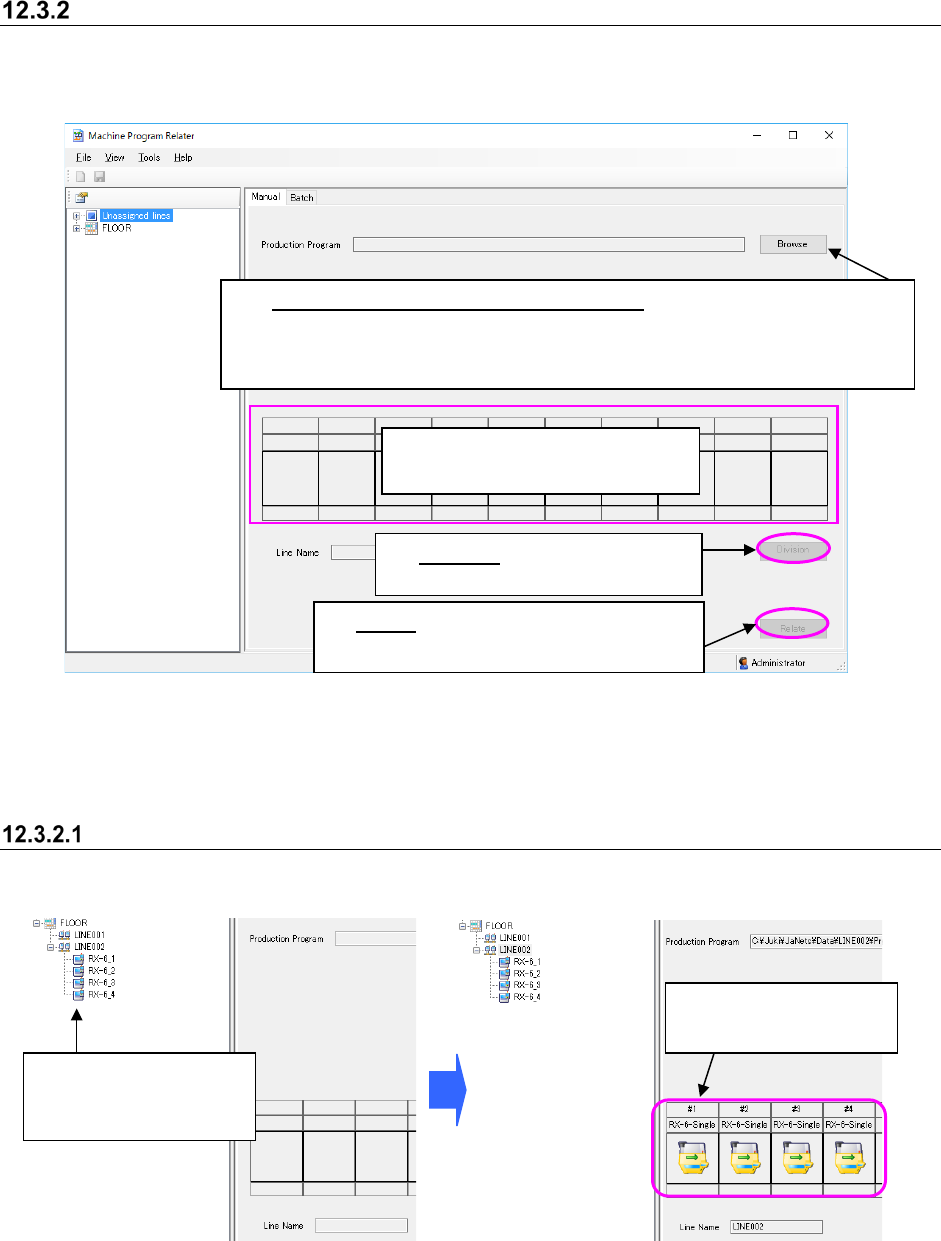
Figure 12.3-3 “Manual” relating screen
Selection of the production program to be related is not essential.
If you leave the “Production Program” field blank, a new production program is created.
Selecting a production line
Specify a production line to relate a file to.
Figure 12.3-4 Selecting a production line
* Note that PWB data may not be completely created from a file divided with an RX-7 series in
some case. Therefore, be sure to follow Step 1 “Select a production program to be related” if
there is any RX-7 series on the production line.
②
See Section 12.3.2.1 “Selecting
a production line.”
①
Select a production program to be related:
When you click the <Browse> button, the “Open” dialog box appears on the
screen. Specify a file, and click the <Open> button on this dialog box .
Note that you can select a production program whose extension is “*.iss” only.
The selected production
line is displayed here.
Select a production line
or a machine within the
Line Explorer.
③
Division: See Section 12.3.2.2
“Selecting a divided file.”
④
Relate:
See Section 12.3.2.3 “Executing
the process for relating a file manually.”
JaNets Instruction Manual 12. Machine Program Relater
12-6
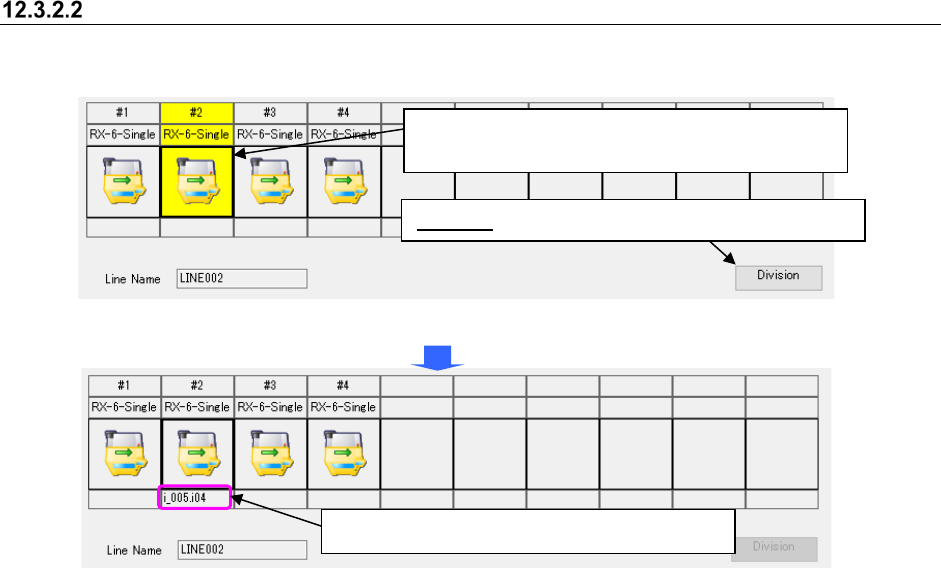
Selecting a divided file
Select a divided program of each machine to be related.
Figure 12.3-5 Selecting a divided file
Figure 12.3-6 Selecting a divided file – Setting a divided file
Division: Specify a file on the “Division” dialog box.
When you select a machine, the <Division> button
located at the lower right corner is enabled.
The divided file is set to the specified machine.