JANETS_INM.pdf - 第489页
JaNets Instr ucti on Man ual 12 . Machine Program R elater 12 -7 Divided fi les/ product ion pr ograms yo u can sel ect her e are shown i n the table below . T able 12.3 -1 Selectable divided files/ production prog rams …
JaNets Instruction Manual 12. Machine Program Relater
12-6
Selecting a divided file
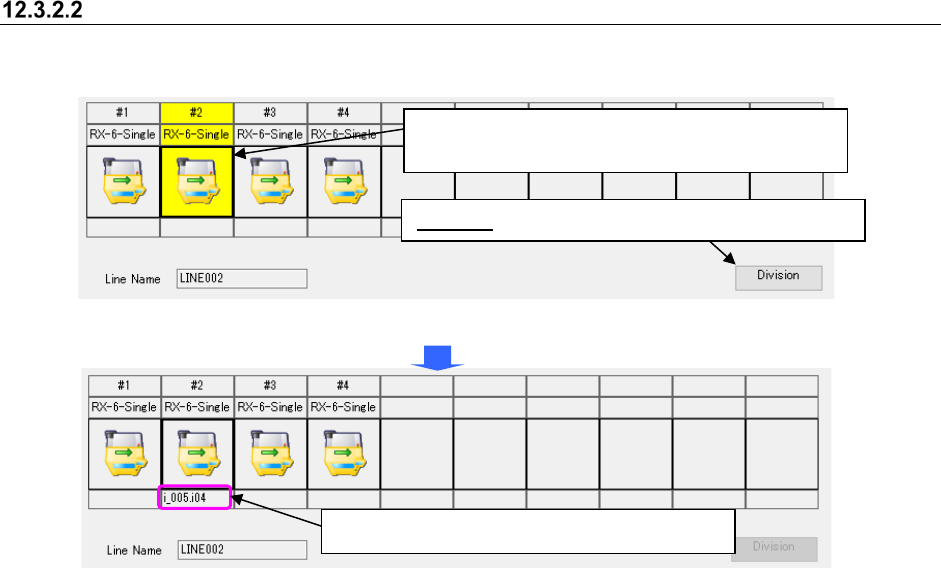
Select a divided program of each machine to be related.
Figure 12.3-5 Selecting a divided file
Figure 12.3-6 Selecting a divided file – Setting a divided file
Division: Specify a file on the “Division” dialog box.
When you select a machine, the <Division> button
located at the lower right corner is enabled.
The divided file is set to the specified machine.

JaNets Instruction Manual 12. Machine Program Relater
12-7
Divided files/production programs you can select here are shown in the table below.
Table 12.3-1 Selectable divided files/production programs
File type
Description
Optimized division file (*.m01 to *.m10) Division file for each machine created after optimization with MI
Line Optimizer
Optimized division file (*.i01 to *.i10, *.e45)
Division file for each machine created after optimization with
production program files created by 2050 and 2050R, and
program editor
Optimized division file (*.i01 to *.i10, *.e46)
Division file for each machine created after optimization with
production program files created by 2055R, 2060, 2060R, and
program editor
Optimized division file (*.i01 to *.i10, *.e47)
Division file for each machine created after optimization with
production program files created by 2070, and program editor
Optimized division file (*.i01 to *.i10, *.x4d)
Division file for each machine created after optimization with
production program files created by 2077, and program editor
Optimized division file (*.i01 to *.i10, *.e48)
Division file for each machine created after optimization with
production program files created by 2080 and 2080R, and
program editor
Optimized division file (*.i01 to *.i10, *.x21) Division file for each machine created after optimization with
production program files created by 3020 and 3020R, and
program editor
Optimized division file (*.i01 to *.i10, *.x11)
Division file for each machine created after optimization with
production program files created by 3010 and 3010A, and
program editor
Optimized division file (*.i01 to *.i10, *.x21)
Division file for each machine created after optimization with
production program files created by 3020V, 3020VR, 3020VA,
3020VRA, and program editor
Optimized division file (*.i01 to *.i10, *.x01)
Division file for each machine created after optimization with
production program files created by FX-3, FX-3R, FX-3RA, and
program editor
Optimized division file (*.i01 to *.i10, *.s01x)
Division file for each machine created after optimization with
production program files created by RS-1 and RS-1R, and
program editor
Optimized division file (*.i01 to *.i10, *.j01x)
Division file for each machine created after optimization with
production program files created by RX-6 and RX-6R, and
program editor
Optimized division file (*.i01 to *.i10, *.prd) Division file for each machine created after optimization with
production program files created by RX-7/RX-7R, and program
editor
Optimized division file (*.i01 to *.i10, *.e71)
Division file for each machine created after optimization with
production program files created by JM-10, and program editor
Optimized division file (*.i01 to *.i10, *.x41)
Division file for each machine created after optimization with
production program files created by JM-20, and program editor
Optimized division file (*.i01 to *.i10, *.s30x)
Division file for each machine created after optimization with
production program files created by JM-100, and program editor

JaNets Instruction Manual 12. Machine Program Relater
12-8
Executing the process for relating a file manually
Click the <Relate> button on the “Manual” relating screen.
* A production program for Idle mode is automatically generated for a machine for which any
divided file is not specified.
Relating operation cannot be executed under the following conditions:
(The ’#n’ in a message indicated a machine position.)
● When the divided file is not completed, the following message appears;
“Data in the program file specified in #n is incomplete. The process will be suspended.”
● When the machine type is different from divided file that you specified, the following message
appears;
“Wrong machine type for the program file specified in #n. The process will be suspended.”
● When the transport direction of the divided file is different from the production line, the
following message appears;
“Wrong transport direction for the program file specified in #n. The process will be
suspended.”
● When the reference side set on the divided file is different from the production line, the
following message appears;
“Wrong reference side for the program file specified in #n. The process will be suspended.
● If the system relates only production programs of an inspection machine and a printer
although any production program is not selected, the message indicating that any production
program of an inspection machine/printer cannot be related when any production program is
not specified appears on the screen.
When combining the divided files, duplicated data (component data and adhesive data) are
treated as follows:
As for Component data, if the packaging style is different from that of the divided file even though
the component name is the same, it causes an error when the files are combined.
If the packaging style is the same, only the data set according to the machine model specified in
the divided file is combined with the Component data combined already.