JANETS_INM.pdf - 第498页
JaNets Instr ucti on Man ual 13 . Program D ownloa der 13 -2 13.1 S tarting U p or Qu it ting the Program D ownloader Start - up : Double - clic k the "Produ ction" tab from t he JaNets Launch er , and t hen th…
JaNets Instruction Manual 13. Program Downloader
13-1
13. Program Downloader
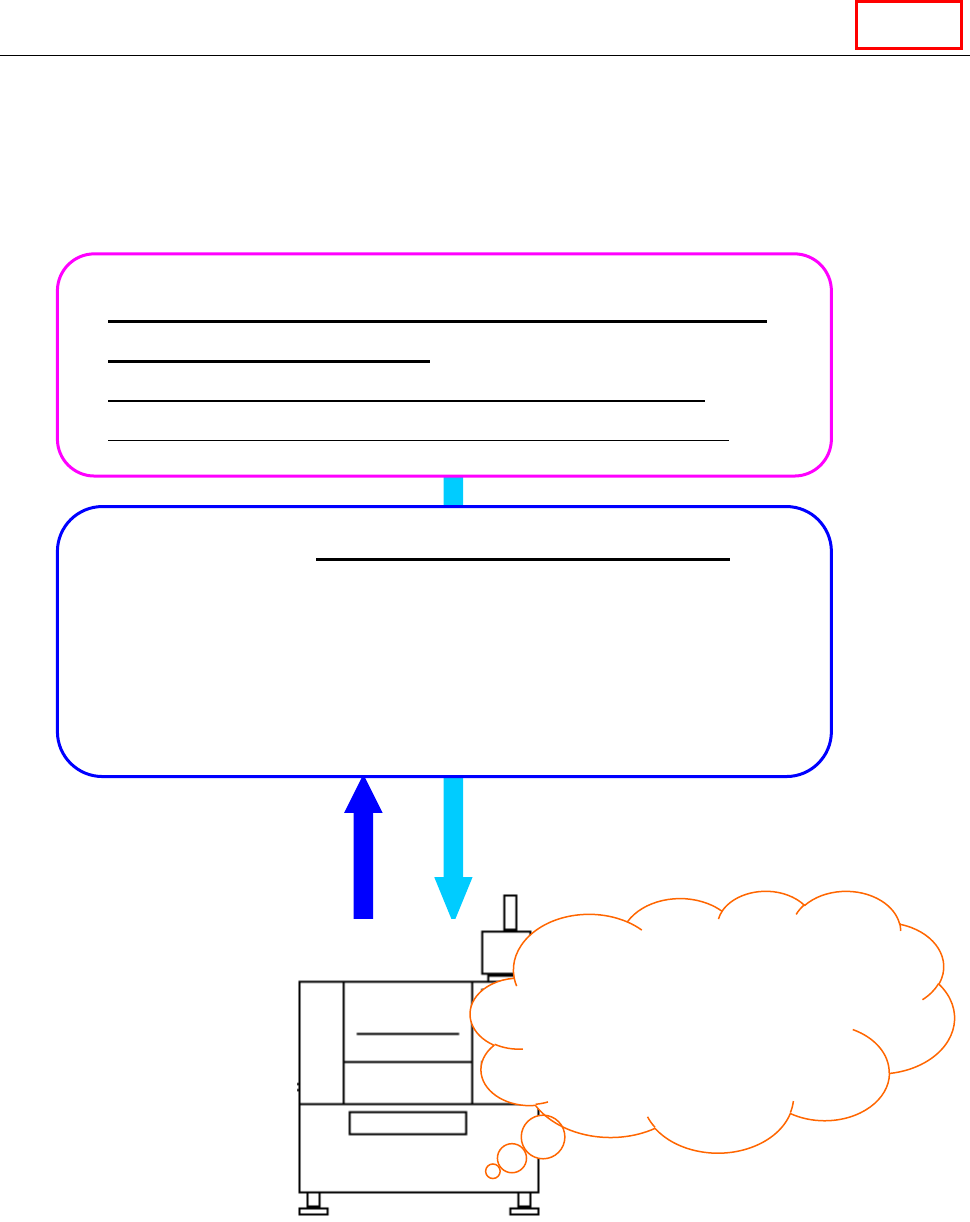
What is the Program Downloader?
The Program Downloader transfers (downloads) a production program to a machine via the Local
Area Network (LAN), produces PWBs and then receives (uploads) the program from the machine
after PWB production finishes.
It also displays the graphics during PWB production.
* Change a setup of Windows not to be in a screen saver screen and a standby state during
start-up of the Program Downloader.
Created and optimized production program (*.iss)
or reservation file (*.rsv)
Production program: Optimization by “7. Program editor”
Reservation file: “Cluster optimization by “8. Job optimizer”
Production – “13. Production Downloader”
When the Program Downloader transfers (downloads) the files described
above to a machine, and then you press the “Start” button of the
machine, the PWB starts. Next, it receives (uploads) the production
program whose production has finished, and stores the production
results. In addition, the Program Downloader monitors the PWB
production conditions of the selected production lines and machines
during PWB production.
When you press the
“Start” button,
PWB production
starts.
Downloading of files
Uploading of files
after PWB production
finishes
Line
JaNets Instruction Manual 13. Program Downloader
13-2
13.1 Starting Up or Quitting the Program Downloader
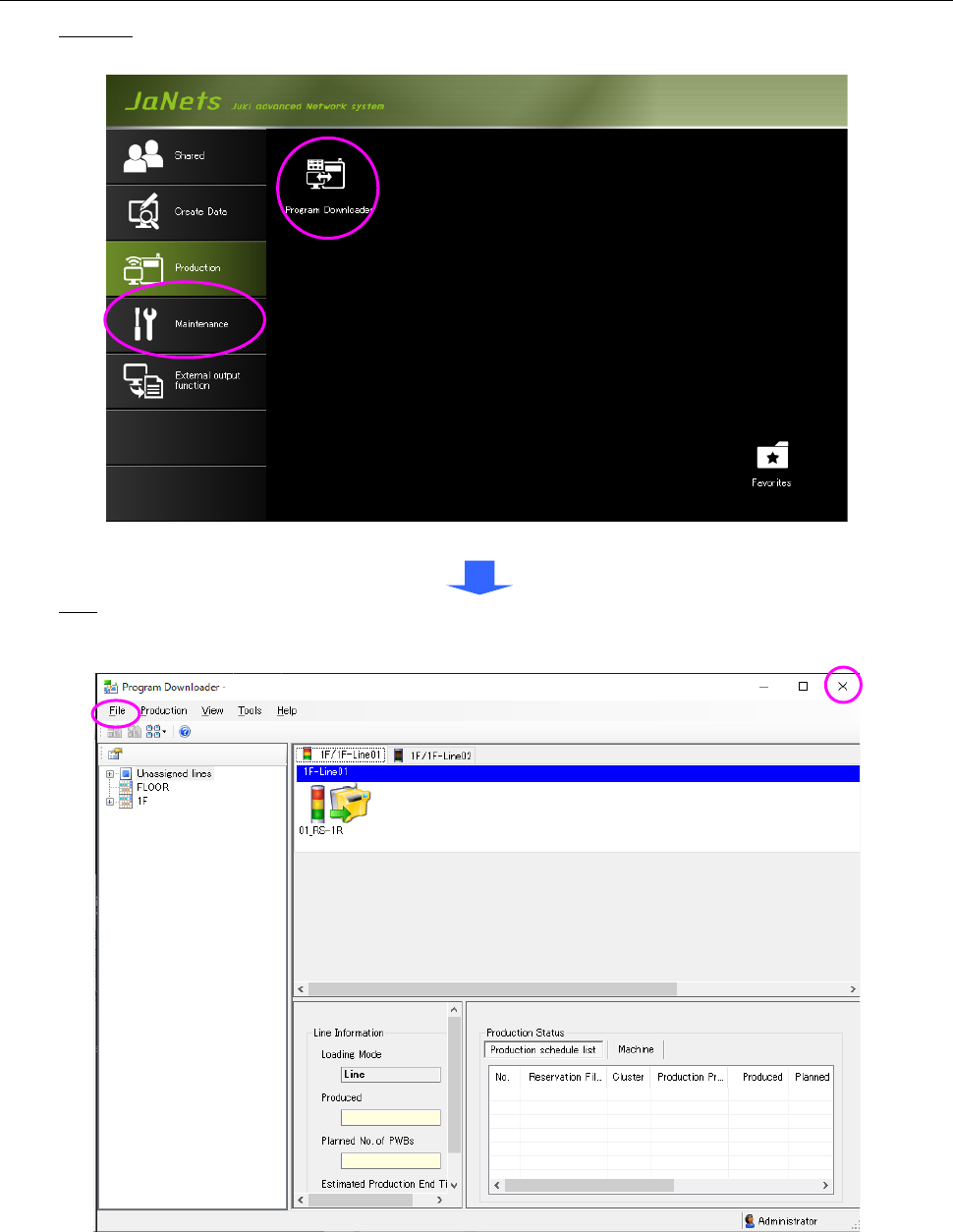
Start-up: Double-click the "Production" tab from the JaNets Launcher, and then the "Program
Downloader" icon.
Figure 13.1-1 JaNets Launcher screen
Quit: Select the "File" command from the menu bar, and then the "Quit Program Downloader"
command on the “File” menu, or select the close (×) button at the upper right corner of the title
bar.
Figure 13.1-2 Main screen
* When on-line production is running at the time of the termination of the Program
Downloader, it cannot be quitted. Quit the Program Downloader after ending on-line
production by forced termination.

JaNets Instruction Manual 13. Program Downloader
13-3
13.2 Warning or Error That May Occur When the Program Downloader
Starts Up
The Program Downloader cannot start up in the following case ① / ②.
① Another client or server is starting up the “Shopfloor Setup.” → Quit the “Shopfloor Setup.”
② If you do not register any line to be monitored yet, register a line to be monitored with
“Shopfloor Setup.”
* When the error "E3105029 communication with Machine Communication service failed" is
displayed at the time of a start-up and it causes the Program Downloader not to start up, there
is a possibility that the user account "isuser" is locked out or invalid. Make sure of the state of
account "isuser" from "Computer Management" and password.
* If the error “E3102020 Since WatchLine.xml was corrupted, line monitoring information was
deleted. Register a line to be monitored with Shopfloor Setup again.” is displayed on the
screen at start-up, register a line to be monitored with Shopfloor Setup again. You cannot
start up Program Downloader until you register a line again.
* If the error “E3102021 WatchLine.xml is corrupted. Terminate JaNets, and then delete
WatchLine.xml. After deleting it, register a line to be monitored with Shopfloor Setup again.” is
displayed on the screen at start-up, follow this message to terminate JaNets, and then delete
WatchLine.xml is saved in <JaNets installation folder>\Plugins\ProgramDownloader.
* If the production line configuration of production program specified before the Program
Downloader starts up is different from the current one, a warning message appears on the
screen, and the PWB production is disabled.
* When an inspection machine/printer or a machine that is set to use the Equipment Manager
linkage function (see Section 13.17) are assigned to the production line to be monitored, the
Equipment Manager license is required to start up the system.