JANETS_INM.pdf - 第500页
JaNets Instr ucti on Man ual 13 . Program D ownloa der 13 -4 13.3 M enu Config uration T able 13.3 -1 Menu bar item s Menu item Description File (F) Open (O) Reads the producti on program file used for prod uction. Open …

JaNets Instruction Manual 13. Program Downloader
13-3
13.2 Warning or Error That May Occur When the Program Downloader
Starts Up
The Program Downloader cannot start up in the following case ① / ②.
① Another client or server is starting up the “Shopfloor Setup.” → Quit the “Shopfloor Setup.”
② If you do not register any line to be monitored yet, register a line to be monitored with
“Shopfloor Setup.”
* When the error "E3105029 communication with Machine Communication service failed" is
displayed at the time of a start-up and it causes the Program Downloader not to start up, there
is a possibility that the user account "isuser" is locked out or invalid. Make sure of the state of
account "isuser" from "Computer Management" and password.
* If the error “E3102020 Since WatchLine.xml was corrupted, line monitoring information was
deleted. Register a line to be monitored with Shopfloor Setup again.” is displayed on the
screen at start-up, register a line to be monitored with Shopfloor Setup again. You cannot
start up Program Downloader until you register a line again.
* If the error “E3102021 WatchLine.xml is corrupted. Terminate JaNets, and then delete
WatchLine.xml. After deleting it, register a line to be monitored with Shopfloor Setup again.” is
displayed on the screen at start-up, follow this message to terminate JaNets, and then delete
WatchLine.xml is saved in <JaNets installation folder>\Plugins\ProgramDownloader.
* If the production line configuration of production program specified before the Program
Downloader starts up is different from the current one, a warning message appears on the
screen, and the PWB production is disabled.
* When an inspection machine/printer or a machine that is set to use the Equipment Manager
linkage function (see Section 13.17) are assigned to the production line to be monitored, the
Equipment Manager license is required to start up the system.
JaNets Instruction Manual 13. Program Downloader
13-4
13.3 Menu Configuration
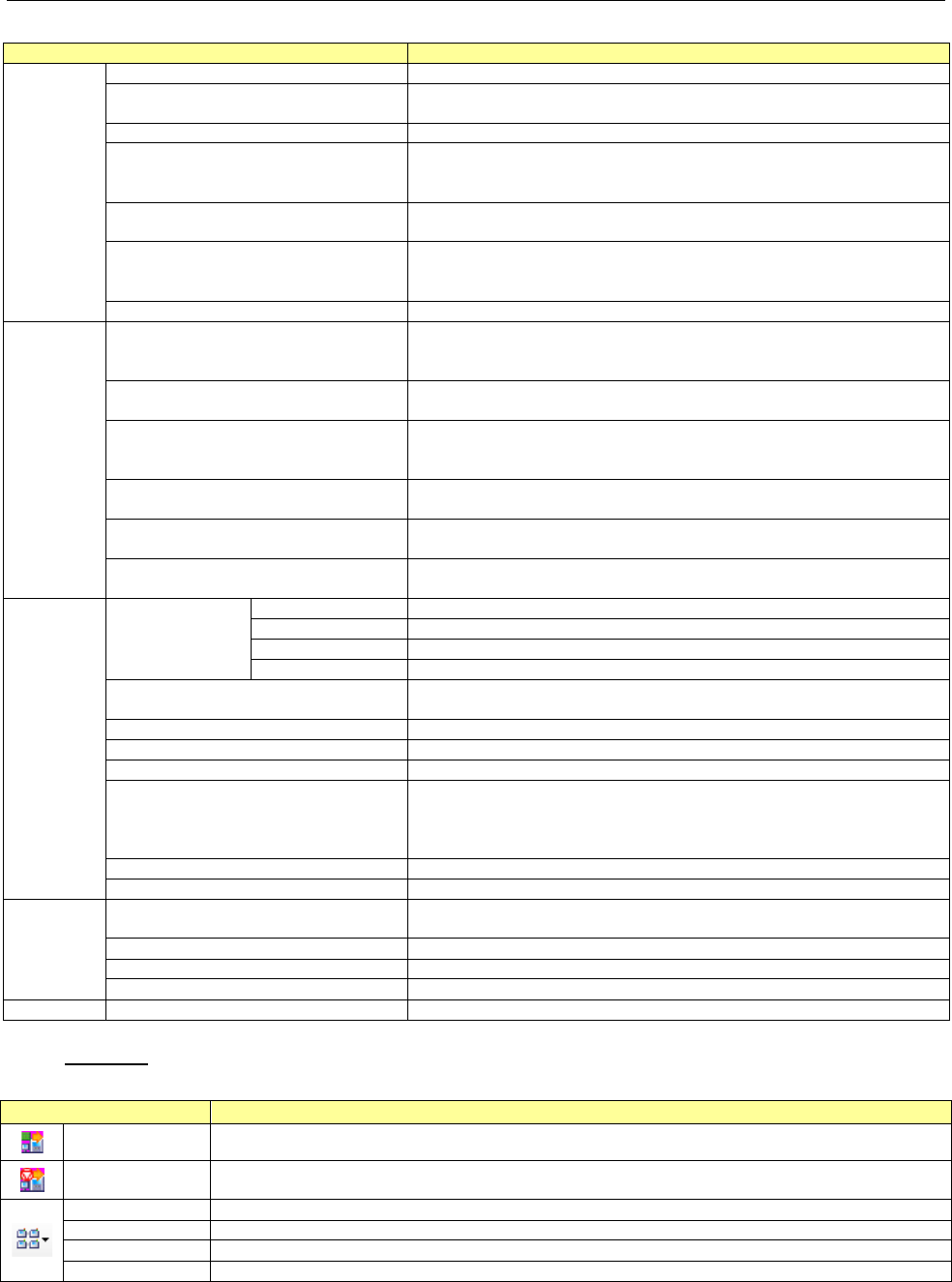
Table 13.3-1 Menu bar items
Menu item
Description
File (F)
Open (O)
Reads the production program file used for production.
Open with a Serial code (S)
Reads a production program file used for production from the
associated serial code.
Clear the production schedule list (C)
Clears planned production registered in the active production line.
Change Planned No. of PWBs (E)
Changes the planned number of PWBs set for PWB production with
a production program at the present. You cannot select this
command when you specify a reservation file to produce PWBs.
Next production program reservation
(N)
The next program to be produced is reserved and registered by the
production program.
Register the next reservation file (R)
Reserves and registers a reservation file to be used for the next
production when production is set to be performed according to a
reservation file.
Exit Program Downloader (X)
Quits the Program Downloader.
Production
(P)
Switching operation mode (S)
Switches the operation mode of the Program Downloader.
This command is enabled only when the External Output function
license is valid.
Download (D)
Downloads a production program from the specified reservation file
or downloads the specified production program.
Termination Production (X)
Terminates or cancels the PWB production. If the system cannot
terminate the PWB production forcibly, this command is displayed in
gray and you cannot select it.
Individual Machine (I)
Specifies the desired machine on the selected production line to
download or upload data to/from the machine.
Download data for teaching (T)
Downloads a production program for teaching component pick-up
coordinates.
Upload data for teaching (U)
Uploads a production program for teaching component pick-up
coordinates.
View (V)
Line Monitor (M)
Line (L)
Displays each production line on the Line Monitor (default).
Floor (F)
Displays each floor on the Line Monitor.
All Lines (A)
Displays all production liens on the Line Monitor.
Floor Map (M)
Displays the floor map on the Line Monitor.
Number of components (O)
The information on the number of components is displayed and the
setting of the number of components is executed.
Feeder Layout (F)
Displays the feeder layout.
Nozzle Layout (N)
Displays the nozzle layout.
Supervising Condition (W)
Displays the monitored conditions.
Line Explorer (E)
/ Program Explorer (E)
When not Connecting to a Server
Displays/hides the Line Explorer.
When Connecting to a Server
Displays/hides the Program Explorer.
Toolbar (T)
Displays/hides the toolbar.
Status Bar (S)
Displays/hides the status bar.
Tool (T)
Deletion of pick coordinate
succeeded data (D)
The pick coordinate succeeded data is deleted.
Association of a serial code (A)
Associates a serial code with a production program.
Set Environments (E)
Makes settings of operations of the Program Downloader.
Setup Views (V)
Sets the items to be displayed on the data screen.
Help (H)
Table of Contents (C)
Displays the table of contents.
Toolbar
Table 13.3-2 Tool bar items
Tool button item
Description
Download
Downloads a production program from the specified reservation file.
Termination
Production
Terminates or cancels the PWB production. If the system cannot terminate the PWB
production forcibly, this tool button is displayed in gray and you cannot select it.
Line
Displays each production line on the Line Monitor (default).
Floor
Displays each floor on the Line Monitor.
All Lines
Displays all production liens on the Line Monitor.
Floor Map
Displays the floor map on the Line Monitor.
JaNets Instruction Manual 13. Program Downloader
13-5
13.4 Main Screen Configuration
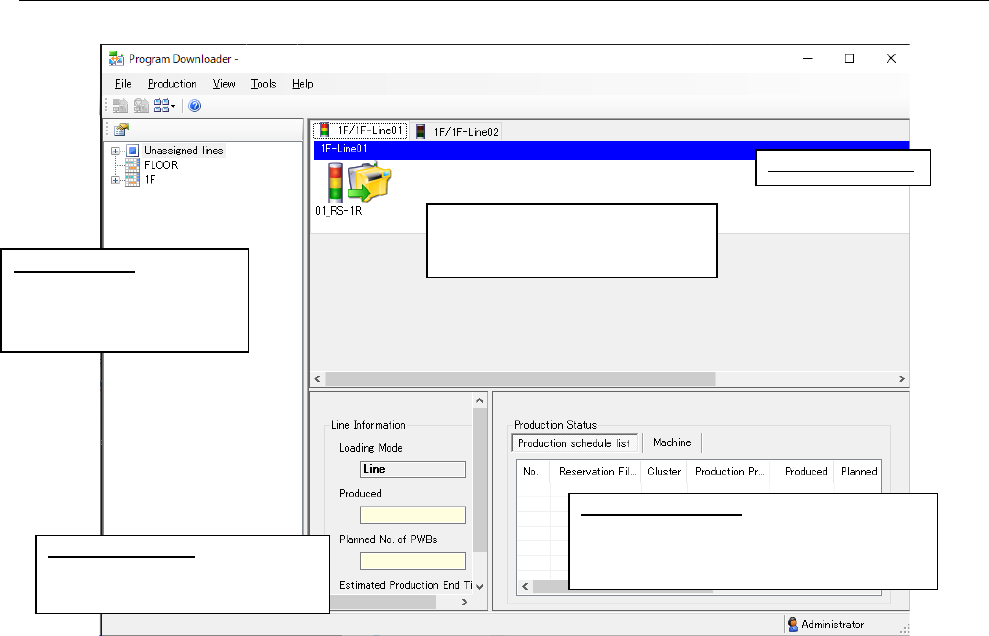
Figure 13.4-1 Main screen (Condition of the Line monitor)
Line Information:
Displays information on PWB
production of a production line.
Production Status:
Displays the PWB production condition of
each machine of a reservation file and that
of a production line.
Displays the signal light, the
machine No., the machine ID and
the board transport direction.
Machine condition
Line Explorer: Displays
the production line
configuration and the
monitored condition.