JANETS_INM.pdf - 第502页
JaNets Instr ucti on Man ual 13 . Program D ownloa der 13 -6 13.4.1 When Connec ting to a Server When you se lect t he <Use> but ton for t he menu item “ Server” on the “ Set Env ironment s” scr een of the JaNets L…
JaNets Instruction Manual 13. Program Downloader
13-5
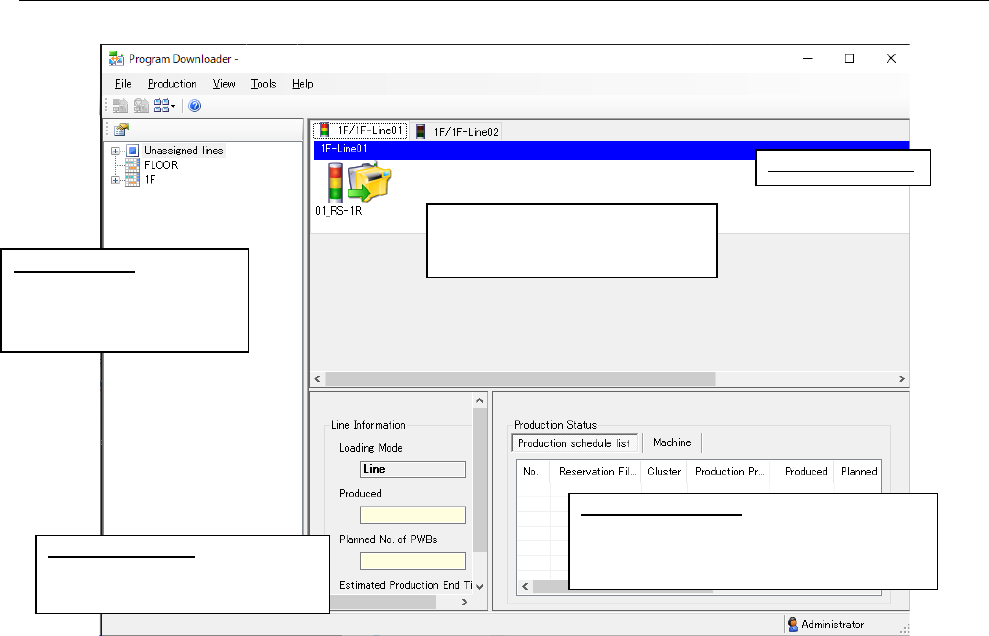
13.4 Main Screen Configuration
Figure 13.4-1 Main screen (Condition of the Line monitor)
Line Information:
Displays information on PWB
production of a production line.
Production Status:
Displays the PWB production condition of
each machine of a reservation file and that
of a production line.
Displays the signal light, the
machine No., the machine ID and
the board transport direction.
Machine condition
Line Explorer: Displays
the production line
configuration and the
monitored condition.
JaNets Instruction Manual 13. Program Downloader
13-6
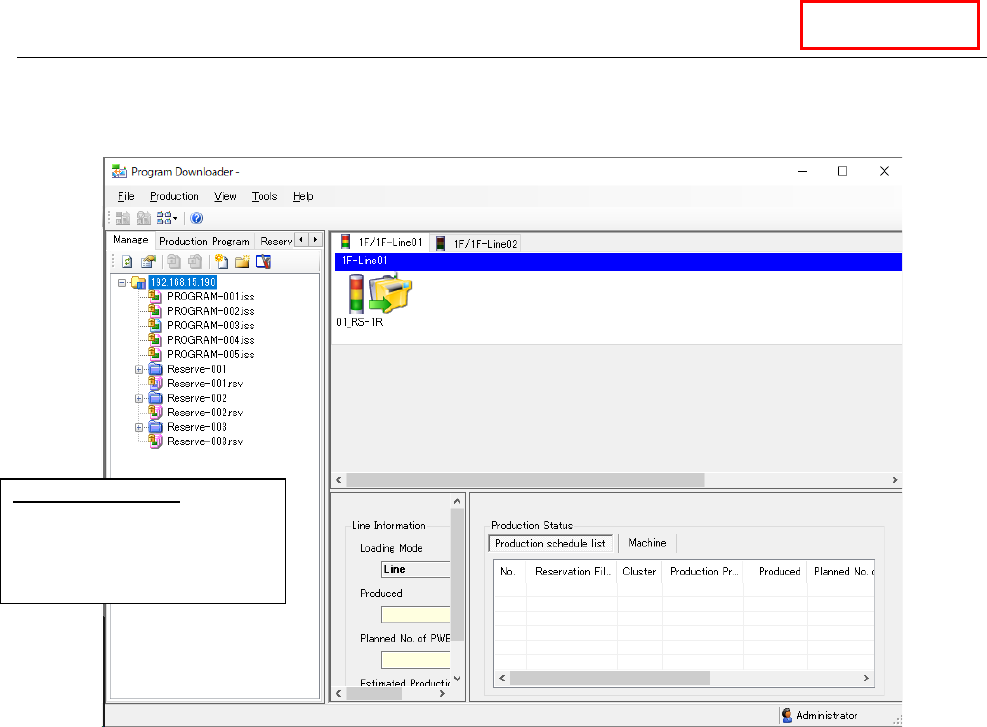
13.4.1 When Connecting to a Server
When you select the <Use> button for the menu item “Server” on the “Set Environments” screen of
the JaNets Launcher, the Program Explorer is displayed instead of the Line Explorer.
Figure 13.4-2 Main screen (when the Data Manager is used)
Data Manager
Program Explorer:
Displays a list of production
programs, the production line
configuration and the
monitored condition.
JaNets Instruction Manual 13. Program Downloader
13-7
13.5 Line Monitor
The Line Monitor displays the PWB production condition of each machine of a production line, the
PWB production information on the entire production line, the PWB production condition of each
production program registered in a reservation file and the PWB production condition of a
production program for each machine.
13.5.1 Display of the machine status on the line
The “machine condition” is indicated with the displayed status of its signal light as shown below:
Figure 13.5-1 Machine condition (indicated with the signal light)
● Displayed colors of the signal light
The system updates the signal light condition by obtaining it from a machine periodically.
When you change the displayed colors of the signal light with the machine, the system
reflects the change to display the colors.
* RX-7/RX-7R obtains the signal status from the machine when the signal light display is
changed. Therefore, no lighting may be performed for the display up to a change of the
signal light display depending on the RX-7/RX-7R monitoring start timing.
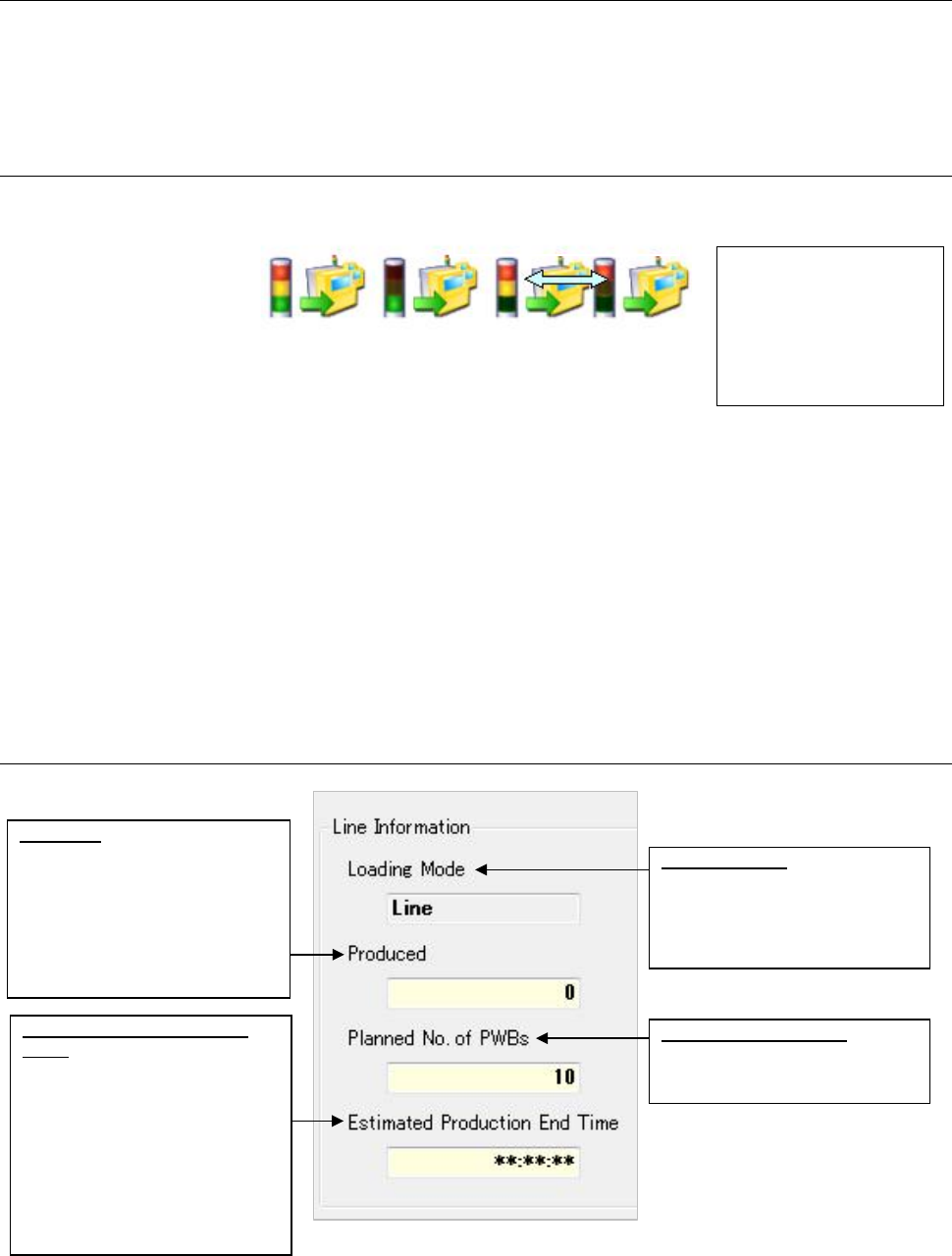
13.5.2 Line information
Figure 13.5-2 Line information
* The number of produced boards and the planned number of boards to be produced remain
blank unless the production program is specified.
The signal light reflects
the condition of each
machine.
The displayed colors
vary depending on the
setting of each machine.
Estimated Production End
Time:
Displays the estimated time to
be required to finish PWB
production with the production
line (until the number of
produced PWBs reaches the
number set in the “Planned No.
of PWBs.”) This is displayed
after one or more PWBs are
produced.
Loading Mode:
Displays the production method
of the production line
(Machine unit and line unit) are
displayed.
Planned No. of PWBs:
UDisplays the planned number of
PWBs to be produced
After the power is
turned on
(all lamps light)
During PWB
production
(the green lamp
lights)
Stop due to a
component
run-out error (the
red lamp lights
and the yellow
lamp flashes)
The yellow lamp flashes.
Produced:
Displays the number of the
PWBs produced with the
production line (number of the
PWBs produced with the last
machine on the production line).
This remains blank unless the
production program is specified.