JANETS_INM.pdf - 第504页
JaNets Instr ucti on Man ual 13 . Program D ownloa der 13 -8 13.5.3 Produc ti on status Figure 13.5 -3 Production s tatus 13.5.3.1 Pr oduction status of the reservation file Figure 13.5 -4 Production status of the reserv…
JaNets Instruction Manual 13. Program Downloader
13-7
13.5 Line Monitor
The Line Monitor displays the PWB production condition of each machine of a production line, the
PWB production information on the entire production line, the PWB production condition of each
production program registered in a reservation file and the PWB production condition of a
production program for each machine.
13.5.1 Display of the machine status on the line
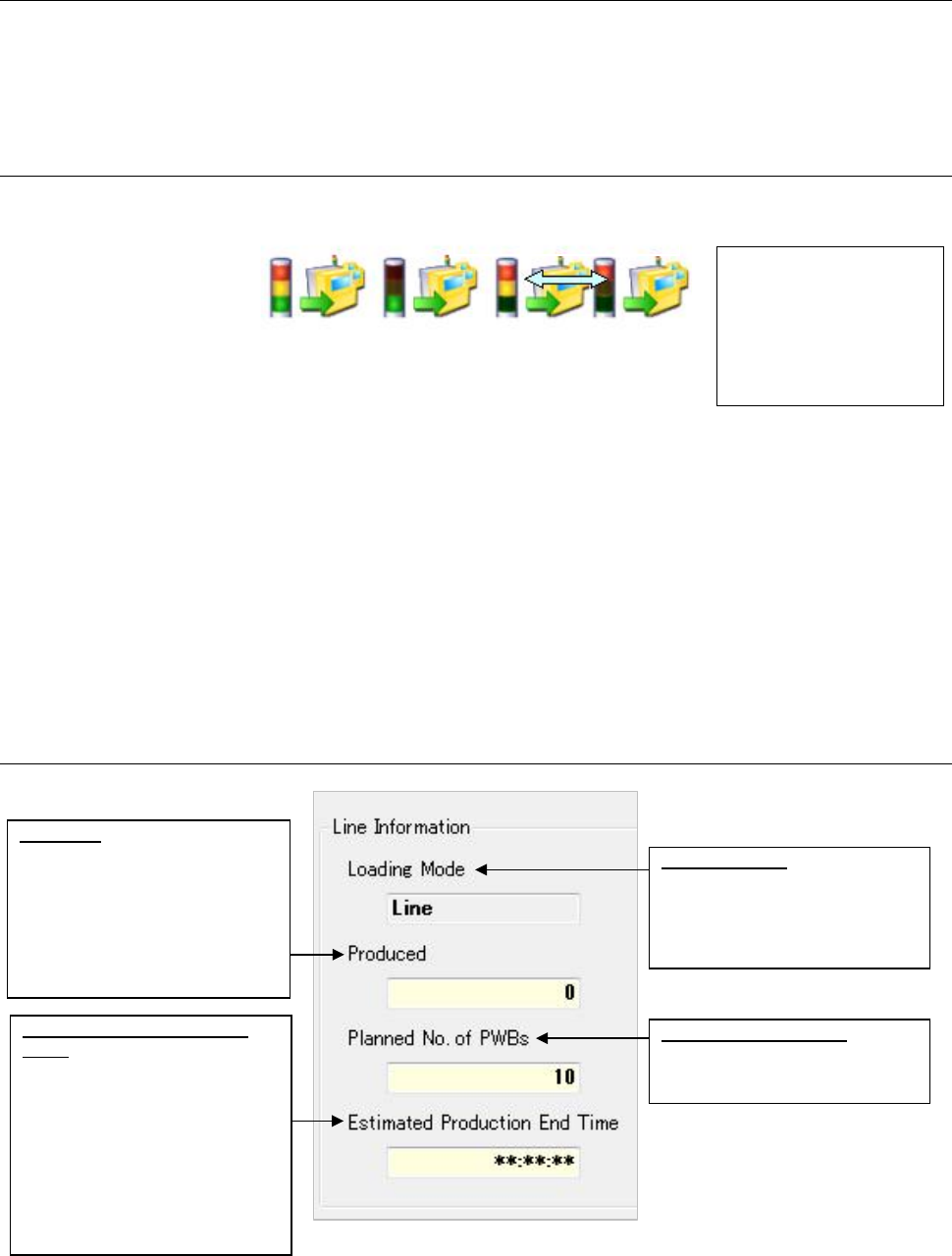
The “machine condition” is indicated with the displayed status of its signal light as shown below:
Figure 13.5-1 Machine condition (indicated with the signal light)
● Displayed colors of the signal light
The system updates the signal light condition by obtaining it from a machine periodically.
When you change the displayed colors of the signal light with the machine, the system
reflects the change to display the colors.
* RX-7/RX-7R obtains the signal status from the machine when the signal light display is
changed. Therefore, no lighting may be performed for the display up to a change of the
signal light display depending on the RX-7/RX-7R monitoring start timing.
13.5.2 Line information
Figure 13.5-2 Line information
* The number of produced boards and the planned number of boards to be produced remain
blank unless the production program is specified.
The signal light reflects
the condition of each
machine.
The displayed colors
vary depending on the
setting of each machine.
Estimated Production End
Time:
Displays the estimated time to
be required to finish PWB
production with the production
line (until the number of
produced PWBs reaches the
number set in the “Planned No.
of PWBs.”) This is displayed
after one or more PWBs are
produced.
Loading Mode:
Displays the production method
of the production line
(Machine unit and line unit) are
displayed.
Planned No. of PWBs:
UDisplays the planned number of
PWBs to be produced
After the power is
turned on
(all lamps light)
During PWB
production
(the green lamp
lights)
Stop due to a
component
run-out error (the
red lamp lights
and the yellow
lamp flashes)
The yellow lamp flashes.
Produced:
Displays the number of the
PWBs produced with the
production line (number of the
PWBs produced with the last
machine on the production line).
This remains blank unless the
production program is specified.
JaNets Instruction Manual 13. Program Downloader
13-8
13.5.3 Production status
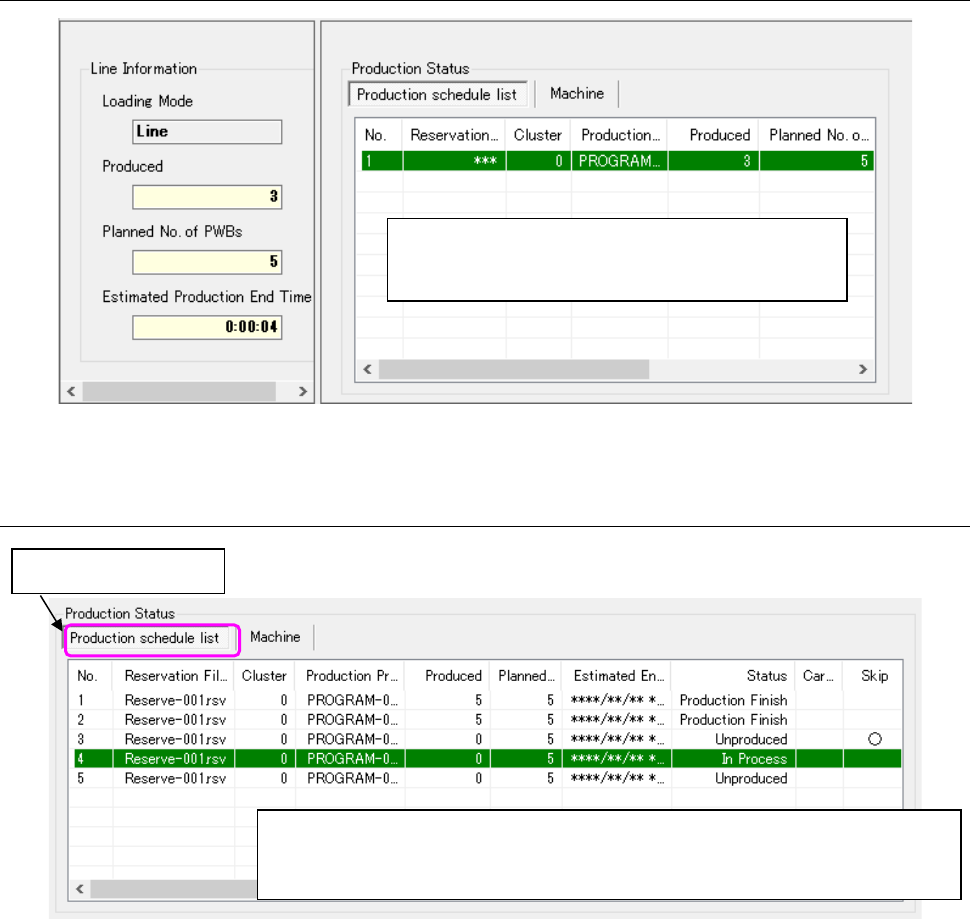
Figure 13.5-3 Production status
13.5.3.1 Production status of the reservation file
Figure 13.5-4 Production status of the reservation file
The production status of the production program
reserved in a reservation file and the production
program in each machine are displayed.
The production status of the production program registered in the reservation file
during production is displayed. The displayed items and display color can be
changed. (⇒ 13.14 “Setting the Displayed Items” )
Double-click this tab.
JaNets Instruction Manual 13. Program Downloader
13-9
13.5.3.2 Production skip setting/change status to finished
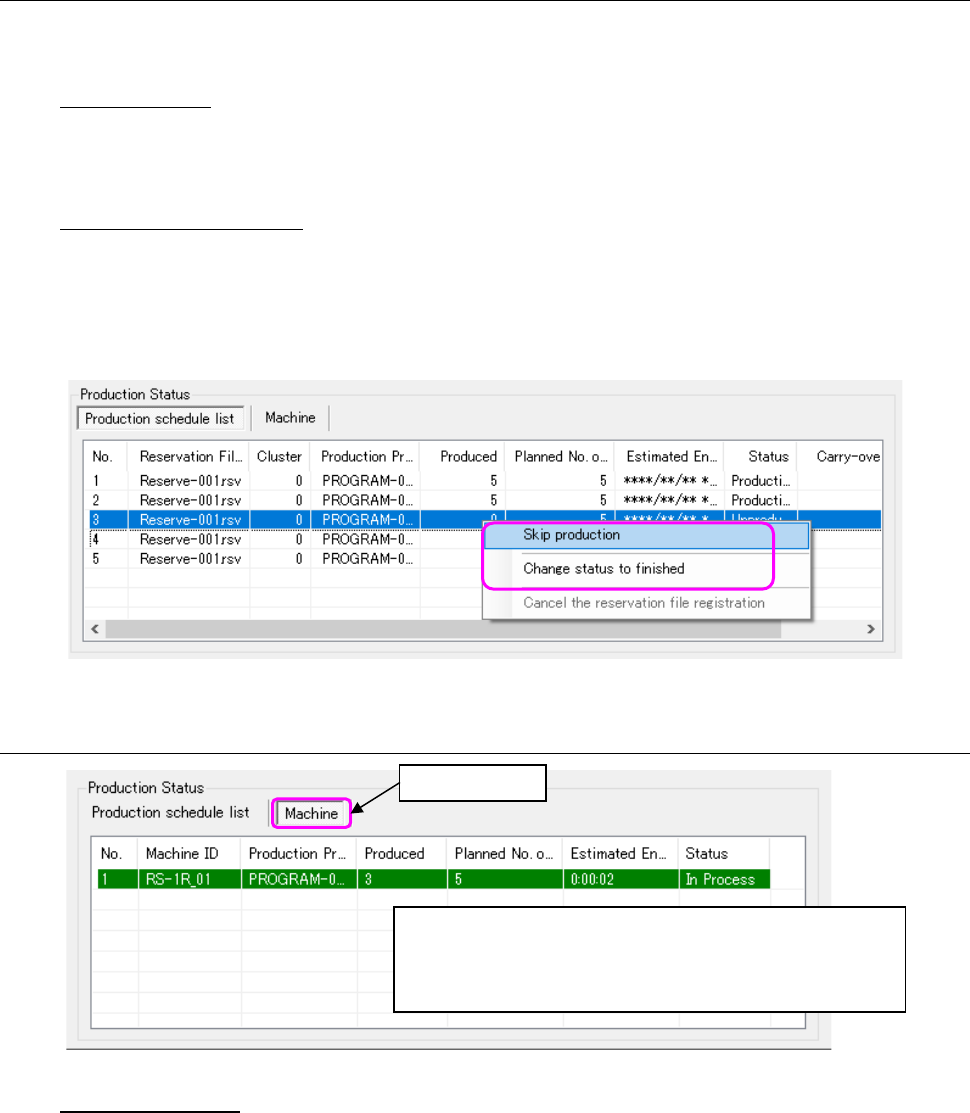
From the menu that is displayed by clicking the right button of the mouse after selecting production
programs (multiple files can be selected), select “Skip production” or “Change status to finished.”
Skip production: Set a production program to skip production out of the production
programs registered in the reservation file. In this case, the
production program set to Skip remains in a non-production status
and the production of the reservation file is not finished.
Change status to finished: Set the production program in a “non-production” or “in the process
of production” to “Finished.” The production program set to
“Completion” remains in a non-production and the production of the
reservation file is finished.
* Since the status is set to a finished status, uploading is not executed.
Figure 13.5-5 Production skip setting
13.5.3.3 Machine production status
Figure 13.5-6 Machine production status
Estimated end time
The estimated end time of each machine can be obtained by dividing the placement-related time
by the number of produced boards and then multiplying the mean production time per board by the
residual estimated end time.
Regarding the placement-related time, the stop time, board carry-in wait time, and stop time are
not included.
Time related to the placement of RX-7/RX-7R: Placement time and placement invalid time of the
production control information
Time related to placement of others than RX-7/RX-7R: Operation time of the production control
information
Click this tab.
The production status of the production program in each
machine in the line is displayed. The display items and
display color can be customized.
(⇒ 13.14 Setting the Displayed Items)