JANETS_INM.pdf - 第520页
JaNets Instr ucti on Man ual 13 . Program D ownloa der 13 - 24 [4] The value of menu item “Min imum num ber of PWB s you can s pecify” i s great er than or equ al to the va lue of the m enu it em “Chang ed set ting of t …
JaNets Instruction Manual 13. Program Downloader
13-23
[3] If “Suspended” is displayed in the “Status” column and there is a machine that finished
production as the production result, the [Change Planned No. of PWBs] menu command is
disactivated, and you cannot select it.
[4] If “In Process” is displayed in the “Status” column and there is a machine model that does not
support change of the number of PWBs to be produced during production, the [Change
Planned No. of PWBs] menu command is disactivated, and you cannot select it.
[5] If “In Process” is displayed in the “Status” column and the total of the value of the menu item
“Planned No. of PWBs” and that of the menu item “Threshold value for the minimum number
of PWBs you can specify” exceeds the value of the menu item “Produced,” the [Change
Planned No. of PWBs] menu command is disactivated, and you cannot select it.
13.9.8.1 Executing the [Change Planned No. of PWBs] command
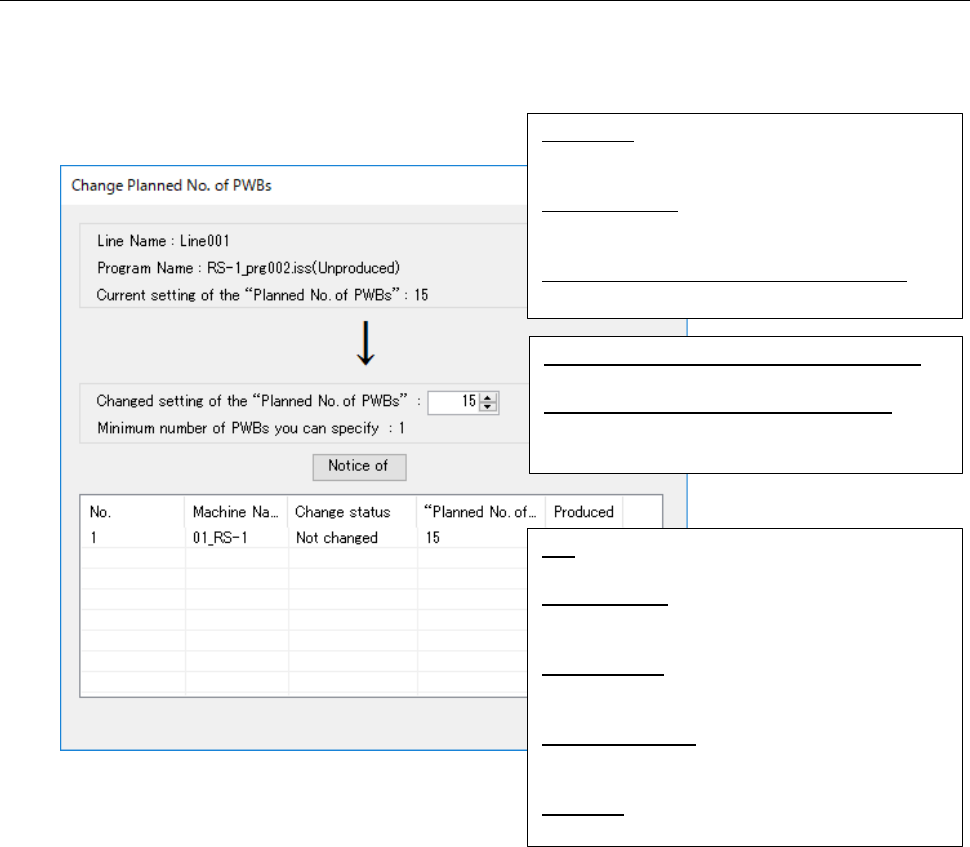
When you specify the number of PWBs you plan to produce in the “Change setting of the ‘Planned
No. of PWBs’” field, and then click the < Notice of> button, the number you specified is notified to
the machine, and you can update the number of PWBs to be produced.
Figure 13.9-10 “Change Planned No. of PWBs”
screen
<Notes>
[1] When “In Process” is displayed in the “Status” column, the following items are automatically
updated: “Minimum number of PWBs you can specify,” “Planned No. of…” and “Planned…”
[2] When the planned number of PWBs to be produced is changed by the machine successfully,
the value displayed in the “Planned No. of…” column is not updated automatically.
[3] If “In Progress” is displayed in the “Status” column, and the total of the value of the menu item
“Planned No. of PWBs” and that of the menu item “Threshold value for the minimum number
of PWBs you can specify” exceeds the value of the menu item “Produced,” the <Notify of>
button is disactivated and you cannot change the planned number of PWBs to be produced.
Line Name:
Line name whose planned number of PWBs is
to be changed
Program Name:
Name of a production program whose planned
number of PWBs is to be changed
Current setting of the “Planned No. of PWBs”:
Current setting of the planned number of PWBs
Changed setting of the “Planned No. of PWBs”:
Planned number of PWBs you change to
Minimum number of PWBs you can specify:
Minimum number of PWBs to be produced you
can specify
No.:
Number counted from the first machine
Machine Name:
Name of a machine that exists in the selected
production line
Change status:
Change status of the planned number of PWBs
to be produced
“Planned No. of…”:
Planned number of PWBs to be produced by
the machine
Produced:
Number of PWBs already produced
JaNets Instruction Manual 13. Program Downloader
13-24
[4] The value of menu item “Minimum number of PWBs you can specify” is greater than or equal
to the value of the menu item “Changed setting of the ‘Planned No. of PWBs’,” the <Notice of>
button is disactivated and you cannot change the planned number of PWBs to be produced.
[5] While the planned number of PWBs to be produced is being displayed on the screen, you
cannot perform automatic download/upload.
[6] When you use an RX-7 series machine, the menu item “Planned No. of…” is not updated
even though you change the planned number of PWBs to be produced by the machine.
13.9.8.2 Notification of change of the number of PWBs planned to be produced
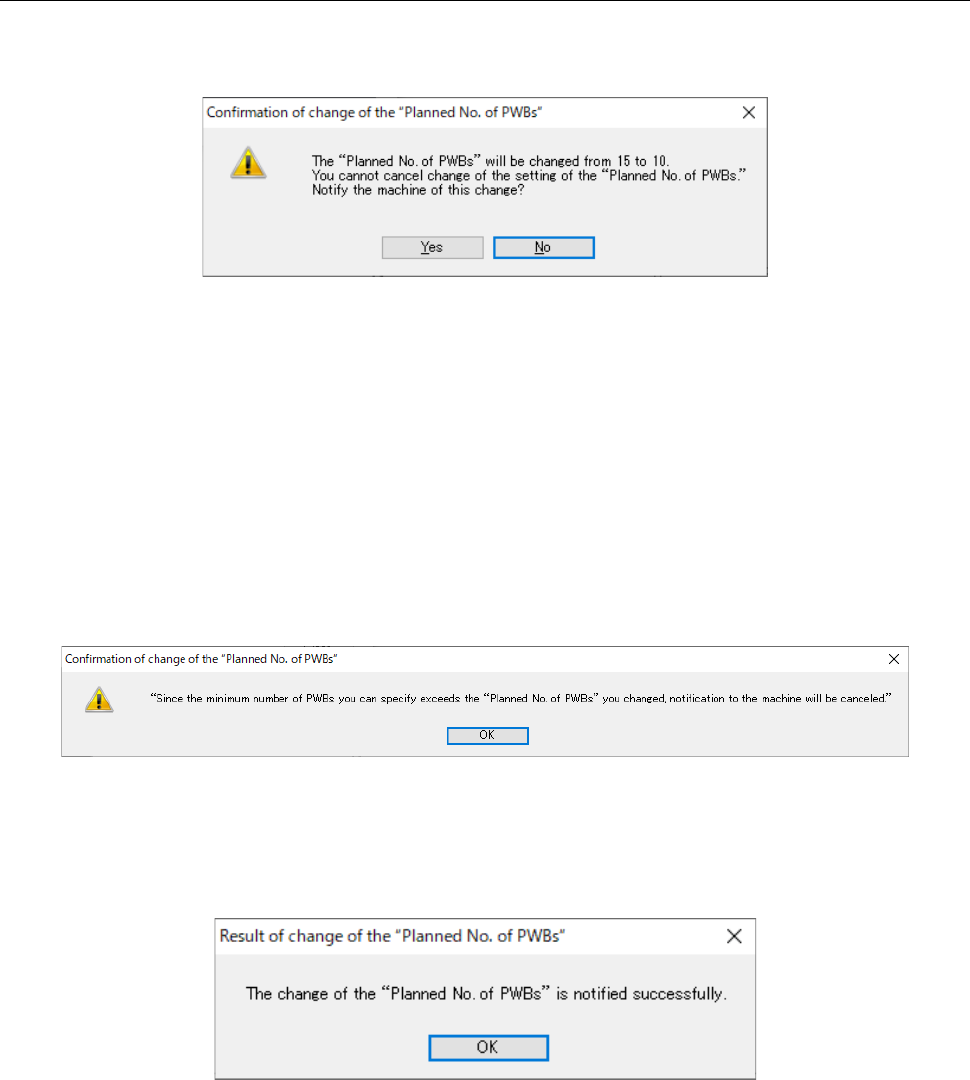
When you click the <Notify of> button while the “Stats” column shows “In Progress,” the
confirmation message is displayed as shown in Figure 13.9-11.
Figure 13.9-11 “Confirmation of change of the “Planned No. of PWBs” screen
When you press the <Yes> button, the system changes the planned number of PWBs specified in
the program(s) whose number is set to be changed and that is (are) displayed in the Production
schedule list, and notifies the machine of change of the planned number of PWBs to be produced.
When you press the <No> button, the system cancels notification to the machine.
* Even though all machines fail to change the planned number of PWBs to be produced, the
system change the planned number of PWBs to be produced of the Production schedule list.
If the value of the menu item “Minimum number of PWBs you can specify” exceeds the value of
the menu item “Changed setting of the ‘Planned No. of PWBs’” while this change is being
confirmed, the system cancels notification to the machine of the change.
Figure 13.9-12 Cancel of change of the planned number of PWBs to be produced
When the system notifies the machine of change of the planned number of PWBs to be produced
successfully, the confirmation message appears on the screen as shown in Figure 13.9-13.
Figure 13.9-13 Success message
JaNets Instruction Manual 13. Program Downloader
13-25
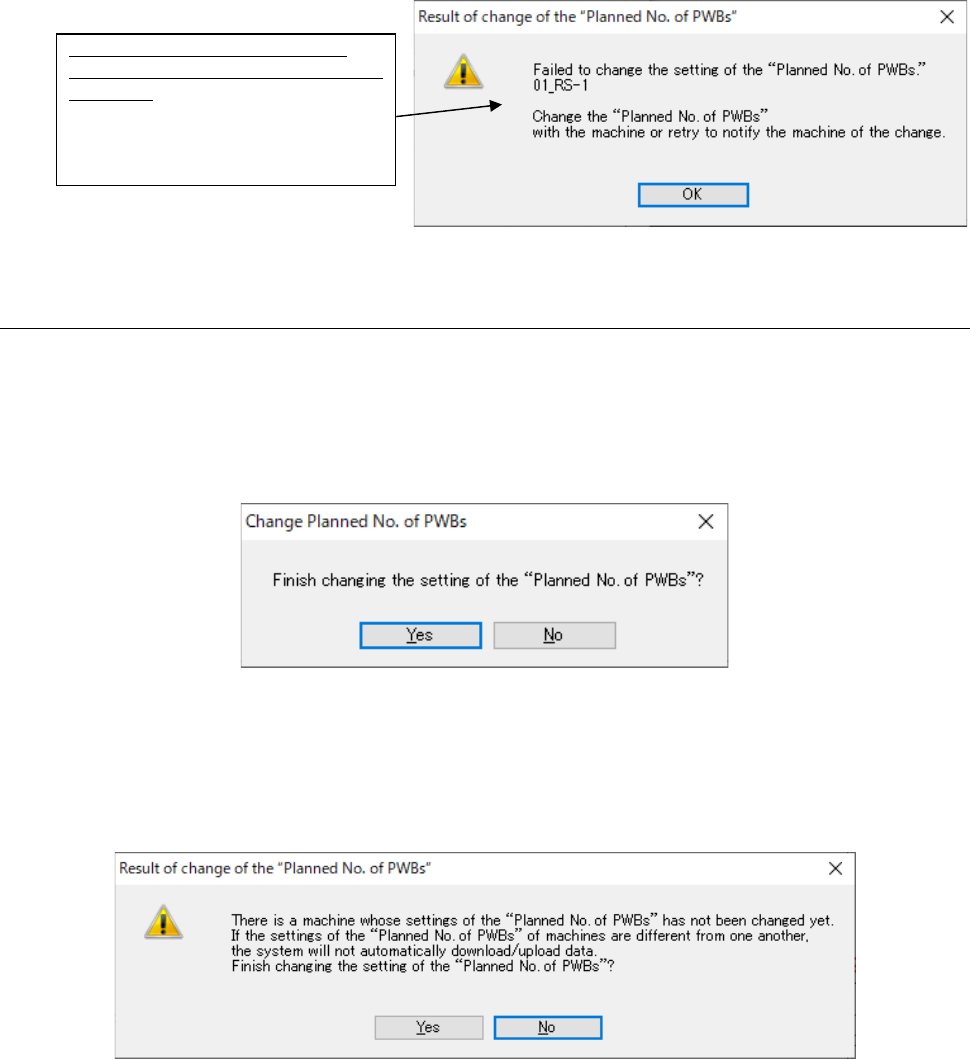
If the system fails to notify any machine of the change of the planned number of PWBs to be
produced, the confirmation message appears on the screen as shown in Figure 13.9-14.
Figure 13.9-14 Failure message
13.9.8.3 Quitting the “Change of Planned No. of PWBs” screen
When you click the <Close> button, the message for confirming quit operation appears on the
screen.
If no machine changed the planned number of PWBs to be produced or if all machines changed
the respective numbers, the confirmation message appears on the screen as shown in Figure
13.9-15.
Figure 13.9-15 Confirmation message for quitting the screen
when the system succeeded in notifying the machine(s) of the change
If any machine fails to change the planned number of PWBs, the confirmation message appears
on the screen as shown in Figure 13.9-16.
Figure 13.9-16 Confirmation message for quitting the screen
when the system failed to notify the machine of the change
List of machines whose number of
PWBs to be produced the system failed
to change:
Machines whose number of PWBs
to be produced the system failed to
change are displayed here.