JANETS_INM.pdf - 第526页
JaNets Instr ucti on Man ual 13 . Program D ownloa der 13 - 30 13.9.10.1 Registering a local file as the next reservation file T o regist er the next r eservat ion file, se lect [Fi le] from the menu, and then [ Register…
JaNets Instruction Manual 13. Program Downloader
13-29
according to a reservation file. You cannot register any reservation file by a production line
that is not performing production or specifies a production program (iss file) to perform
production.
[2] Up to one reservation file can be registered as the next reservation file by each production
line. You cannot reserve any production by specifying two or more reservation files for one
production line. For example, if there are a reservation file A, a reservation file B and a
reservation file C, you cannot register both files B and C as the next reservation file of the file
A. However, you can register the reservation file B as the next one while the system is
performing production according to the reservation file A, and then register the reservation file
C as the next one after the system starts production according to the reservation file B.
[3] When the system is performing production while switching one reservation file to the next one,
you cannot register the next reservation file. When you select “Machine” for the menu item
“Loading Mode,” the current reservation file is switched to the next one sequentially from the
first machine of the production line. Until the file is switched by all machines of the
production line, you cannot register the next reservation file.
[4] If any machine of a production line finishes production according to all programs of the
reservation file, you cannot register the next reservation file.
[5] If you want to register a reservation file displayed on the Production Status panel as the next
reservation file again for example because you stopped production performed according to
the displayed reservation file halfway and switched the production to production according to
another reservation file, you have to change the respective statuses of all production
programs contained in the reservation file to “Production Finish” (When the number of PWBs
produced according to a production program does not reach the planned number of PWBs to
be produced after the reservation file is registered again, the corresponding “Status” is
changed to “Suspended”).
[6] When you open another reservation file although the next reservation file is registered, the
contents of the production schedule list are replaced with those of the opened reservation file.
[7] When the system starts registering the next reservation file for a production line, it does not
download/upload any production program for the production line until the system finishes
registration or you cancel it. The system downloads/uploads a production program for a
production line other than the production line for which the next reservation file is being
registered.
[8] A program of the next reservation file can be downloaded only if all production programs of
the current reservation file finish being used for production. When the menu item “Loading
Mode” is set to “Machine,” a program is downloaded every time one machine finishes
producing PWBs for all programs. When it is set to “Line,” a program is downloaded when
all machines finish producing PWBs for all programs.
JaNets Instruction Manual 13. Program Downloader
13-30
13.9.10.1 Registering a local file as the next reservation file
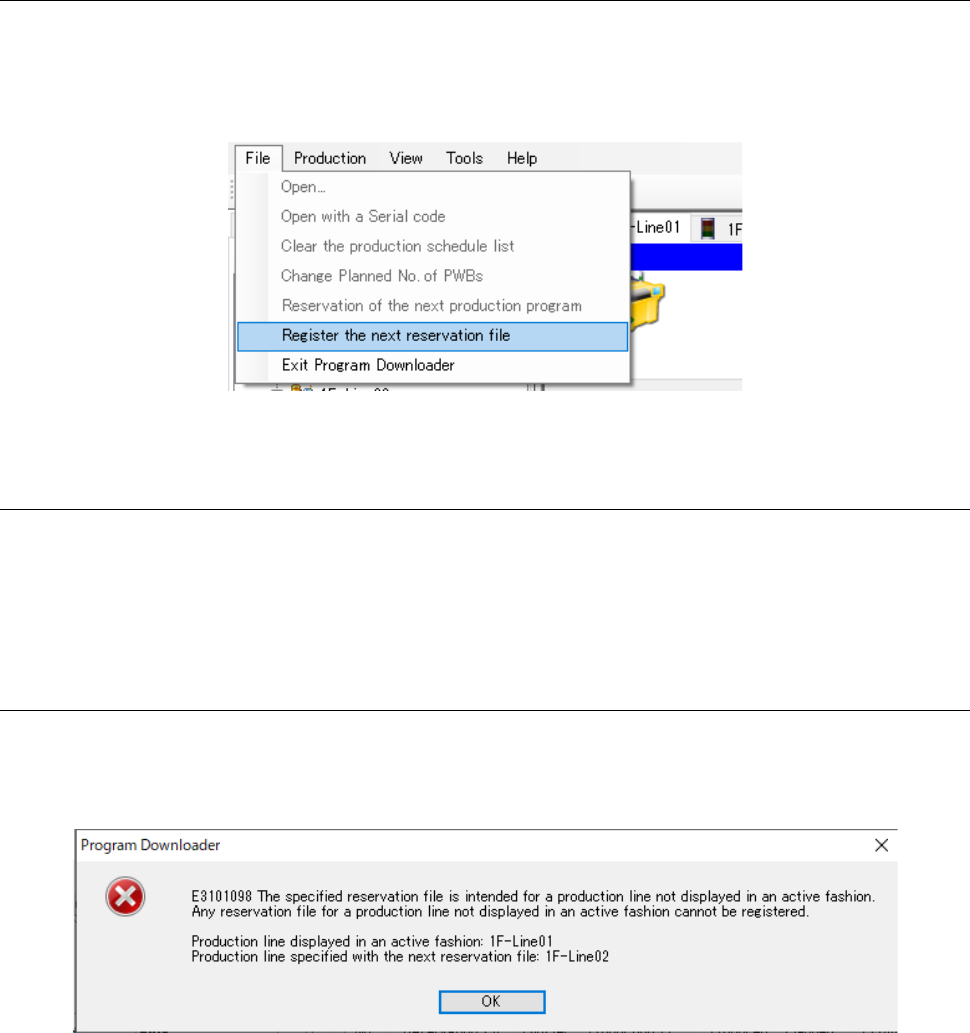
To register the next reservation file, select [File] from the menu, and then [Register the next
reservation file]. When the dialog box for opening a file appears on the screen, select a
reservation file you want to register, and then click the <Open> button. This menu is enabled
only during production performed according to a reservation file.
Figure 13.9-22 [Register the next reservation file] command
13.9.10.2 Registering a file stored in a server as the next reservation file
In the same manner described in Section 13.9.1.2 “Specifying a program registered in a server,”
specify an optimized reservation file with the Program Explorer to drag and drop it to the Line
Monitor.
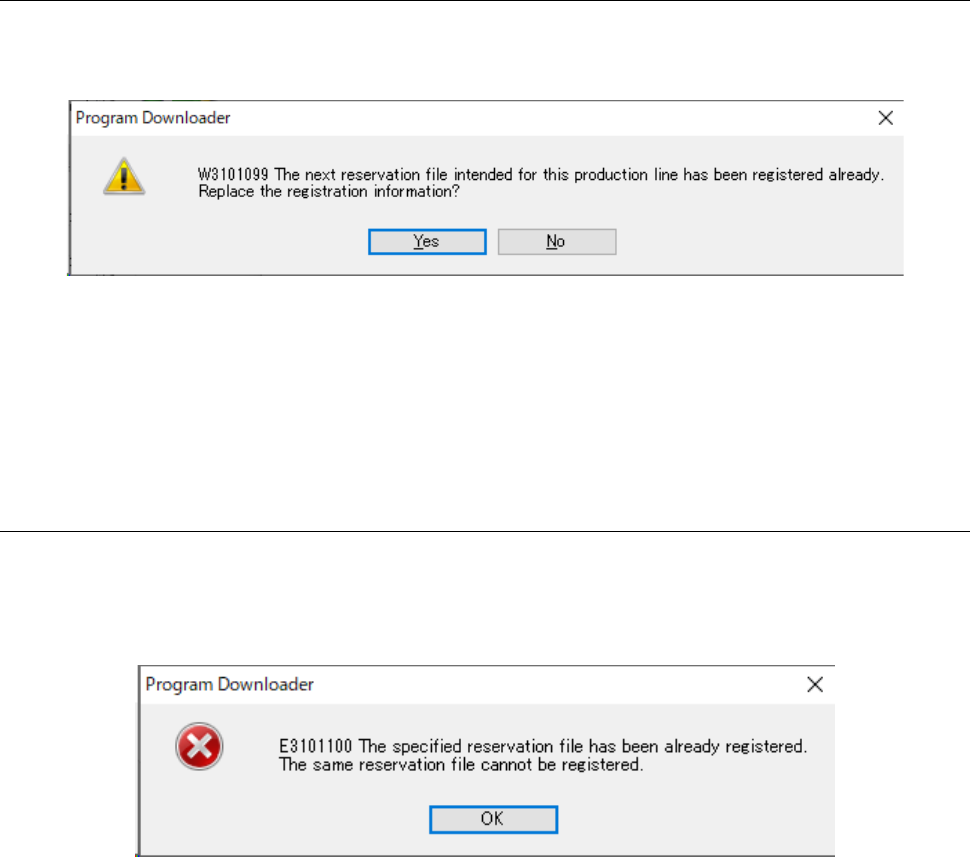
13.9.10.3 If the production line of the specified reservation file is different from the
displayed active production line
If a production line for which a reservation file is reserved is different from the displayed active
production line shown by the Program Downloader, the error message appears on the screen as
shown in Figure 13.9-23.
Figure 13.9-23 If you try to register a reservation file of a production line
not displayed in the active state
If this message appears on the screen, switch the active production line to a line for which you
want to register a reservation file, and then register the next reservation file again.
JaNets Instruction Manual 13. Program Downloader
13-31
13.9.10.4 If any next reservation file is already registered
If you try to register the next reservation file although another one is already registered, the
confirmation message appears on the screen as shown in Figure 13.9-24.
Figure 13.9-24 When the next reservation file is already registered
When you press the <Yes> button, registration information on the existing next reservation file is
replaced with that on the reservation file registered newly.
When you press the <No> button, registration operation is aborted, and then the existing
registration information is still saved.
13.9.10.5 If the same reservation file is already registered
You cannot register a reservation file whose name is the same as that of a reservation file already
registered. If you try to register such a file, the error message shown in Figure 13.9-25 appears
on the screen.
Figure 13.9-25 If the same reservation file is already registered