JANETS_INM.pdf - 第527页
JaNets Instr ucti on Man ual 13 . Program D ownloa der 13 - 31 13.9.10.4 If any next reservation file is already registered If you tr y to register t he next reservat ion file alt houg h another on e is alrea dy re giste…
JaNets Instruction Manual 13. Program Downloader
13-30
13.9.10.1 Registering a local file as the next reservation file
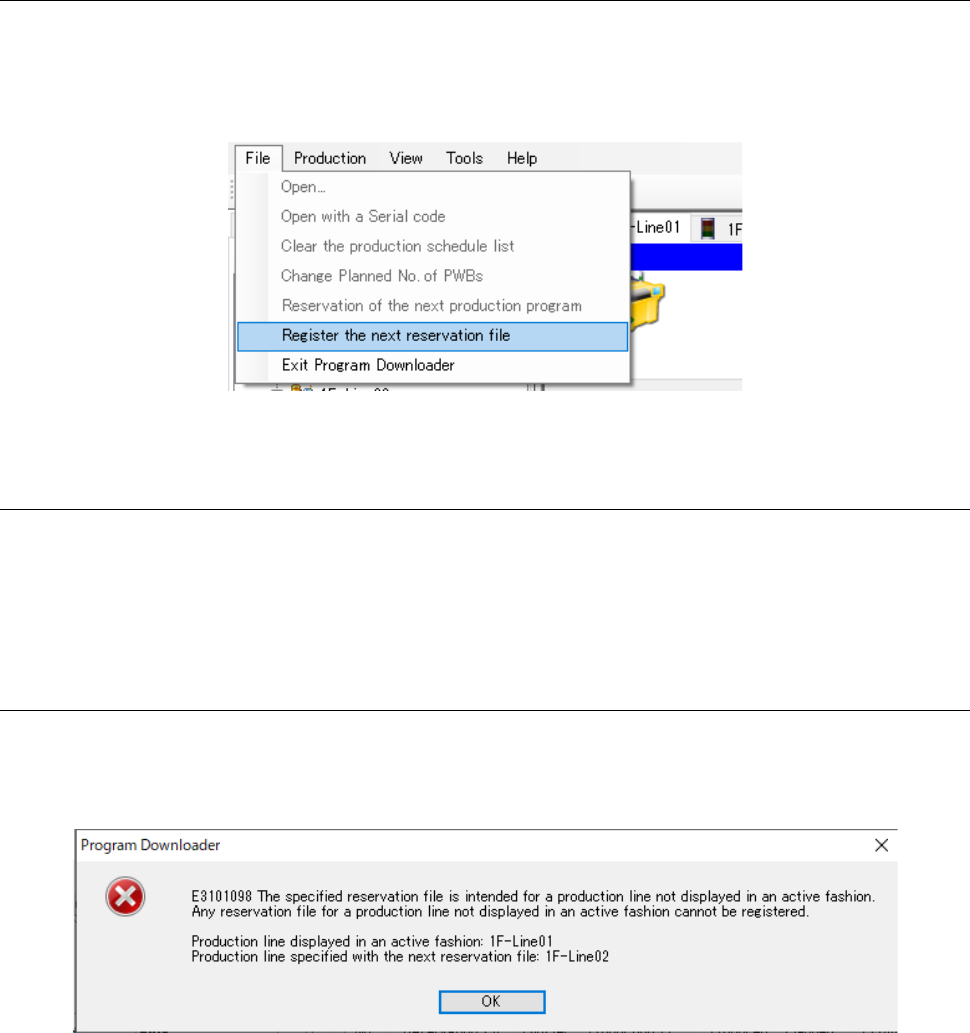
To register the next reservation file, select [File] from the menu, and then [Register the next
reservation file]. When the dialog box for opening a file appears on the screen, select a
reservation file you want to register, and then click the <Open> button. This menu is enabled
only during production performed according to a reservation file.
Figure 13.9-22 [Register the next reservation file] command
13.9.10.2 Registering a file stored in a server as the next reservation file
In the same manner described in Section 13.9.1.2 “Specifying a program registered in a server,”
specify an optimized reservation file with the Program Explorer to drag and drop it to the Line
Monitor.
13.9.10.3 If the production line of the specified reservation file is different from the
displayed active production line
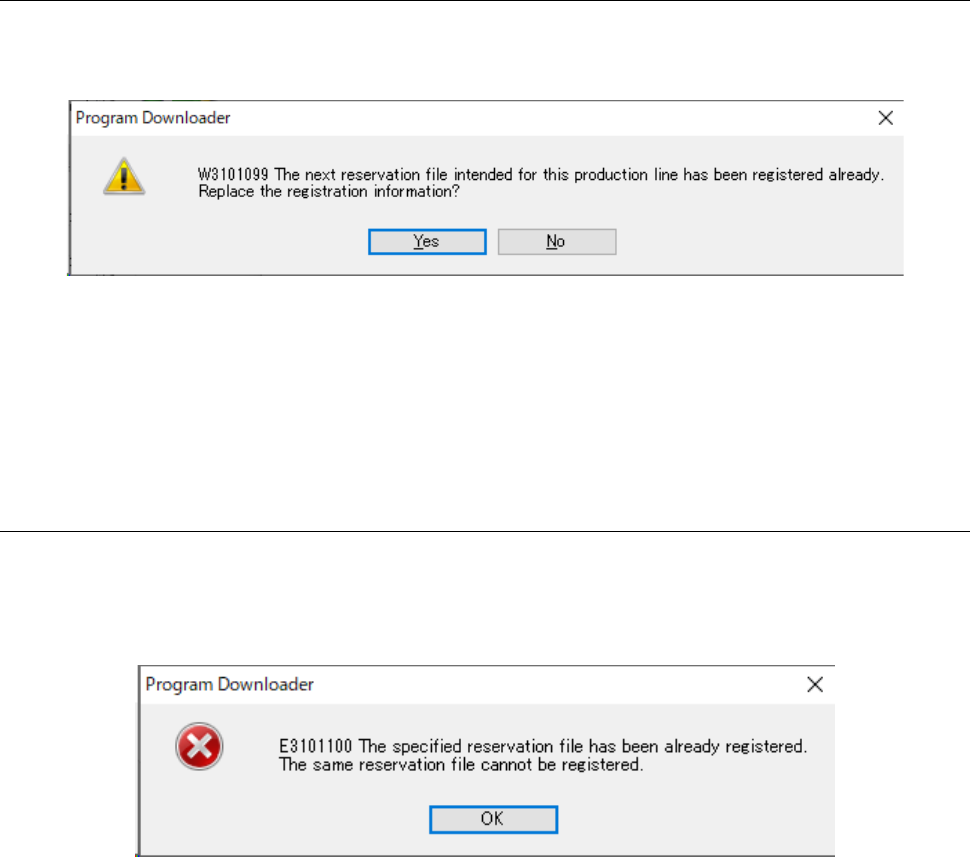
If a production line for which a reservation file is reserved is different from the displayed active
production line shown by the Program Downloader, the error message appears on the screen as
shown in Figure 13.9-23.
Figure 13.9-23 If you try to register a reservation file of a production line
not displayed in the active state
If this message appears on the screen, switch the active production line to a line for which you
want to register a reservation file, and then register the next reservation file again.
JaNets Instruction Manual 13. Program Downloader
13-31
13.9.10.4 If any next reservation file is already registered
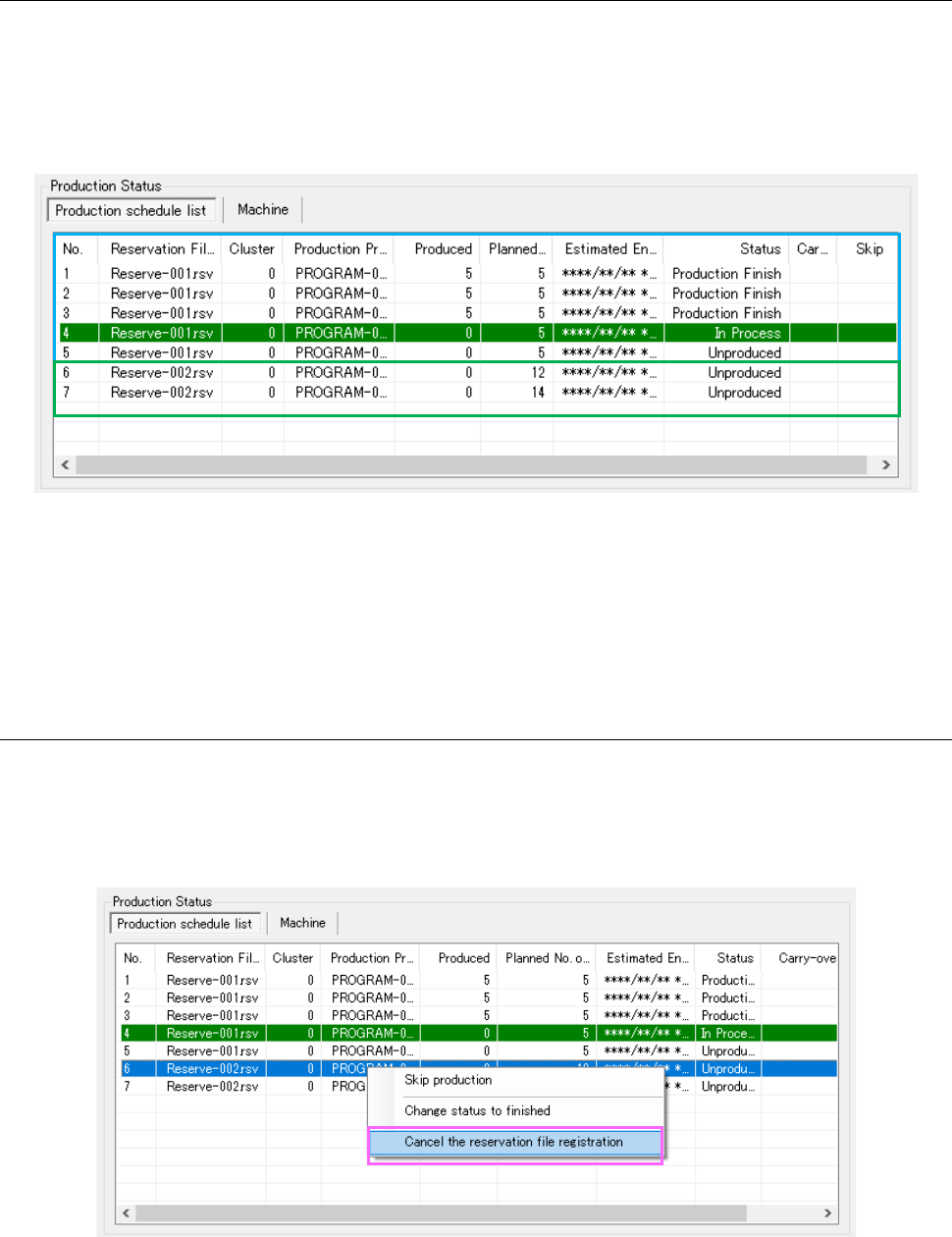
If you try to register the next reservation file although another one is already registered, the
confirmation message appears on the screen as shown in Figure 13.9-24.
Figure 13.9-24 When the next reservation file is already registered
When you press the <Yes> button, registration information on the existing next reservation file is
replaced with that on the reservation file registered newly.
When you press the <No> button, registration operation is aborted, and then the existing
registration information is still saved.
13.9.10.5 If the same reservation file is already registered
You cannot register a reservation file whose name is the same as that of a reservation file already
registered. If you try to register such a file, the error message shown in Figure 13.9-25 appears
on the screen.
Figure 13.9-25 If the same reservation file is already registered
JaNets Instruction Manual 13. Program Downloader
13-32
13.9.10.6 When the next reservation file is registered normally
When the next reservation file is registered normally, a reservation file whose production has
finished and that exists in the production schedule list is deleted from the list, and then a
reservation file registered newly is added to the list.
When the next reservation file is registered normally, the screen appears as shown in Figure
13.9-26.
Figure 13.9-26 Production Status panel displayed after the next reservation file is registered
Note that when the “Automatic check-in” check box is enabled on the “Set Environments” screen
of the Program Downloader, the system automatically displays the check-in dialog box for a
reservation file that finishes the corresponding production, is already checked out and is stored in
the production schedule list after the next reservation file is registered.
13.9.10.7 Canceling registration of the next reservation file
When you right-click a reservation file displayed in the production schedule list, and then select
[Cancel the reservation file registration], the selected reservation file is deleted from the production
schedule list. You cannot delete the first reservation file in the production schedule list or a
reservation file containing a production program that is being used for production.
Figure 13.9-27 Canceling registration of the next reservation file