JANETS_INM.pdf - 第532页
JaNets Instr ucti on Man ual 13 . Program D ownloa der 13 - 36 Figure 13.9 - 31 “Specify a production pr ogram” scree n Select a progr am to be ad ded among t hose di splayed in t he list, and then c lick the <OK> …
JaNets Instruction Manual 13. Program Downloader
13-35
13.9.11.2 Specifying a program to be added (when the Data Manager is not used)
Select a program to be added on the dialog box for specifying a file. You cannot specify two or
more programs.
13.9.11.3 Specifying a program to be added (when the Data Manager is used)
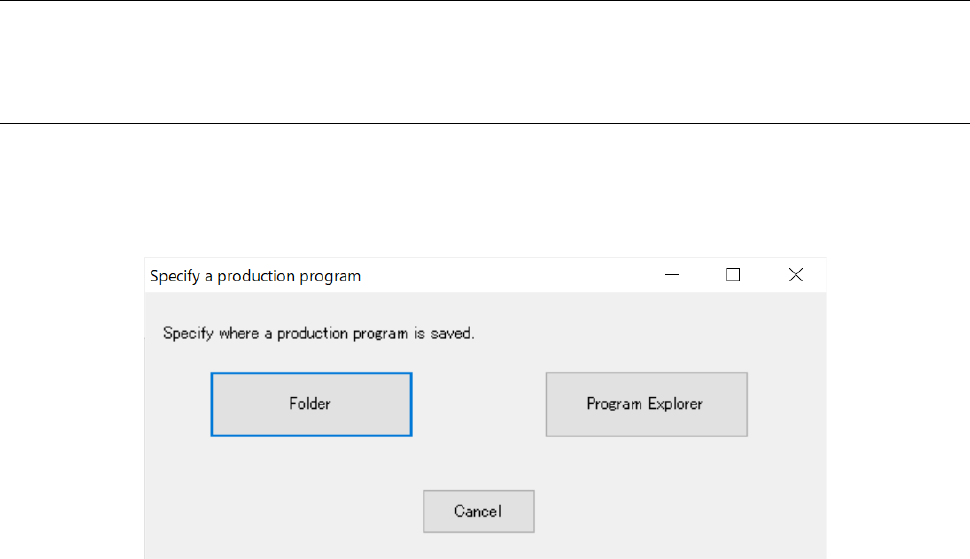
When you use the Data Manager, the screen for specifying a program selection method appears:
select a program from a folder of the JaNets PC or select a program among those displayed with
the Program Explorer.
Figure 13.9-30 Screen for selecting a place where a program to be added is saved
When you click the <Folder> button
Select a program to be added on the dialog box for specifying a file in the same manner as
when the Data Manager is not used.
When you click the <Program Explorer> button
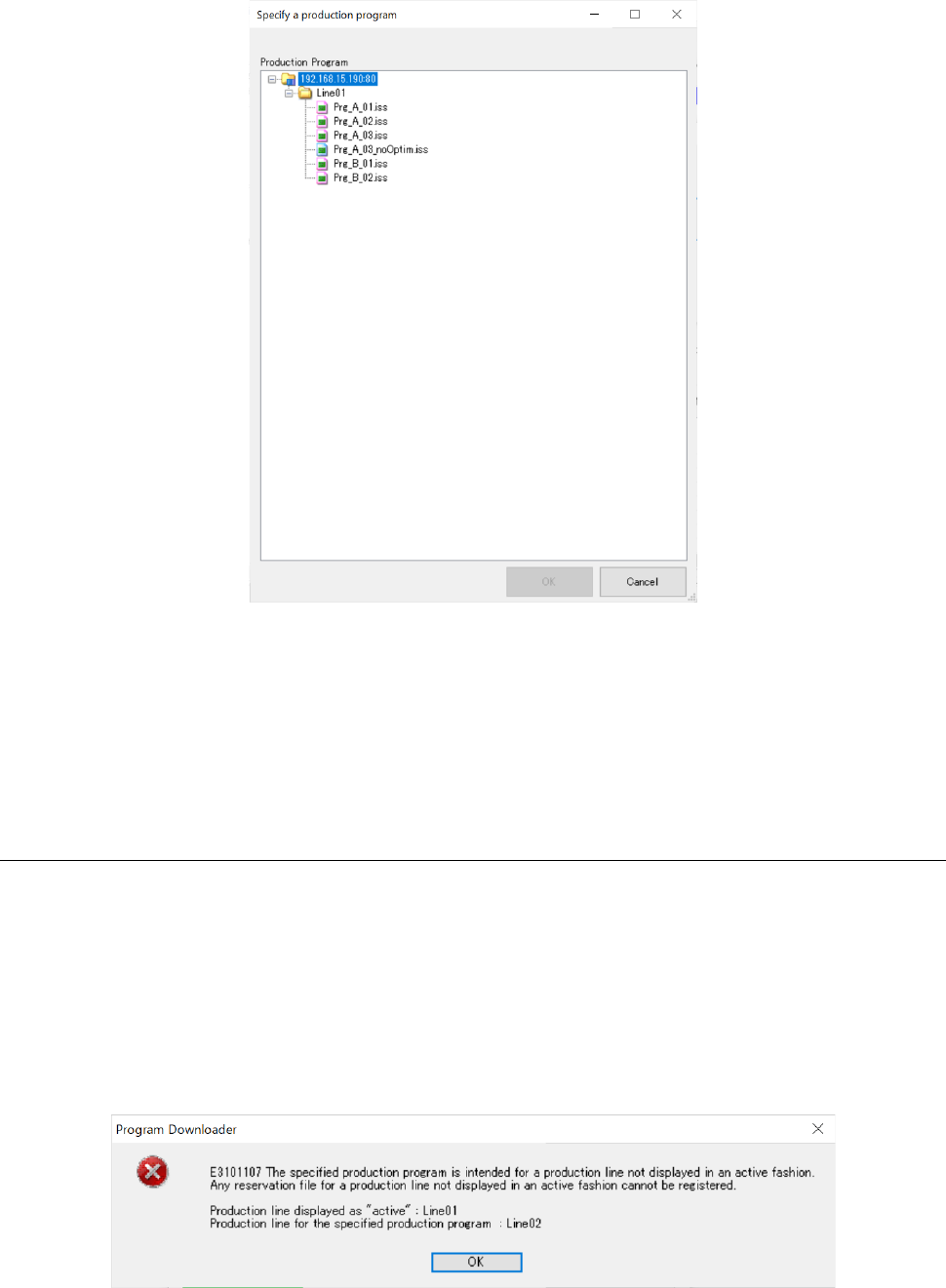
Programs displayed with the Program Explorer are displayed in a tree list form. Note that a
program not specified for an active display production line or a program checked out by
another user who has logged in the system is excluded.
JaNets Instruction Manual 13. Program Downloader
13-36
Figure 13.9-31 “Specify a production program” screen
Select a program to be added among those displayed in the list, and then click the <OK> button.
You cannot select two or more programs. If the selected program is not checked out yet, it is
checked out before a production program is loaded to the system. When you click the <Cancel>
button, specification of the program is cancelled, and the screen is switched back to the screen for
selecting a place where a program to be added is saved.
13.9.11.4 Loading a program to be added
Load a program you want to add. The system checks an active display production line, the line
configuration and whether optimization has been conducted already. If any error occurs due to
one of these checks, the program addition processing is aborted.
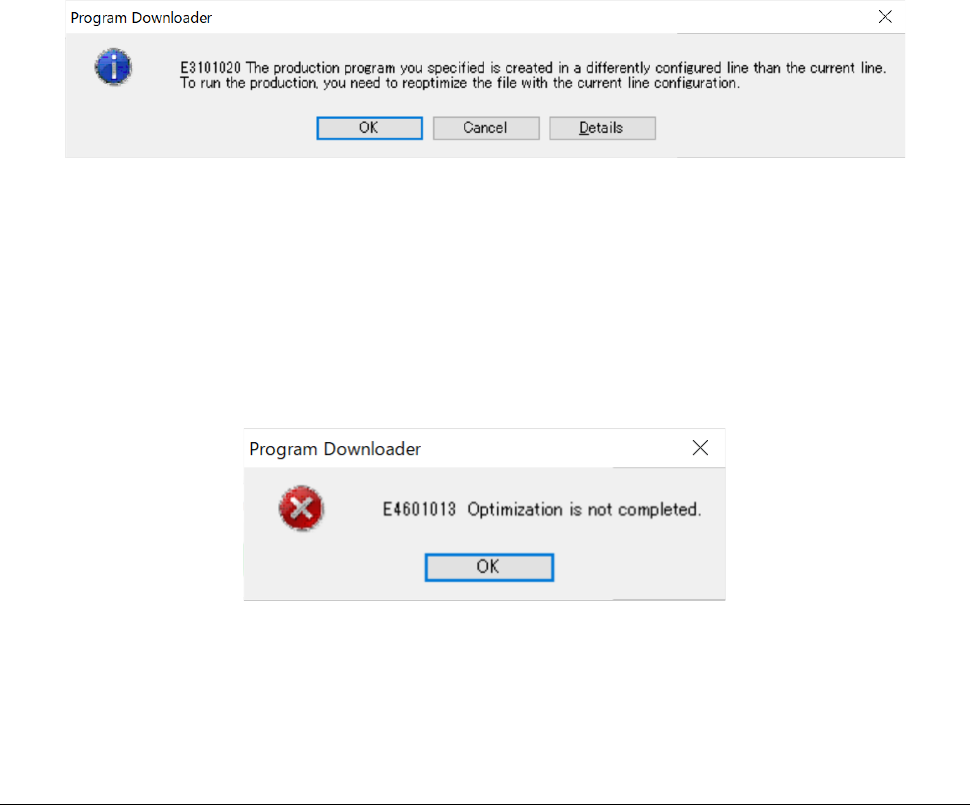
Check of the active display production line
If the production line for the selected production program is different from the active display
production line of the Program Downloader, the error message shown below appears on the
screen.
Figure 13.9-32 If a production line specified with a production program is different
from the active display production line
JaNets Instruction Manual 13. Program Downloader
13-37
If this message appears on the screen, switch the current active production line to a
production line for a program to be added as an active display production line, and then
perform the program addition operation again.
<Check of the line configuration>
If the name of a production line for the selected production program is the same as that of the
current production line, but their configurations (such as the number of machines and a
machine type) are different from each other, the message shown below appears on the
screen.
Figure 13.9-33 If the production line configuration is different
If this message appears on the screen, optimize the program to be added, and then perform a
program adding operation again.
<Check to see if the selected production program is optimized>
If the selected production program is not optimized, the error message shown below appears
on the screen.
Figure 13.9-34 If the selected production program is not optimized
If this message appears on the screen, optimize a program to be added, and then perform the
program addition operation again.
13.9.11.5 Setting of the planned number of PWBs to be produced
Specify the number of PWBs to be produced. You can specify a value between 1 and 99999.