JANETS_INM.pdf - 第536页
JaNets Instr ucti on Man ual 13 . Program D ownloa der 13 - 40 Figure 13.9 - 39 When programs are added between a reservat ion file and the next r eservation fil e
JaNets Instruction Manual 13. Program Downloader
13-39
13.9.11.8 Switching a machine model to another one when an added program exists
See Section 13.9.10.8 “Requirements for switching production to the next reservation file” also.
If a program is added to a reservation file
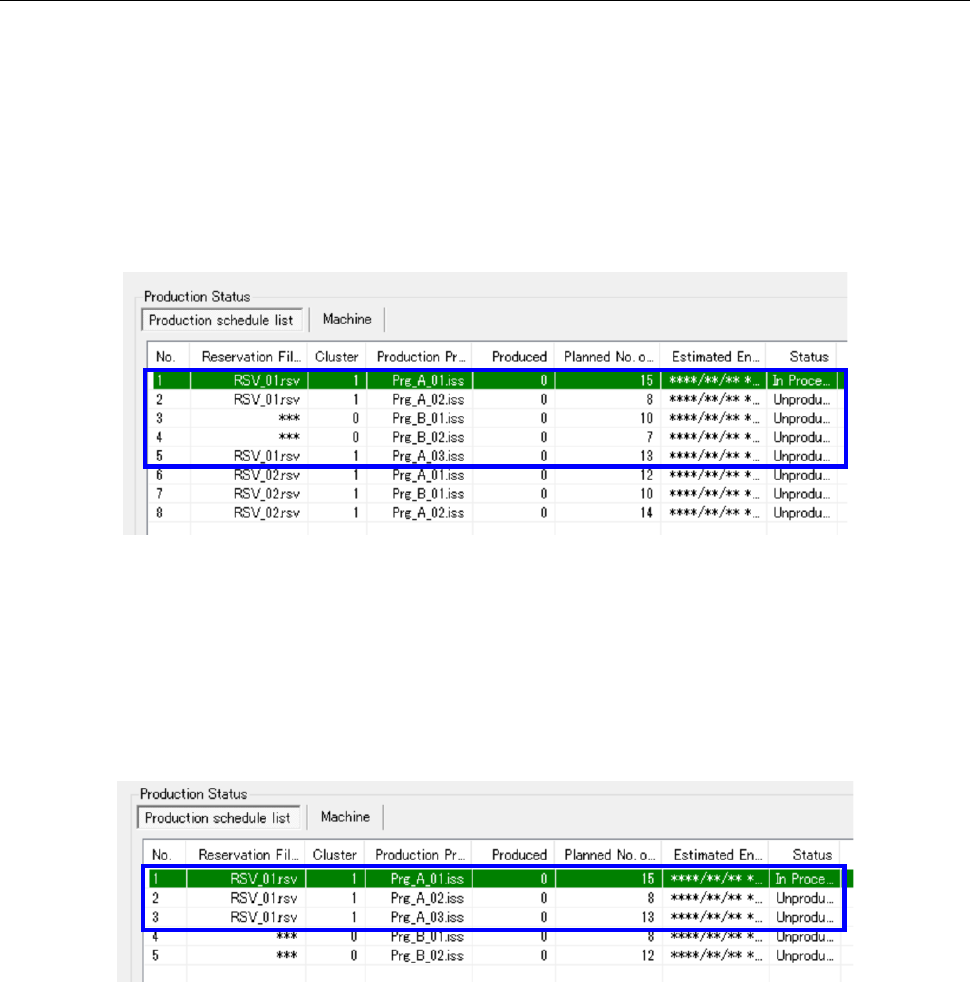
When a production program is added to a reservation file (RSV_01.rsv) as shown in Figure
13.9-37, the system switches the current production to production that is to be performed
according to the next reservation file (RSV_02.rsv) only if production specified with all
production programs contained in the reservation file and production specified with those
added to the reservation file (indicated with the blue frame in the figure) finished.
Figure 13.9-37 When a program is added to a reservation file
When a program is added not to a reservation file
When a production program is added below the last program of a reservation file as shown in
Figure 13.9-38, the system switch the current production to production that is to be performed
according to the added program (Prg_B_01.iss) only if production with all production
programs of a reservation file (indicated with the blue frame in the figure) finished.
Figure 13.9-38 When a program is added below the last program of a reservation file
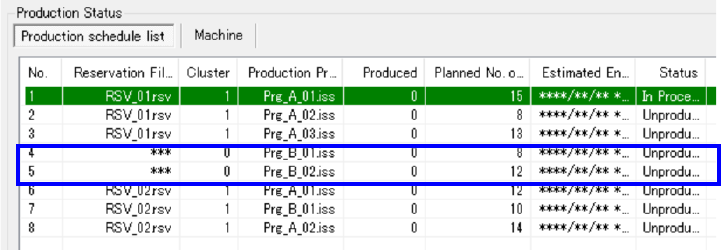
When a production program is added below the last program of a reservation file as shown in
Figure 13.9-39, and then a reservation file is registered, the system switches the current
production to production that is to be performed according to the next reservation file only if
production with all programs added between the reservation file and the next reservation file
(indicated with the blue frame in the figure) finished.
JaNets Instruction Manual 13. Program Downloader
13-40
Figure 13.9-39 When programs are added between a reservation file and the next reservation file

JaNets Instruction Manual 13. Program Downloader
13-41
13.9.12 Clearing the production schedule list
When you select the [File] command from the menu, and then the [Clear the production schedule
list] command, information on a file registered in the active line can be cleared.
13.9.13 Notes on production with a production line including an RX-7 series
machine
13.9.13.1 Skip processing of a reservation file during production
When PWB production is performed with a reservation file, the “production skip” function allows
you to set the setting item “Skip production” of a production program to ON to skip the production
program. However, note that the production status of the skipped program is changed depending
on the conditions described below after the next program to be used for production is downloaded.
If the number of PWBs produced with any of the machines of the production line is “1” or a larger
number
The production status is changed from “Suspended” to “Production Finish.”
If the number of PWBs produced with all machines of the production line is “0” (zero)
The production status is changed from “Suspended” to “Unproduced.”
13.9.13.2 Re-downloading processing of a reservation file during production
When you download another production program after selecting the “Change status to suspended”
radio button on the “Termination production” screen, and then uploading one production program,
the status of the uploaded program whose production is not completed yet is changed depending
on the conditions described below.
If the number of PWBs produced with any of the machines of the production line is “1” or a larger
number
The production status is changed from “Suspended” to “Production Finish.”
If the number of PWBs produced with all machines of the production line is “0” (zero)
The production status is changed from “Suspended” to “Unproduced.”
13.10 Managing a Production Program with a Seral Code
This is a function for managing a production program with associating it with a serial code. By
reading a serial code with a code reader, you can open a production program associated with the
read serial code.
* To use this function, you have to check the “Use a serial code to load a production program”
check box on the screen displayed by selecting [Set Environments] – [Management of a
production program] of the Program Downloader (see Section 13.14.2.7).
13.10.1 Notes
13.10.1.1 Code reader you can use
The system supports a code reader to be connected via a USB connector.