JANETS_INM.pdf - 第575页
JaNets Instr ucti on Man ual 13 . Program D ownloa der 13 - 79 T able 13.16 - 22 Inspection information (R V - 1/2/2 - 3D) ID code Label (Title) Description Inspection infor mation 21 CnvrLaneId Conveyor l ane ID 0: Fron…
JaNets Instruction Manual 13. Program Downloader
13-78
Table 13.16-19 Tray/MTS information (JM-20/JM-100)
ID code
Label (Title)
Description
Tray/MTS information
17
FeederBankKind
Feeder bank type
StepNo
Step number
CompoName
Component name
PickedNum
Number of times a component was picked up successfully
PlacedNum
Number of times a component was placed on a board successfully
PickErrorNum
Number of component pick-up errors
NoCompoNum
Number of component run-out errors
ErrorVacNum
Number of retry-over errors
LaserErrorNum
Number of laser errors
VisionErrorNum
Number of image recognition errors
LeadBendErrorNum
Number of bent lead errors
PosCompoNum
Number of component posture errors
AngleCompoNum
Number of component angle errors
TakeoutCompoNum
Number of times a component was returned without being placed on a board
CompoDirectionErrorNum
Number of component direction determination errors
InsertDimensionErrorNum
Number of insertable component judgment out of range errors
CompoInsertErrorNum
Number of component insertion error detection errors
LeadCorrectionErrorNum
Number of correction failures
OtherErrorNum
Number of other errors
Table 13.16-20 Production management information (RV-1/2/2-3D)
ID code
Label (Title)
Description
Production management information
18
MachineName
Machine name
MachineFunction
Machine function
As for an inspection machine, the machine function is fixed to “INSPECTER.”
ProdutionNum
Planned number of PWBs to be produced
SystemProgramName
Names of files that are related to production and downloaded with JaNets
MachineProgramName
Name of a production program used for production with the machine
Table 13.16-21 Production management information (RP-1)
ID code
Label (Title)
Description
Production management information
19
MachineName
Machine name
MachineFunction
Machine function
As for a printer, the machine function is fixed to “PRINTER.”
ProdutionNum
Planned number of PWBs to be produced
SystemProgramName
Names of files that are related to production and downloaded with JaNets
MachineProgramName
Name of a production program used for production with the machine
JaNets Instruction Manual 13. Program Downloader
13-79
Table 13.16-22 Inspection information (RV-1/2/2-3D)
ID code
Label (Title)
Description
Inspection information
21
CnvrLaneId
Conveyor lane ID
0: Front lane or single-lane machine
1: Rear lane
ProductNum
Number of produced PWBs
ProductCir
Number of produced circuits
EndProductionCode
Termination code for end of PWB production
0: Normal
1: Abnormal
TimeCycle
Cycle time
TimeProduction
Production time (hour:minute:second)
TimeInspection
Inspection time (hour:minute:second)
TimeJudgement
Judgment time (hour:minute:second)
QualifiedProductionNum
Number of qualified PWBs
QualifiedProductionCircuit
Number of qualified circuits
Side
Inspected side of a PWB
0: Side A
1: Side B
InspectStartTime
Inspection start date and time
InspectMode
Inspection mode
0: Auto mode
1: Semi-auto mode
2: Remote mode
InspectResult
Inspection result
0: OK
1: NG
JudgeResult
Judgement result
0: OK
1: NG
BoardCode
Board barcode
SubBoardCode
Barcode character string of each circuit
Each barcode character string is connected with “,” (comma), and then
output.
BadMark
Existence of a bad mark of each circuit
0: No bad mark
1: with a bad mark
When all of three circuits have no bad mark, “000” is output. When only
the second circuit of three circuits has a bad mark, “010” is output. In
this way, existence of a bad mark of each circuit is output continuously.
NgStepCount
Number of NG components
StepCount
Total number of inspected components
Table 13.16-23 Print information (RP-1)
ID code
Label (Title)
Description
Print information
22
ProductNum
Number of produced PWBs
TimeTact
Takt time
TimeCycle
Cycle time
TimeMarkRetry
Mark retry time (hour:minute:second)
TimeTransportWaitIn
Board load waiting time (hour:minute:second)
TimeTransportWaitOut
Board eject waiting time (hour:minute:second)
TimeTotal
Accumulated time (hour:minute:second)
JaNets Instruction Manual 13. Program Downloader
13-80
13.17 Equipment Manager Linkage Functions
The functions described in this chapter can be used only when the Equipment Manager license is
valid.
13.17.1 Bad mark propagation
The bad mark information uploaded from an upstream machine of a production line is taken over
to a downstream machine.
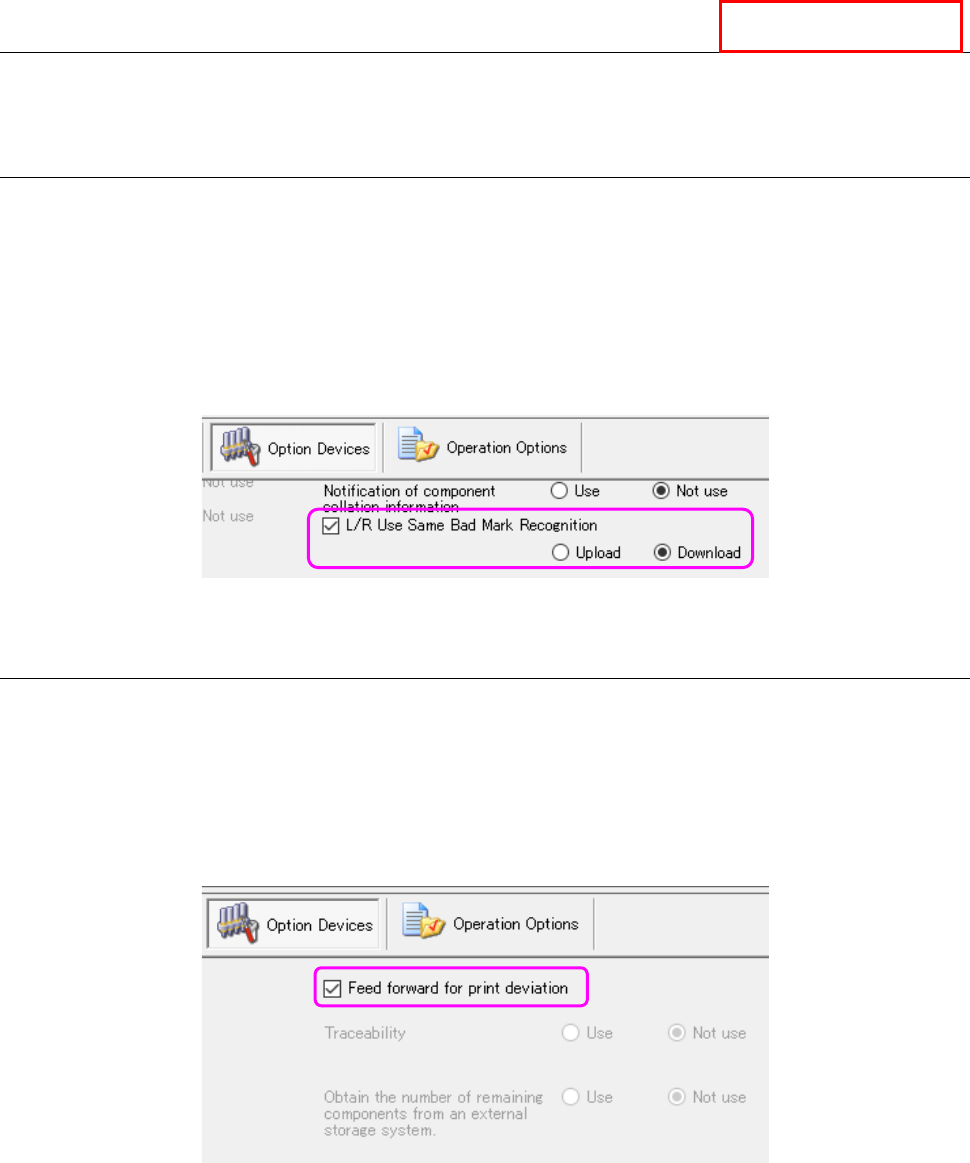
Whether to enable/disable this bad mark propagation function has to be set for each machine with
the Shopfloor Setup. To use this function, check to see if a checkmark is put in the “L/R Use
Same Bad Mark Recognition” check box on the “Option Devices” tab, and the “Upload” radio
button is selected for the source machine, while the “Download” radio button is selected for the
destination machine.
Figure 13.17-1 Setting of the “L/R Use Same Bad Mark Recognition” check box (Shopfloor Setup)
13.17.2 Feed forward for print deviation
The printing position error offset information output by an inspection machine located on the
upstream side of a production line is transmitted to an RS-1 series on the downstream side of the
production line.
Whether to enable/disable this print position error feed forward function has to be set for each
machine with the Shopfloor Setup. To use this function, check to see if a checkmark is put in the
“Feed forward for print deviation” check box on the “Option Devices” tab of the Shopfloor Setup.
Figure 13.17-2 Setting of the “Feed forward for print deviation” check box (Shopfloor Setup)
Equipment Manager