JANETS_INM.pdf - 第576页
JaNets Instr ucti on Man ual 13 . Program D ownloa der 13 - 80 13.17 Equipme nt Man ag er Li nka ge Fu nct i ons The function s descr ibed in this chapter c an be used only when t he Equ ipment M anager licen se is valid…
JaNets Instruction Manual 13. Program Downloader
13-79
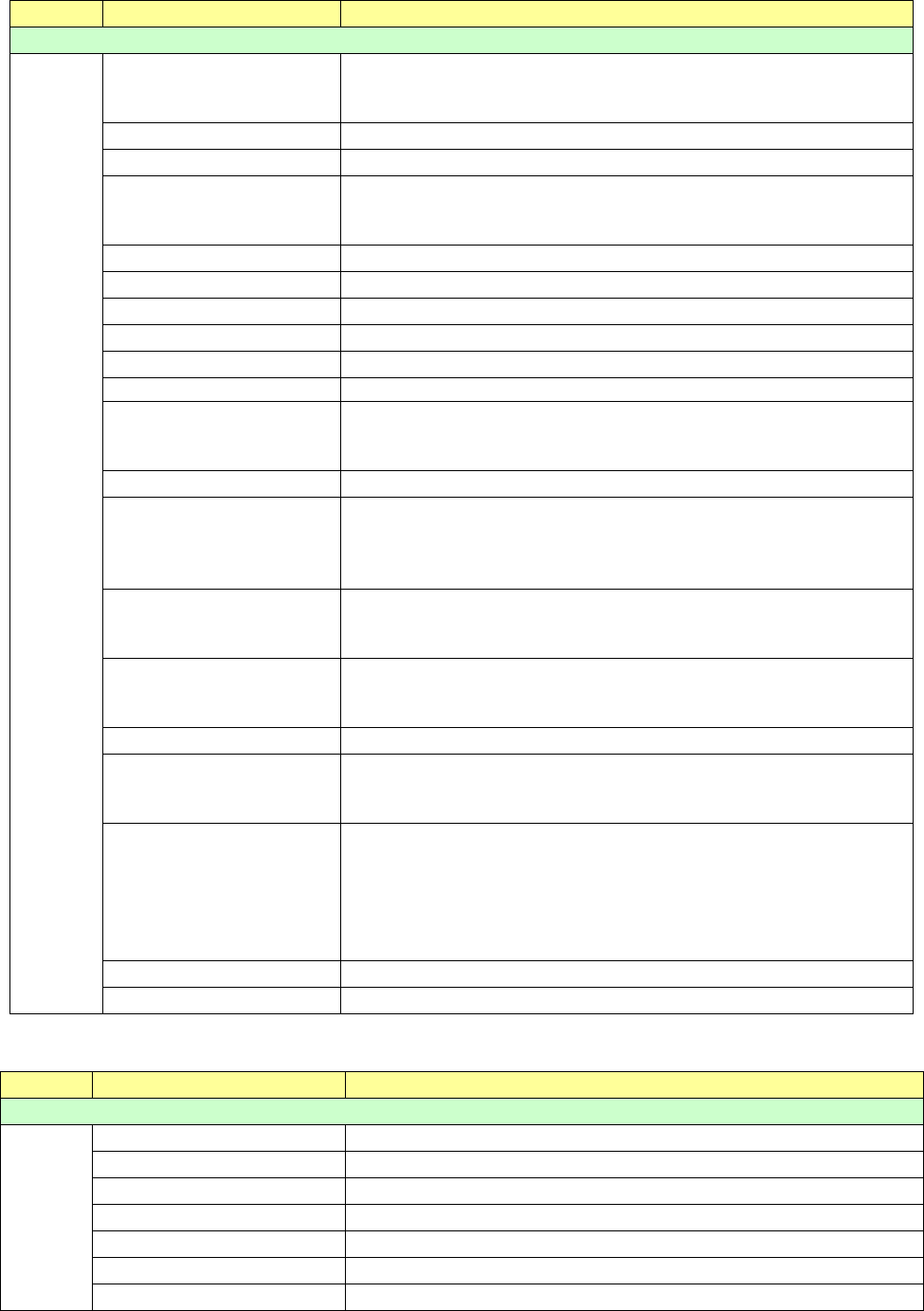
Table 13.16-22 Inspection information (RV-1/2/2-3D)
ID code
Label (Title)
Description
Inspection information
21
CnvrLaneId
Conveyor lane ID
0: Front lane or single-lane machine
1: Rear lane
ProductNum
Number of produced PWBs
ProductCir
Number of produced circuits
EndProductionCode
Termination code for end of PWB production
0: Normal
1: Abnormal
TimeCycle
Cycle time
TimeProduction
Production time (hour:minute:second)
TimeInspection
Inspection time (hour:minute:second)
TimeJudgement
Judgment time (hour:minute:second)
QualifiedProductionNum
Number of qualified PWBs
QualifiedProductionCircuit
Number of qualified circuits
Side
Inspected side of a PWB
0: Side A
1: Side B
InspectStartTime
Inspection start date and time
InspectMode
Inspection mode
0: Auto mode
1: Semi-auto mode
2: Remote mode
InspectResult
Inspection result
0: OK
1: NG
JudgeResult
Judgement result
0: OK
1: NG
BoardCode
Board barcode
SubBoardCode
Barcode character string of each circuit
Each barcode character string is connected with “,” (comma), and then
output.
BadMark
Existence of a bad mark of each circuit
0: No bad mark
1: with a bad mark
When all of three circuits have no bad mark, “000” is output. When only
the second circuit of three circuits has a bad mark, “010” is output. In
this way, existence of a bad mark of each circuit is output continuously.
NgStepCount
Number of NG components
StepCount
Total number of inspected components
Table 13.16-23 Print information (RP-1)
ID code
Label (Title)
Description
Print information
22
ProductNum
Number of produced PWBs
TimeTact
Takt time
TimeCycle
Cycle time
TimeMarkRetry
Mark retry time (hour:minute:second)
TimeTransportWaitIn
Board load waiting time (hour:minute:second)
TimeTransportWaitOut
Board eject waiting time (hour:minute:second)
TimeTotal
Accumulated time (hour:minute:second)
JaNets Instruction Manual 13. Program Downloader
13-80
13.17 Equipment Manager Linkage Functions
The functions described in this chapter can be used only when the Equipment Manager license is
valid.
13.17.1 Bad mark propagation
The bad mark information uploaded from an upstream machine of a production line is taken over
to a downstream machine.
Whether to enable/disable this bad mark propagation function has to be set for each machine with
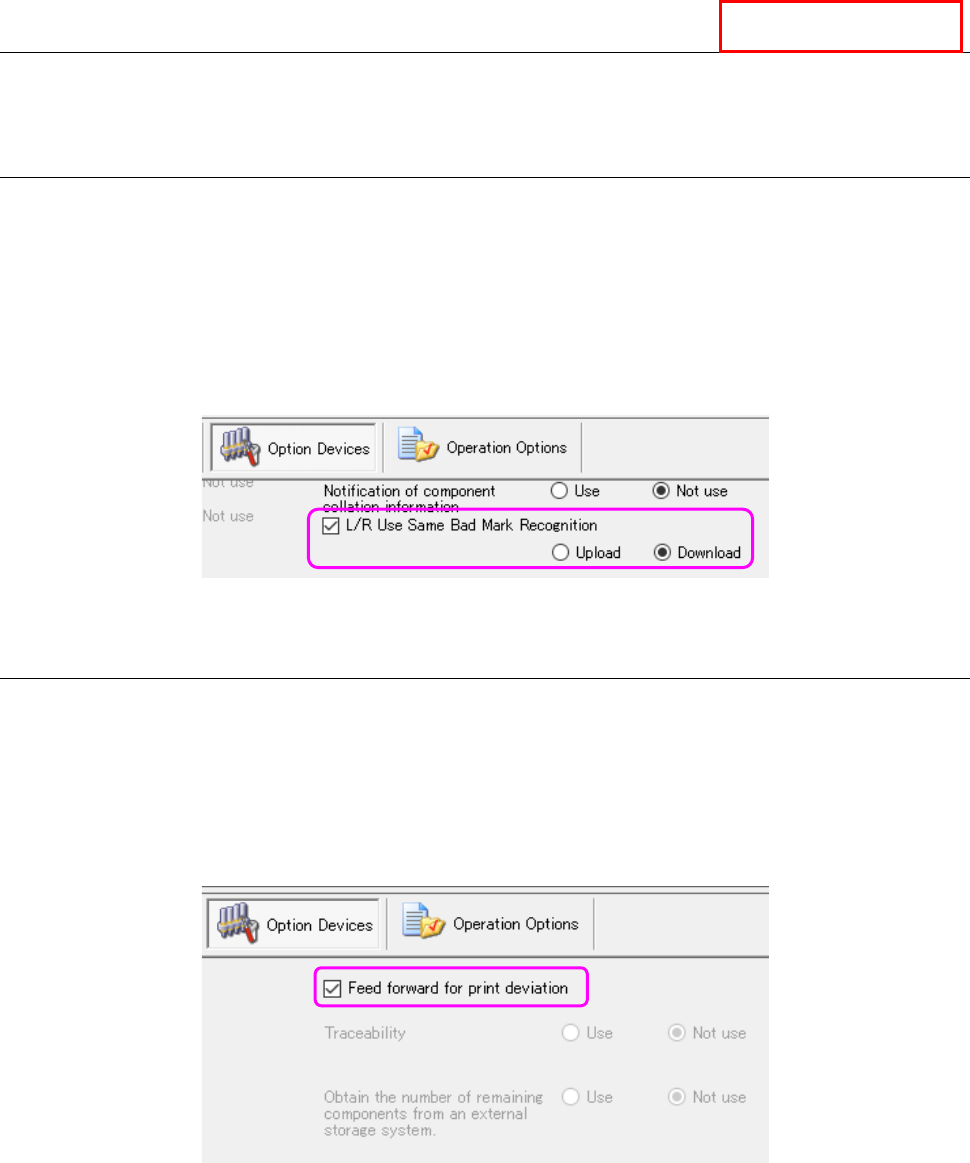
the Shopfloor Setup. To use this function, check to see if a checkmark is put in the “L/R Use
Same Bad Mark Recognition” check box on the “Option Devices” tab, and the “Upload” radio
button is selected for the source machine, while the “Download” radio button is selected for the
destination machine.
Figure 13.17-1 Setting of the “L/R Use Same Bad Mark Recognition” check box (Shopfloor Setup)
13.17.2 Feed forward for print deviation
The printing position error offset information output by an inspection machine located on the
upstream side of a production line is transmitted to an RS-1 series on the downstream side of the
production line.
Whether to enable/disable this print position error feed forward function has to be set for each
machine with the Shopfloor Setup. To use this function, check to see if a checkmark is put in the
“Feed forward for print deviation” check box on the “Option Devices” tab of the Shopfloor Setup.
Figure 13.17-2 Setting of the “Feed forward for print deviation” check box (Shopfloor Setup)
Equipment Manager
JaNets Instruction Manual 13. Program Downloader
13-81
13.18 Production Instruction from an External System
The function described in this Section can be used only when the External Output Function license
is valid.
This is a function for reading or downloading a program without operating the Program
Downloader by an operator just when the upper system transmits a production instruction
command to the External Output Function.
This Instruction Manual describes the settings of the Program Downloader only. Refer to the
Instruction Manual of the External Output Function for commands to be sent/received to/from an
upper system and the settings of the External Output Function.
13.18.1 Preparations for using the function
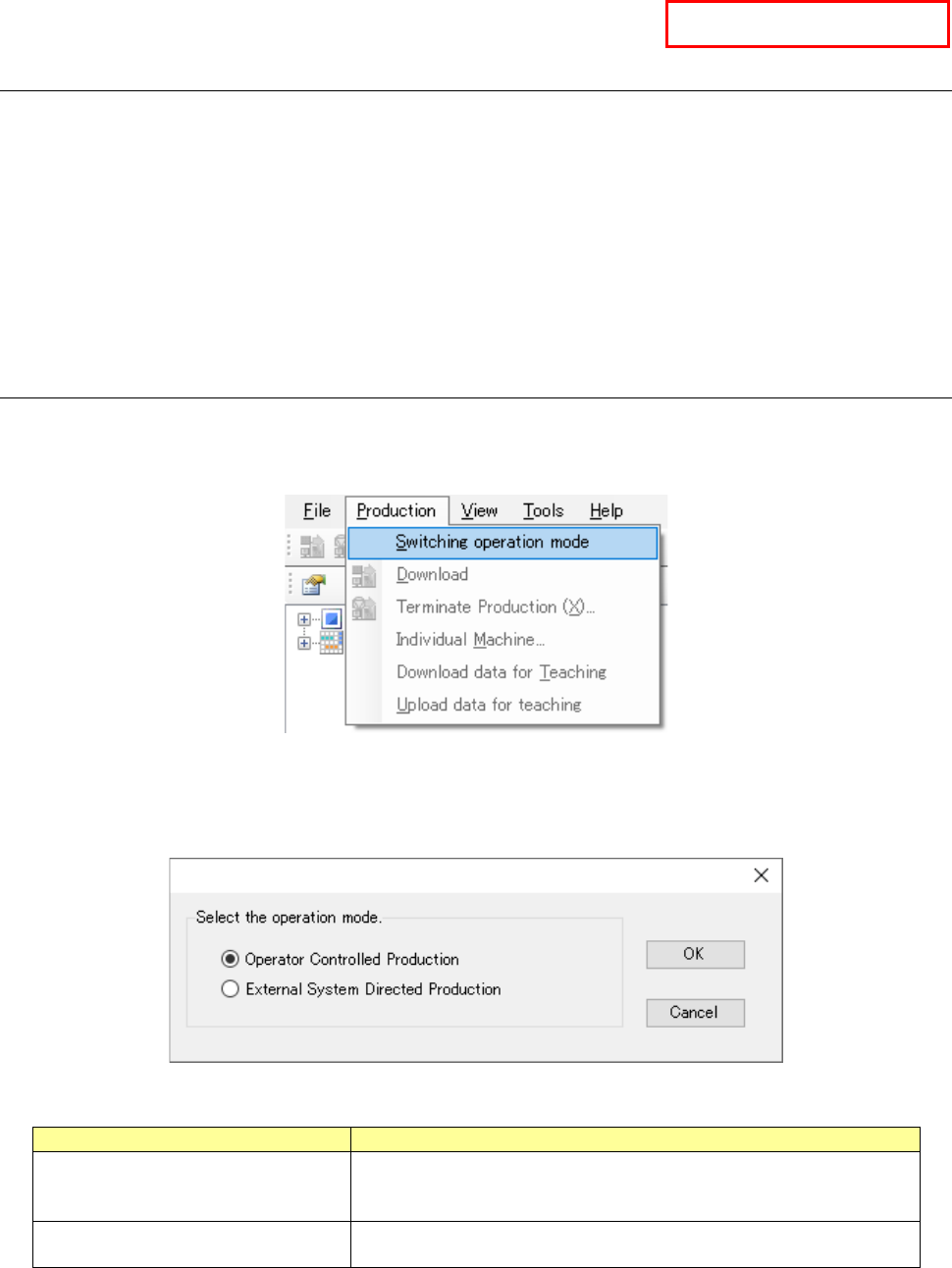
Select the menu command [Switching operation mode] on the “Production” menu invoked from the
menu bar. (When any of production lines is producing a PWB, this [Switching operation mode]
menu command is disabled, and you cannot select it.)
Figure 13.18-1 [Switching operation mode] menu command
When the dialog box for changing the operation mode appears on the screen, select the Program
Downloader operation mode.
Figure 13.18-2 Dialog box for changing the operation mode
Operation mode
Description
Operator Controlled Production
In this mode, an operator is supposed to operate the Program
Downloader menu to produce PWBs.
* This mode is selected by default.
External System Directed Production
In this mode, the system produces PWBs by following a command
received from an external system.
When you click the <OK> button, the dialog box for confirming change of the operation mode
appears on the screen. When you click the <Cancel> button, the system closes this dialog box
without switching the operation mode.
External Output Function