JANETS_INM.pdf - 第577页
JaNets Instr ucti on Man ual 13 . Program D ownloa der 13 - 81 13.18 P roduction In struction fr om an External Sys tem The function d escribed in this Secti on can be used o nly when t he Externa l Output Function l ice…
JaNets Instruction Manual 13. Program Downloader
13-80
13.17 Equipment Manager Linkage Functions
The functions described in this chapter can be used only when the Equipment Manager license is
valid.
13.17.1 Bad mark propagation
The bad mark information uploaded from an upstream machine of a production line is taken over
to a downstream machine.
Whether to enable/disable this bad mark propagation function has to be set for each machine with
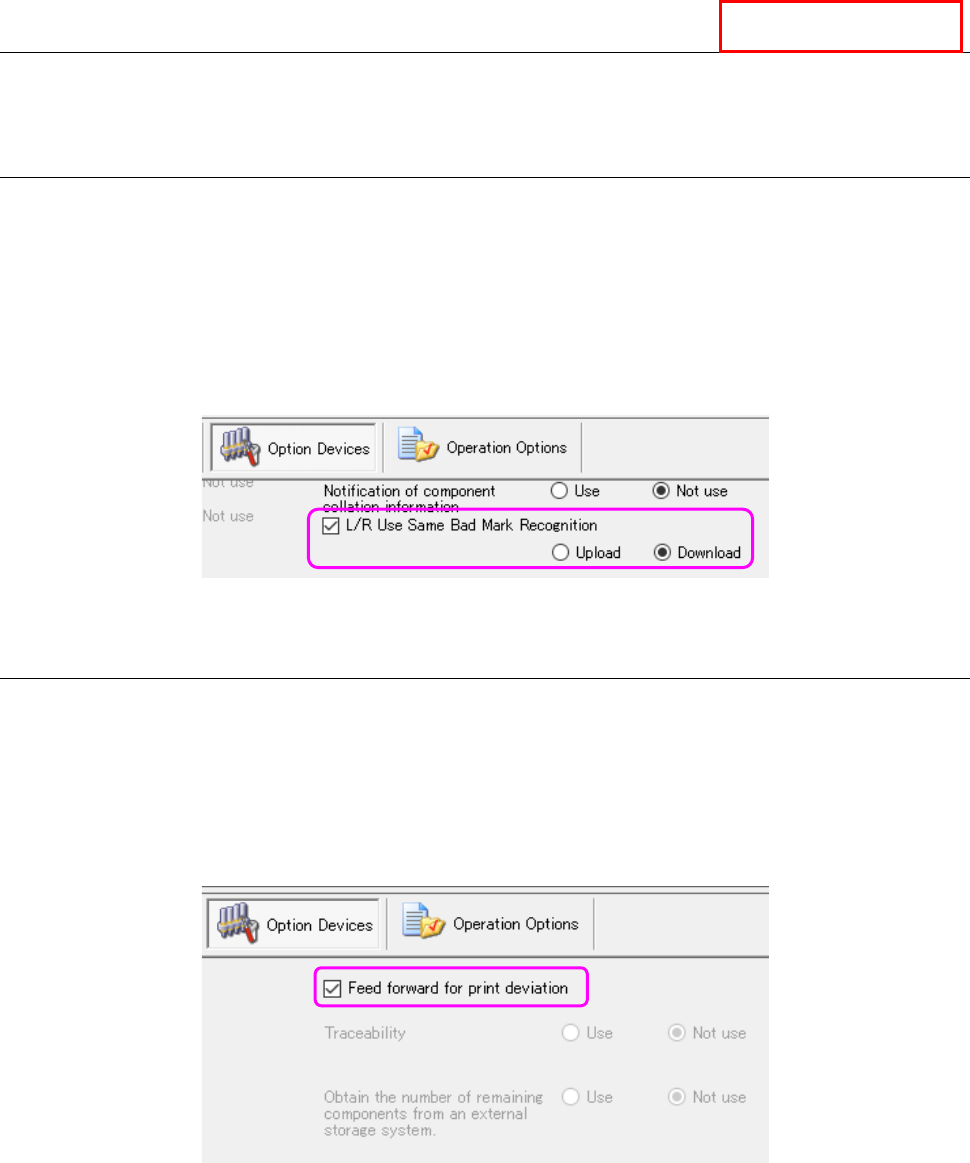
the Shopfloor Setup. To use this function, check to see if a checkmark is put in the “L/R Use
Same Bad Mark Recognition” check box on the “Option Devices” tab, and the “Upload” radio
button is selected for the source machine, while the “Download” radio button is selected for the
destination machine.
Figure 13.17-1 Setting of the “L/R Use Same Bad Mark Recognition” check box (Shopfloor Setup)
13.17.2 Feed forward for print deviation
The printing position error offset information output by an inspection machine located on the
upstream side of a production line is transmitted to an RS-1 series on the downstream side of the
production line.
Whether to enable/disable this print position error feed forward function has to be set for each
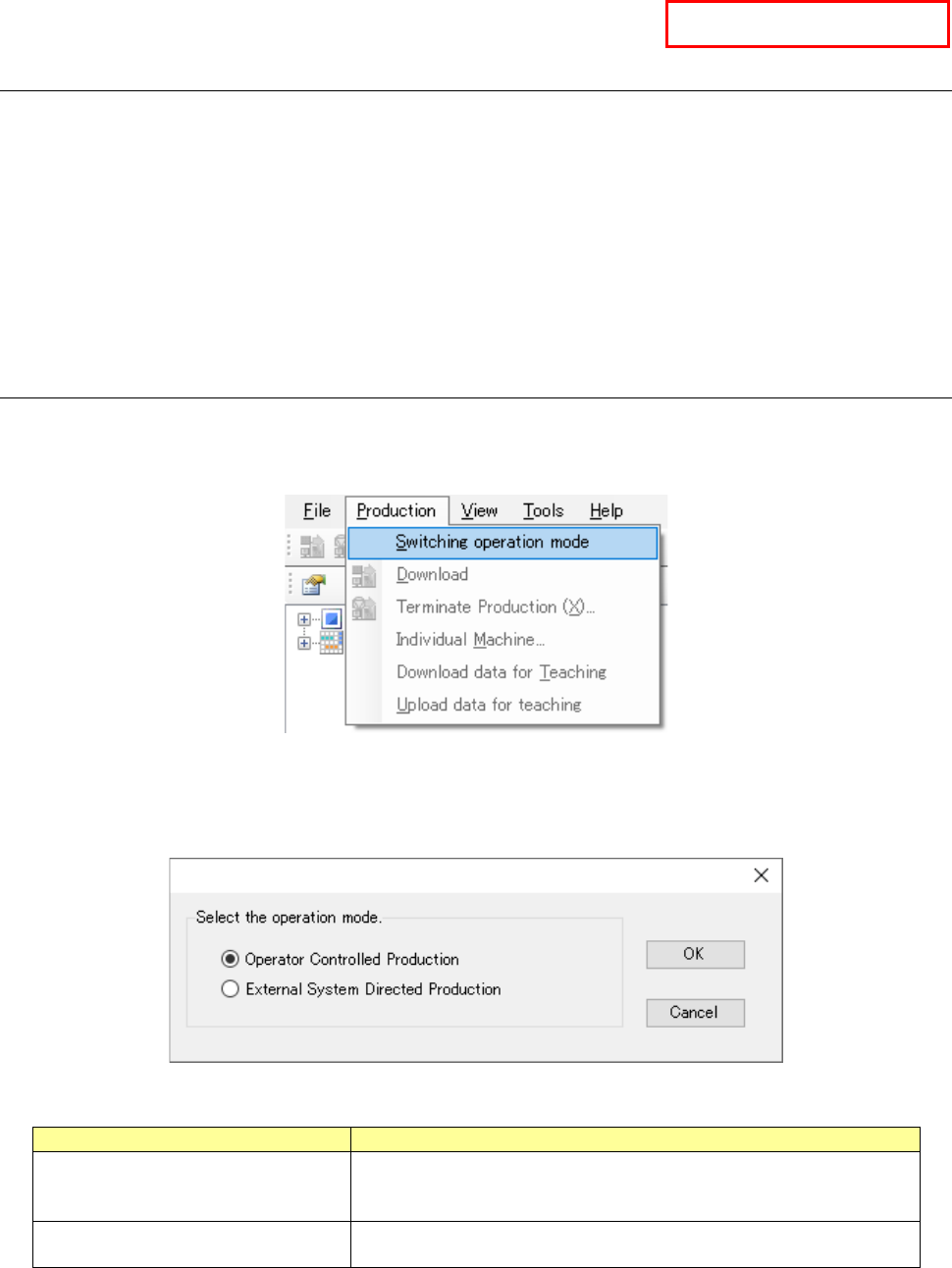
machine with the Shopfloor Setup. To use this function, check to see if a checkmark is put in the
“Feed forward for print deviation” check box on the “Option Devices” tab of the Shopfloor Setup.
Figure 13.17-2 Setting of the “Feed forward for print deviation” check box (Shopfloor Setup)
Equipment Manager
JaNets Instruction Manual 13. Program Downloader
13-81
13.18 Production Instruction from an External System
The function described in this Section can be used only when the External Output Function license
is valid.
This is a function for reading or downloading a program without operating the Program
Downloader by an operator just when the upper system transmits a production instruction
command to the External Output Function.
This Instruction Manual describes the settings of the Program Downloader only. Refer to the
Instruction Manual of the External Output Function for commands to be sent/received to/from an
upper system and the settings of the External Output Function.
13.18.1 Preparations for using the function
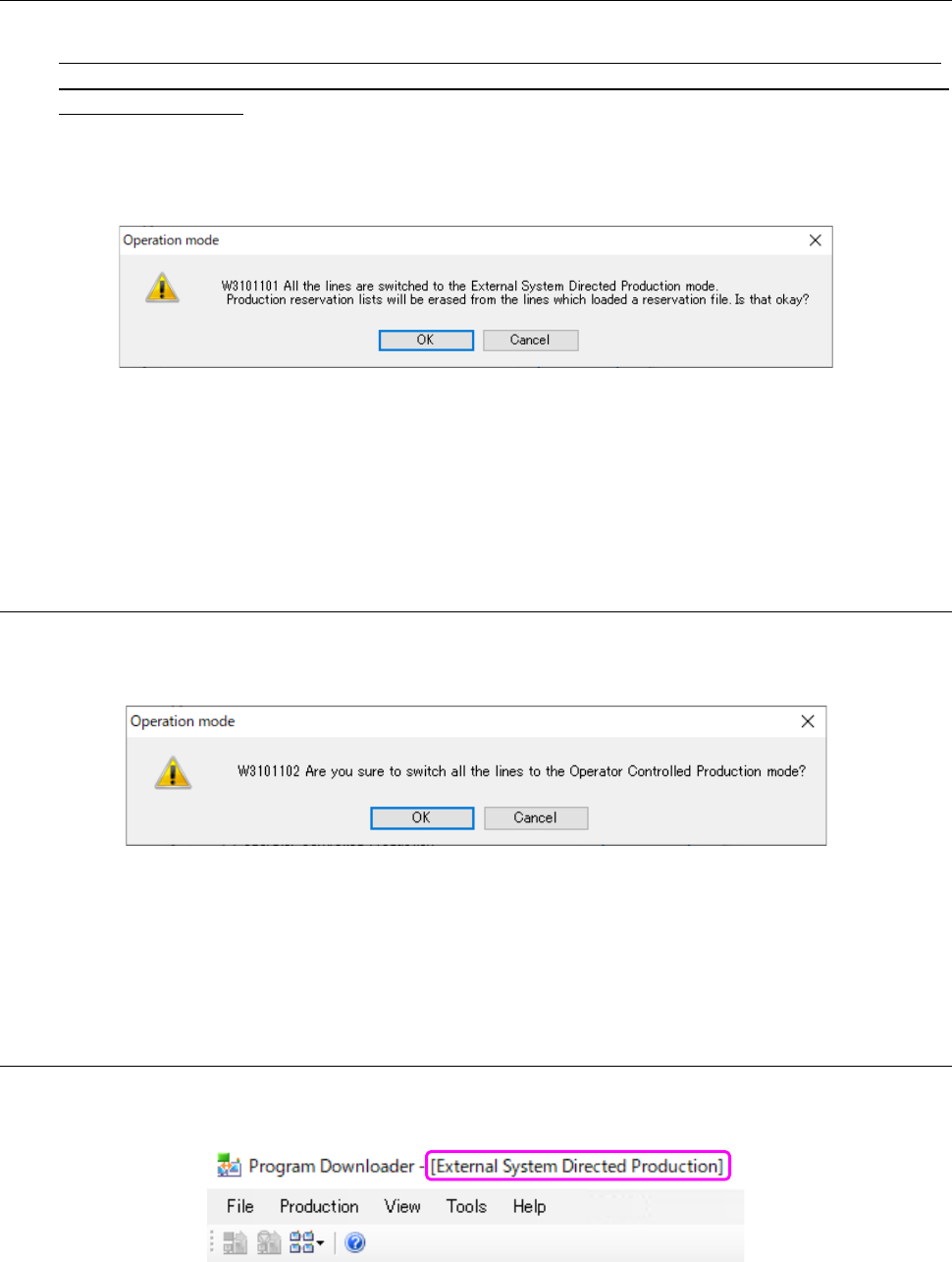
Select the menu command [Switching operation mode] on the “Production” menu invoked from the
menu bar. (When any of production lines is producing a PWB, this [Switching operation mode]
menu command is disabled, and you cannot select it.)
Figure 13.18-1 [Switching operation mode] menu command
When the dialog box for changing the operation mode appears on the screen, select the Program
Downloader operation mode.
Figure 13.18-2 Dialog box for changing the operation mode
Operation mode
Description
Operator Controlled Production
In this mode, an operator is supposed to operate the Program
Downloader menu to produce PWBs.
* This mode is selected by default.
External System Directed Production
In this mode, the system produces PWBs by following a command
received from an external system.
When you click the <OK> button, the dialog box for confirming change of the operation mode
appears on the screen. When you click the <Cancel> button, the system closes this dialog box
without switching the operation mode.
External Output Function
JaNets Instruction Manual 13. Program Downloader
13-82
13.18.1.1 To switch the operation mode from “Operator Controlled Production” to
“External System Directed Production”
<Note>
When you switch the operation mode from “Operator Controlled Production” to “External System
Directed Production,” loading of a reservation file is canceled in the production line that has loaded
the reservation file.
When you switch the operation mode from “Operator Controlled Production” to “External System
Directed Production,” the following dialog box for confirming change of the operation mode
appears on the screen.
Figure 13.18-3 Confirmation dialog box for switching the operation mode to
“External System Directed Production”
When you click the <OK> button, the operation mode is switched to “External System Directed
Production.” When you click the <Cancel> button, the system does not switch the operation
mode.
13.18.1.2 To switch the operation mode from “External System Directed Production” to
“Operator Controlled Production”
When you switch the operation mode from “External System Directed Production” to “Operator
Controlled Production,” the following dialog box for confirming change of the operation mode
appears on the screen.
Figure 13.18-4 Confirmation dialog box for switching the operation mode to
“Operator Controlled Production”
When you click the <OK> button, the operation mode is switched to “Operator Controlled
Production.” When you click the <Cancel> button, the system does not switch the operation
mode.
13.18.1.3 Display of the operation mode
When the system is operating in “External System Directed Production” mode, the operation mode
is displayed on the title bar.
Figure 13.18-5 Displayed operation mode